
Find the best LLM that runs on your hardware
Verified details
These details have been verified by PyPIProject links
GitHub Statistics
Maintainers

Project description
whichllm




Find the best local LLM that actually runs on your hardware.
Auto-detects your GPU/CPU/RAM and ranks the top models from HuggingFace that fit your system.

See it
$ whichllm --gpu "RTX 4090"

#1  Qwen/Qwen3.6-27B     27.8B  Q5_K_M   score 92.8    27 t/s
#2  Qwen/Qwen3-32B       32.0B  Q4_K_M   score 83.0    31 t/s
#3  Qwen/Qwen3-30B-A3B   30.0B  Q5_K_M   score 82.7   102 t/s
The 32B model fits your card fine — whichllm still ranks the 27B #1, because it scores higher on real benchmarks and is a newer generation. A size-only "what fits?" tool would hand you the bigger one. That gap is the whole point of whichllm. (Note #3: a MoE model at 102 t/s — speed is ranked on active params, quality on total.)
What can I run?
Real top picks (snapshot 2026-05 — your results track live HuggingFace data, this is not a static list):
| Hardware | VRAM | Top pick | Speed |
|---|---|---|---|
| RTX 5090 | 32 GB | Qwen3.6-27B · Q6_K · score 94.7 |
~40 t/s |
| RTX 4090 / 3090 | 24 GB | Qwen3.6-27B · Q5_K_M · score 92.8 |
~27 t/s |
| RTX 4060 | 8 GB | Qwen3-14B · Q3_K_M · score 71.0 |
~22 t/s |
| Apple M3 Max | 36 GB | Qwen3.6-27B · Q5_K_M · score 89.4 |
~9 t/s |
| CPU only | — | gpt-oss-20b (MoE) · Q4_K_M · score 45.2 |
~6 t/s |
whichllm --gpu "<your card>" to simulate any of these before you buy.
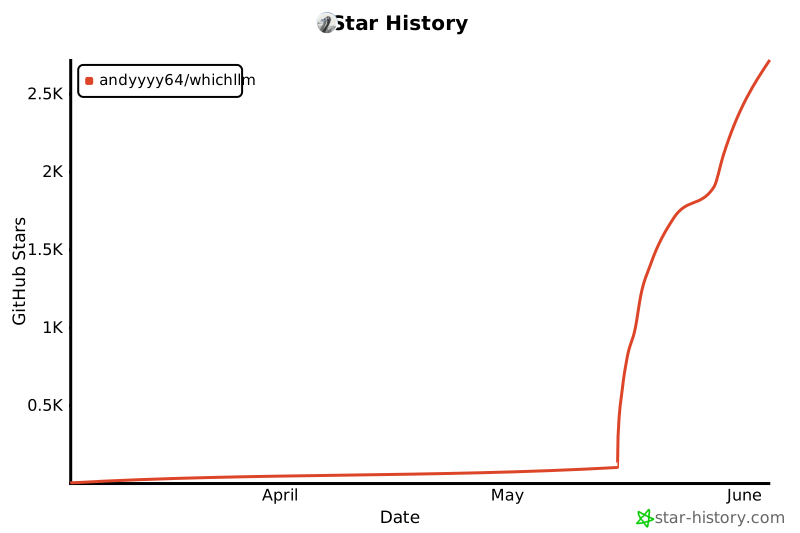
Useful? A GitHub star helps other people find it — and I'd genuinely like to know what it picked for your rig: drop it in Issues.
Star History
Why whichllm?
Fitting a model into your VRAM is the easy part. The hard part is knowing which of the models that fit is actually the best — and that is what whichllm is built to get right.
- Evidence-based ranking, not a size heuristic — The top pick is chosen from merged real benchmarks (LiveBench, Artificial Analysis, Aider, multimodal/vision, Chatbot Arena ELO, Open LLM Leaderboard) — never "the biggest model that happens to fit."
- Recency-aware — Stale leaderboards are demoted along each model's lineage, so a 2024 model can't outrank a current-generation one on an outdated score. The benchmark snapshot date is printed under every ranking, so a stale recommendation is self-evident instead of silently trusted.
- Evidence-graded and guarded — Every score is tagged
direct/variant/base/interpolated/self-reportedand discounted by confidence. Fabricated uploader claims and cross-family inheritance (a small fork borrowing its much larger base's score) are actively rejected. - Architecture-aware estimates — VRAM = weights + GQA KV cache + activation + overhead; speed is bandwidth-bound with per-quant efficiency, per-backend factors, MoE active-vs-total split, and unified-memory vs discrete-PCIe partial-offload modeling.
- One command, scriptable —
whichllmprints the answer; add--json | jqfor pipelines. No TUI, no keybindings to memorize. - Live data — Models fetched directly from the HuggingFace API, with curated frozen fallbacks for offline or rate-limited use.
Features
- Auto-detect hardware — NVIDIA, AMD, Apple Silicon, CPU-only
- Smart ranking — Scores models by VRAM fit, speed, and benchmark quality
- One-command chat —
whichllm rundownloads and starts a chat session instantly - Code snippets —
whichllm snippetprints ready-to-run Python for any model - Live data — Fetches models directly from HuggingFace (cached for performance)
- Benchmark-aware — Integrates real eval scores with confidence-based dampening
- Task profiles — Filter by general, coding, vision, or math use cases
- GPU simulation — Test with any GPU:
whichllm --gpu "RTX 4090" - Hardware planning — Reverse lookup:
whichllm plan "llama 3 70b" - Upgrade planning — Compare your current machine with candidate GPUs
- JSON output — Pipe-friendly:
whichllm --json
Run & Snippet
Try any model with a single command. No manual installs needed — whichllm creates an isolated environment via uv, installs dependencies, downloads the model, and starts an interactive chat.

# Chat with a model (auto-picks the best GGUF variant)
whichllm run "qwen 2.5 1.5b gguf"

# Auto-pick the best model for your hardware and chat
whichllm run

# CPU-only mode
whichllm run "phi 3 mini gguf" --cpu-only
Works with all model formats:
- GGUF — via
llama-cpp-python(lightweight, fast) - AWQ / GPTQ — via
transformers+autoawq/auto-gptq - FP16 / BF16 — via
transformers
Get a copy-paste Python snippet instead:
whichllm snippet "qwen 7b"
from llama_cpp import Llama

llm = Llama.from_pretrained(
    repo_id="Qwen/Qwen2.5-7B-Instruct-GGUF",
    filename="qwen2.5-7b-instruct-q4_k_m.gguf",
    n_ctx=4096,
    n_gpu_layers=-1,
    verbose=False,
)

output = llm.create_chat_completion(
    messages=[{"role": "user", "content": "Hello!"}],
)
print(output["choices"][0]["message"]["content"])
Install
uv (recommended)
uvx whichllm
To install permanently:
uv tool install whichllm
Homebrew
brew install andyyyy64/whichllm/whichllm
pip
pip install whichllm
Development
git clone https://github.com/Andyyyy64/whichllm.git
cd whichllm
uv sync --dev
uv run whichllm
uv run pytest
Usage
# Auto-detect hardware and show best models
whichllm

# Simulate a GPU (e.g. planning a purchase)
whichllm --gpu "RTX 4090"
whichllm --gpu "RTX 5090"
# Specify variant
whichllm --gpu "RTX 5060 16"


# CPU-only mode
whichllm --cpu-only

# More results / filters
whichllm --top 20
whichllm --quant Q4_K_M
whichllm --min-speed 30
whichllm --evidence base   # allow id/base-model matches
whichllm --evidence strict # id-exact only (same as --direct)
whichllm --direct

# JSON output
whichllm --json

# Force refresh (ignore cache)
whichllm --refresh

# Show hardware info only
whichllm hardware

# Plan: what GPU do I need for a specific model?
whichllm plan "llama 3 70b"
whichllm plan "Qwen2.5-72B" --quant Q8_0
whichllm plan "mistral 7b" --context-length 32768

# Upgrade: compare your current machine against candidate GPUs
whichllm upgrade "RTX 4090" "RTX 5090" "H100"
whichllm upgrade "Apple M4 Max" --top 5

# Run: download and chat with a model instantly
whichllm run "qwen 2.5 1.5b gguf"
whichllm run                       # auto-pick best for your hardware

# Snippet: print ready-to-run Python code
whichllm snippet "qwen 7b"
whichllm snippet "llama 3 8b gguf" --quant Q5_K_M
JSON model rows include estimated_tok_per_sec, speed_confidence,
speed_range_tok_per_sec, and speed_notes. The speed range is a planning
range, not a live benchmark.
Integrations
Ollama
Use JSON output to feed scripts that map HuggingFace IDs to your local Ollama model names:
# Pick the top HuggingFace model ID
whichllm --top 1 --json | jq -r '.models[0].model_id'

# Find the best coding model ID
whichllm --profile coding --top 1 --json | jq -r '.models[0].model_id'
Ollama model names do not always match HuggingFace repo IDs, so a small mapping
step is usually needed before ollama run.
Shell alias
Add to your .bashrc / .zshrc:
alias bestllm='whichllm --top 1 --json | jq -r ".models[0].model_id"'
# Usage: ollama run $(bestllm)
Scoring
Each model gets a 0-100 score. Benchmark quality and size form the core; evidence confidence and runtime fit then scale it, with speed, source trust, and popularity as adjustments.
| Factor | Effect | Description |
|---|---|---|
| Benchmark quality | core | Merged LiveBench / Artificial Analysis / Aider / Vision / Arena ELO / Open LLM Leaderboard, weighted by source confidence |
| Model size | up to 35 | log2-scaled world-knowledge proxy (MoE uses total params) |
| Quantization | × penalty | Lower-bit quants discounted multiplicatively |
| Evidence confidence | ×0.55–1.0 | none / self-reported ×0.55, inherited ×0.78, direct full |
| Runtime fit | ×0.50–1.0 | partial-offload ×0.72, CPU-only ×0.50 |
| Speed | -8 to +8 | Usability gate vs a fit-dependent tok/s floor; reported with confidence and range metadata |
| Source trust | -5 to +5 | Official-org bonus, known-repackager penalty |
| Popularity | tie-breaker | Downloads/likes; weight shrinks as evidence strengthens |
Score markers:
~(yellow) — No direct benchmark; score inherited/interpolated from the model family!sr(bright yellow) — Uploader-reported benchmark only, not independently verified?(red) — No benchmark data available
Speed markers in --status:
~(yellow) — Estimated tok/s range is available?(red) — Low-confidence speed estimate; backend/runtime sensitivity is high
Documentation
- CLI reference
- How it works
- Scoring
- Hardware detection and simulation
- Run and snippet
- Troubleshooting
How it works
Data pipeline
-
Model fetching — Fetches popular models from HuggingFace API:
- Text-generation (downloads + recently updated)
- GGUF-filtered (separate query for coverage)
- Vision models (
image-text-to-text) when--profile visionorany
-
Benchmark sources — Current tier (LiveBench, Artificial Analysis Index, Aider) merged live when reachable, plus a curated multimodal / vision index; frozen tier (Open LLM Leaderboard v2, Chatbot Arena ELO). Tiers have separate caps and lineage-aware recency demotion so stale leaderboards stop over-rewarding older generations.
-
Benchmark evidence — Five resolution levels, increasingly discounted:
direct— Exact model ID matchvariant— Suffix-stripped or -Instruct variantbase_model— Base model from cardDataline_interp— Size-aware interpolation within model familyself_reported— Uploader-claimed eval (heavily discounted)
Inheritance is rejected when a model's params diverge more than 2× from its family's dominant member, catching draft / MTP / abliterated forks that share a
family_idwith a much larger base. -
Cache —
~/.cache/whichllm/:models.json— 6h TTLbenchmark.json— 24h TTL
Ranking engine
- Hardware detection — NVIDIA (nvidia-ml-py), AMD (dbgpu/ROCm), Apple Silicon (Metal), CPU cores, RAM, disk
- VRAM estimation — Weights + KV cache + activation + framework overhead (~500MB)
- Compatibility — Full GPU / Partial Offload / CPU-only; compute capability and OS checks
- Speed — tok/s from GPU memory bandwidth, quantization, backend, fit type, and MoE active parameters
- Scoring — Benchmark (with confidence dampening), size, quantization penalty, fit type, speed, popularity, source trust (official vs repackager)
- Backend filter — Apple Silicon and CPU-only restrict to GGUF for stability; Linux+NVIDIA allows AWQ/GPTQ
Project structure
src/whichllm/
├── cli.py              # Typer CLI: main, plan, run, snippet, hardware
├── constants.py        # GPU bandwidth, quantization bytes, compute capability
├── hardware/
│   ├── detector.py     # Orchestrates GPU/CPU/RAM detection
│   ├── nvidia.py       # NVIDIA GPU via nvidia-ml-py
│   ├── amd.py          # AMD GPU (Linux)
│   ├── apple.py        # Apple Silicon (Metal)
│   ├── cpu.py          # CPU name, cores, AVX support
│   ├── memory.py       # RAM and disk free
│   ├── gpu_simulator.py # --gpu flag: synthetic GPU from name
│   └── types.py        # GPUInfo, HardwareInfo
├── models/
│   ├── fetcher.py      # HuggingFace API, model parsing, evalResults
│   ├── benchmark.py    # Arena ELO, Leaderboard (parquet/rows API)
│   ├── grouper.py      # Family grouping by base_model and name
│   ├── cache.py        # JSON cache with TTL
│   └── types.py        # ModelInfo, GGUFVariant, ModelFamily
├── engine/
│   ├── vram.py         # VRAM = weights + KV cache + activation + overhead
│   ├── compatibility.py# Fit type, disk check, compute/OS warnings
│   ├── performance.py  # tok/s from bandwidth
│   ├── quantization.py # Bytes per weight, quality penalty, non-GGUF inference
│   ├── ranker.py       # Scoring, evidence filter, profile/match
│   └── types.py        # CompatibilityResult
└── output/
    └── display.py      # Rich table, JSON output, hardware/plan displays
Contributing
Contributions are welcome! See CONTRIBUTING.md for guidelines.
Support
If whichllm helped you find a model or avoid a bad hardware guess, sponsoring is appreciated. It helps keep the project maintained: hardware reports, packaging, test fixtures, benchmark updates, and support for more machines.
whichllm will stay open-source either way. Issues and PRs are always welcome.
Requirements
- Python 3.11+
- NVIDIA GPU detection via
nvidia-ml-py(included by default) - AMD / Apple Silicon detected automatically
License
MIT
Project details
Verified details
These details have been verified by PyPIProject links
GitHub Statistics
Maintainers
Release history Release notifications | RSS feed


Download files
Download the file for your platform. If you're not sure which to choose, learn more about installing packages.
Source Distribution
Built Distribution
Filter files by name, interpreter, ABI, and platform.
If you're not sure about the file name format, learn more about wheel file names.
Copy a direct link to the current filters
File details
Details for the file whichllm-0.5.7.tar.gz.
File metadata
- Download URL: whichllm-0.5.7.tar.gz
- Upload date:
- Size: 1.1 MB
- Tags: Source
- Uploaded using Trusted Publishing? Yes
- Uploaded via: twine/6.1.0 CPython/3.13.12
File hashes
| Algorithm | Hash digest | |
|---|---|---|
| SHA256 |
971a0810dc16a10dfe01ea5ed3c96ea4e14ba7804276309a3816f94308720ab4
|
|
| MD5 |
7802ef89cf5403ff1011ac39db941cec
|
|
| BLAKE2b-256 |
d5002c6d6ceac22aa9dfd99661e2be2aff8fc370ad2eb9fdb49a0dfc64a534aa
|
Provenance
The following attestation bundles were made for whichllm-0.5.7.tar.gz:
Publisher:
publish.yml on Andyyyy64/whichllm
-
Statement:
-
Statement type:
https://in-toto.io/Statement/v1 -
Predicate type:
https://docs.pypi.org/attestations/publish/v1 -
Subject name:
whichllm-0.5.7.tar.gz -
Subject digest:
971a0810dc16a10dfe01ea5ed3c96ea4e14ba7804276309a3816f94308720ab4 - Sigstore transparency entry: 1574802367
- Sigstore integration time:
-
Permalink:
Andyyyy64/whichllm@282e77b64a9202475688c5d9941c824d02d84b4c -
Branch / Tag:
refs/tags/v0.5.7 - Owner: https://github.com/Andyyyy64
-
Access:
public
-
Token Issuer:
https://token.actions.githubusercontent.com -
Runner Environment:
github-hosted -
Publication workflow:
publish.yml@282e77b64a9202475688c5d9941c824d02d84b4c -
Trigger Event:
release
-
Statement type:
File details
Details for the file whichllm-0.5.7-py3-none-any.whl.
File metadata
- Download URL: whichllm-0.5.7-py3-none-any.whl
- Upload date:
- Size: 99.0 kB
- Tags: Python 3
- Uploaded using Trusted Publishing? Yes
- Uploaded via: twine/6.1.0 CPython/3.13.12
File hashes
| Algorithm | Hash digest | |
|---|---|---|
| SHA256 |
71cc9ab74c3b86fa9cd8d4620a56fd705b0754f79ef48e561998037005032805
|
|
| MD5 |
257688629c726320454916bc3d6e3ef1
|
|
| BLAKE2b-256 |
02bf0c4def960d8b3bd403d69d726391e3124d9488c1e67b8a1e3c34b007ceb5
|
Provenance
The following attestation bundles were made for whichllm-0.5.7-py3-none-any.whl:
Publisher:
publish.yml on Andyyyy64/whichllm
-
Statement:
-
Statement type:
https://in-toto.io/Statement/v1 -
Predicate type:
https://docs.pypi.org/attestations/publish/v1 -
Subject name:
whichllm-0.5.7-py3-none-any.whl -
Subject digest:
71cc9ab74c3b86fa9cd8d4620a56fd705b0754f79ef48e561998037005032805 - Sigstore transparency entry: 1574802473
- Sigstore integration time:
-
Permalink:
Andyyyy64/whichllm@282e77b64a9202475688c5d9941c824d02d84b4c -
Branch / Tag:
refs/tags/v0.5.7 - Owner: https://github.com/Andyyyy64
-
Access:
public
-
Token Issuer:
https://token.actions.githubusercontent.com -
Runner Environment:
github-hosted -
Publication workflow:
publish.yml@282e77b64a9202475688c5d9941c824d02d84b4c -
Trigger Event:
release
-
Statement type:






