
A streamlined Speech-to-Text pipeline for Whisper using CTranslate2
Verified details
These details have been verified by PyPIProject links
GitHub Statistics
Maintainers

Reason this release was yanked:
mistake in code
Project description
WhisperS2T-Reborn ⚡
An Optimized Speech-to-Text Pipeline for the Whisper Model Using CTranslate2
WhisperS2T-Reborn is a modernized fork of WhisperS2T, an optimized lightning-fast Speech-to-Text (ASR) pipeline. It is tailored for the Whisper model using the CTranslate2 backend to provide faster transcription. It includes several heuristics to enhance transcription accuracy.
Whisper is a general-purpose speech recognition model developed by OpenAI. It is trained on a large dataset of diverse audio and is also a multitasking model that can perform multilingual speech recognition, speech translation, and language identification.
Installation
Recommended — install with PyAV for built-in audio decoding (no system dependencies required):
pip install -U whisper-s2t-reborn[pyav]
Alternatively, if you have ffmpeg correctly installed and available in your system PATH:
pip install -U whisper-s2t-reborn
Quick Start
Transcribe a single file
import whisper_s2t

model = whisper_s2t.load_model(model_identifier="large-v3")

files = ['audio1.wav']
lang_codes = ['en']
tasks = ['transcribe']
initial_prompts = [None]

out = model.transcribe_with_vad(files,
                                lang_codes=lang_codes,
                                tasks=tasks,
                                initial_prompts=initial_prompts,
                                batch_size=32)

print(out[0][0]) # Print first utterance for first file
"""
[Console Output]

{'text': "Let's bring in Phil Mackie who is there at the palace...",
 'avg_logprob': -0.25426941679184695,
 'no_speech_prob': 8.147954940795898e-05,
 'start_time': 0.0,
 'end_time': 24.8}
"""
Batch across multiple files
Passing multiple files allows segments from different files to be batched together, making better use of the GPU:
import whisper_s2t

model = whisper_s2t.load_model(model_identifier="large-v3")

files = ['audio1.wav', 'audio2.wav', 'audio3.wav']
lang_codes = ['en', 'en', 'en']
tasks = ['transcribe', 'transcribe', 'transcribe']
initial_prompts = [None, None, None]

out = model.transcribe_with_vad(files,
                                lang_codes=lang_codes,
                                tasks=tasks,
                                initial_prompts=initial_prompts,
                                batch_size=32)

# out[0] = results for audio1.wav, out[1] = results for audio2.wav, etc.
for file_idx, transcript in enumerate(out):
    print(f"File {files[file_idx]}: {len(transcript)} segments")
Word-level alignment
To enable word-level timestamps, load the model with:
model = whisper_s2t.load_model("large-v3", asr_options={'word_timestamps': True})
Benchmarks
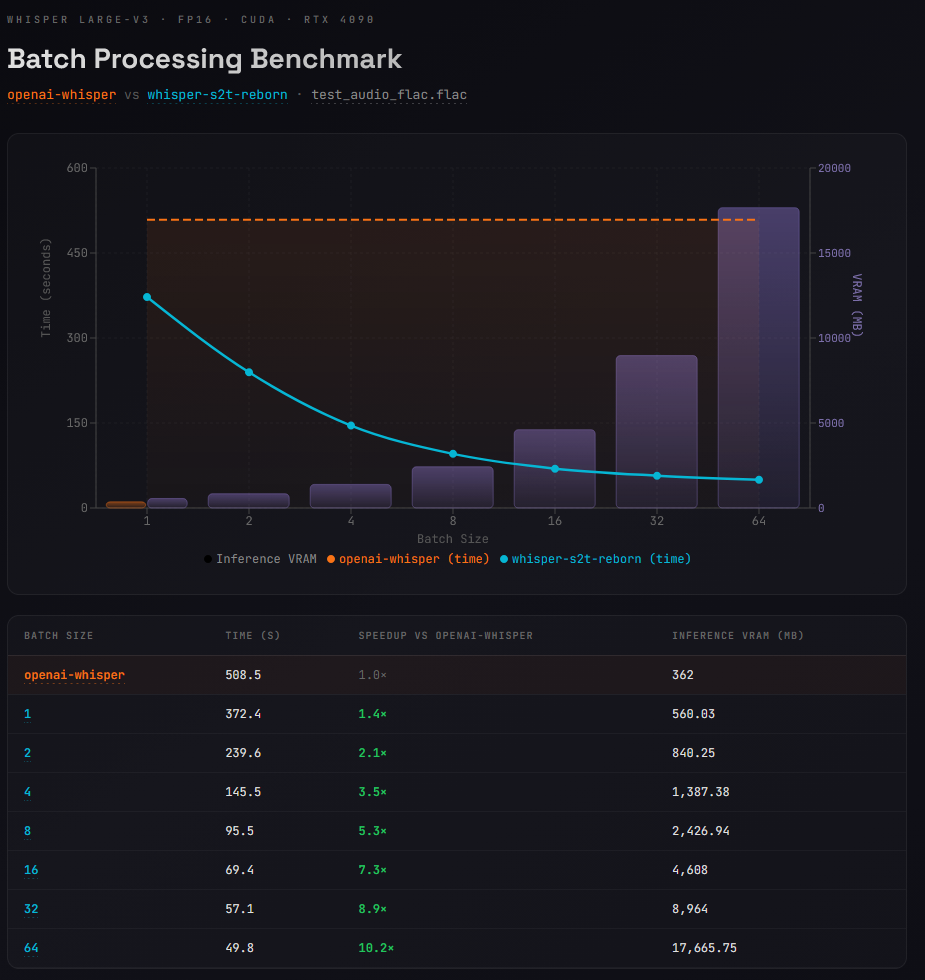
Model: Whisper large-v3 · FP16 · CUDA · RTX 4090
Audio: sam_altman_lex_podcast_367.flac
Comparing openai-whisper (no batch support) against whisper-s2t-reborn.
| Backend | Batch Size | Time (s) | Speedup | Inference VRAM (MB) |
|---|---|---|---|---|
| openai-whisper | 1 | 508.5 | 1.0× | 362 |
| whisper-s2t-reborn | 1 | 372.4 | 1.4× | 560 |
| whisper-s2t-reborn | 2 | 239.6 | 2.1× | 840 |
| whisper-s2t-reborn | 4 | 145.5 | 3.5× | 1,387 |
| whisper-s2t-reborn | 8 | 95.5 | 5.3× | 2,427 |
| whisper-s2t-reborn | 16 | 69.4 | 7.3× | 4,608 |
| whisper-s2t-reborn | 32 | 57.1 | 8.9× | 8,964 |
The increased VRAM usage even at batch size 1 is largely due to the VAD model. Openai's implementation doesn't use voice activity detection. The
benchmarksfolder has the actual scripts used.
VISUAL OF BENCHMARK RESULTS
Acknowledgements
- Original WhisperS2T: Thanks to shashig for the original WhisperS2T project that this fork is based on.
- OpenAI Whisper Team: Thanks to the OpenAI Whisper Team for open-sourcing the Whisper model.
- CTranslate2 Team: Thanks to the CTranslate2 Team for providing a faster inference engine for Transformers architecture.
- NVIDIA NeMo Team: Thanks to the NVIDIA NeMo Team for their contribution of the open-source VAD model used in this pipeline.
License
This project is licensed under MIT License - see the LICENSE file for details.
Project details
Verified details
These details have been verified by PyPIProject links
GitHub Statistics
Maintainers
Release history Release notifications | RSS feed


Download files
Download the file for your platform. If you're not sure which to choose, learn more about installing packages.
Source Distribution
Built Distribution
Filter files by name, interpreter, ABI, and platform.
If you're not sure about the file name format, learn more about wheel file names.
Copy a direct link to the current filters
File details
Details for the file whisper_s2t_reborn-1.4.6.tar.gz.
File metadata
- Download URL: whisper_s2t_reborn-1.4.6.tar.gz
- Upload date:
- Size: 1.4 MB
- Tags: Source
- Uploaded using Trusted Publishing? Yes
- Uploaded via: twine/6.1.0 CPython/3.13.7
File hashes
| Algorithm | Hash digest | |
|---|---|---|
| SHA256 |
9bc4663e38e0dc01043a66a3cb3b87c4f3d3b52a05d4e159fe7ce659ebf2e222
|
|
| MD5 |
7a79843c6bc6382a522c17de193ca4db
|
|
| BLAKE2b-256 |
97724ad1f051af4c813259c38a09758bcdc9b182240d7f0099146fdd9466eb16
|
Provenance
The following attestation bundles were made for whisper_s2t_reborn-1.4.6.tar.gz:
Publisher:
publish.yml on BBC-Esq/WhisperS2T-reborn
-
Statement:
-
Statement type:
https://in-toto.io/Statement/v1 -
Predicate type:
https://docs.pypi.org/attestations/publish/v1 -
Subject name:
whisper_s2t_reborn-1.4.6.tar.gz -
Subject digest:
9bc4663e38e0dc01043a66a3cb3b87c4f3d3b52a05d4e159fe7ce659ebf2e222 - Sigstore transparency entry: 1013407233
- Sigstore integration time:
-
Permalink:
BBC-Esq/WhisperS2T-reborn@cfc6da8da5913c8f2d33ed2815dc2b01c6e06d57 -
Branch / Tag:
refs/tags/v1.4.6 - Owner: https://github.com/BBC-Esq
-
Access:
public
-
Token Issuer:
https://token.actions.githubusercontent.com -
Runner Environment:
github-hosted -
Publication workflow:
publish.yml@cfc6da8da5913c8f2d33ed2815dc2b01c6e06d57 -
Trigger Event:
release
-
Statement type:
File details
Details for the file whisper_s2t_reborn-1.4.6-py3-none-any.whl.
File metadata
- Download URL: whisper_s2t_reborn-1.4.6-py3-none-any.whl
- Upload date:
- Size: 1.4 MB
- Tags: Python 3
- Uploaded using Trusted Publishing? Yes
- Uploaded via: twine/6.1.0 CPython/3.13.7
File hashes
| Algorithm | Hash digest | |
|---|---|---|
| SHA256 |
ab5f7d80842c538420dac30efd6cdc2b2efb44ba848ddb132a79e1dabb95d4ba
|
|
| MD5 |
684fda48ff6709286ab1656be2a523da
|
|
| BLAKE2b-256 |
a5b7efc74ebd7024cf5c9d39962e92b35aaaff6e3e69bd00b1d968fda0dc1d6f
|
Provenance
The following attestation bundles were made for whisper_s2t_reborn-1.4.6-py3-none-any.whl:
Publisher:
publish.yml on BBC-Esq/WhisperS2T-reborn
-
Statement:
-
Statement type:
https://in-toto.io/Statement/v1 -
Predicate type:
https://docs.pypi.org/attestations/publish/v1 -
Subject name:
whisper_s2t_reborn-1.4.6-py3-none-any.whl -
Subject digest:
ab5f7d80842c538420dac30efd6cdc2b2efb44ba848ddb132a79e1dabb95d4ba - Sigstore transparency entry: 1013407277
- Sigstore integration time:
-
Permalink:
BBC-Esq/WhisperS2T-reborn@cfc6da8da5913c8f2d33ed2815dc2b01c6e06d57 -
Branch / Tag:
refs/tags/v1.4.6 - Owner: https://github.com/BBC-Esq
-
Access:
public
-
Token Issuer:
https://token.actions.githubusercontent.com -
Runner Environment:
github-hosted -
Publication workflow:
publish.yml@cfc6da8da5913c8f2d33ed2815dc2b01c6e06d57 -
Trigger Event:
release
-
Statement type:






