
whisper-scrub
English | 한국어
A small Python library and CLI that finds and removes Whisper hallucinations (phantom sentences on silence or noise such as You, and same-sentence repeat loops) from JSON, SRT and VTT transcripts made by openai-whisper, faster-whisper, whisper.cpp or the OpenAI API. It combines a phrase dictionary, repeat rules, Whisper's own signals and (optionally) audio, keeps timecodes and untouched cues byte-for-byte, and writes a per-segment evidence report on why each was removed. Even without a ground-truth transcript, check shows a file's share of suspected hallucinations. Install (not on PyPI yet, so install from the GitHub tag): pip install "whisper-scrub[audio] @ git+https://github.com/LeeGyeongPil/whisper-scrub@v0.2.2", run: whisper-scrub clean talk.srt --dry-run --report -. The bundled examples are recorded real outputs ("mock" inputs, no model runs when you try them).
What it does
Imagine a transcriber who writes "시청해 주셔서 감사합니다" ("Thank you for watching") every time the room goes quiet. What Whisper does in silent or noisy stretches is similar. These are sentences that actually came out of a reproduction run with the tiny model in this repository (silence, noise and plain-tone inputs).
| Language | Input | Sentence produced |
|---|---|---|
| ko | silence, noise, tone | 수고하셨습니다 ("good work today") |
| ja | silence | ご視聴ありがとうございました ("thank you for watching") |
| en | silence | You |
Installation
# Install from the tag-pinned GitHub release (needs git on your PATH)
pip install "whisper-scrub[audio] @ git+https://github.com/LeeGyeongPil/whisper-scrub@v0.2.2"
# With uv, without installing
uvx --from git+https://github.com/LeeGyeongPil/whisper-scrub@v0.2.2 whisper-scrub --help
If the project is already published on PyPI, the bare package name works too (if the install fails with "no matching distribution", it is not published yet; use the GitHub tag install above):
pip install "whisper-scrub[audio]" # once published on PyPI
- Python 3.10 or later. The base install has 0 runtime dependencies. The
[audio]extra adds only numpy, and it is needed only when you read audio files directly (--audio). If you will use only a speech-interval JSON (--speech) or meta signals,pip install whisper-scrub(once published on PyPI) or the same GitHub command without[audio]is enough. - With uv, once published on PyPI:
uv add "whisper-scrub[audio]", or without installing,uvx whisper-scrub --help. (Install uv:curl -LsSf https://astral.sh/uv/install.sh | sh) - Install from source:
pip install "git+https://github.com/LeeGyeongPil/whisper-scrub"(installs withgit+need git installed) - The tag-pinned GitHub install via
uvx --from git+https://github.com/LeeGyeongPil/whisper-scrub@v0.2.0 whisper-scrub --lang en --versionwas confirmed to run (confirmed on v0.2.0; the tag-pinned install form is the same for every version). The PyPI commands were not run here.
Quick start
The repository's examples/ holds files that record results the faster-whisper 1.2.1 tiny model actually produced. These are practice mock inputs: no model runs, and only the saved results are read. It works the same way on transcripts you made yourself.
You need uv (see the Installation section). To use it without uv, run python -m venv .venv && .venv/bin/pip install -e ".[audio]" and then run .venv/bin/whisper-scrub without uv run.
git clone https://github.com/LeeGyeongPil/whisper-scrub
cd whisper-scrub
uv sync
uv run whisper-scrub clean examples/mixed_ko.srt --dry-run --report -
--dry-run only judges and writes no files. --report - prints the report to the screen. This is how an 8-in-a-row "이 말은," ("this is,") loop, caused by forcing Korean (language="ko") onto English speech, gets caught.
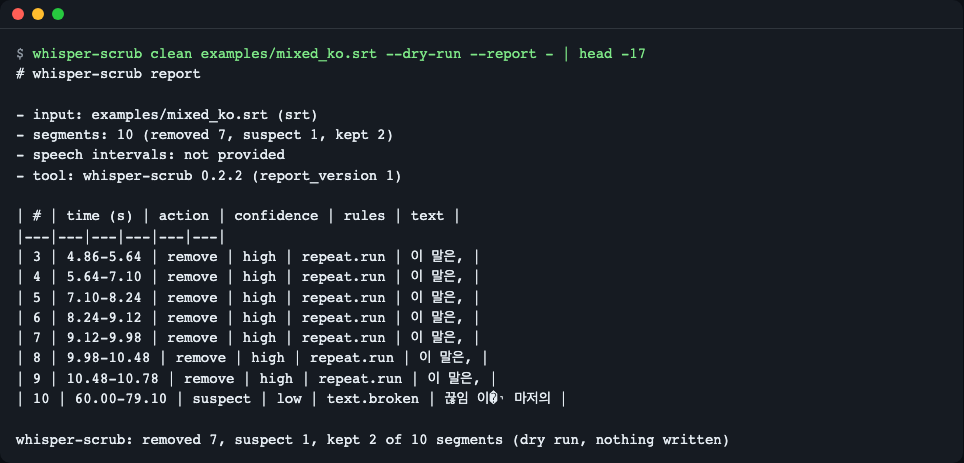
Figure 1. Cues 3 to 9 are remove by the repeat.run rule (only the first "이 말은," is kept). Cue 10 has a broken character (U+FFFD), so it is suspect.
Actual output (the table part):
whisper-scrub: removed 7, suspect 1, kept 2 of 10 segments (dry run, nothing written)
# whisper-scrub report

- input: examples/mixed_ko.srt (srt)
- segments: 10 (removed 7, suspect 1, kept 2)
- speech intervals: not provided
- tool: whisper-scrub 0.2.2 (report_version 1)

| # | time (s) | action | confidence | rules | text |
|---|---|---|---|---|---|
| 3 | 4.86-5.64 | remove | high | repeat.run | 이 말은, |
| 4 | 5.64-7.10 | remove | high | repeat.run | 이 말은, |
| 5 | 7.10-8.24 | remove | high | repeat.run | 이 말은, |
| 6 | 8.24-9.12 | remove | high | repeat.run | 이 말은, |
| 7 | 9.12-9.98 | remove | high | repeat.run | 이 말은, |
| 8 | 9.98-10.48 | remove | high | repeat.run | 이 말은, |
| 9 | 10.48-10.78 | remove | high | repeat.run | 이 말은, |
| 10 | 60.00-79.10 | suspect | low | text.broken | 끊임 이�י 마저의 |
Below the report, each rule's evidence appears on one line. For example:
- #3 remove: `repeat.run` value=copy 2 of 8 threshold=>= 3 in a row - same sentence as the previous segment; the first of 8 copies is kept
To actually write the cleaned file, use -o instead of --dry-run:
uv run whisper-scrub clean examples/mixed_ko.srt -o ko.clean.srt
whisper-scrub: removed 7, suspect 1, kept 2 of 10 segments (wrote ko.clean.srt)
The only difference between the original and the cleaned file is that the cue blocks 3 to 9 are removed entirely. Blocks 1, 2 and 10 are byte-for-byte identical, and the numbers stay as they were (1, 2, 10) (with --renumber they become 1, 2, 3).
9,36d8
< 3
< 00:00:04,860 --> 00:00:05,640
< 이 말은,
<
< 4
< 00:00:05,640 --> 00:00:07,100
< 이 말은,
(…cues 5 to 9 look the same…)
Core concepts
flowchart LR
    A["JSON / SRT / VTT"] --> B["Read: auto-detect format"]
    B --> C{"10 rules"}
    P["Phrase dictionary<br>ko en ja zh"] --> C
    M["Whisper meta signals<br>no_speech, logprob"] --> C
    S["Audio speech intervals<br>optional"] --> C
    C --> D["Per-segment verdict<br>remove / suspect / keep"]
    D --> E["Cleaned file<br>untouched cues as they are"]
    D --> F["Evidence report<br>Markdown / JSON"]
- It combines signals rather than deleting on one. A
removehappens when (a) a rule that is sufficient on its own fires (phrase.strict,repeat.run,meta.silent_window, etc.), or (b) a weak phrase match (phrase.weak) is accompanied by one more piece of evidence that "there is no speech" (meta.no_speechoraudio.no_speech). If the evidence falls short, it stays assuspect(suspected, not deleted). If there is counter-evidence that speech is present, it iskeep. - Meta signals work per 30-second window. Whisper's
no_speech_prob,avg_logproband compression ratio are computed per decoding window, not per segment. Segments in the same window share the same values, so meta alone cannot tell them apart. In the Korean example above, 9 segments shared the same values (no_speech 0.093, logprob -1.475, compression ratio 2.222). That is whyrepeat.run, which looks at the sentence repetition itself, is needed. The "Shared meta values" section of the report shows such groups. - Whisper's own skip rule has a hole. Whisper treats a stretch as silent and skips it only when
no_speech_prob > 0.6andavg_logprobis-1.0or lower. In this repository's recording, 20 seconds of silence came out as" You", and its values (no_speech 0.985, logprob -0.942) slipped through the second condition. suspectandremovediffer. Even when the phrase is the same, it may be real speech (a "Thank you." at the end of a meeting), so it deletes only when there is firm evidence.
Rule table
| Rule ID | What it looks at | Deletes alone? | False-positive risk |
|---|---|---|---|
phrase.strict |
The normalized whole sentence equals a certain hallucination phrase in the dictionary (subtitle credits, etc.) | Yes | Low: only sentences that almost never appear in real speech are strict |
phrase.weak |
Equals a weak phrase in the dictionary ("You", "수고하셨습니다", etc.) | No, only together with other signals | High: it may be real speech, so it is not deleted alone |
repeat.run |
The same sentence 3 or more times in a row -> keep only the first | Yes | Medium: "네 네 네" ("yes yes yes") in real conversation |
repeat.loop |
Character or word repetition within one segment | No | Medium: songs, stuttering |
meta.no_speech |
no_speech_prob is 0.6 or more |
No | Medium: it is a per-window value, so a normal sentence in the same window can also be high |
meta.silent_window |
no_speech >= 0.8 and logprob < -1.0 | Yes | Low: the same direction as Whisper's own skip condition |
audio.no_speech |
There is no speech in the audio under the segment | Yes if overlap is 0 and it is 1 second or longer (even a fluent sentence is seen as a hallucination). If the speech intervals cannot be trusted (see "Known limits" below), the rule itself is turned off | Depends on the quality of the interval file |
audio.beyond_end |
Deleted if the start is after the end of the audio. suspect if the end is more than 0.5 seconds past the audio length |
Yes, only when the start is beyond | Low: when the length was given wrongly |
text.broken |
A broken character (U+FFFD) | No | Low |
segment.isolated |
A very short segment set apart from its neighbors | No (auxiliary signal) | High: used only as an aid |
All thresholds can be changed with Config. strict phrases are ones very unlikely to occur as real speech (subtitle production credits, etc.), while weak phrases are short ones that can come out either as hallucinations or as real speech.
Usage
Command line
whisper-scrub clean   input  [-o output] [--report file|-] [--dry-run] [--renumber]
                          [--audio WAV | --speech JSON] [--phrases TSV] [--lang ko|en|ja|zh]
                          [--repeat-min N] [--phantom-min-seconds SEC] [--no-speech-guard] ...
whisper-scrub check   input...  [--fail-over ratio] [--audio-dir DIR] [--format table|json] ...
whisper-scrub phrases [--lang ko|en|ja|zh] [--phrases TSV] [--no-builtin]
The input format is auto-detected from the content: openai-whisper result JSON, OpenAI verbose_json, faster-whisper segment-list JSON, whisper.cpp -oj JSON, SRT, VTT. If it is unknown, you get UnknownFormatError. Tuning options: --repeat-min N (from how many consecutive repeats of the same sentence to collapse, default 3), --phantom-min-seconds SEC (the minimum length for deleting on audio.no_speech alone, default 1.0), --no-speech-guard (turn off the safeguard below, on by default). It never overwrites the input file (it is an error if -o equals the input). Exit codes: 0 normal, 1 check --fail-over exceeded, 2 usage error (a one-line message with how to fix it).
Display language (English / Korean)
Messages, --help, error messages and the Markdown report labels come in English or Korean. Pick one:
--lang en|kobefore the subcommand:whisper-scrub --lang ko clean talk.srt --dry-run- the
WHISPER_SCRUB_LANG=koenvironment variable - otherwise
LC_ALL,LC_MESSAGES,LANG(in that order); a value starting withko(for exampleko_KR.UTF-8) means Korean, anything else English.
The two --lang options are different things. The one before the subcommand is the display language (en|ko). The --lang ko|en|ja|zh after clean, check or phrases is the dictionary (transcript) language and works as before. They can be used together: whisper-scrub --lang ko check talk.srt --lang ja shows Korean text and judges with the Japanese dictionary first (the language detected from the text is still checked, so an English segment can still match the English dictionary).
Only text for people changes. JSON output (--format json, .json reports), the phrases TSV, rule ids, remove|suspect|keep values, per-rule notes and exit codes are identical in both languages. If a script compares message text, pin it with WHISPER_SCRUB_LANG=en. The Python API stays English (report_markdown(lang="ko") is an opt-in).
When you have an audio signal
An SRT has no meta signals, so a subtitle with just a You line, like the one below, ends as suspect.
uv run whisper-scrub clean examples/mixed_en.srt --dry-run --report -
| # | time (s) | action | confidence | rules | text |
|---|---|---|---|---|---|
| 2 | 30.00-32.00 | suspect | low | phrase.weak, segment.isolated | You |

Figure 2. Without audio evidence, You only gets suspicion and is not deleted.
If you give the speech intervals of the original audio ([{"start": seconds, "end": seconds}] JSON), the same line becomes remove.
uv run whisper-scrub clean examples/mixed_en.srt --speech examples/mixed_vad_speech.json --dry-run --report -
| # | time (s) | action | confidence | rules | text |
|---|---|---|---|---|---|
| 2 | 30.00-32.00 | remove | high | phrase.weak, audio.no_speech | You |

- #2 remove: `phrase.weak` value=you threshold=exact - exact match of en dictionary phrase 'you' (weak, source: AGH:hallucination_list)
- #2 remove: `audio.no_speech` value=0.0 threshold=< 0.1 - no speech in the audio under this 2.0s segment (even a fluent sentence is a phantom)

Figure 3. With the added evidence that there is no speech at 30-32 seconds, it is remove.
Safeguard. If the speech intervals are empty, or do not overlap at all with 80% or more of the long segments that have text (3 or more), it concludes the interval file is wrong and skips the audio.no_speech rule that relies on speech intervals (audio.beyond_end, which relies on the audio length, still applies if you gave --audio). It also leaves a warning on stderr and in the report (a WARNING line, and the warnings key in JSON). This is the result with an empty interval file ([]) (You is not deleted and becomes suspect).
echo '[]' > empty.json
uv run whisper-scrub clean examples/mixed_en.srt --speech empty.json --dry-run --report -
whisper-scrub: warning: speech intervals cover almost none of the transcript - check the file and its units (seconds) or the recording level; the speech-interval rule (audio.no_speech) was skipped, so nothing was deleted because of missing speech (audio.beyond_end, based on the audio length, still applies)
whisper-scrub: removed 0, suspect 1, kept 2 of 3 segments (dry run, nothing written)
# whisper-scrub report

- input: examples/mixed_en.srt (srt)
- segments: 3 (removed 0, suspect 1, kept 2)
- speech intervals: 0
- tool: whisper-scrub 0.2.2 (report_version 1)
- WARNING: speech intervals cover almost none of the transcript - check the file and its units (seconds) or the recording level; the speech-interval rule (audio.no_speech) was skipped, so nothing was deleted because of missing speech (audio.beyond_end, based on the audio length, still applies)

| # | time (s) | action | confidence | rules | text |
|---|---|---|---|---|---|
| 2 | 30.00-32.00 | suspect | low | phrase.weak, segment.isolated | You |
To give a WAV file (16-bit PCM) directly, use --audio clip.wav (the [audio] extra is required), and the speech intervals are found with a simple energy-based detector. It separates sound from silence but cannot separate speech from noise. Convert mp3 and the like first with ffmpeg -i in.mp3 -ar 16000 -ac 1 -c:a pcm_s16le out.wav. It also deletes a fluent sentence that is not in the dictionary when it sits over a silent stretch (examples/audio_demo.py, 2 seconds of sound + 3 seconds of silence made with numpy).
uv run python examples/audio_demo.py
#1 keep    -  Today we start with the budget.
#2 remove  audio.no_speech  Please remember to like and subscribe to the channel.
Quality check without ground truth: check
uv run whisper-scrub check examples/mixed_en.json examples/mixed_ko.json examples/mixed_ko.srt --fail-over 0.3
echo $?
examples/mixed_en.json: flagged 1/3 (0.33) | removed 1 | suspect 0 | repeat runs: 0 | speechless chars: n/a | fast segments: 0 | FAIL (> 0.3)
examples/mixed_ko.json: flagged 8/10 (0.80) | removed 7 | suspect 1 | repeat runs: 1 | speechless chars: n/a | fast segments: 0 | FAIL (> 0.3)
examples/mixed_ko.srt: flagged 8/10 (0.80) | removed 7 | suspect 1 | repeat runs: 1 | speechless chars: n/a | fast segments: 0 | FAIL (> 0.3)
1
Without
--fail-over, there is noFAILmark and the exit code is 0. If any file's ratio exceeds the threshold, the exit code is 1.

Figure 4. The suspicion ratio per file (removed+suspect / segments). Use it in dataset cleaning to re-transcribe only the files with a high ratio.
flagged is the remove+suspect ratio, repeat runs is the number of repeated stretches, speechless chars is the share of characters placed in stretches without speech (computed only when you give audio or speech intervals, otherwise n/a), and fast segments is the number of segments with an abnormally high number of characters per second.
Python
You can feed the result of faster-whisper's model.transcribe() (a generator) or JSON segment dictionaries straight into scrub(). The parts that need a model were not run in this document, and the example below runs on a recorded faster-whisper result (examples/mixed_en.json). The path that accepts Segment-shaped objects is checked by a test (tests/test_io.py).
import json
from pathlib import Path

from whisper_scrub import scrub

data = json.loads(Path("examples/mixed_en.json").read_text(encoding="utf-8"))
result = scrub(data["segments"], audio_duration=data["duration"])

for seg, verdict in zip(result.segments, result.verdicts):
    rules = ", ".join(h.rule_id for h in verdict.rules) or "-"
    print(f"#{seg.index} {seg.text.strip()[:30]!r:34} {verdict.action:8} {verdict.confidence:7} {rules}")
print("kept:", [s.index for s in result.kept])
(This is the same code as examples/api_demo.py, run with uv run python examples/api_demo.py.)
#1 'And so my fellow Americans ask'   keep     none    -
#2 'You'                              remove   medium  phrase.weak, meta.no_speech
#3 'And so my fellow Americans ask'   keep     none    -
kept: [1, 3]
Here a meta signal (no_speech 0.985) is present, so confidence is medium. With audio added, it would be high.
Your own phrase dictionary
To use your own phrases instead of the built-in dictionary, write one TSV line as phrase<TAB>strict|weak (weak if the grade is omitted). Lines starting with # are comments.
# my phrases
subtitles by the amara org community	strict
please like and subscribe	weak
uv run whisper-scrub phrases --lang en --no-builtin --phrases my.tsv
en	strict	subtitles by the amara org community	user
en	weak	please like and subscribe	user
Check the built-in dictionary:
uv run whisper-scrub phrases --lang ko
ko weak 수고하셨습니다 probe:raw_silence30_ko,raw_noise30_ko,raw_tones30_ko
The dictionary size is 30 for en (10 strict, 20 weak), 1 for ko, 2 for ja and 3 for zh. The English entries come from a public list (DSP-AGH Bag of Hallucinations, MIT), and the source is in THIRD_PARTY_NOTICES.md. For ko, ja and zh, only outputs reproduced directly were included (the source column names the reproduction run). Partial matching is off by default (turn it on with --substring), and even when on, a weak phrase is deleted only with a second signal.
API
| Name | What it does | Main arguments | Returns |
|---|---|---|---|
scrub(segments, *, audio_duration, speech, config) |
Judges a list of segments (dictionaries, Segment, Document) |
audio_duration seconds, speech list of speech intervals, config |
ScrubResult |
scrub_file(path, out, *, audio, speech, audio_duration, report, dry_run, renumber, config) |
Reads a file, judges it, and writes the cleaned file and report. Does not touch the input | out (required unless dry_run=True) |
ScrubResult |
load(path) / loads(text) |
Reads a file / string with automatic format detection | Document |
|
check_result(result) |
Computes quality metrics without ground truth | ScrubResult |
CheckReport (summary_line(), as_dict()) |
Config(...) |
All thresholds (table below) | ConfigError if a value is out of range |
Config |
PhraseBook.builtin(), .from_file(path), .merge(other) |
Phrase dictionary | PhraseBook |
|
ScrubResult |
.segments, .verdicts, .kept, .removed, .suspects, .flagged_ratio, .report_markdown(), .report_json() |
||
Verdict / RuleHit / Segment |
Verdict (action, confidence, rules) / rule evidence (rule_id, value, threshold) / segment (index, start, end, text, 4 optional meta fields) |
||
| Exceptions | Under ScrubError: UnknownFormatError, ConfigError, MissingExtraError, AudioError |
Main Config values (defaults): no_speech_threshold=0.6, silent_no_speech=0.8, silent_logprob=-1.0, repeat_min=3, repeat_max_gap=10.0 (seconds), loop_min=4, speech_overlap_min=0.1, phantom_min_seconds=1.0, guard_speech_intervals=True, speech_guard_ratio=0.8, beyond_end_slack=0.5, substring=False, lang=None (guess the language from the characters).
Python code that uses your own dictionary:
from whisper_scrub import Config, PhraseBook, scrub

book = PhraseBook.builtin().merge(PhraseBook.from_file("my.tsv"))
result = scrub(segments, config=Config(phrases=book, repeat_min=4))
(The snippet above is an excerpt that assumes segments already exists, and a test checks the same call path.)
When to use it
- Use it when: you receive transcripts and subtitles that already exist (including SRTs you cannot run again) and want to clean up only the hallucinations. It also handles SRT and VTT with no meta signals. Also when you want to pick out "is this file suspicious?" without ground truth.
- Use another tool when: if you want to stop it at the transcription stage, use faster-whisper's
vad_filterandhallucination_silence_thresholdoptions, or the VAD options of whisper.cpp. If you need a filter that works only from Whisper's meta signals (no_speech, logprob, compression ratio), use whisper-guard. You can use it together with these tools (turn on the preventive options at transcription and clean up what remains afterward). Check each tool's documentation for what it does now.
Known limits
- The ko, ja and zh dictionaries are thin. Only 1 Korean, 2 Japanese and 3 Chinese entries (the principle is to include only what was confirmed by reproduction). Most Korean phrases are caught not by the dictionary but by
repeat.run, meta and audio signals. Put phrases you see in your own data into the user dictionary. - Speech intervals that are wrong only in part can still delete real speech. A segment with 0 overlap and 1 second or longer is deleted alone by
audio.no_speecheven if the sentence is not in the dictionary. If the intervals are empty or do not overlap with most sentences, it warns and ignores them, but intervals that are off only in part are followed as they are. The energy detector cannot separate speech from loud noise. Look with--dry-runfirst. Change the 1-second criterion with--phantom-min-seconds. - For a recording that is silent throughout, the
audio.no_speechrule is turned off because of the safeguard (audio.beyond_endstays on). A hallucination over a file with no speech at all cannot be caught byaudio.no_speech. If the file really is like that, force it with--no-speech-guard. - The same sentence 3 or more times in a row is collapsed. "네 네 네" in real conversation can be collapsed too. Adjust with
--repeat-min N(in Python,Config(repeat_min=...)). - Audio is read directly only as 16-bit PCM WAV. Convert other formats with ffmpeg first.
- There is not yet a real mode (a
[whisper]extra that runs transcription as well in one go). All examples are recorded inputs.
Troubleshooting
| Symptom | Cause | Fix |
|---|---|---|
A single You line is not deleted and appears only as suspect |
An SRT has no meta signals and there is no audio evidence | Give --speech (speech-interval JSON) or --audio |
CLI: whisper-scrub: error: numpy is required for --audio ... (exit code 2), Python API: MissingExtraError |
numpy is missing | pip install "whisper-scrub[audio] @ git+https://github.com/LeeGyeongPil/whisper-scrub@v0.2.2" (or pip install "whisper-scrub[audio]" once published on PyPI) |
CLI: whisper-scrub: error: cannot read <file> as a WAV file ..., Python API: AudioError |
The input is not a WAV or not 16-bit | ffmpeg -i in.mp3 -ar 16000 -ac 1 -c:a pcm_s16le out.wav |
UnknownFormatError |
An unsupported JSON or subtitle format | Convert to a supported format (list above), or pass the segment list directly to scrub() |
| Exit code 2 | Usage error (arguments, file path, -o equal to the input, etc.) |
Follow the guidance in the one-line message |
A normal sentence comes out as remove |
The speech-interval file is off in part, or the repeated sentence is real speech | Check the evidence in the --dry-run report and fix the interval file, or adjust --repeat-min and --phantom-min-seconds |
warning: speech intervals cover almost none of the transcript ... |
The interval file is empty, the units are not seconds, or the recording is too quiet | Check that start and end in the interval JSON are in seconds, and the recording level. If the file really is silent, --no-speech-guard |
(<file> in the CLI message is the placeholder for the file name.)
Versions and compatibility
- Follows Semantic Versioning (SemVer). During 0.x, the API may change in minor versions, and changes are recorded in CHANGELOG.md.
- Currently 0.2.2. Python 3.10 to 3.14 is declared as supported, and CI runs on 3.10 and 3.12 (ubuntu).
Development and contributing
uv sync
uv run pytest -q
160 passed, 1 skipped in 0.69s
The 1 skipped test is the test marked real that needs a real model (skipped if WHISPER_SCRUB_MODEL_DIR is not set). A contribution that adds a phrase to the dictionary must come with the evidence of a reproduced run (model, input, output).
Learn more
- The closest tool: whisper-guard — meta-signal thresholds and a repeat filter.
- English hallucination phrase list: DSP-AGH Bag of Hallucinations (MIT); for the detailed source, see THIRD_PARTY_NOTICES.md.
- Skip rule of the original Whisper implementation:
transcribe.pyin openai/whisper. - Description of the recorded inputs: examples/README.md.
License
MIT. For third-party notices, see THIRD_PARTY_NOTICES.md.
1 maintainer

Metadata
1 maintainer
Release files for whisper-scrub 0.2.2
For a detailed explanation of source distributions (sdists) and built distributions (wheels), please see the package formats documentation.
Source distribution (sdist)
| File | Size | Uploaded | Provenance | Actions |
|---|---|---|---|---|
| whisper_scrub-0.2.2.tar.gz | 72.6 kB | Without provenance | Details for whisper_scrub-0.2.2.tar.gz |
Built distribution (wheel)
| File | Interpreter | ABI | Platform | Actions Reset |
|---|---|---|---|---|
| whisper_scrub-0.2.2-py3-none-any.whl | Python 3 | none | any | Details for whisper_scrub-0.2.2-py3-none-any.whl |
Total release size: 127.4 kB
Release files / whisper_scrub-0.2.2.tar.gz
| Download URL | whisper_scrub-0.2.2.tar.gz |
|---|---|
| Size | 72.6 kB |
| Tags | Source |
|
SHA-256 checksum How to use checksums |
470188068e01cd9d1d16cd83cffedb8674c565a53ee10f96761c6f0efd2f527c
|
|
BLAKE2b-256 checksum How to use checksums |
7d142403cf683f76fa881a291b2e40edaf57fd80de0224da211823eb30205c54
|
| Upload date | |
|
Uploaded using Trusted Publishing? What is trusted publishing? |
No |
| Uploaded via |
uv/0.13.6 {"installer":{"name":"uv","version":"0.13.6","subcommand":["publish"]},"python":null,"implementation":{"name":null,"version":null},"distro":{"name":"macOS","version":null,"id":null,"libc":null},"system":{"name":null,"release":null},"cpu":null,"openssl_version":null,"setuptools_version":null,"rustc_version":null,"ci":null}
|
Release files / whisper_scrub-0.2.2-py3-none-any.whl
| Download URL | whisper_scrub-0.2.2-py3-none-any.whl |
|---|---|
| Size | 54.8 kB |
| Tags | Python 3 |
|
SHA-256 checksum How to use checksums |
eab63f1a26bbd13816a48cbb5cd323f2d0fa446363eba33c2584d33a7e6c581e
|
|
BLAKE2b-256 checksum How to use checksums |
e9daacd8f18ca8be4e7aca3ce3f74977449aeb3dc0ba5a7cbe83488bbad769a9
|
| Upload date | |
|
Uploaded using Trusted Publishing? What is trusted publishing? |
No |
| Uploaded via |
uv/0.13.6 {"installer":{"name":"uv","version":"0.13.6","subcommand":["publish"]},"python":null,"implementation":{"name":null,"version":null},"distro":{"name":"macOS","version":null,"id":null,"libc":null},"system":{"name":null,"release":null},"cpu":null,"openssl_version":null,"setuptools_version":null,"rustc_version":null,"ci":null}
|
Security for whisper-scrub 0.2.2
Provenance
Provenance describes where a file came from. On PyPI, provenance is shared via attestations, which provide a verifiable record of the build or publishing details. View details, limitations and caveats.
No provenance found
None of the files in this release were uploaded with provenance metadata.
A note on package security
PyPI is a repository for distributing packages, not a service for auditing them. While third-party security researchers and our staff do their best to detect and remove malicious packages, PyPI cannot guarantee the quality, security or suitability of any given package.
To learn more about protecting yourself from malicious actors, visit our package security documentation.













