

whisper-vtt2srt
A robust, production-grade library designed to convert WebVTT to SRT, turning messy AI transcripts into clean, usable subtitles.
A post-processing tool designed to clean the output from OpenAI Whisper, YouTube Auto-Captions, and other AI transcription services.
Perfect for TTS pipelines, video dubbing, and dataset preparation.





🧠 The Problem with Raw AI Subtitles
AI tools like Whisper are incredible at speech recognition, but their raw VTT output is often chaotic. They frequently produce:
- The "Karaoke Effect": Words accumulating screen-by-screen (e.g., "Hello", "Hello world", "Hello world!").
- Micro-Glitches: Subtitle frames lasting milliseconds that are invisible to humans but break TTS/dubbing scripts.
- Metadata Clutter: Tags like
align:start,<c>,<b>or<i>that mess up text processing.
whisper-vtt2srt is the bridge between raw AI output and your production pipeline. It stabilizes and normalizes the text, making it safe for Text-to-Speech (TTS) generation, video players, and NLP tasks.
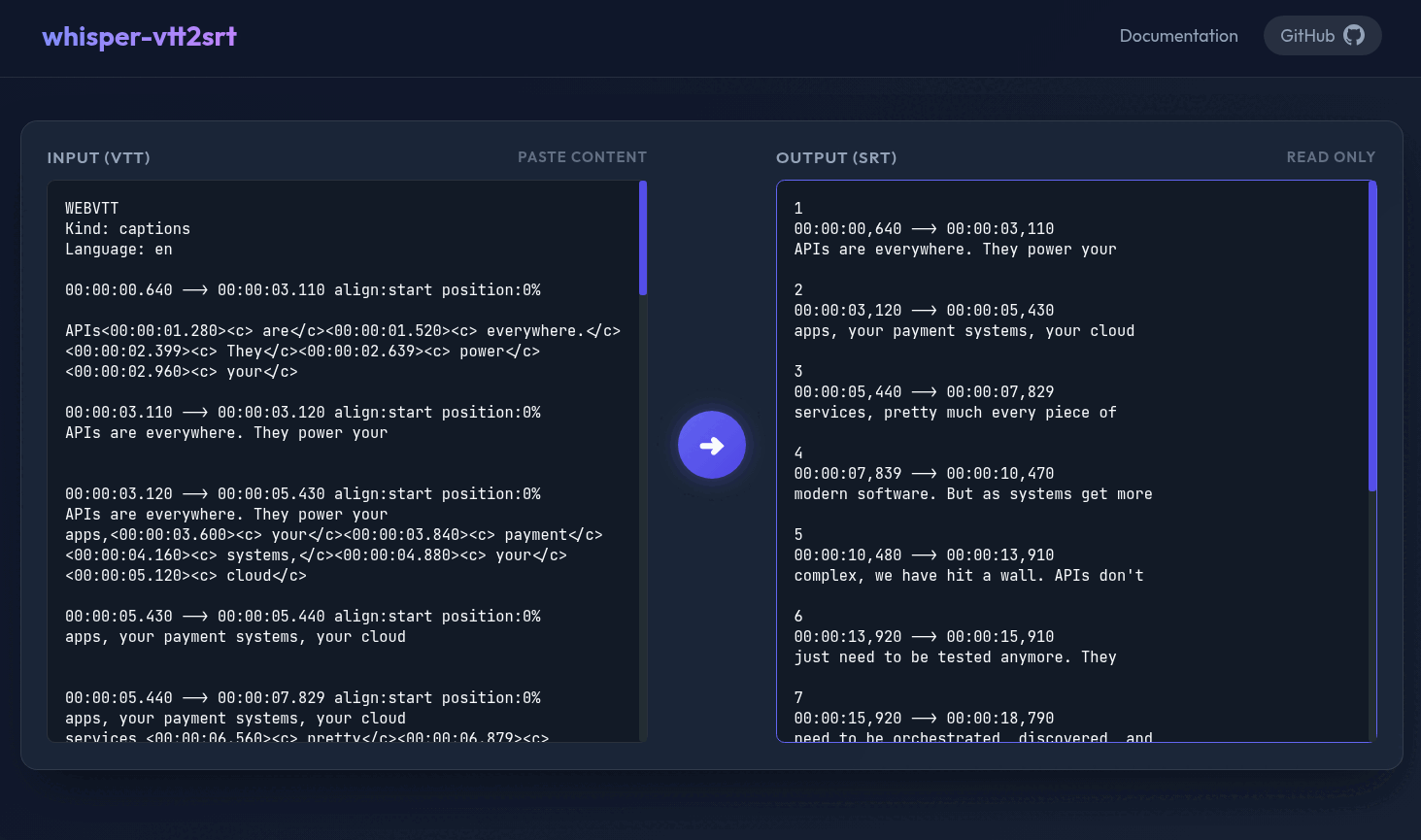
🚀 Try it Online
Test the conversion instantly in your browser (Client-Side / Secure). No installation required.

📖 Table of Contents
- 🎮 Online Playground
- 👀 See the Difference
- 🚀 Key Features
- 📦 Installation
- 📘 How to Use
- 🧠 How It Works
- 📆 Changelog
- 🤝 Contributing
- 📜 License
- 📚 Reference
👀 See the Difference (Before vs After)
🚧 Raw Input — (Typical output from YouTube/Whisper - with "Karaoke Effect")
Notice the accumulated text, repetitive lines, and internal tagging.
WEBVTT
Kind: captions
Language: en

00:00:00.640 --> 00:00:03.110 align:start position:0%

APIs<00:00:01.280><c> are</c><00:00:01.520><c> everywhere.</c><00:00:02.399><c> They</c><00:00:02.639><c> power</c><00:00:02.960><c> your</c>

00:00:03.110 --> 00:00:03.120 align:start position:0%
APIs are everywhere. They power your


00:00:03.120 --> 00:00:05.430 align:start position:0%
APIs are everywhere. They power your
apps,<00:00:03.600><c> your</c><00:00:03.840><c> payment</c><00:00:04.160><c> systems,</c><00:00:04.880><c> your</c><00:00:05.120><c> cloud</c>

00:00:05.430 --> 00:00:05.440 align:start position:0%
apps, your payment systems, your cloud


00:00:05.440 --> 00:00:07.829 align:start position:0%
apps, your payment systems, your cloud
services,<00:00:06.560><c> pretty</c><00:00:06.879><c> much</c><00:00:07.120><c> every</c><00:00:07.440><c> piece</c><00:00:07.680><c> of</c>

00:00:07.829 --> 00:00:07.839 align:start position:0%
services, pretty much every piece of


00:00:07.839 --> 00:00:10.470 align:start position:0%
services, pretty much every piece of
✨ Cleaned Output — (Processed by whisper-vtt2srt)
Clean, stable, and ready for TTS input, YouTube, Netflix or standard players.
1
00:00:00,640 --> 00:00:03,110
APIs are everywhere. They power your

2
00:00:03,120 --> 00:00:05,430
apps, your payment systems, your cloud

3
00:00:05,440 --> 00:00:07,829
services, pretty much every piece of
🚀 Key Features
-
🛡️ Stabilization Strategy Intelligently detects and merges accumulating text blocks ("Karaoke Effect"), preventing the rapid flashing of partial sentences. Essential for generating smooth audio in TTS pipelines, video dubbing, and subtitles.
-
🎵 Sound Description Removal Automatically filters out non-speech elements like
[Music],[Applause], or[Laughter], ensuring your TTS voice doesn't try to read stage directions. -
🧹 Glitch Filtering Automatically removes subtitle blocks with insignificant duration (< 50ms) that can cause audio generation errors or player flickering.
-
✨ Smart Normalization Strips VTT-specific metadata (
align:start,position:0%), removes internal tags (<c>,<00:00:00>), and cleans up inconsistent whitespace ensuring pure text output. -
⚡ Zero Dependencies Built with pure Python standard library. Lightweight and easy to install in any environment (Linux, Windows, Docker).
-
🔧 Configurable Strictness Every cleaning step is optional. You enable exactly what your pipeline needs.
📦 Installation
pip install whisper-vtt2srt
📘 How to Use
💻 CLI Usage
Process files directly from the command line:
# Convert a Single File
whisper-vtt2srt input.vtt

# Batch Convert a Folder
whisper-vtt2srt ./my_dataset

# Recursive Conversion (subfolders included)
whisper-vtt2srt ./my_dataset --recursive

# Handle Legacy Encodings (e.g., Latin-1)
whisper-vtt2srt input_latin.vtt --encoding ISO-8859-1

# Keep the "karaoke" effect (disable deduplication)
whisper-vtt2srt input.vtt --no-karaoke
Command Help
usage: whisper-vtt2srt [-h] [-r] [-e ENCODING] [--no-karaoke] [--keep-glitches] [--keep-formatting]
               [--keep-metadata] [--merge-short-lines]
               input [output]

Convert WebVTT to SRT with professional cleaning.

positional arguments:
  input                 Input VTT file or directory
  output                Output SRT file or directory (optional)

options:
  -h, --help            show this help message and exit
  -r, --recursive       Recursively process directories
  -e ENCODING, --encoding ENCODING
                        Input file encoding (default: utf-8)
  --no-karaoke          Disable anti-karaoke filter (keep accumulating text)
  --keep-sound-descriptions
                        Keep sound descriptions like [Music] or [Applause]
  --keep-glitches       Keep short <50ms blocks
  --keep-formatting     Keep VTT tags (bold, italic, colors)
  --keep-metadata       Keep metadata tags (align:start, position:0%)
  --merge-short-lines   Aggressively merge short lines into single lines
  --max-line-length MAX_LINE_LENGTH
                        Maximum line length allowed when merging short lines (default: 42, like YouTube/Netflix)
🐍 Python API Usage
Easily integrate whisper-vtt2srt into your own Python pipelines.
The library exports a high-level Pipeline class for full control.
Basic Conversion
from whisper_vtt2srt import Pipeline

# 1. Initialize
pipeline = Pipeline()

# 2. Read input
with open("subs.vtt", "r", encoding="utf-8") as f:
    raw_vtt_content = f.read()

# 3. Convert raw VTT content
srt_content = pipeline.convert(raw_vtt_content)

# 4. Use the clean SRT (e.g., send to TTS engine, save to file, render in player, etc.)
print(srt_content)
Advanced Control
You can customize the cleaning options if needed:
Just pass a
CleaningOptionsobject to thePipelineconstructor to toggle specific cleaning rules.
from whisper_vtt2srt import CleaningOptions, Pipeline

# Configure strictness
options = CleaningOptions(
    remove_pixelation=True,    # Fix Karaoke effect
    remove_sound_descriptions=True, # Remove [Music], [Applause]
    remove_glitches=True,      # Remove <50ms blocks
    simplify_formatting=True,  # Strip tags like <c> or <b> and fix whitespace
    remove_metadata=True,      # Clean VTT positioning
    merge_short_lines=False,   # Aggressively merge short lines
    max_line_length=42         # Max length constraint for merging
)

pipeline = Pipeline(options)
🧠 How It Works
- Parser (State Machine): Robustly reads messy VTT files, handling multi-line strings and irregular spacing.
- Deduplication Engine: Uses a sliding window to identify comparison patterns between blocks. If a block is just a prefix of the next one (common in AI streams), it is merged or removed to stabilize the text.
- Filter Layer: Applies duration checks and regex cleaning to ensure the final output is compliant with the SubRip (SRT) standard.
📆 Changelog
Project history and updates are tracked in CHANGELOG.md.
🤝 Contributing
Contributions are welcome! We follow a strict SOLID architecture. See CONTRIBUTING.md for details.
📜 License
MIT License - see LICENSE.
📚 Reference
If you use this library in your research or project, please cite it as:
@software{whisper_vtt2srt,
  author = {Jorcelino Junior},
  title = {whisper-vtt2srt: A robust WebVTT to SRT converter for AI subtitles},
  year = {2026},
  url = {https://github.com/jorcelinojunior/whisper-vtt2srt}
}
Saved you time? Helped your project?
Support independent open-source development!

1 maintainer

Metadata
1 maintainer
Release files for whisper-vtt2srt 0.1.2
For a detailed explanation of source distributions (sdists) and built distributions (wheels), please see the package formats documentation.
Source distribution (sdist)
| File | Size | Uploaded | |
|---|---|---|---|
| whisper_vtt2srt-0.1.2.tar.gz | 23.8 kB | Details |
Built distribution (wheel)
| File | Interpreter | ABI | Platform | Reset |
|---|---|---|---|---|
| whisper_vtt2srt-0.1.2-py3-none-any.whl | Python 3 | none | any | Details |
Total release size: 43.1 kB
Release files / whisper_vtt2srt-0.1.2.tar.gz
| Download URL | whisper_vtt2srt-0.1.2.tar.gz |
|---|---|
| Size | 23.8 kB |
| Tags | Source |
|
SHA-256 checksum How to use checksums |
57b138a79ecdb2398036d54a63ce1cfc98b3e8b854bb655d08820f0ddb239734
|
|
BLAKE2b-256 checksum How to use checksums |
f081df32a8a20ba79f01fa58221a40a0d6a7496f34dc036ba8c4d602c3e7db6f
|
| Upload date | |
|
Uploaded using Trusted Publishing? What is trusted publishing? |
Yes |
| Uploaded via |
twine/6.1.0 CPython/3.13.7
|
Provenance
Provenance describes where a file came from. On PyPI, provenance is shared via attestations, which provide a verifiable record of the build or publishing details. View details, limitations and caveats.


PyPI Publish Attestation
PyPI verified that this artifact, at this checksum, originated from the publisher listed below.
Signed by GitHub Actions, verified by PyPI on Jan 13, 2026.
Transparency logRelease files / whisper_vtt2srt-0.1.2-py3-none-any.whl
| Download URL | whisper_vtt2srt-0.1.2-py3-none-any.whl |
|---|---|
| Size | 19.3 kB |
| Tags | Python 3 |
|
SHA-256 checksum How to use checksums |
cba480389bab55f88d79b3069102af2742b5d78f86bfe79efdf229aea2ab772d
|
|
BLAKE2b-256 checksum How to use checksums |
9f75269270974bba839479493177b0d32aabb6e158ec74f28cd590ad7a31684e
|
| Upload date | |
|
Uploaded using Trusted Publishing? What is trusted publishing? |
Yes |
| Uploaded via |
twine/6.1.0 CPython/3.13.7
|
Provenance
Provenance describes where a file came from. On PyPI, provenance is shared via attestations, which provide a verifiable record of the build or publishing details. View details, limitations and caveats.
PyPI Publish Attestation
PyPI verified that this artifact, at this checksum, originated from the publisher listed below.
Signed by GitHub Actions, verified by PyPI on Jan 13, 2026.
Transparency log













