
Whisper Flow
Real-Time Transcription Using OpenAI Whisper



About The Project
OpenAI Whisper
OpenAI Whisper is a versatile speech recognition model designed for general use. Trained on a vast and varied audio dataset, Whisper can handle tasks such as multilingual speech recognition, speech translation, and language identification. It is commonly used for batch transcription, where you provide the entire audio or video file to Whisper, which then converts the speech into text. This process is not done in real-time; instead, Whisper processes the files and returns the text afterward, similar to handing over a recording and receiving the transcript later.
Whisper Flow
Using Whisper Flow, you can generate real-time transcriptions for your media content. Unlike batch transcriptions, where media files are uploaded and processed, streaming media is delivered to Whisper Flow in real time, and the service returns a transcript immediately.
What is Streaming
Streaming content is sent as a series of sequential data packets, or 'chunks,' which Whisper Flow transcribes on the spot. The benefits of using streaming over batch processing include the ability to incorporate real-time speech-to-text functionality into your applications and achieving faster transcription times. However, this speed may come at the expense of accuracy in some cases.
Stream Windowing
In scenarios involving time-streaming, it's typical to perform operations on data within specific time frames known as temporal windows. One common approach is using the tumbling window technique, which involves gathering events into segments until a certain condition is met.
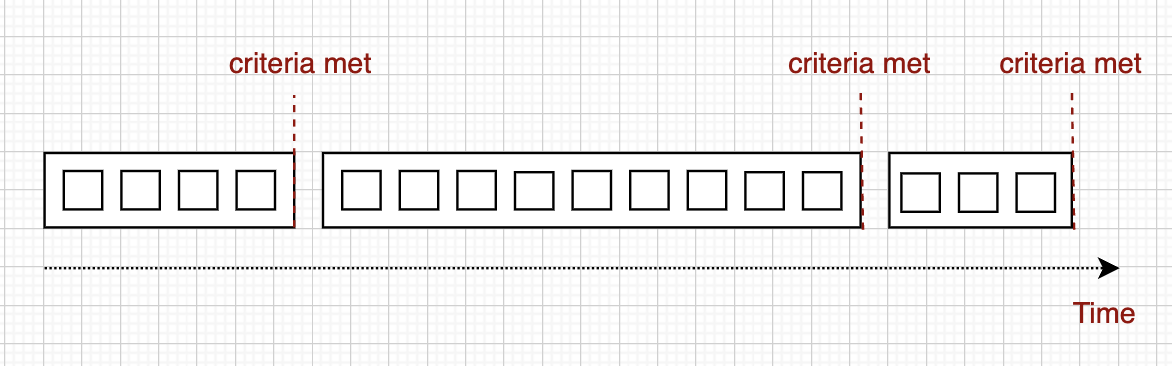
Streaming Results
Whisper Flow splits the audio stream into segments based on natural speech patterns, like speaker changes or pauses. The transcription is sent back as a series of events, with each response containing more transcribed speech until the entire segment is complete.
| Transcript | EndTime | IsPartial |
|---|---|---|
| Reality | 0.55 | True |
| Reality is created | 1.05 | True |
| Reality is created by the | 1.50 | True |
| Reality is created by the mind | 2.15 | True |
| Reality is created by the mind | 2.65 | False |
| we can | 3.05 | True |
| we can change | 3.45 | True |
| we can change reality | 4.05 | True |
| we can change reality by changing | 4.45 | True |
| we can change reality by changing our mind | 5.05 | True |
| we can change reality by changing our mind | 5.55 | False |
WebSocket Protocol
Clients stream audio to /ws as binary frames (16 kHz, mono, int16 PCM) and receive JSON results
shaped like {"is_partial": bool, "data": {"text": ...}, "time": ms}. Optional JSON text frames
control the session: start (model, language, vocabulary prompt), flush and stop. A segment
becomes final after a pause in speech, when its text stops changing, at the window cap, or on
flush/stop. GET /ready reports protocol_version and the available models.
The full contract, including close codes, endpointing settings, and how to add models, is in docs/protocol.md.
Benchmarking
The evaluation metrics for comparing the performance of Whisper Flow are Word Error Rate (WER) and latency. Latency is measured as the time between two subsequent partial results, with the goal of achieving sub-second latency. We're not starting from scratch, as several quality benchmarks have already been performed for different ASR engines. I will rely on the research article "Benchmarking Open Source and Paid Services for Speech to Text" for guidance. For benchmarking the current implementation of Whisper Flow, I use LibriSpeech.
| Partial | Latency | Result |

True  175.47  when we took
True  185.14  When we took her.
True  237.83  when we took our seat.
True  176.42  when we took our seats.
True  198.59  when we took our seats at the
True  186.72  when we took our seats at the
True  210.04  when we took our seats at the breakfast.
True  220.36  when we took our seats at the breakfast table.
True  203.46  when we took our seats at the breakfast table.
True  242.63  When we took our seats at the breakfast table, it will
True  237.41  When we took our seats at the breakfast table, it was with
True  246.36  When we took our seats at the breakfast table, it was with the
True  278.96  When we took our seats at the breakfast table, it was with the feeling.
True  285.03  When we took our seats at the breakfast table, it was with the feeling of being.
True  295.39  When we took our seats at the breakfast table, it was with the feeling of being no
True  270.88  When we took our seats at the breakfast table, it was with the feeling of being no longer
True  320.43  When we took our seats at the breakfast table, it was with the feeling of being no longer looked
True  303.66  When we took our seats at the breakfast table, it was with the feeling of being no longer looked upon.
True  470.73  When we took our seats at the breakfast table, it was with the feeling of being no longer
True  353.25  When we took our seats at the breakfast table, it was with the feeling of being no longer looked upon as connected.
True  345.74  When we took our seats at the breakfast table, it was with the feeling of being no longer looked upon as connected in any way.
True  368.66  When we took our seats at the breakfast table, it was with the feeling of being no longer looked upon as connected in any way with the
True  400.25  When we took our seats at the breakfast table, it was with the feeling of being no longer looked upon as connected in any way with this case.
True  382.71  When we took our seats at the breakfast table, it was with the feeling of being no longer looked upon as connected in any way with this case.
False 405.02  When we took our seats at the breakfast table, it was with the feeling of being no longer looked upon as connected in any way with this case.
When running this benchmark on a MacBook Air with an M1 chip and 16GB of RAM, we achieve impressive performance metrics. The latency is consistently well below 500ms, ensuring real-time responsiveness. Additionally, the word error rate is around 7%, demonstrating the accuracy of the transcription.
Latency Stats:
count     26.000000
mean     275.223077
std       84.525695
min      154.700000
25%      205.105000
50%      258.620000
75%      339.412500
max      470.700000
Prerequisites
Before installing WhisperFlow, ensure you have the following:
- Python: 3.8 or higher (tested with Python 3.12)
- PortAudio: Required for PyAudio (audio I/O library)
Installing PortAudio
macOS (using Homebrew):
brew install portaudio
Linux (Ubuntu/Debian):
sudo apt-get install portaudio19-dev
Linux (Fedora/RHEL):
sudo dnf install portaudio-devel
Windows: PortAudio is typically bundled with PyAudio wheels on Windows. If you encounter issues, refer to the PyAudio documentation.
How To Use it
Quick Start
Get WhisperFlow running in under 5 minutes:
# Clone the repository
git clone https://github.com/dimastatz/whisper-flow.git
cd whisper-flow

# Setup environment, install dependencies, and run tests
./run.sh -local

# Activate the virtual environment
source .venv/bin/activate

# Start the server on port 8181
./run.sh -run-server
The server will be available at http://localhost:8181. Visit http://localhost:8181/health to verify it's running.
Development Setup
For contributors and developers:
1. Initial Setup
# Clone and enter the directory
git clone https://github.com/dimastatz/whisper-flow.git
cd whisper-flow

# Setup environment: creates .venv, installs dependencies, runs tests
./run.sh -local
What -local does:
- Creates a fresh virtual environment (
.venv) - Installs all dependencies from
requirements.txt - Runs
blackformatter on code - Runs
pylintlinter (requires 9.9/10 score) - Runs all unit tests (requires 95% coverage)
2. Running Tests
# Activate environment
source .venv/bin/activate

# Run tests only (formatting + linting + unit tests)
./run.sh -test
3. Running the Server
# Activate environment
source .venv/bin/activate

# Start the FastAPI server on port 8181
./run.sh -run-server
The server provides:
- WebSocket endpoint:
ws://localhost:8181/ws- Real-time streaming transcription - Health check:
GET http://localhost:8181/health- Server status - Batch transcription:
POST http://localhost:8181/transcribe_pcm_chunk- Process PCM audio files
4. Running Benchmarks
# Activate environment
source .venv/bin/activate

# Run benchmark tests (starts server, runs tests, stops server)
./run.sh -benchmark
This measures transcription latency and word error rate (WER) using LibriSpeech test data.
Docker Deployment
Using Docker
# Build and run the Docker container
./run.sh -docker
What -docker does:
- Stops and removes any existing
whisperflow-container - Removes the old
whisperflow-image - Builds a fresh Docker image with all dependencies
- Runs the container on port 8888
Manual Docker Setup
# Build the image
docker build -t whisperflow-image --file Dockerfile.test .

# Run the container
docker run --name whisperflow-container -p 8181:8181 -d whisperflow-image

# Check logs
docker logs whisperflow-container

# Stop the container
docker stop whisperflow-container
Using as a Python Library
Install WhisperFlow as a package to integrate real-time transcription into your own applications:
Installation
pip install whisperflow
Basic Usage
Create a WebSocket endpoint for real-time streaming transcription:
from fastapi import FastAPI, WebSocket
import whisperflow.streaming as st
import whisperflow.transcriber as ts

app = FastAPI()

@app.websocket("/ws")
async def websocket_endpoint(websocket: WebSocket):
    # Load the Whisper model (default: tiny.en.pt)
    model = ts.get_model()

    # Define transcription callback
    async def transcribe_async(chunks: list):
        return await ts.transcribe_pcm_chunks_async(model, chunks)

    # Define response callback
    async def send_back_async(data: dict):
        await websocket.send_json(data)

    try:
        await websocket.accept()

        # Create transcription session
        session = st.TranscribeSession(transcribe_async, send_back_async)

        # Process incoming audio chunks
        while True:
            message = await websocket.receive()
            if message["type"] == "websocket.disconnect":
                break
            if message.get("bytes") is not None:
                session.add_chunk(message["bytes"])
            elif message.get("text") == '{"type": "flush"}':
                await session.flush()
    finally:
        # Client disconnected or an error occurred
        await session.stop()
API Reference
Transcriber Module (whisperflow.transcriber):
get_model(file_name="tiny.en.pt")- Load a Whisper modellist_models()- Names of the model files inwhisperflow/models/transcribe_pcm_chunks(model, chunks, lang="en", prompt=None)- Synchronous transcription;promptis an optional vocabulary hint (Whisperinitial_prompt)transcribe_pcm_chunks_async(model, chunks, lang="en", prompt=None)- Async transcription
Streaming Module (whisperflow.streaming):
TranscribeSession(transcribe_fn, send_back_fn)- Create a streaming sessionsession.add_chunk(audio_data)- Add audio chunk for processingsession.flush()- Finalize queued audio and send it as a final resultsession.stop()- Stop the transcription session
Audio Format Requirements
WhisperFlow expects PCM audio data with the following specifications:
- Sample Rate: 16 kHz
- Channels: Mono (1 channel)
- Format: 16-bit signed integer (int16)
Available Commands
All commands are available through ./run.sh:
| Command | Description |
|---|---|
./run.sh -local |
Setup environment, install dependencies, run tests |
./run.sh -test |
Run formatter, linter, and unit tests |
./run.sh -run-server |
Start the FastAPI server on port 8181 |
./run.sh -benchmark |
Run performance benchmark tests |
./run.sh -docker |
Build and run Docker container |
Roadmap
- Release v1.0-RC - Includes transcription streaming implementation.
- Release v1.1 - Bug fixes and implementation of the most requested changes.
- Release v1.2 - WebSocket control frames (
start/flush/stop), per-session model, language and vocabulary prompt, silence endpointing, and a versioned wire protocol (docs/protocol.md). - Release v1.3 - Prepare the package for integration with the py-speech package.
1 maintainer

Metadata
1 maintainer
Release files for whisperflow 1.3.0
For a detailed explanation of source distributions (sdists) and built distributions (wheels), please see the package formats documentation.
Source distribution (sdist)
| File | Size | Uploaded | |
|---|---|---|---|
| whisperflow-1.3.0.tar.gz | 69.9 MB | Details |
Built distribution (wheel)
| File | Interpreter | ABI | Platform | Reset |
|---|---|---|---|---|
| whisperflow-1.3.0-py3-none-any.whl | Python 3 | none | any | Details |
Total release size: 139.8 MB
Release files / whisperflow-1.3.0.tar.gz
| Download URL | whisperflow-1.3.0.tar.gz |
|---|---|
| Size | 69.9 MB |
| Tags | Source |
|
SHA-256 checksum How to use checksums |
426ad70c3d7cac57100859743ff30f64a086ad82b671b9eba12416b448fe0b53
|
|
BLAKE2b-256 checksum How to use checksums |
f945a218e8064d82c35211b48ea35e8d28502a4d94f4ba315c4dc74ac564c06c
|
| Upload date | |
|
Uploaded using Trusted Publishing? What is trusted publishing? |
No |
| Uploaded via |
twine/7.0.0 CPython/3.12.12
|
Release files / whisperflow-1.3.0-py3-none-any.whl
| Download URL | whisperflow-1.3.0-py3-none-any.whl |
|---|---|
| Size | 69.9 MB |
| Tags | Python 3 |
|
SHA-256 checksum How to use checksums |
9d3c952dfd301949920572e9c22918b4efa3e291fdae8ba466bbf65c07fb83ff
|
|
BLAKE2b-256 checksum How to use checksums |
e7703a78bb8c928574576eebf00e26ccf48737615d584b5f7352cf5d4ef09214
|
| Upload date | |
|
Uploaded using Trusted Publishing? What is trusted publishing? |
No |
| Uploaded via |
twine/7.0.0 CPython/3.12.12
|














