
Real-time, Fully Local Whisper's Speech-to-Text and Speaker Diarization

Project description
WhisperLiveKit
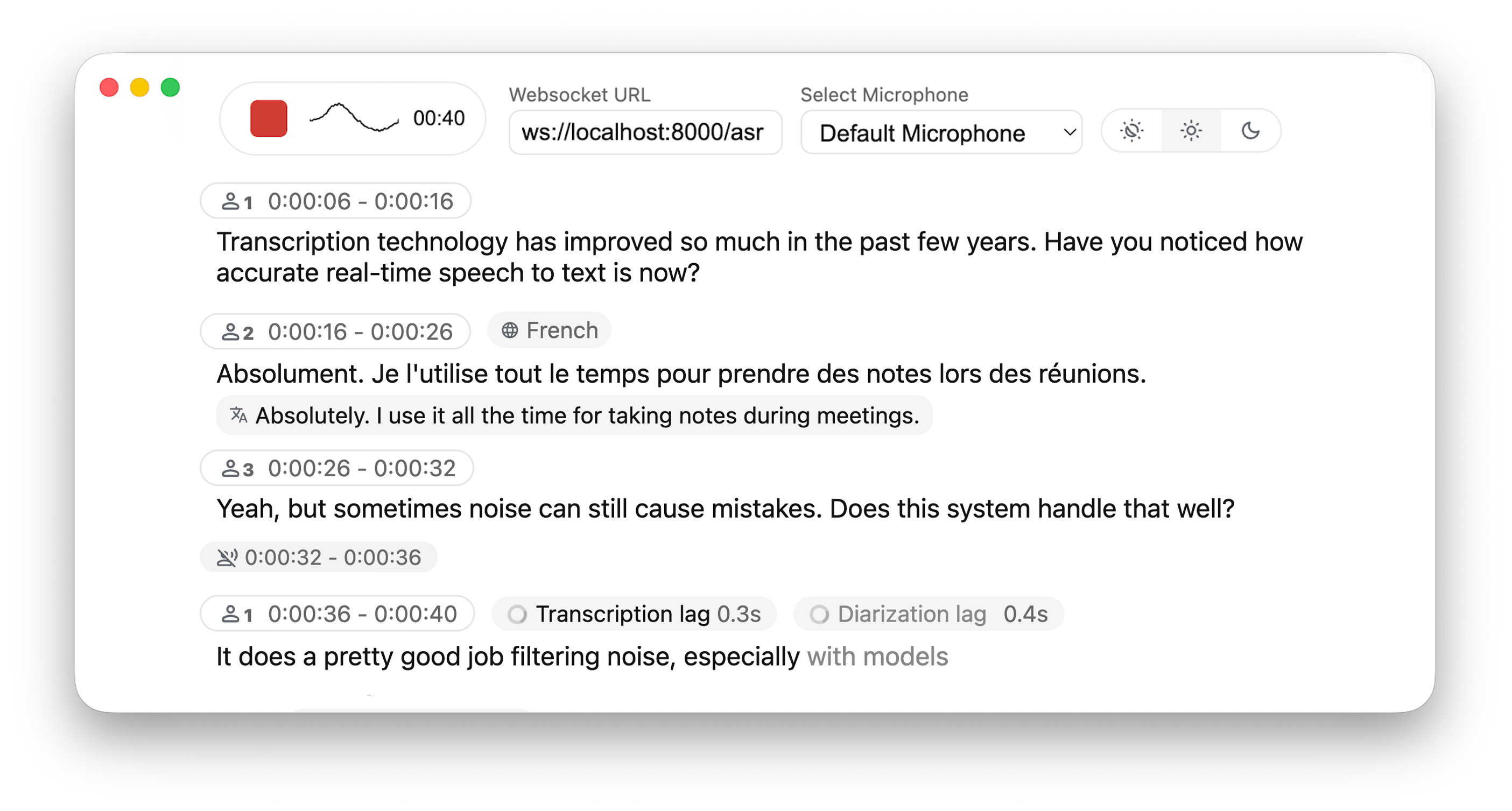
Real-time, Fully Local Speech-to-Text with Speaker Diarization




WhisperLiveKit brings real-time speech transcription directly to your browser, with a ready-to-use backend+server and a simple frontend. ✨
Built on SimulStreaming (SOTA 2025) and WhisperStreaming (SOTA 2023) for transcription, plus Streaming Sortformer (SOTA 2025) and Diart (SOTA 2021) for diarization.
Key Features
- Real-time Transcription - Locally (or on-prem) convert speech to text instantly as you speak
- Speaker Diarization - Identify different speakers in real-time. (⚠️ backend Streaming Sortformer in developement)
- Multi-User Support - Handle multiple users simultaneously with a single backend/server
- Automatic Silence Chunking – Automatically chunks when no audio is detected to limit buffer size
- Confidence Validation – Immediately validate high-confidence tokens for faster inference (WhisperStreaming only)
- Buffering Preview – Displays unvalidated transcription segments (not compatible with SimulStreaming yet)
- Punctuation-Based Speaker Splitting [BETA] - Align speaker changes with natural sentence boundaries for more readable transcripts
- SimulStreaming Backend - Dual-licensed - Ultra-low latency transcription using SOTA AlignAtt policy.
Architecture

Quick Start
# Install the package
pip install whisperlivekit

# Start the transcription server
whisperlivekit-server --model tiny.en

# Open your browser at http://localhost:8000 to see the interface.
# Use  -ssl-certfile public.crt --ssl-keyfile private.key parameters to use SSL
That's it! Start speaking and watch your words appear on screen.
Installation
#Install from PyPI (Recommended)
pip install whisperlivekit

#Install from Source
git clone https://github.com/QuentinFuxa/WhisperLiveKit
cd WhisperLiveKit
pip install -e .
FFmpeg Dependency
# Ubuntu/Debian
sudo apt install ffmpeg

# macOS
brew install ffmpeg

# Windows
# Download from https://ffmpeg.org/download.html and add to PATH
Optional Dependencies
# Voice Activity Controller (prevents hallucinations)
pip install torch

# Sentence-based buffer trimming
pip install mosestokenizer wtpsplit
pip install tokenize_uk  # If you work with Ukrainian text

# Speaker diarization
pip install diart

# Alternative Whisper backends (default is faster-whisper)
pip install whisperlivekit[whisper]              # Original Whisper
pip install whisperlivekit[whisper-timestamped]  # Improved timestamps
pip install whisperlivekit[mlx-whisper]          # Apple Silicon optimization
pip install whisperlivekit[openai]               # OpenAI API
pip install whisperlivekit[simulstreaming]
🎹 Pyannote Models Setup
For diarization, you need access to pyannote.audio models:
- Accept user conditions for the
pyannote/segmentationmodel - Accept user conditions for the
pyannote/segmentation-3.0model - Accept user conditions for the
pyannote/embeddingmodel - Login with HuggingFace:
pip install huggingface_hub
huggingface-cli login
💻 Usage Examples
Command-line Interface
Start the transcription server with various options:
# Basic server with English model
whisperlivekit-server --model tiny.en

# Advanced configuration with diarization
whisperlivekit-server --host 0.0.0.0 --port 8000 --model medium --diarization --language auto

# SimulStreaming backend for ultra-low latency
whisperlivekit-server --backend simulstreaming --model large-v3 --frame-threshold 20
Python API Integration (Backend)
Check basic_server.py for a complete example.
from whisperlivekit import TranscriptionEngine, AudioProcessor, parse_args
from fastapi import FastAPI, WebSocket, WebSocketDisconnect
from fastapi.responses import HTMLResponse
from contextlib import asynccontextmanager
import asyncio

transcription_engine = None

@asynccontextmanager
async def lifespan(app: FastAPI):
    global transcription_engine
    transcription_engine = TranscriptionEngine(model="medium", diarization=True, lan="en")
    # You can also load from command-line arguments using parse_args()
    # args = parse_args()
    # transcription_engine = TranscriptionEngine(**vars(args))
    yield

app = FastAPI(lifespan=lifespan)

# Process WebSocket connections
async def handle_websocket_results(websocket: WebSocket, results_generator):
    async for response in results_generator:
        await websocket.send_json(response)
    await websocket.send_json({"type": "ready_to_stop"})

@app.websocket("/asr")
async def websocket_endpoint(websocket: WebSocket):
    global transcription_engine

    # Create a new AudioProcessor for each connection, passing the shared engine
    audio_processor = AudioProcessor(transcription_engine=transcription_engine)
    results_generator = await audio_processor.create_tasks()
    results_task = asyncio.create_task(handle_websocket_results(websocket, results_generator))
    await websocket.accept()
    while True:
        message = await websocket.receive_bytes()
        await audio_processor.process_audio(message)
Frontend Implementation
The package includes a simple HTML/JavaScript implementation that you can adapt for your project. You can find it here, or load its content using get_web_interface_html() :
from whisperlivekit import get_web_interface_html
html_content = get_web_interface_html()
⚙️ Configuration Reference
WhisperLiveKit offers extensive configuration options:
| Parameter | Description | Default |
|---|---|---|
--host |
Server host address | localhost |
--port |
Server port | 8000 |
--model |
Whisper model size. Caution : '.en' models do not work with Simulstreaming | tiny |
--language |
Source language code or auto |
en |
--task |
transcribe or translate |
transcribe |
--backend |
Processing backend | faster-whisper |
--diarization |
Enable speaker identification | False |
--punctuation-split |
Use punctuation to improve speaker boundaries | True |
--confidence-validation |
Use confidence scores for faster validation | False |
--min-chunk-size |
Minimum audio chunk size (seconds) | 1.0 |
--vac |
Use Voice Activity Controller | False |
--no-vad |
Disable Voice Activity Detection | False |
--buffer_trimming |
Buffer trimming strategy (sentence or segment) |
segment |
--warmup-file |
Audio file path for model warmup | jfk.wav |
--ssl-certfile |
Path to the SSL certificate file (for HTTPS support) | None |
--ssl-keyfile |
Path to the SSL private key file (for HTTPS support) | None |
--segmentation-model |
Hugging Face model ID for pyannote.audio segmentation model. Available models | pyannote/segmentation-3.0 |
--embedding-model |
Hugging Face model ID for pyannote.audio embedding model. Available models | speechbrain/spkrec-ecapa-voxceleb |
SimulStreaming-specific Options:
| Parameter | Description | Default |
|---|---|---|
--frame-threshold |
AlignAtt frame threshold (lower = faster, higher = more accurate) | 25 |
--beams |
Number of beams for beam search (1 = greedy decoding) | 1 |
--decoder |
Force decoder type (beam or greedy) |
auto |
--audio-max-len |
Maximum audio buffer length (seconds) | 30.0 |
--audio-min-len |
Minimum audio length to process (seconds) | 0.0 |
--cif-ckpt-path |
Path to CIF model for word boundary detection | None |
--never-fire |
Never truncate incomplete words | False |
--init-prompt |
Initial prompt for the model | None |
--static-init-prompt |
Static prompt that doesn't scroll | None |
--max-context-tokens |
Maximum context tokens | None |
--model-path |
Direct path to .pt model file. Download it if not found | ./base.pt |
🔧 How It Works
- Audio Capture: Browser's MediaRecorder API captures audio in webm/opus format
- Streaming: Audio chunks are sent to the server via WebSocket
- Processing: Server decodes audio with FFmpeg and streams into the model for transcription
- Real-time Output: Partial transcriptions appear immediately in light gray (the 'aperçu') and finalized text appears in normal color
🚀 Deployment Guide
To deploy WhisperLiveKit in production:
-
Server Setup (Backend):
# Install production ASGI server
pip install uvicorn gunicorn

# Launch with multiple workers
gunicorn -k uvicorn.workers.UvicornWorker -w 4 your_app:app
-
Frontend Integration:
- Host your customized version of the example HTML/JS in your web application
- Ensure WebSocket connection points to your server's address
-
Nginx Configuration (recommended for production):
server {
   listen 80;
   server_name your-domain.com;

location / {
    proxy_pass http://localhost:8000;
    proxy_set_header Upgrade $http_upgrade;
    proxy_set_header Connection "upgrade";
    proxy_set_header Host $host;
}}
-
HTTPS Support: For secure deployments, use "wss://" instead of "ws://" in WebSocket URL
🐋 Docker
A basic Dockerfile is provided which allows re-use of Python package installation options. ⚠️ For large models, ensure that your docker runtime has enough memory available. See below usage examples:
All defaults
-
Create a reusable image with only the basics and then run as a named container:
docker build -t whisperlivekit-defaults .
docker create --gpus all --name whisperlivekit -p 8000:8000 whisperlivekit-defaults
docker start -i whisperlivekit
Note: If you're running on a system without NVIDIA GPU support (such as Mac with Apple Silicon or any system without CUDA capabilities), you need to remove the
--gpus allflag from thedocker createcommand. Without GPU acceleration, transcription will use CPU only, which may be significantly slower. Consider using small models for better performance on CPU-only systems.
Customization
-
Customize the container options:
docker build -t whisperlivekit-defaults .
docker create --gpus all --name whisperlivekit-base -p 8000:8000 whisperlivekit-defaults --model base
docker start -i whisperlivekit-base
-
--build-argOptions:EXTRAS="whisper-timestamped"- Add extras to the image's installation (no spaces). Remember to set necessary container options!HF_PRECACHE_DIR="./.cache/"- Pre-load a model cache for faster first-time startHF_TKN_FILE="./token"- Add your Hugging Face Hub access token to download gated models
🔮 Use Cases
Capture discussions in real-time for meeting transcription, help hearing-impaired users follow conversations through accessibility tools, transcribe podcasts or videos automatically for content creation, transcribe support calls with speaker identification for customer service...
🙏 Acknowledgments
We extend our gratitude to the original authors of:
| Whisper Streaming | SimulStreaming | Diart | OpenAI Whisper |
|---|
Release history Release notifications | RSS feed


Download files
Download the file for your platform. If you're not sure which to choose, learn more about installing packages.
Source Distribution
Built Distribution
Filter files by name, interpreter, ABI, and platform.
If you're not sure about the file name format, learn more about wheel file names.
Copy a direct link to the current filters
File details
Details for the file whisperlivekit-0.2.5.tar.gz.
File metadata
- Download URL: whisperlivekit-0.2.5.tar.gz
- Upload date:
- Size: 851.3 kB
- Tags: Source
- Uploaded using Trusted Publishing? No
- Uploaded via: twine/6.1.0 CPython/3.12.10
File hashes
| Algorithm | Hash digest | |
|---|---|---|
| SHA256 |
1acc6cd54031b3563d025839262a6bd93f574b23c9a5f8b1f96a1f9aff2b4612
|
|
| MD5 |
6e50bc8600c5f6ccc03877e9a59d4fee
|
|
| BLAKE2b-256 |
0d8aac1bdfafde0b383354dcc03b756fc4a7605a5538aecc53c44545c8f719f9
|
File details
Details for the file whisperlivekit-0.2.5-py3-none-any.whl.
File metadata
- Download URL: whisperlivekit-0.2.5-py3-none-any.whl
- Upload date:
- Size: 854.4 kB
- Tags: Python 3
- Uploaded using Trusted Publishing? No
- Uploaded via: twine/6.1.0 CPython/3.12.10
File hashes
| Algorithm | Hash digest | |
|---|---|---|
| SHA256 |
0d62ac1aff7315d15cbc0060b21ac1f395ff1f1997643a62010f5246004a9ffb
|
|
| MD5 |
3f48c3e8abaa6ec48e912ebb752a0193
|
|
| BLAKE2b-256 |
bfc5af0afa3f60343dd99ab80443c7156e99a96e0c1b842f1ce17bc4e3178631
|






