
WhoChat
 ___       __   ___  ___  ________  ________  ___  ___  ________  _________
|\  \     |\  \|\  \|\  \|\   __  \|\   ____\|\  \|\  \|\   __  \|\___   ___\
\ \  \    \ \  \ \  \\\  \ \  \|\  \ \  \___|\ \  \\\  \ \  \|\  \|___ \  \_|
 \ \  \  __\ \  \ \   __  \ \  \\\  \ \  \    \ \   __  \ \   __  \   \ \  \
  \ \  \|\__\_\  \ \  \ \  \ \  \\\  \ \  \____\ \  \ \  \ \  \ \  \   \ \  \
   \ \____________\ \__\ \__\ \_______\ \_______\ \__\ \__\ \__\ \__\   \ \__\
    \|____________|\|__|\|__|\|_______|\|_______|\|__|\|__|\|__|\|__|    \|__|
一个依赖于 ComWeChatRobot提供的Com接口的微信机器人,在此之上提供了:
- 发布至PyPI,可以一键安装
- 命令行支持,可以方便通过命令操作(见下面使用说明)
- WebSocket消息推送
- JSON-RPC2.0方法调用,支持WebSocket和HTTP
- 简单的定时任务支持
- 其他
当前支持微信版本为3.7.0.30, Python版本3.8及以上
安装:
pip install whochat
若需要HTTP RPC支持,则是
pip install whochat[httprpc]
安装完成之后尝试使用whochat命令,理应看到以下输出:
D:\
> whochat --help
Usage: whochat [OPTIONS] COMMAND [ARGS]...

  微信机器人

  使用<子命令> --help查看使用说明

Options:
  --help  Show this message and exit.

Commands:
  list-wechat       列出当前运行的微信进程
  regserver         注册COM
  serve-message-ws  运行接收微信消息的Websocket服务
  serve-rpc-http    运行微信机器人RPC服务(JSON-RPC2.0), 使用HTTP接口
  serve-rpc-ws      运行微信机器人RPC服务(JSON-RPC2.0), 使用Websocket
  show-rpc-docs     列出RPC接口
  version           显示程序和支持微信的版本信息
使用
- 列出当前运行的微信进程:
> whochat list-wechat
PID: 102852
启动时间: 2022-08-27T22:22:02.290700
运行状态: running
用户名: wxid_hjkafa123a
---
- 注册COM服务:
> whochat regserver  # 注册
> whochat regserver --unreg  # 取消注册
注册一次就可以使用服务了。
- 开启微信消息转发WebSocket服务
> whochat serve-message-ws --help
Usage: whochat serve-message-ws [OPTIONS] [WX_PIDS]...

  运行接收微信消息的Websocket服务

  WX_PIDS: 微信进程PID

Options:
  -h, --host TEXT     Server host.  [default: localhost]
  -p, --port INTEGER  Server port  [default: 9001]
  --help              Show this message and exit.
该子命令接受一或多个微信PID作为位置参数,可以指定地址
> whochat serve-message-ws 102852
注册SIGINT信号处理程序: WechatWebsocketServer.shutdown
开始运行微信消息接收服务
开始向客户端广播接收到的微信消息
开始运行微信Websocket服务,地址为:<localhost:9001>
{'wxId': 'wxid_hjkafa123a', 'wxNumber': 'wxid_hjkafa123a', 'wxNickName': 'Cider', 'Sex': '男', 'wxSignature': 'null', 'wxBigAvatar': 'http://wx.qlogo.cn/mmhead/ver_1/R50J6cxxTRzE28sY32DVJibeRUZPiaPotzPVjuReXZsONBdNZXQChSfrK0rDWh8RKS5ibt7VJdK0p22YJrOGjRA051lY9mwkt6ONruLmYTyBAA/0', 'wxSmallAvatar': 'http://wx.qlogo.cn/mmhead/ver_1/R50J6cxxTRzE28sY32DVJibeRUZPiaPotzPVjuReXZsONBdNZXQChSfrK0rDWh8RKS5ibt7VJdK0p22YJrOGjRA051lY9mwkt6ONruLmYTyBAA/132', 'wxNation': 'CN', 'wxProvince': 'Anhui', 'wxCity': 'Hefei', 'PhoneNumber': 'null'}
开启Robot消息推送
默认地址为localhost:9001,连接测试:
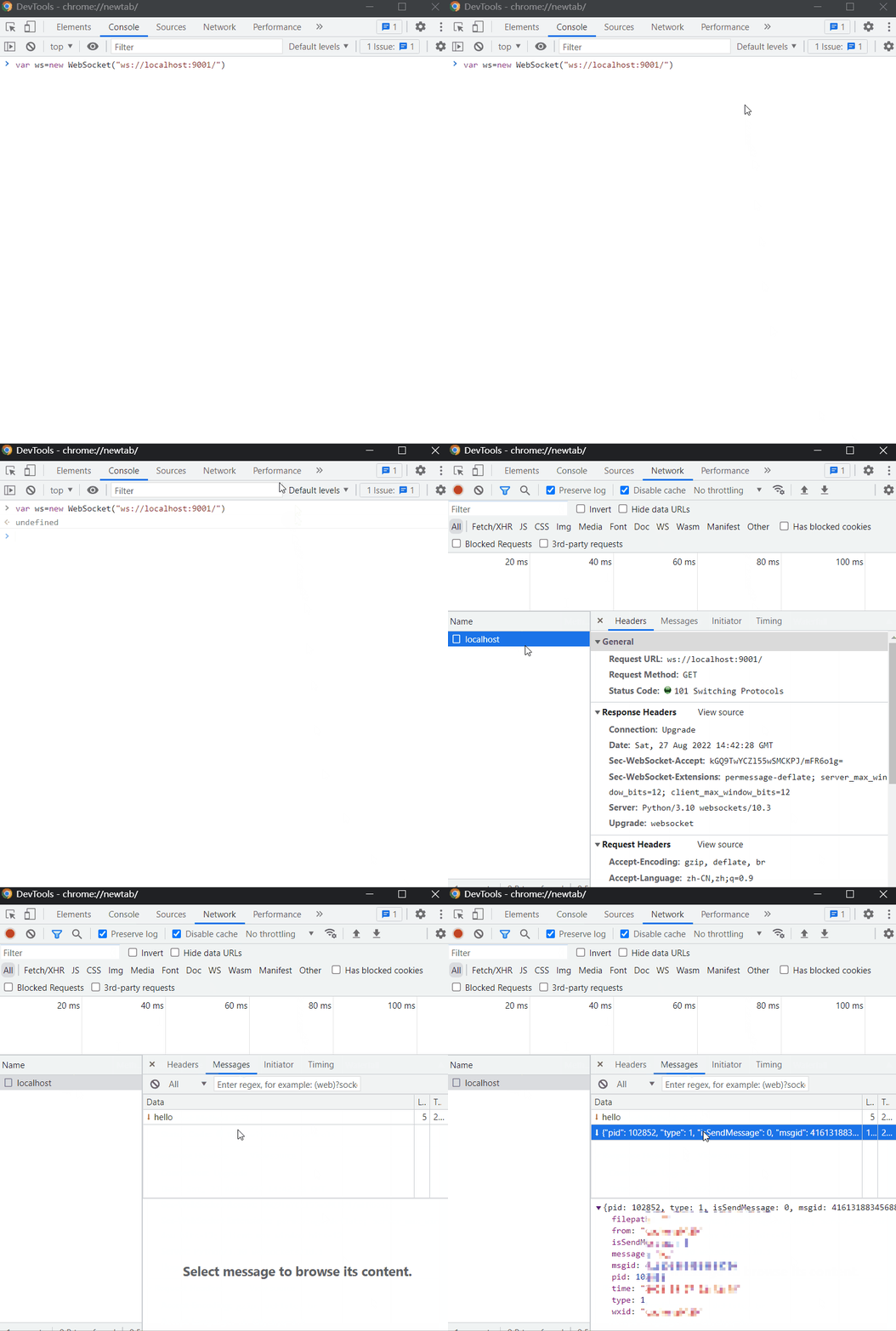
当前接收消息格式示例:
{
    "extrainfo": {
        "is_at_msg": true,
        "at_user_list": [
            "wx_user_id1",
            "wx_user_id2"
        ],
        "member_count": 23
    },
    "filepath": "",
    "isSendMsg": 0,
    "message": "@wx_user1\u2005@wx_user2\u2005Hello",
    "msgid": 7495392442139043211,
    "pid": 17900,
    "sender": "20813132945@chatroom",
    "time": "2022-09-03 22: 10: 33",
    "type": 1,
    "wxid": "wx_user_id10"
}
- 开启WebSocket RPC服务进行方法调用:
> whochat serve-rpc-ws
PID: 28824
注册SIGINT信号处理程序: run.<locals>.shutdown
运行微信机器人RPC websocket服务, 地址为<localhost:9002>
默认地址为localhost:9002,测试发送消息给文件传输助手,记得先调用,现在调用方法时会自动注入dll
start_robot_service注入dll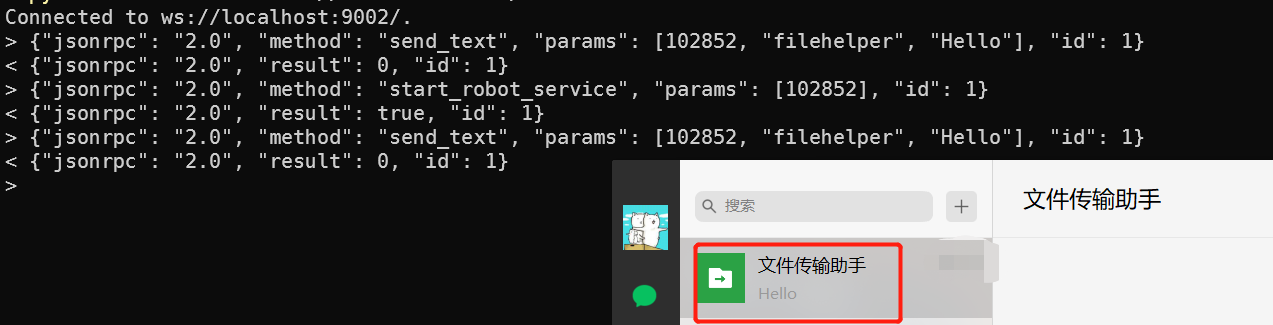
whochat show-rpc-docs命令查看或者whochat show-rpc-docs --json > docs.json生成JSON文档(rpc-api.json):
> whochat show-rpc-docs --help
Usage: whochat show-rpc-docs [OPTIONS]

  列出RPC接口

  whochat show-rpc-docs
  or
  whochat show-rpc-docs --json > docs.json

Options:
  --json  JSON文档
  --help  Show this message and exit.
- 定时任务:
在每天上午6点整喊基友起床,同样使用RPC调用schedule_a_job(获取接口文档见4),
{
    "jsonrpc": "2.0",
    "method": "schedule_a_job",
    "params": {
        "name": "GETUP",
        "unit": "days",
        "every": 1,
        "at": "08:00:00",
        "do": {
            "func": "send_text",
            "args": [
                102852,
                "jiyou",
                "GET UP!"
            ]
        },
        "description": "",
        "tags": [
            "jiyou"
        ]
    },
    "id": 4
}
v1.3.5
- 解析最新微信版本
extra_info - Log raw message at debug level
v1.3.4
- 自动设置微信版本号避免更新
- 增加环境变量
WHOCHAT_WECHAT_VERSION自定义微信版本号 - 尝试使
BotWebsocketRPCClient.rpc_call更正确地运行
v1.3.3
- 增加获取微信最新版本号的方法
- 修复Mac用户发送@消息无法正确解析的问题
v1.3.2
- 修改日志级别,增加日志文件记录
v1.3.0
- 增加RPC Websocket客户端
- 消息转发命令行增加
--welcome参数决定是否在客户端连接是发送"hello" hook_方法返回路径- 增加
prevent_revoke阻止文件消息被撤回时被删除
v1.2.1
- 更新适配 Robot DLL
- 添加
_comtypes.py方便在非Windows平台开发
v.1.1.0
- 更新 Robot DLL
- 接收消息增加
extrainfo字段,当消息为群消息时可获取群成员数量和被@的人的微信ID - 命令行增加
log-level选项控制日志级别 - 调用bot方法时自动注入dll
- 添加 docs/rpc/api.json
v1.0.1
- 添加Python版本依赖说明
欢迎学习交流,点个star⭐️
1 maintainer

Metadata
1 maintainer
Release files for whochat 1.3.5
For a detailed explanation of source distributions (sdists) and built distributions (wheels), please see the package formats documentation.
Source distribution (sdist)
| File | Size | Uploaded | Provenance | |
|---|---|---|---|---|
| whochat-1.3.5.tar.gz | 221.0 kB | Without provenance | Details |
Built distribution (wheel)
| File | Interpreter | ABI | Platform | Reset |
|---|---|---|---|---|
| whochat-1.3.5-py3-none-any.whl | Python 3 | none | any | Details |
Total release size: 443.6 kB
Release files / whochat-1.3.5.tar.gz
| Download URL | whochat-1.3.5.tar.gz |
|---|---|
| Size | 221.0 kB |
| Tags | Source |
|
SHA-256 checksum How to use checksums |
3604313887c236bd318ff619a7f2443a7735f5d01b3104dab8d21806f1eb9cf5
|
|
BLAKE2b-256 checksum How to use checksums |
e165923ba8024f583f23d9c662ea19edde43643dc9b50b5e4c74ba3ba067e953
|
| Upload date | |
|
Uploaded using Trusted Publishing? What is trusted publishing? |
No |
| Uploaded via |
twine/4.0.2 CPython/3.9.13
|
Release files / whochat-1.3.5-py3-none-any.whl
| Download URL | whochat-1.3.5-py3-none-any.whl |
|---|---|
| Size | 222.6 kB |
| Tags | Python 3 |
|
SHA-256 checksum How to use checksums |
26e1de7a699cee85719b95a8899056d6ff5b464ded2656e49edcc7434cb56a1f
|
|
BLAKE2b-256 checksum How to use checksums |
87d60c5fe4606b8887dfd35c5bb269d9389d9154ed0ea2fcf436330dc5a06ab7
|
| Upload date | |
|
Uploaded using Trusted Publishing? What is trusted publishing? |
No |
| Uploaded via |
twine/4.0.2 CPython/3.9.13
|
Security for whochat 1.3.5
Provenance
Provenance describes where a file came from. On PyPI, provenance is shared via attestations, which provide a verifiable record of the build or publishing details. View details, limitations and caveats.
No provenance found
None of the files in this release were uploaded with provenance metadata.
A note on package security
PyPI is a repository for distributing packages, not a service for auditing them. While third-party security researchers and our staff do their best to detect and remove malicious packages, PyPI cannot guarantee the quality, security or suitability of any given package.
To learn more about protecting yourself from malicious actors, visit our package security documentation.














