
Terminal dashboard for ports, processes, and Docker containers

Project description

A terminal dashboard for ports, processes, and Docker containers.
Like htop but focused on network ports.



What is whosat?
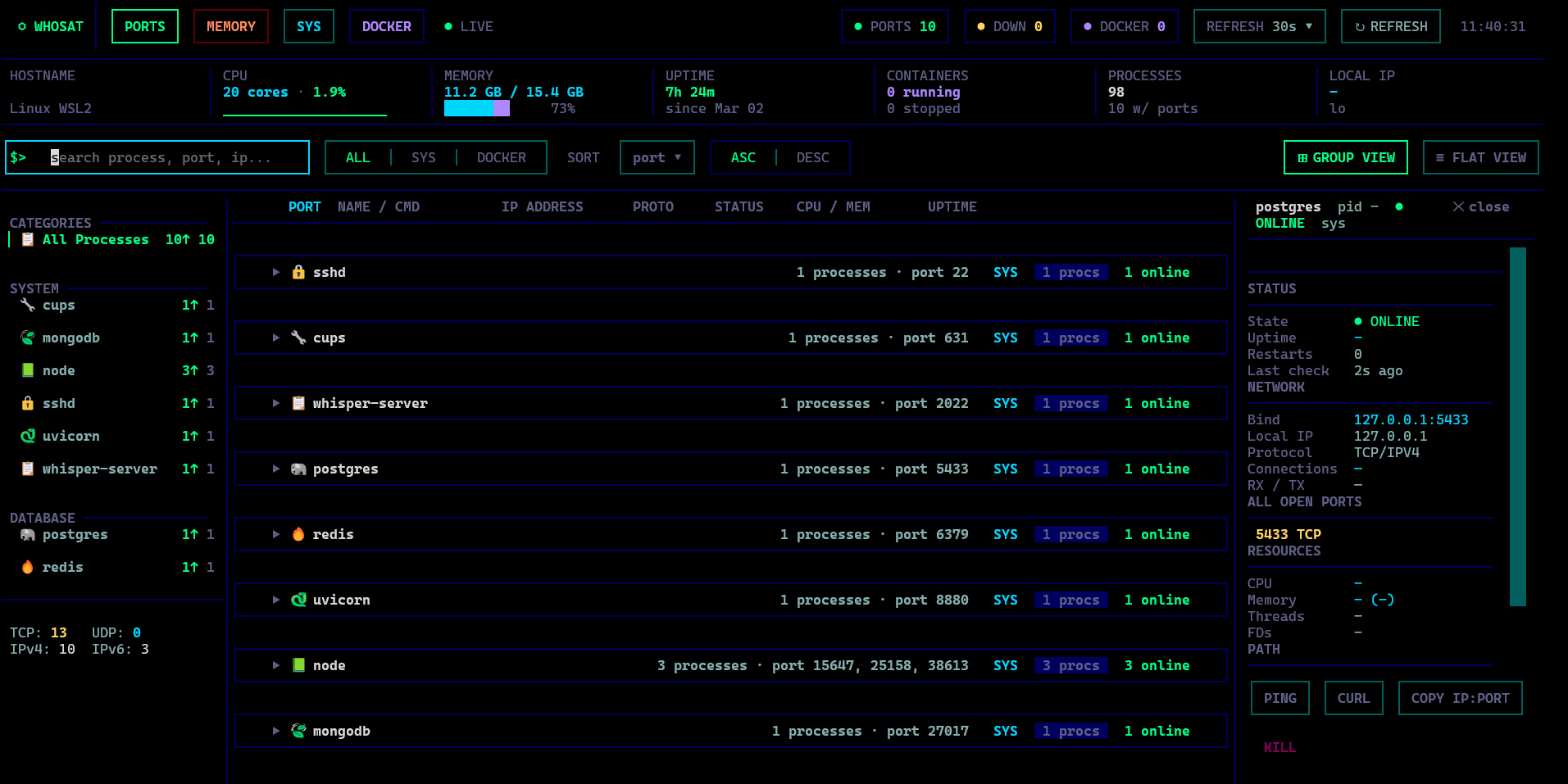
whosat is a terminal-based system monitor that answers one question: "who's sitting on that port?"
It scans all listening ports on your machine, groups them by process, enriches them with CPU/memory stats, and displays everything in a rich interactive TUI. Think of it as htop meets netstat — you get a live, searchable, themeable dashboard showing every port, the process behind it, and what resources it's consuming.
Whether you're debugging a port conflict, hunting down a runaway process, or just want a quick overview of what's running on your system — whosat gives you the answer in one command.
Install
pip install whosat
With Docker support:
pip install 'whosat[docker]'
Usage
whosat
That's it. whosat will scan your system and display all listening ports and their processes.
Features
- Port & Process Monitoring — See all listening ports with owning processes, CPU/memory usage, and uptime
- Memory View — System-wide process memory usage with GPU memory tracking (NVIDIA)
- Docker Integration — Optional container monitoring alongside system processes
- Group & Flat Views — Group processes by name or view as a flat list
- Detail Panel — Expand any process to see full network info, open ports, resource usage, and CPU sparkline
- Actions — Ping, curl, and kill processes directly from the TUI
- Live Refresh — Configurable auto-refresh (15s / 30s / 1m / 2m / off)
- Theming — 6 built-in themes (matrix, nord, dracula, tokyo-night, gruvbox, solarized)
- Search & Filter — Search by process name, port, or IP; filter by scope (system / docker)
- Keyboard Driven — Full keyboard navigation
- Cross-platform — Linux, macOS, and WSL2
Keyboard Shortcuts
| Key | Action |
|---|---|
1 / 2 |
Switch to Ports / Memory view |
Up / Down |
Navigate rows |
Enter |
Expand/collapse row + open detail panel |
Esc |
Close detail panel / modal / clear search |
/ |
Focus search |
R |
Refresh data |
G |
Toggle group/flat view |
K |
Kill selected process |
S |
Cycle scope (ALL / SYS / DOCKER) |
T |
Cycle theme |
Y |
Copy IP:PORT to clipboard |
Q |
Quit |
Configuration
On first run, whosat creates ~/.whosat/config.toml with default categories and settings.
theme = "matrix"
refresh_interval = 30

[[categories]]
name = "python"
icon = "snake"
section = "System"
match = ["python3", "python", "uvicorn", "gunicorn", "celery"]

# Add your own:
# [[port_names]]
# port = 8020
# name = "My App"
# icon = "robot"
Requirements
- Python 3.10+
- Linux, macOS, or WSL2
- Optional: Docker SDK for container monitoring
- Optional: NVIDIA GPU for GPU memory tracking in memory view
License
MIT


Download files
Download the file for your platform. If you're not sure which to choose, learn more about installing packages.
Source Distribution
Built Distribution
Filter files by name, interpreter, ABI, and platform.
If you're not sure about the file name format, learn more about wheel file names.
Copy a direct link to the current filters
File details
Details for the file whosat-0.1.3.tar.gz.
File metadata
- Download URL: whosat-0.1.3.tar.gz
- Upload date:
- Size: 53.2 kB
- Tags: Source
- Uploaded using Trusted Publishing? No
- Uploaded via: twine/6.2.0 CPython/3.12.3
File hashes
| Algorithm | Hash digest | |
|---|---|---|
| SHA256 |
3d1e403adeb3118c4db06812e30cb9e4485024da9135123552af4e5e06770918
|
|
| MD5 |
150e44061e080affeb840d54e466d369
|
|
| BLAKE2b-256 |
f701cac20c70a810901aa6786a4776cc934b297d1d2bc55bbcab67d18d7dae2c
|
File details
Details for the file whosat-0.1.3-py3-none-any.whl.
File metadata
- Download URL: whosat-0.1.3-py3-none-any.whl
- Upload date:
- Size: 58.9 kB
- Tags: Python 3
- Uploaded using Trusted Publishing? No
- Uploaded via: twine/6.2.0 CPython/3.12.3
File hashes
| Algorithm | Hash digest | |
|---|---|---|
| SHA256 |
13416554ed1c2ad61e78d5208032bdd0d10843cd1fc58510f1bd7dccb85da34a
|
|
| MD5 |
523de2c9e2a94afcbd1c3be8b6676d06
|
|
| BLAKE2b-256 |
81ee4c6a450a9d0f53ef2c4e45e1b610e3457b62997e701eeb19ebd1b489bcd0
|






