
whotalks
Who does your computer talk to? whotalks watches every outbound connection for one minute, then tells you which companies were on the other end, which apps were talking to them, and gives the whole thing a privacy grade.
uvx whotalks
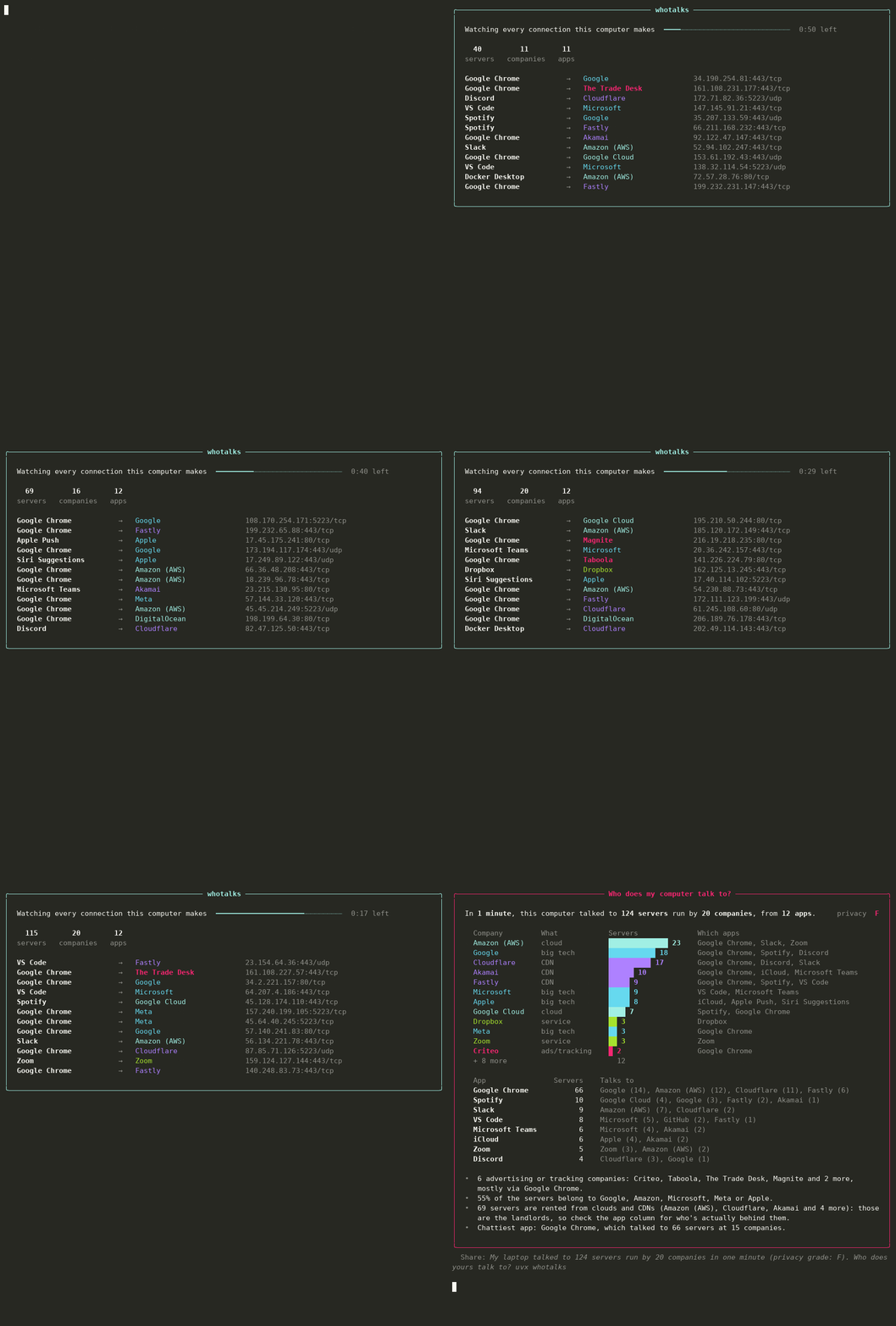
The demo replays a typical laptop's minute (Chrome with a news site open, Slack, Spotify, VS Code, iCloud) so it looks the same every time. The company lookups in it are real. Run it yourself to see your own.
Most people have no idea that leaving a few apps open means talking to a hundred-plus servers a minute. whotalks makes that visible without installing a kernel extension, a firewall, or anything that needs root.
What you get
- Every server, grouped by the company that runs it: Amazon, Google, Cloudflare, Meta, Microsoft, Apple…
- Which app made each connection, using the names you'd recognise ("Google Chrome", not "Google Chrome Helper (Renderer)"; "iCloud", not
cloudd). - Ad and tracking networks called out in red: Criteo, Taboola, Outbrain, The Trade Desk, PubMatic, Magnite, Xandr, Quantcast and others that run their own networks.
- A privacy grade: A means no dedicated ad or tracking networks, F means six or more.
- A share line: "My laptop talked to 124 servers run by 20 companies in one minute (privacy grade: F)."
How it works
- Watch. Twice a second, whotalks asks the OS for every open TCP connection and every connected UDP socket (that's how QUIC and HTTP/3 show up), keeps the ones going to public internet addresses, and notes which process owns each one. It uses psutil, so it works the same on macOS, Linux and Windows.
- Look up the owner. Every IP address belongs to a network (an ASN) registered to some organisation. whotalks uses the public-domain iptoasn.com database, downloaded once (~11 MB) and cached for 30 days, then maps networks to companies with a hand-checked list.
- Refine with names. Reverse DNS fills gaps (an AWS address that answers to
*.github.comis GitHub). On Windows, it also reads the DNS cache (ipconfig /displaydns) to see the actual names your machine looked up.
Honest limits
- The IP tells you the landlord, not always the tenant. A server on Amazon (AWS) or Cloudflare could belong to any of their customers. That's why the report shows which app made each connection, and labels clouds and CDNs as such.
- Google and Meta ads look like Google and Meta. Their ad servers share networks with everything else they run, so whotalks can't count them as trackers. The grade only counts companies whose whole business is ads or tracking.
- Very short connections can slip through. Anything opened and closed in under half a second may be missed. Use
--interval 0.2to look more often. - On macOS, other users' and some system processes are hidden from a normal user. whotalks tells you how many, and
sudo whotalksincludes them.
Options
whotalks                 # watch for 60 seconds
whotalks -s 300          # watch for 5 minutes (Ctrl-C to stop early and still get the report)
whotalks --all           # list every company, not just the top 12
whotalks --json          # everything, machine-readable
whotalks --no-rdns       # skip reverse-DNS lookups
whotalks --offline       # don't download the owner database; show apps and IPs only
whotalks --refresh-db    # re-download the owner database now
Privacy
whotalks only reads connection tables from your OS. It sends nothing about you anywhere. The only network traffic it makes itself is the one-time database download from iptoasn.com and the reverse-DNS lookups (which go to your own DNS resolver, and which you can turn off with --no-rdns).
Install
uvx whotalks          # run without installing
pipx install whotalks # or install it
Requires Python 3.9+. Depends on rich and psutil.
License
MIT. IP-to-ASN data from iptoasn.com, public domain (PDDL v1.0).
1 maintainer

Metadata
1 maintainer
Release files for whotalks 0.1.0
For a detailed explanation of source distributions (sdists) and built distributions (wheels), please see the package formats documentation.
Source distribution (sdist)
| File | Size | Uploaded | Provenance | Actions |
|---|---|---|---|---|
| whotalks-0.1.0.tar.gz | 18.9 kB | With provenance | Details for whotalks-0.1.0.tar.gz |
Built distribution (wheel)
| File | Interpreter | ABI | Platform | Actions Reset |
|---|---|---|---|---|
| whotalks-0.1.0-py3-none-any.whl | Python 3 | none | any | Details for whotalks-0.1.0-py3-none-any.whl |
Total release size: 37.3 kB
Release files / whotalks-0.1.0.tar.gz
| Download URL | whotalks-0.1.0.tar.gz |
|---|---|
| Size | 18.9 kB |
| Tags | Source |
|
SHA-256 checksum How to use checksums |
c104d1d6018f2f21fa58c5f39131635e3c931c805b3f79120d2d309867fcdb34
|
|
BLAKE2b-256 checksum How to use checksums |
c2a04fde1d4901b817036d38d0c66d4beaa37fb562438677dcac8926451fbea5
|
| Upload date | |
|
Uploaded using Trusted Publishing? What is trusted publishing? |
Yes |
| Uploaded via |
twine/7.0.0 CPython/3.13.16
|
Provenance
Provenance describes where a file came from. On PyPI, provenance is shared via attestations, which provide a verifiable record of the build or publishing details. View details, limitations and caveats.


PyPI Publish Attestation
PyPI verified that this artifact, at this checksum, originated from the publisher listed below.
Signed by GitHub Actions, verified by PyPI on Nov 5, 2026.
Transparency logRelease files / whotalks-0.1.0-py3-none-any.whl
| Download URL | whotalks-0.1.0-py3-none-any.whl |
|---|---|
| Size | 18.4 kB |
| Tags | Python 3 |
|
SHA-256 checksum How to use checksums |
00e15cea5310fcb07be6e0eb9fd5e3d9d855ff26505123576841f97b0a739896
|
|
BLAKE2b-256 checksum How to use checksums |
f2a90cfdc3574a4df5be4d0658774594ae92243aad24ef0af02b01b147fd90e6
|
| Upload date | |
|
Uploaded using Trusted Publishing? What is trusted publishing? |
Yes |
| Uploaded via |
twine/7.0.0 CPython/3.13.16
|
Provenance
Provenance describes where a file came from. On PyPI, provenance is shared via attestations, which provide a verifiable record of the build or publishing details. View details, limitations and caveats.
PyPI Publish Attestation
PyPI verified that this artifact, at this checksum, originated from the publisher listed below.
Signed by GitHub Actions, verified by PyPI on Nov 5, 2026.
Transparency logSecurity for whotalks 0.1.0
Provenance
Provenance describes where a file came from. On PyPI, provenance is shared via attestations, which provide a verifiable record of the build or publishing details. View details, limitations and caveats.
Full provenance
Both files in this release have been uploaded with provenance metadata.
Attestation for whotalks-0.1.0.tar.gz
PyPI Publish Attestation
PyPI verified that this artifact, at this checksum, originated from the publisher listed below.
Signed by GitHub Actions, verified by PyPI on Nov 5, 2026.
Transparency logA note on package security
PyPI is a repository for distributing packages, not a service for auditing them. While third-party security researchers and our staff do their best to detect and remove malicious packages, PyPI cannot guarantee the quality, security or suitability of any given package.
To learn more about protecting yourself from malicious actors, visit our package security documentation.













