
Whybook




You ask the questions. Agents write the code.
Whybook is a JupyterLab extension: a view of a Jupyter notebook for asking questions about data and understanding every result. It has no chat box. The analyst picks one of the questions it offers, or types or says their own. The offers follow what the analyst points at (a column dragged onto a cell or clicked in Click mode, a region of a plot, a chip on a cell). The code comes from a template or from the AI model of the analyst's choice, and Whybook places the cell and runs it. Every constant, default and choice that Whybook finds behind the result is shown on the cell, where the analyst can question it.
Any .ipynb file opens in Whybook and stays an ordinary notebook: the questions, choices and assumptions go into its metadata. Whybook opens next to JupyterLab's notebook editor, and both share one notebook model and one kernel, so an edit in one shows in the other.
whybook.dev also gives the evidence behind the idea, and the roadmap sets out the path to v1.
What it does
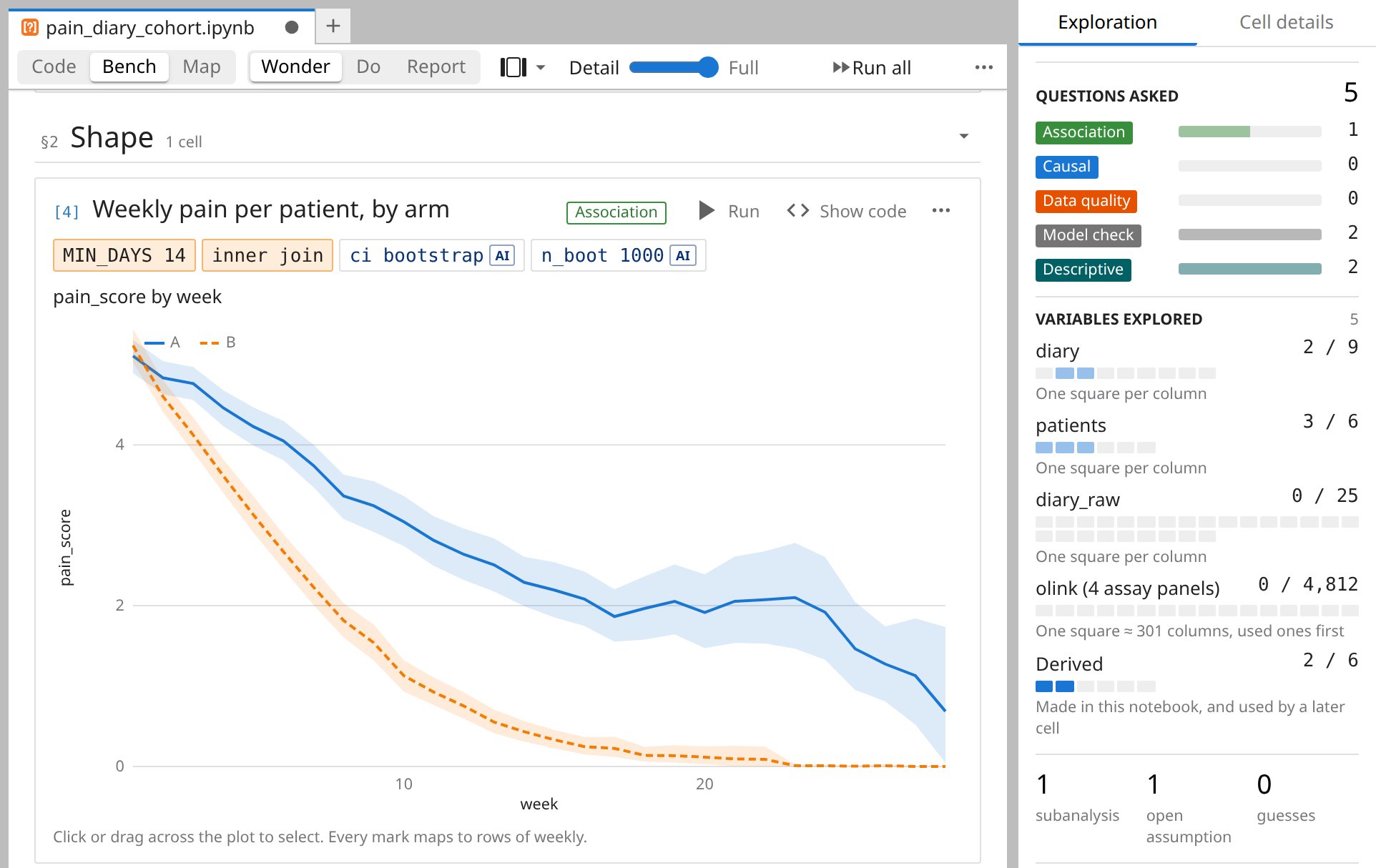
- Ask by pointing at the data. The analyst drags a variable, a column, a file or a table of a SQLite file onto a cell, or clicks the two in Click mode. Whybook then offers up to 12 ranked questions of five types (descriptive, data quality, association, causal and model check), each with a place in the notebook. Most of them run code from a template at once, with no model call.
- Every choice in plain sight. After a cell runs, Whybook reads its code against the live kernel and shows each value that it finds the result depends on as a chip, such as
MIN_DAYS 14, orinner join ×2for two merges that keep pandas' default. A constant defined in an imported file shows on the cell that uses it. - Question a plot. Every mark of a plot drawn with the
whybookhelpers maps to rows of its data frame, and so does a box drawn on a Plotly scatter chart, or on a matplotlib figure whose axes hold numbers and whose x label names a column. Whybook counts the rows behind a selection, reports what differs there and offers questions about it. A question about any other picture sends the picture to the AI model. - Branch in parallel. Shift+drop turns a question into a branch, and Alt+drop starts several branches at once. Each branch runs in its own kernel subshell (JEP 91, ipykernel 7), on the same data, and the notebook stays one list of cells.
- Answers that need AI. For a question that needs a new cell, an agent adds and runs the cells it needs, and ends with a short answer that links the cells that show it. An edit, a branch or a preview gets one cell. Every cell that a model wrote is marked, and one click removes the cells of a run.
- Python and R. In an R kernel, Whybook lists the variables, shows the chips and offers the questions, and a model writes the code of each answer in R. The templates write Python only.
- A kernel in a sandbox. "Python 3 (sandboxed)" sees the notebook's folder and no network, under bubblewrap on Linux and Seatbelt on macOS.
python -m whybook.sandbox <kernel name>makes a sandboxed copy of any other kernel, such as R.
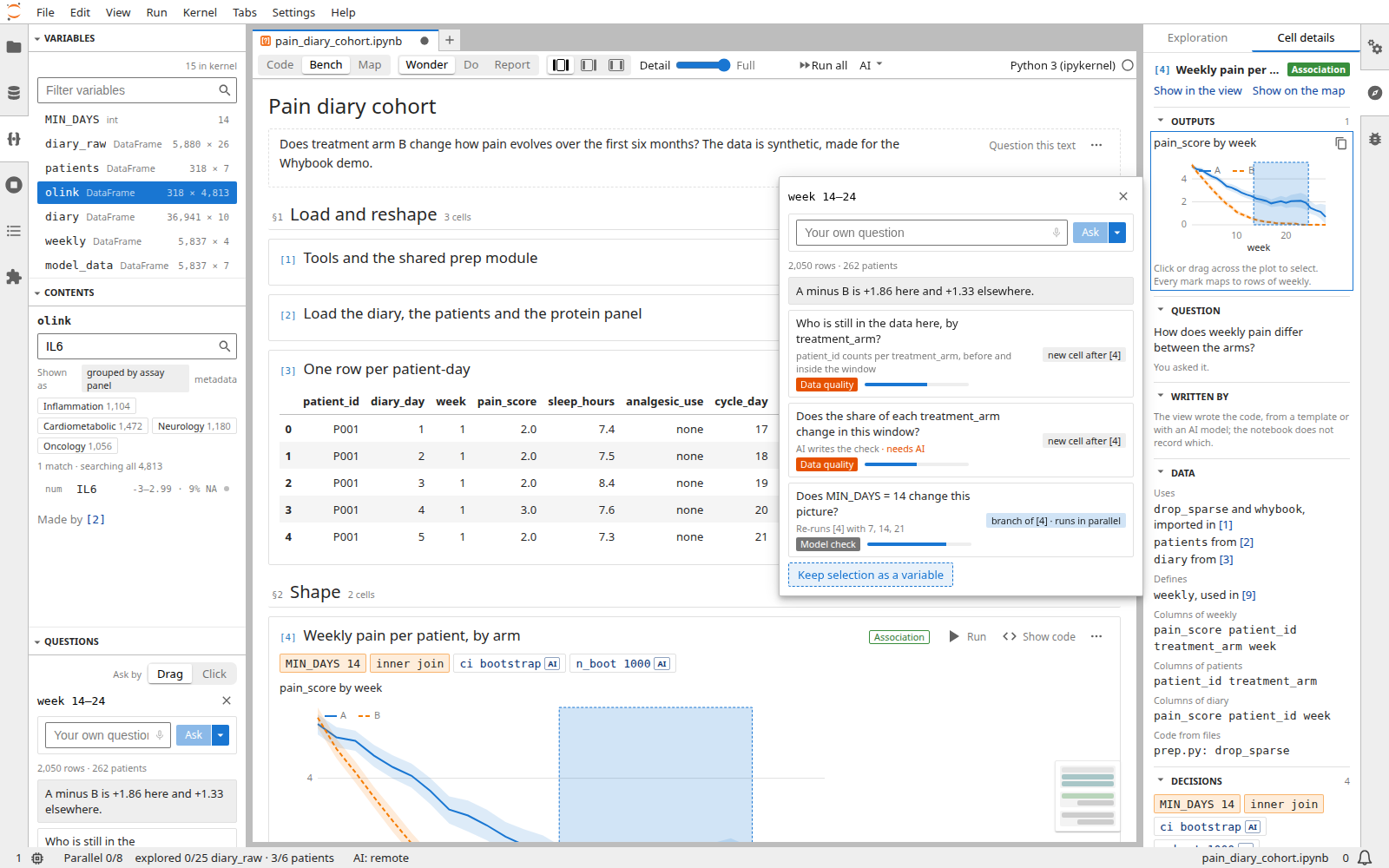
The data in the screenshots is synthetic: the demo cohort of examples/pain_diary.
Install
Whybook needs Python 3.10 or later and JupyterLab 4.4 or later, in the 4.x series.
pip install "whybook[kernel,demo,models]"
jupyter lab
To run small AI models in the Jupyter server too, add local: pip builds llama-cpp-python with the system's C++ compiler, in about 4 minutes on 8 virtual CPUs.
pip install "whybook[kernel,demo,local,models]"
jupyter lab
Add speech for spoken questions transcribed by Moonshine in the Jupyter server, on Linux x86_64 or macOS 15 on Apple silicon. On Linux, speech needs glibc 2.34 or later, as in Ubuntu 22.04. The setting Spoken questions in the AI models panel is off by default: choose Moonshine Medium or Small there. The first click on the microphone of a "Your own question" box then downloads the model.
Whybook reads the data in the kernel. When a kernel runs in another environment, install whybook[kernel] there too, and demo for the demo. kernel installs narwhals, and without it the Variables panel shows data frames without their columns.
To open a notebook in Whybook, right-click it in the file browser and choose Open With, then Whybook. With a notebook open in JupyterLab's notebook editor, "Open Notebook in Whybook" in the command palette does the same. A new notebook starts from the Whybook section of the Launcher, or from File, New, Whybook. A double-click still opens JupyterLab's notebook editor. To open notebooks in Whybook by default, set Default Viewers of the Document Manager to {"notebook": "Whybook"} in the Settings Editor. On JupyterLab 4.6 and later, the sections of the Whybook panel can also move to the file browser.
Whybook also runs in Jupyter Notebook 7: on a notebook's page, the switch Notebook | Whybook in the menu bar shows Whybook in place of the notebook editor. Whybook has some limitations in Notebook 7 that it does not have in JupyterLab. They are bugs and improvements, tracked in issues of their own, often in upstream projects.
Try the demo
Clone this repository and open examples/pain_diary/pain_diary_cohort.ipynb in Whybook, then press Run all: the notebook imports its helpers and data from prep.py in the same folder. examples/pain_diary/pain_diary_cohort_6h.ipynb is the same analysis after six more hours of work.
The questions from templates work with no AI model. Questions marked needs AI, and questions that the analyst types, need a model connected in the AI models panel: OpenRouter after a sign-in, a Hugging Face access token, an API key of Anthropic, OpenAI, Google or Mistral AI, or a model server on this machine.
To try it without installing, open the demo on Binder, with no AI model connected.
What leaves the machine
Once a remote AI model is connected, Whybook sends it each table that it shows as a tile, to get a label, and asks it for more questions each time the analyst drags or clicks. With the setting "Keep data on this machine", no values, tables or pictures leave the machine, and c.Whybook.keep_data_local = True turns it on for every user of a Jupyter server.
Report a problem or contribute
Report a problem or ask a question in the issues. CONTRIBUTING.md explains how to report a security problem privately, set up a checkout and run the tests.
Uninstall
pip uninstall whybook
pip leaves Whybook's folder in Jupyter's data folder, with the keys and sign-ins of the AI models panel in keys.json. To remove them, delete the whybook folder in the folder that jupyter --data-dir prints. The models that Whybook downloaded stay in the caches of Hugging Face and moonshine-voice, and in ~/.cache/whybook. A kernel copied with python -m whybook.sandbox stays until jupyter kernelspec remove <name>. Whybook also installs jupyterlab-unfold, and the file browser stays a tree until pip uninstall jupyterlab-unfold.
Troubleshoot
- pip fails while it builds llama-cpp-python: install a C++ compiler, or leave
localout of the list. - The Variables panel shows data frames without their columns: install
whybook[kernel]in the kernel's environment. - Questions marked needs AI are greyed: connect a model in the AI models panel. The item of the status bar that starts with "AI:" opens it.
- Python 3 (sandboxed) does not start: on Linux it needs bubblewrap, and on Ubuntu 24.04 also an AppArmor profile for bubblewrap. The "Error Starting Kernel" dialog gives the commands.
If you are seeing the frontend extension, but it is not working, check that the server extension is enabled:
jupyter server extension list
If the server extension is installed and enabled, but you are not seeing the frontend extension, check the frontend extension is installed:
jupyter labextension list
License
Whybook is under the Apache License 2.0: see LICENSE. The Seatbelt profiles in whybook/sandbox/codex/ come from OpenAI Codex, under the same licence, with its LICENSE and NOTICE.
1 maintainer

Metadata
1 maintainer
Release files for whybook 0.4.0
For a detailed explanation of source distributions (sdists) and built distributions (wheels), please see the package formats documentation.
Source distribution (sdist)
| File | Size | Uploaded | Provenance | Actions |
|---|---|---|---|---|
| whybook-0.4.0.tar.gz | 4.3 MB | With provenance | Details for whybook-0.4.0.tar.gz |
Built distribution (wheel)
| File | Interpreter | ABI | Platform | Actions Reset |
|---|---|---|---|---|
| whybook-0.4.0-py3-none-any.whl | Python 3 | none | any | Details for whybook-0.4.0-py3-none-any.whl |
Total release size: 5.5 MB
Release files / whybook-0.4.0.tar.gz
| Download URL | whybook-0.4.0.tar.gz |
|---|---|
| Size | 4.3 MB |
| Tags | Source |
|
SHA-256 checksum How to use checksums |
6d952a6a7ef3ac90d3e18a8ac74454875b4d80d9c809de3f83a478e6195917e0
|
|
BLAKE2b-256 checksum How to use checksums |
753a2a79e406ea087bff611c5c56dbb22366ff4aa7a3548167e296b773189d82
|
| Upload date | |
|
Uploaded using Trusted Publishing? What is trusted publishing? |
Yes |
| Uploaded via |
twine/7.0.0 CPython/3.13.14
|
Provenance
Provenance describes where a file came from. On PyPI, provenance is shared via attestations, which provide a verifiable record of the build or publishing details. View details, limitations and caveats.


PyPI Publish Attestation
PyPI verified that this artifact, at this checksum, originated from the publisher listed below.
Signed by GitHub Actions, verified by PyPI on Oct 18, 2026.
Transparency logRelease files / whybook-0.4.0-py3-none-any.whl
| Download URL | whybook-0.4.0-py3-none-any.whl |
|---|---|
| Size | 1.1 MB |
| Tags | Python 3 |
|
SHA-256 checksum How to use checksums |
47b21f1e5bf1d0bbbd4978c4200e978184e35e70ff3f501d8f7d270fee0b8089
|
|
BLAKE2b-256 checksum How to use checksums |
230de487c1f089c8963ff116b5c67864fb1b0d81d096d8e64c4c5a46d52d7a36
|
| Upload date | |
|
Uploaded using Trusted Publishing? What is trusted publishing? |
Yes |
| Uploaded via |
twine/7.0.0 CPython/3.13.14
|
Provenance
Provenance describes where a file came from. On PyPI, provenance is shared via attestations, which provide a verifiable record of the build or publishing details. View details, limitations and caveats.
PyPI Publish Attestation
PyPI verified that this artifact, at this checksum, originated from the publisher listed below.
Signed by GitHub Actions, verified by PyPI on Oct 18, 2026.
Transparency logSecurity for whybook 0.4.0
Provenance
Provenance describes where a file came from. On PyPI, provenance is shared via attestations, which provide a verifiable record of the build or publishing details. View details, limitations and caveats.
Full provenance
Both files in this release have been uploaded with provenance metadata.
Attestation for whybook-0.4.0.tar.gz
PyPI Publish Attestation
PyPI verified that this artifact, at this checksum, originated from the publisher listed below.
Signed by GitHub Actions, verified by PyPI on Oct 18, 2026.
Transparency logA note on package security
PyPI is a repository for distributing packages, not a service for auditing them. While third-party security researchers and our staff do their best to detect and remove malicious packages, PyPI cannot guarantee the quality, security or suitability of any given package.
To learn more about protecting yourself from malicious actors, visit our package security documentation.














