
whyfull
Find out why your Linux disk is full, and get the command that fixes it.


df says 100%. du doesn't add up. Something is failing with No space left on device.
whyfull checks the places where disk space usually goes on a Linux server: deleted files that a process still holds open, the systemd journal, Docker images and container logs, old kernels, package caches, core dumps, runaway logs and inode exhaustion. For each thing it finds, it prints how much space it takes, how risky it is to remove, and the exact command to get the space back.
It never deletes anything itself.
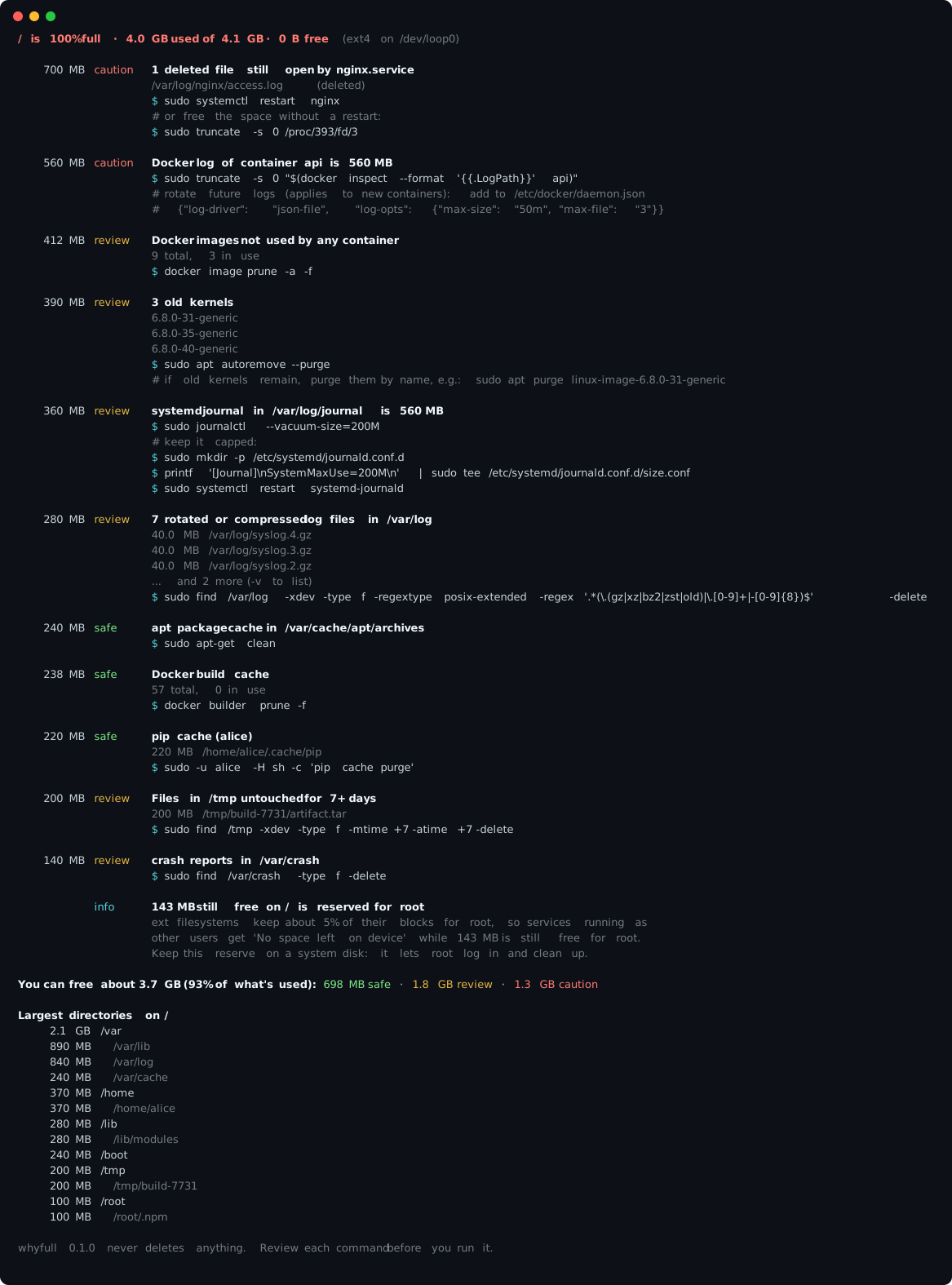
Run it
A full disk may leave no room to install anything, so whyfull is a single 30 KB file with no dependencies. It runs on the Python 3 that already ships with nearly every Linux server (3.6 or newer). Download it to /dev/shm, which lives in memory:
curl -fsSL -o /dev/shm/whyfull https://github.com/amlaban65/whyfull/releases/latest/download/whyfull.pyz
sudo python3 /dev/shm/whyfull
Or install it from PyPI:
pipx install whyfull      # or: uv tool install whyfull, pip install --user whyfull
sudo "$(command -v whyfull)"
uvx whyfull and pipx run whyfull work for a one-off run.
Run it with sudo. Without root it can't measure files owned by other users and services, and it will tell you what it couldn't read.
What it looks for
| Check | What it finds |
|---|---|
deleted-open |
Files that were deleted while a process still had them open. This is the classic "df says full but du says otherwise". whyfull names the systemd service or Docker container holding them and shows how to release the space with or without a restart. |
docker |
Build cache, unused images, stopped containers, dangling volumes, and container logs with no size limit. |
journald |
A systemd journal that has grown past a sensible size, with the commands to vacuum it and cap it. |
logs |
Rotated and compressed logs in /var/log, and single log files over 1 GB. |
kernels |
Installed kernels other than the running one and the newest one, with the right removal command for apt, dnf or zypper. |
packages |
apt, dnf, yum, pacman, zypper and apk caches. |
snaps |
Disabled snap revisions that snapd keeps around. |
crashes |
Core dumps from systemd-coredump, apport and ABRT, and /var/crash. |
tmp |
Files in /tmp and /var/tmp nobody has touched in a week. |
user-caches |
pip, uv, poetry, npm, yarn, pnpm, Go, Cargo, Maven, Gradle, Hugging Face, PyTorch and conda caches, and the Trash, for every user. |
inodes |
A filesystem that ran out of inodes (too many files) rather than bytes, and the directories with the most entries. |
reserved |
ext filesystems that look full only because of the 5% reserved for root. |
whyfull also scans the whole filesystem (with a time limit) and lists the largest directories. When the files it can see add up to much less than df reports, it says so, and points to where the rest usually is. Common causes are files hidden underneath a mount point and btrfs or ZFS snapshots.
whyfull --list-checks prints the list from your installed version.
Risk levels
Every finding is labelled so you know what you're agreeing to:
- safe: caches that are rebuilt on demand. Removing them costs a slower next build or download.
- review: almost always fine to remove (old kernels, rotated logs, unused images), but take a look first.
- caution: can lose data or affect a running service, such as truncating a live log or pruning Docker volumes.
- info: explains what's going on, like inode exhaustion or the root reserve, without a direct cleanup.
Usage
sudo whyfull                      # every filesystem that is 85% full or more
sudo whyfull /var                 # only the filesystem holding /var
sudo whyfull -t 70                # lower the "full" threshold to 70%
sudo whyfull -v                   # explain every finding, list all evidence
sudo whyfull --no-scan            # skip the full scan, run only the checks
sudo whyfull --only docker,logs   # run some checks; see --list-checks
If nothing is above the threshold, whyfull analyses / anyway and tells you the disks are fine.
For incident tickets, scripts and monitoring
sudo whyfull --format markdown > disk.md   # paste into a ticket or chat
sudo whyfull --json | jq '.targets[].findings[] | {title, bytes, risk}'
whyfull --fail-above 90 --no-scan          # exits 1 when any filesystem is 90%+ full
Exit codes: 0 when the run finished, 1 when --fail-above was exceeded, 2 for usage errors.
How is this different from ncdu, du, dust or gdu?
Those are great for browsing a directory tree, and you should keep using them. They answer "which folder is big". whyfull answers "what is this space, and how do I get it back without breaking anything". It finds space that no directory browser can see (deleted files held open by a process). It knows that /var/lib/docker/overlay2 is cleaned with docker image prune, not rm. It knows which kernels are safe to remove, and that a 2 GB syslog.2.gz can go while a live syslog should be truncated.
Run whyfull first. If something is still unexplained, open ncdu on the directory it points to.
Safety
- whyfull only reads. It does not delete, truncate, prune or restart anything.
- The only commands it runs are read-only:
docker system df,docker infoandsnap list --all. - Every fix is printed for you to read and run yourself. Commands that can lose data are marked caution and explained.
- Scans stay on one filesystem (like
du -x), count hard links once, and stop at a time limit, so they won't hang on a huge disk or wander into network mounts.
Contributing
The most useful contribution is a new check: "my disk filled up because of X, and here is how to spot it and clean it up." Each check is one short file in src/whyfull/checks/, and tests run against a fake filesystem, so you don't need a full disk to write one. CONTRIBUTING.md walks through it.
Some checks that would help a lot of people: containerd and CRI-O images (crictl), Podman, Kubernetes pod logs, PostgreSQL WAL, MySQL binlogs, Elasticsearch, LXD, Flatpak, Jenkins workspaces and GitLab Runner caches. If you have a war story about a disk that filled up in a strange way, open an issue even if you don't plan to write the code.
License
1 maintainer

Metadata
1 maintainer
Release files for whyfull 0.1.0
For a detailed explanation of source distributions (sdists) and built distributions (wheels), please see the package formats documentation.
Source distribution (sdist)
| File | Size | Uploaded | Provenance | Actions |
|---|---|---|---|---|
| whyfull-0.1.0.tar.gz | 34.8 kB | With provenance | Details for whyfull-0.1.0.tar.gz |
Built distribution (wheel)
| File | Interpreter | ABI | Platform | Actions Reset |
|---|---|---|---|---|
| whyfull-0.1.0-py3-none-any.whl | Python 3 | none | any | Details for whyfull-0.1.0-py3-none-any.whl |
Total release size: 70.3 kB
Release files / whyfull-0.1.0.tar.gz
| Download URL | whyfull-0.1.0.tar.gz |
|---|---|
| Size | 34.8 kB |
| Tags | Source |
|
SHA-256 checksum How to use checksums |
eb2333882e66e79cd411a3e533cf8f932deb23cf7b8d76780cefda05a095e5c7
|
|
BLAKE2b-256 checksum How to use checksums |
44c7a4f0864c89dd223bb4aabbf7650e9b47cf409013fbc55c75f3ab7d37d14f
|
| Upload date | |
|
Uploaded using Trusted Publishing? What is trusted publishing? |
Yes |
| Uploaded via |
twine/7.0.0 CPython/3.13.16
|
Provenance
Provenance describes where a file came from. On PyPI, provenance is shared via attestations, which provide a verifiable record of the build or publishing details. View details, limitations and caveats.


PyPI Publish Attestation
PyPI verified that this artifact, at this checksum, originated from the publisher listed below.
Signed by GitHub Actions, verified by PyPI on Nov 2, 2026.
Transparency logRelease files / whyfull-0.1.0-py3-none-any.whl
| Download URL | whyfull-0.1.0-py3-none-any.whl |
|---|---|
| Size | 35.4 kB |
| Tags | Python 3 |
|
SHA-256 checksum How to use checksums |
59d77f484d985ddee39354c032414f022418e1ddc494c9c6437f5219420eff1d
|
|
BLAKE2b-256 checksum How to use checksums |
9dfd8866eae68a81cc99794a9d66c7e94b1145776d2afdd2f08e979b03698bc1
|
| Upload date | |
|
Uploaded using Trusted Publishing? What is trusted publishing? |
Yes |
| Uploaded via |
twine/7.0.0 CPython/3.13.16
|
Provenance
Provenance describes where a file came from. On PyPI, provenance is shared via attestations, which provide a verifiable record of the build or publishing details. View details, limitations and caveats.
PyPI Publish Attestation
PyPI verified that this artifact, at this checksum, originated from the publisher listed below.
Signed by GitHub Actions, verified by PyPI on Nov 2, 2026.
Transparency logSecurity for whyfull 0.1.0
Provenance
Provenance describes where a file came from. On PyPI, provenance is shared via attestations, which provide a verifiable record of the build or publishing details. View details, limitations and caveats.
Full provenance
Both files in this release have been uploaded with provenance metadata.
Attestation for whyfull-0.1.0.tar.gz
PyPI Publish Attestation
PyPI verified that this artifact, at this checksum, originated from the publisher listed below.
Signed by GitHub Actions, verified by PyPI on Nov 2, 2026.
Transparency logA note on package security
PyPI is a repository for distributing packages, not a service for auditing them. While third-party security researchers and our staff do their best to detect and remove malicious packages, PyPI cannot guarantee the quality, security or suitability of any given package.
To learn more about protecting yourself from malicious actors, visit our package security documentation.














