
WhyKit
The layer that remembers why.
Git-native evidence and decision ledger for teams and AI agents.
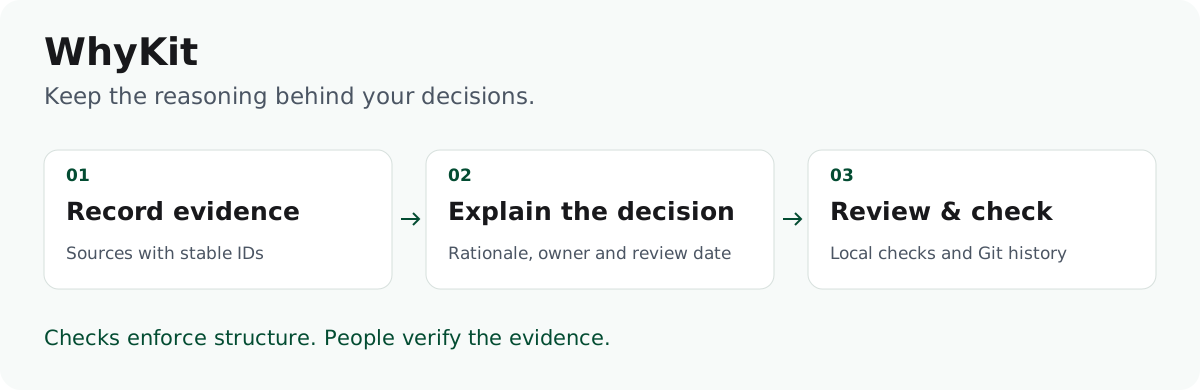
WhyKit keeps sources, decisions, their reasoning, and review events together in plain Markdown and Git. It gives people and tools a shared, inspectable record of what is known, what was decided, and what still needs checking.
Python 3.11+ · No runtime dependencies · Apache-2.0
Status: public alpha, available on PyPI. Source version: 0.3.2.

60-second quickstart
You need Python 3.11+ and uv 0.13.4+.
Install the latest published release, then create a vault in your own working
directory. No source checkout is needed.
uv tool install whykit

# 1. Create a vault.
whykit init my-ledger

# 2. Register a source, then a decision that cites it.
whykit new --root my-ledger evidence \
  --source "Support ticket export, Q3" --type dataset \
  --location "https://example.com/exports/q3-tickets.csv" \
  --claims "Most onboarding tickets mention SSO"
whykit new --root my-ledger decision "Ship SSO before audit logs" \
  --owner Platform --status draft --source E-001

# 3. Check the vault and see what is due for review.
whykit lint --root my-ledger
whykit review --root my-ledger list --due-days 120
If whykit is not found, run uv tool update-shell and open a new terminal.
Use uv tool upgrade whykit to update an existing installation. For development
or the optional Explorer, see running from a checkout.
What you should see:
created E-001: 00-context/evidence-register.md
created D-001: 06-decisions/d-001-ship-sso-before-audit-logs.md
...
24 files — 0 error(s), 5 warning(s)
0 review(s) overdue or due by <date> (120 day(s) from <today>)
The vault now holds an evidence row (E-001), a decision record that cites it
(D-001), and a matching decision-log entry. The record is a draft until you
complete and approve it. Four of
the warnings are the questions in the vault's AGENTS.md that only you can
answer (reply language, branching rule, tone-of-voice owner, safety rules).
The fifth, decision.placeholder, says the new record still holds the
scaffold's prompts: open it and write the real context, decision, rationale,
alternatives and consequences. Do both before you let an agent write in the
vault, or before you turn on the strict ci gate.
--root can go before or after the subcommand (whykit new --root ../my-ledger decision ... and whykit new decision ... --root ../my-ledger both work).
Inside the vault directory you can drop --root altogether.
Next: write the real context and rationale into 06-decisions/d-001-*.md,
preview and approve the completed record, git init the vault, and commit it.
Choose a complete workflow:
- Import an ADR, review changed evidence and export public data: keep source provenance, find the affected decision and retain its review warning in a filtered export.
- Record, check and supersede a decision: replace an accepted choice without rewriting its reasoning.
- Gate pull requests in GitHub Actions: check changes against a trusted Git baseline.
Why WhyKit
Teams can find old documents but rarely tell which evidence supported a decision, what replaced an earlier choice, or when anyone last checked that the reasoning still holds. WhyKit makes those links explicit and checks them:
source (E-001) → decision (D-001) → dated review events
Use that record to answer three questions: which decision applies, which sources support it, and what needs review when an input changes. Public exports keep permitted records and their known warnings while filtering non-public data.
- Evidence stays traceable. Each source gets a stable ID and a location a person can inspect.
- Accepted reasoning stays intact. You supersede a decision instead of rewriting it, and CI rejects a diff that edits accepted reasoning.
- Reviews have dates. Every approved decision carries a
review_bydate, and overdue ones fail the strict gate. - The same rules run everywhere. One
whykit.tomldrives local runs, CI, the pre-commit hook and agents, with a versioned JSON contract and a read-only MCP server for tools.
WhyKit checks structure and traceability, not whether a source or conclusion is true. It is not an AI memory service, a vector database or an access-control boundary; Positioning says when plain ADRs are the better choice.
Documentation
Start at the documentation index. The most used pages:
- Concepts: evidence, decisions, supersession and the review cycle.
- How-to guides: adopt existing Markdown, manage evidence, hand context to agents.
- CI integration and troubleshooting.
- Command reference, configuration and lint rules.
- Automation (JSON contract) and the MCP server.
The example vaults show the format at two scales: tiny and the fully linked, fictional Northline.
Contributing · Code of Conduct · Security policy · Release checklist
Copyright 2026 Maciej Zmitrukiewicz (hello@cometweb.io), licensed under Apache-2.0. CometWeb is the product name, not the copyright holder.
1 maintainer

Metadata
1 maintainer
Release files for whykit 0.3.2
For a detailed explanation of source distributions (sdists) and built distributions (wheels), please see the package formats documentation.
Source distribution (sdist)
| File | Size | Uploaded | Provenance | |
|---|---|---|---|---|
| whykit-0.3.2.tar.gz | 337.7 kB | With provenance | Details |
Built distribution (wheel)
| File | Interpreter | ABI | Platform | Reset |
|---|---|---|---|---|
| whykit-0.3.2-py3-none-any.whl | Python 3 | none | any | Details |
Total release size: 635.5 kB
Release files / whykit-0.3.2.tar.gz
| Download URL | whykit-0.3.2.tar.gz |
|---|---|
| Size | 337.7 kB |
| Tags | Source |
|
SHA-256 checksum How to use checksums |
6c3cb745afb030bcbd6f772cf6fa5270e315b2978ae3790d2cc706bd3cd5438f
|
|
BLAKE2b-256 checksum How to use checksums |
54142a3e53851584dc87feba1ab8329317a15af4adf265aaa1929ea6d52fd295
|
| Upload date | |
|
Uploaded using Trusted Publishing? What is trusted publishing? |
Yes |
| Uploaded via |
twine/7.0.0 CPython/3.13.16
|
Provenance
Provenance describes where a file came from. On PyPI, provenance is shared via attestations, which provide a verifiable record of the build or publishing details. View details, limitations and caveats.


PyPI Publish Attestation
PyPI verified that this artifact, at this checksum, originated from the publisher listed below.
Signed by GitHub Actions, verified by PyPI on Oct 27, 2026.
Transparency logRelease files / whykit-0.3.2-py3-none-any.whl
| Download URL | whykit-0.3.2-py3-none-any.whl |
|---|---|
| Size | 297.8 kB |
| Tags | Python 3 |
|
SHA-256 checksum How to use checksums |
d50f553a7cda97143c2a9c2332586c84f53bb6759210841c42bc852f0593b0df
|
|
BLAKE2b-256 checksum How to use checksums |
7c578243b34c30173ff10b956dab9a230b9d0bec8451604fd2b9cd65208536c6
|
| Upload date | |
|
Uploaded using Trusted Publishing? What is trusted publishing? |
Yes |
| Uploaded via |
twine/7.0.0 CPython/3.13.16
|
Provenance
Provenance describes where a file came from. On PyPI, provenance is shared via attestations, which provide a verifiable record of the build or publishing details. View details, limitations and caveats.
PyPI Publish Attestation
PyPI verified that this artifact, at this checksum, originated from the publisher listed below.
Signed by GitHub Actions, verified by PyPI on Oct 27, 2026.
Transparency logSecurity for whykit 0.3.2
Provenance
Provenance describes where a file came from. On PyPI, provenance is shared via attestations, which provide a verifiable record of the build or publishing details. View details, limitations and caveats.
Full provenance
All 2 files in this release have been uploaded with provenance metadata.
Attestation for whykit-0.3.2.tar.gz
PyPI Publish Attestation
PyPI verified that this artifact, at this checksum, originated from the publisher listed below.
Signed by GitHub Actions, verified by PyPI on Oct 27, 2026.
Transparency logA note on package security
PyPI is a repository for distributing packages, not a service for auditing them. While third-party security researchers and our staff do their best to detect and remove malicious packages, PyPI cannot guarantee the quality, security or suitability of any given package.
To learn more about protecting yourself from malicious actors, visit our package security documentation.














