
Profile and monitor your ML data pipeline end-to-end


Project description
whylogs: A Data and Machine Learning Logging Standard








whylogs is an open source standard for data and ML logging
whylogs logging agent is the easiest way to enable logging, testing, and monitoring in an ML/AI application. The lightweight agent profiles data in real time, collecting thousands of metrics from structured data, unstructured data, and ML model predictions with zero configuration.
whylogs can be installed in any Python, Java or Spark environment; it can be deployed as a container and run as a sidecar; or invoked through various ML tools (see integrations).
whylogs is designed by data scientists, ML engineers and distributed systems engineers to log data in the most cost-effective, scalable and accurate manner. No sampling. No post-processing. No manual configurations.
whylogs is released under the Apache 2.0 open source license. It supports many languages and is easy to extend. This repo contains the whylogs CLI, language SDKs, and individual libraries are in their own repos.
This is a Python implementation of whylogs. The Java implementation can be found here.
If you have any questions, comments, or just want to hang out with us, please join our Slack channel.
Getting started
Using pip
Install whylogs using the pip package manager by running
pip install whylogs
From the source
-
Download the source code by cloning the repository or by pressing Download ZIP on this page.
-
You'll need to install poetry in order to install dependencies using the lock file in this project. Follow their docs to get it set up.
-
Run the following comand at the root of the source code:
make install
make
Quickly Logging Data
whylogs is easy to get up and runnings
from whylogs import get_or_create_session
import pandas as pd

session = get_or_create_session()

df = pd.read_csv("path/to/file.csv")

with session.logger(dataset_name="my_dataset") as logger:

    #dataframe
    logger.log_dataframe(df)

    #dict
    logger.log({"name": 1})

    #images
    logger.log_images("path/to/image.png")
whylogs collects approximate statistics and sketches of data on a column-basis into a statistical profile. These metrics include:
- Simple counters: boolean, null values, data types.
- Summary statistics: sum, min, max, median, variance.
- Unique value counter or cardinality: tracks an approximate unique value of your feature using HyperLogLog algorithm.
- Histograms for numerical features. whyLogs binary output can be queried to with dynamic binning based on the shape of your data.
- Top frequent items (default is 128). Note that this configuration affects the memory footprint, especially for text features.
Multiple Profile Plots
To view your logger profiles you can use, methods within whylogs.viz:
vizualization = ProfileVisualizer()
vizualization.set_profiles([profile_day_1, profile_day_2])
figure= vizualization.plot_distribution("<feature_name>")
figure.savefig("/my/image/path.png")
Individual profiles are saved to disk, AWS S3, or WhyLabs API, automatically when loggers are closed, per the configuration found in the Session configuration.
Current profiles from active loggers can be loaded from memory with:
profile = logger.profile()
Profile Viewer
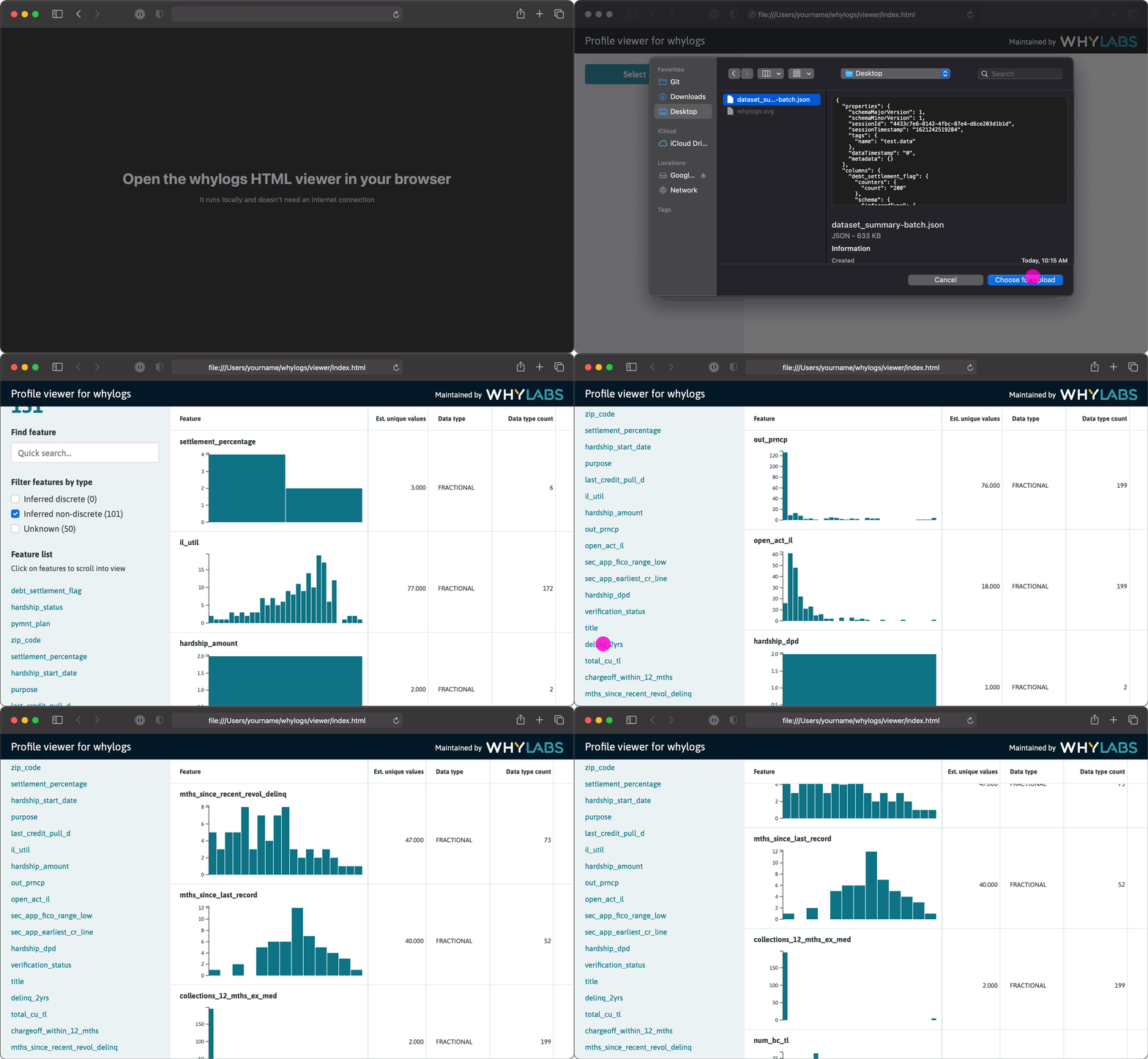
You can also load a local profile viewer, where you upload the json summary file. The default path for the json files is set as output/{dataset_name}/{session_id}/json/dataset_profile.json.
from whylogs.viz import profile_viewer
profile_viewer()
This will open a viewer on your default browser where you can load a profile json summary, using the Select JSON profile button:
Once the json is selected you can view your profile's features and
associated and statistics.
Documentation
The documentation of this package is generated automatically.
Features
- Accurate data profiling: whylogs calculates statistics from 100% of the data, never requiring sampling, ensuring an accurate representation of data distributions
- Lightweight runtime: whylogs utilizes approximate statistical methods to achieve minimal memory footprint that scales with the number of features in the data
- Any architecture: whylogs scales with your system, from local development mode to live production systems in multi-node clusters, and works well with batch and streaming architectures
- Configuration-free: whylogs infers the schema of the data, requiring zero manual configuration to get started
- Tiny storage footprint: whylogs turns data batches and streams into statistical fingerprints, 10-100MB uncompressed
- Unlimited metrics: whylogs collects all possible statistical metrics about structured or unstructured data
Data Types
Whylogs supports both structured and unstructured data, specifically:
| Data type | Features | Notebook Example |
|---|---|---|
| Structured Data | Distribution, cardinality, schema, counts, missing values | Getting started with structured data |
| Images | exif metadata, derived pixels features, bounding boxes | Getting started with images |
| Video | In development | Github Issue #214 |
| Tensors | derived 1d features (more in developement) | Github Issue #216 |
| Text | top k values, counts, cardinality | String Features |
| Audio | In developement | Github Issue #212 |
Integrations

| Integration | Features | Resources |
|---|---|---|
| Spark | Run whylogs in Apache Spark environment | |
| Pandas | Log and monitor any pandas dataframe | |
| Kafka | Log and monitor Kafka topics with whylogs | |
| MLflow | Enhance MLflow metrics with whylogs: | |
| Github actions | Unit test data with whylogs and github actions | |
| RAPIDS | Use whylogs in RAPIDS environment | |
| Java | Run whylogs in Java environment | |
| Docker | Run whylogs as in Docker | |
| AWS S3 | Store whylogs profiles in S3 |
Examples
For a full set of our examples, please check out whylogs-examples.
Check out our example notebooks with Binder:

Roadmap
whylogs is maintained by WhyLabs.
Community
If you have any questions, comments, or just want to hang out with us, please join our Slack channel.
Contribute
We welcome contributions to whylogs. Please see our contribution guide and our developement guide for details.
Release history Release notifications | RSS feed


Download files
Download the file for your platform. If you're not sure which to choose, learn more about installing packages.
Source Distribution
Built Distribution
Filter files by name, interpreter, ABI, and platform.
If you're not sure about the file name format, learn more about wheel file names.
Copy a direct link to the current filters
File details
Details for the file whylogs-0.5.1.tar.gz.
File metadata
- Download URL: whylogs-0.5.1.tar.gz
- Upload date:
- Size: 1.7 MB
- Tags: Source
- Uploaded using Trusted Publishing? No
- Uploaded via: poetry/1.1.6 CPython/3.8.5 Darwin/19.6.0
File hashes
| Algorithm | Hash digest | |
|---|---|---|
| SHA256 |
f83b92231870e92426d15481539ac4344dbcff02708c5fa8de219e08901918d2
|
|
| MD5 |
6c17f470b80445f9490885e5ed6bec37
|
|
| BLAKE2b-256 |
61d021bcfd0d90b72dd7742cdaead78ceb1a800ffb7145a92696dc62f7f3dd8b
|
File details
Details for the file whylogs-0.5.1-py3-none-any.whl.
File metadata
- Download URL: whylogs-0.5.1-py3-none-any.whl
- Upload date:
- Size: 1.7 MB
- Tags: Python 3
- Uploaded using Trusted Publishing? No
- Uploaded via: poetry/1.1.6 CPython/3.8.5 Darwin/19.6.0
File hashes
| Algorithm | Hash digest | |
|---|---|---|
| SHA256 |
5acc767fd994b7016fc8444d3603037278302f84829f9c4ecfecdd45271b5d9d
|
|
| MD5 |
6eb8da990689925561a4e5c11a7584dd
|
|
| BLAKE2b-256 |
963685c24009c2c9fbb11ffed67be94795688278933c9e3bd170ed65125ee5ce
|






