
wican-cli
Command-line tool for managing WiCAN Pro OBD-II WiFi devices.
View and save device configuration, toggle sleep mode, switch protocol modes, query SD card logs, check AutoPID values, manage vehicle profiles, and reboot — all from your terminal.
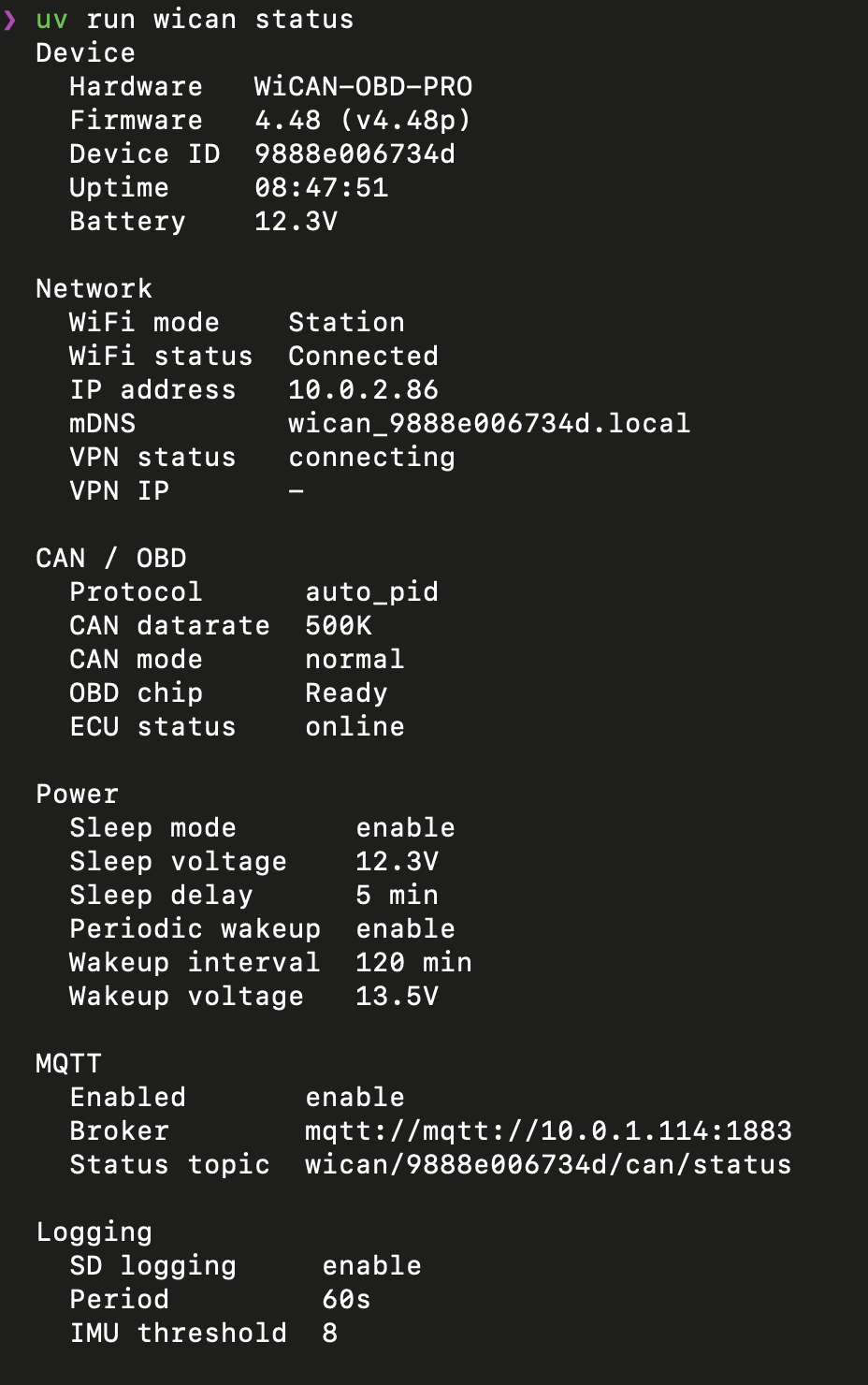
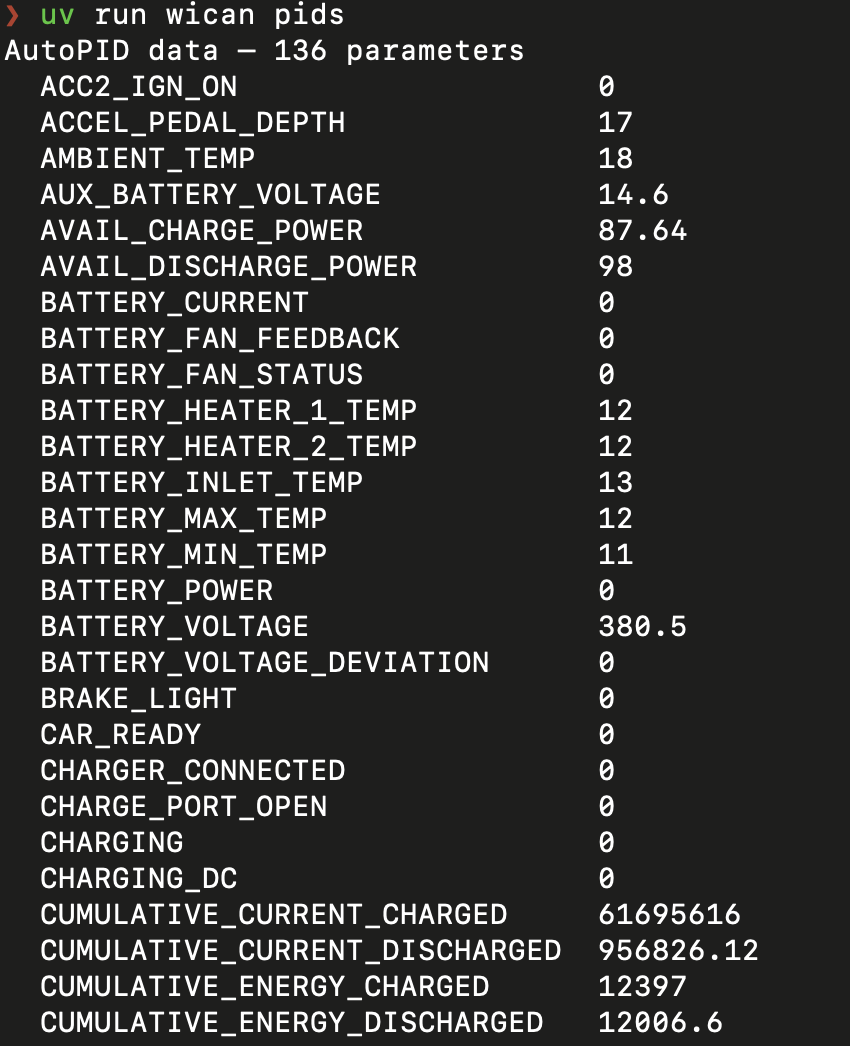
Installation
pip install wican-cli
Or with uv:
uv tool install wican-cli
Quick start
# Connect to WiCAN on its default AP address (192.168.80.1)
wican status

# Or specify a device address
wican --use 192.168.1.100 status

# Set up a config file to avoid typing the address every time
mkdir -p ~/.config/wican-cli
cat > ~/.config/wican-cli/config.yaml << 'EOF'
wican_addresses:
  home: "192.168.1.100"
  vpn: "10.8.0.50"
default_wican: home
EOF

# Now just use the named alias (or omit --use to auto-discover)
wican status
wican --use vpn status
Commands
| Command | Description |
|---|---|
wican config |
View device configuration (optionally save to file) |
wican sleep |
View or modify sleep/power settings |
wican status |
Device status summary |
wican protocol |
View or switch CAN protocol mode |
wican logs |
List, download, or query SD card OBD log databases |
wican autopid |
Show latest AutoPID cached values |
wican profile |
View or upload vehicle profile (AutoPID configuration) |
wican reboot |
Reboot the device |
Examples
# Save a config snapshot with credentials stripped
wican config --save --redact

# Enable sleep mode with 12.5V threshold
wican sleep --enable --voltage 12.5

# Switch to ELM327 mode for use with Torque/Car Scanner
wican protocol --set elm327

# Download all log databases from the SD card
wican logs --download

# Query a specific parameter from the latest log
wican logs --query SOC_BMS --limit 20

# Show AutoPID values filtered by name
wican autopid -f tyre

# View current vehicle profile
wican profile

# Upload a new vehicle profile and reboot to apply
wican profile --upload ioniq-2017.json --reboot
Configuration
wican-cli looks for configuration in this order:
WICAN_URLenvironment variable (overrides everything)./config.yaml(project-local)~/.config/wican-cli/config.yaml(user-global)
If none is found, it defaults to 192.168.80.1 (WiCAN's built-in AP).
Config file format
wican_addresses:
  home: "192.168.1.100"    # Device on local LAN
  vpn: "10.8.0.50"         # Device via VPN tunnel
  ap: "192.168.80.1"       # Direct AP connection (WiCAN default)
default_wican: home         # Which address to use by default
Use --use <name> to select a different address, or pass an IP/URL directly: --use 192.168.1.100.
When --use is omitted, the CLI probes the default address first, then falls back to other configured addresses automatically.
Global flags
| Flag | Description |
|---|---|
--use ADDR |
Device address: named alias or IP/URL (auto-discovers if omitted) |
--timeout SEC |
Request timeout in seconds (default: 10) |
--json |
JSON output (available on most commands) |
--version |
Show version and exit |
Shell completions
wican-cli uses argcomplete for tab completions in bash, zsh, and fish.
Global activation (all argcomplete-enabled tools)
# bash (add to ~/.bashrc)
activate-global-python-argcomplete

# zsh (add to ~/.zshrc)
autoload -U bashcompinit && bashcompinit
activate-global-python-argcomplete

# fish
register-python-argcomplete --shell fish wican | source
Per-command activation
# bash (add to ~/.bashrc)
eval "$(register-python-argcomplete wican)"

# zsh (add to ~/.zshrc)
autoload -U bashcompinit && bashcompinit
eval "$(register-python-argcomplete wican)"

# fish (add to ~/.config/fish/completions/wican.fish)
register-python-argcomplete --shell fish wican | source
Local development
Prerequisites: Python 3.10+ and uv.
# Clone the repository
git clone https://github.com/philipkocanda/wican-cli.git
cd wican-cli

# Install dependencies (including dev extras)
uv sync --extra dev

# Run the CLI locally
uv run wican --help

# Run tests
uv run pytest

# Run tests with coverage
uv run pytest --cov

# Lint and format
uv run ruff check .
uv run ruff format .
What is WiCAN?
WiCAN Pro is an ESP32-based WiFi/BLE OBD-II adapter that supports multiple protocols (AutoPID, SLCAN, ELM327, SavvyCAN, RealDash). It can publish vehicle data via MQTT to Home Assistant, log to SD card, and provide a WebSocket terminal interface.
This CLI tool manages the device itself — it does not send CAN/OBD requests to the vehicle. For that, use tools like python-can, SavvyCAN, or Torque.
License
Public domain — see LICENSE (Unlicense).
1 maintainer

Metadata
1 maintainer
Release files for wican-cli 0.4.0
For a detailed explanation of source distributions (sdists) and built distributions (wheels), please see the package formats documentation.
Source distribution (sdist)
| File | Size | Uploaded | |
|---|---|---|---|
| wican_cli-0.4.0.tar.gz | 32.2 kB | Details |
Built distribution (wheel)
| File | Interpreter | ABI | Platform | Reset |
|---|---|---|---|---|
| wican_cli-0.4.0-py3-none-any.whl | Python 3 | none | any | Details |
Total release size: 59.7 kB
Release files / wican_cli-0.4.0.tar.gz
| Download URL | wican_cli-0.4.0.tar.gz |
|---|---|
| Size | 32.2 kB |
| Tags | Source |
|
SHA-256 checksum How to use checksums |
553be3d9b797f3d9b3e35d971c5ed52e6be38f72860ff346b971720d60ec0cbd
|
|
BLAKE2b-256 checksum How to use checksums |
72a5814635891d2d8b553c36be4b59e631be41adfe2d3cfbd8b1d9d3500ab574
|
| Upload date | |
|
Uploaded using Trusted Publishing? What is trusted publishing? |
No |
| Uploaded via |
uv/0.11.14 {"installer":{"name":"uv","version":"0.11.14","subcommand":["publish"]},"python":null,"implementation":{"name":null,"version":null},"distro":{"name":"macOS","version":null,"id":null,"libc":null},"system":{"name":null,"release":null},"cpu":null,"openssl_version":null,"setuptools_version":null,"rustc_version":null,"ci":null}
|
Release files / wican_cli-0.4.0-py3-none-any.whl
| Download URL | wican_cli-0.4.0-py3-none-any.whl |
|---|---|
| Size | 27.5 kB |
| Tags | Python 3 |
|
SHA-256 checksum How to use checksums |
2b5a6510cc560be521af791f7a247abc40d8bbbaaba848f398d4bd9e298180ab
|
|
BLAKE2b-256 checksum How to use checksums |
303c0bda735498eb0b6b0ab40d2c073b3876c9b6a121e8d43d69c1174df49e6c
|
| Upload date | |
|
Uploaded using Trusted Publishing? What is trusted publishing? |
No |
| Uploaded via |
uv/0.11.14 {"installer":{"name":"uv","version":"0.11.14","subcommand":["publish"]},"python":null,"implementation":{"name":null,"version":null},"distro":{"name":"macOS","version":null,"id":null,"libc":null},"system":{"name":null,"release":null},"cpu":null,"openssl_version":null,"setuptools_version":null,"rustc_version":null,"ci":null}
|














