
Interactive candlestick chart plotting with PyQt6 — mplfinance-compatible API

Project description


Interactive candlestick chart plotting with PyQt6 — drop-in replacement for mplfinance with rich interactivity.
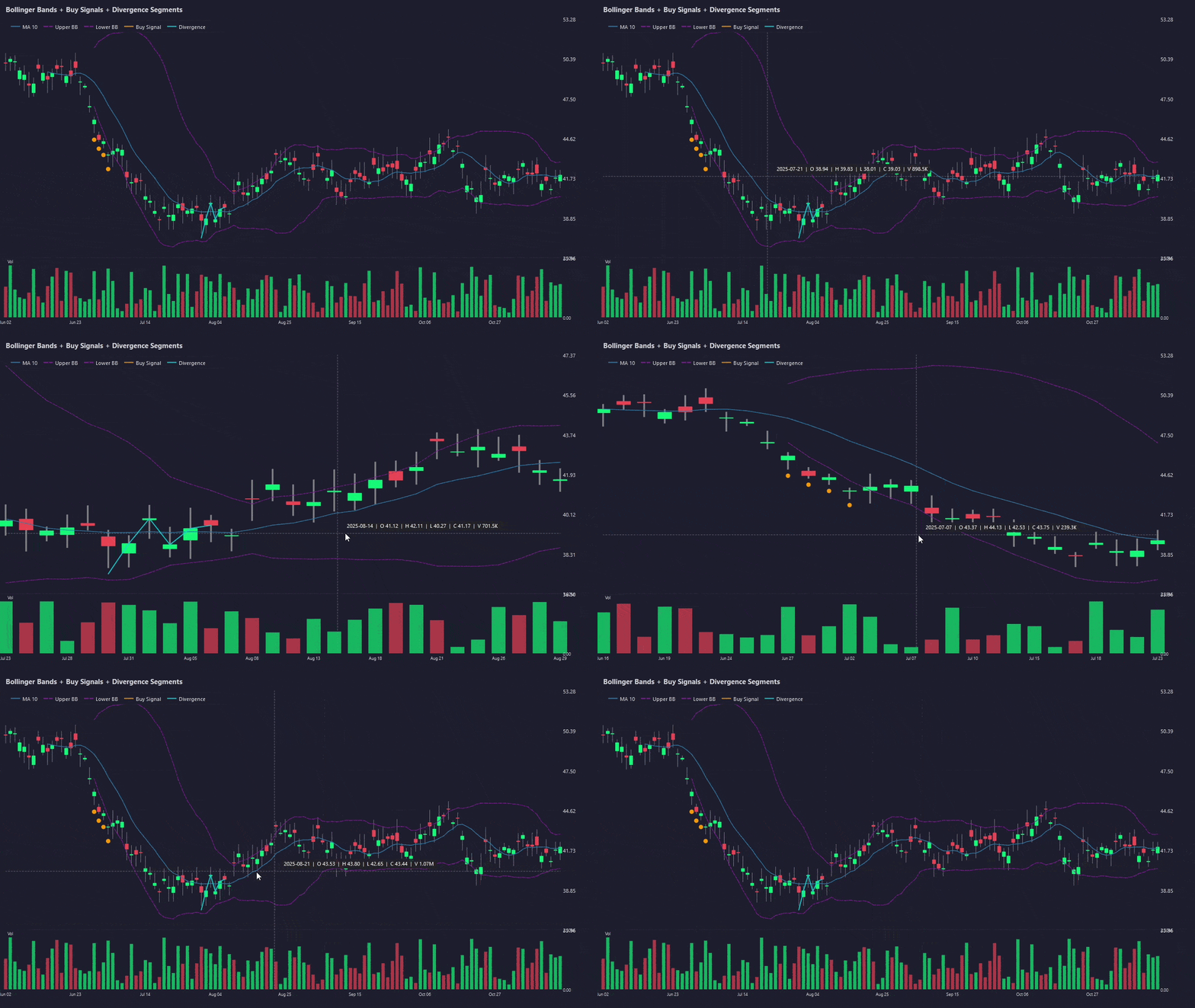
Features
- 📈 Candlestick, OHLC bar, line, and hollow-candle chart types
- 📊 Optional volume subplot
- 🔍 Mouse-wheel zoom and click-drag pan
- 🎯 Crosshair cursor with live OHLC / volume readout
- 📐 Moving average overlays (
mavparameter) - 🎨 Built-in styles (
default,charles,mike,yahoo,classic,nightclouds) - 🖼️
make_addplot()for overlaying custom data (line, scatter & segments) - 🔀
make_segments()for overlapping broken-line overlays (e.g. Knoxville Divergence) - 💾
savefig()support (PNG / JPG / BMP) - 🔁
returnfigmode for embedding in your own PyQt6 application - 🔴
live_plot()for animated / live-updating charts - ✅ mplfinance-compatible function signatures
Installation
pip install .
Or in editable/development mode:
pip install -e ".[dev]"
Quick Start
import pandas as pd
import wickly

# DataFrame must have a DatetimeIndex and columns: Open, High, Low, Close (and optionally Volume)
df = pd.read_csv("your_data.csv", index_col=0, parse_dates=True)

# Candlestick chart with volume and moving averages — same API as mplfinance
wickly.plot(df, type='candle', volume=True, mav=(10, 20), style='yahoo', title='My Chart')
API Reference
wickly.plot(data, **kwargs)
| Parameter | Type | Default | Description |
|---|---|---|---|
data |
DataFrame | required | OHLCV DataFrame with DatetimeIndex |
type |
str | 'ohlc' |
'candle', 'ohlc', 'line', 'hollow' |
style |
str or dict | 'default' |
Style name or dict of color settings |
volume |
bool | False |
Show volume subplot |
mav |
int or tuple | None |
Moving average period(s) |
title |
str | None |
Chart title |
ylabel |
str | 'Price' |
Y-axis label |
figsize |
tuple | (960, 600) |
Widget size in pixels (width, height) |
returnfig |
bool | False |
Return (widget, axes_dict) instead of showing |
savefig |
str | None |
Save chart to file path |
addplot |
dict/list | None |
Additional plots (see make_addplot) |
columns |
tuple | ("Open","High","Low","Close","Volume") |
Column name mapping |
block |
bool | True |
Block until window is closed |
wickly.live_plot(data, **kwargs)
Opens a non-blocking chart designed for animated / live updates. Accepts
the same keyword arguments as plot() (except returnfig and block,
which are forced to True / False). Returns (widget, axes_dict).
Use the returned widget to push new data:
| Method | Description |
|---|---|
widget.append_data(dates, opens, highs, lows, closes, volumes) |
Append one or more bars. Auto-scrolls to the right edge. |
widget.update_last(close=..., high=..., low=..., open_=..., volume=...) |
Update the most recent bar in-place (live tick). |
widget, axes = wickly.live_plot(df, type='candle', volume=True)
# Append a new bar
widget.append_data(new_dates, opens, highs, lows, closes, volumes)
# Update the current candle with a live tick
widget.update_last(close=latest_price)
wickly.make_addplot(data, **kwargs)
| Parameter | Type | Default | Description |
|---|---|---|---|
data |
Series/list | required | Data to overlay (or list of (start, values) tuples for type='segments') |
type |
str | 'line' |
'line', 'scatter', or 'segments' |
color |
str | None |
Line / marker color |
width |
float | 1.5 |
Line width |
scatter |
bool | False |
Deprecated — use type='scatter' |
marker |
str | 'o' |
Scatter marker character |
markersize |
float | 50 |
Scatter marker size |
ylabel |
str | None |
Legend label — if set, the overlay appears in the chart legend |
wickly.make_segments(segments, **kwargs)
Convenience wrapper for make_addplot(type='segments') — builds an addplot dict
for multiple independent, possibly overlapping, line segments.
| Parameter | Type | Default | Description |
|---|---|---|---|
segments |
list | required | List of (start_index, y_values) tuples |
color |
str | None |
Line color |
width |
float | 1.5 |
Line width |
alpha |
float | 1.0 |
Opacity |
linestyle |
str | '-' |
'-', '--', '-.', ':' |
ylabel |
str | None |
Legend label |
wickly.make_style(**kwargs)
Create a custom style dict with keys: up_color, down_color, volume_up, volume_down, bg_color, grid_color, edge_up, edge_down, wick_up, wick_down.
wickly.available_styles()
Returns a list of available built-in style names.
Contributing
Contributions are welcome — bug reports, feature requests, documentation improvements, and pull requests all appreciated.
1. Fork & clone
git clone https://github.com/ShreyanshDarshan/wickly.git
cd wickly
2. Set up the development environment
Create and activate a dedicated environment (conda shown; plain venv works too):
conda create -n wickly python=3.11
conda activate wickly
pip install -e ".[dev,docs]"
3. Project layout
wickly/
├── src/wickly/          # Package source
│   ├── __init__.py      # Public API surface
│   ├── plotting.py      # Top-level plot() function
│   ├── chart_widget.py  # PyQt6 CandlestickWidget
│   ├── addplot.py       # make_addplot() & make_segments() helpers
│   ├── styles.py        # Built-in styles & make_style()
│   └── _utils.py        # Data validation utilities
├── tests/               # pytest test suite
├── docs/                # Sphinx documentation source
├── examples/            # Runnable example scripts
├── pyproject.toml       # Project metadata & dependencies
└── .readthedocs.yaml    # Read the Docs configuration
4. Run the tests
pytest tests/ -v
All 41 tests should pass. Add new tests under tests/ for any code you contribute.
5. Build the documentation locally
# HTML output → docs/_build/html/index.html
python -m sphinx -b html docs docs/_build/html

# Open in the default browser (Windows)
start docs/_build/html/index.html

# Open in the default browser (macOS / Linux)
open docs/_build/html/index.html
Build must succeed with zero warnings (-W flag):
python -m sphinx -b html docs docs/_build/html -W
6. Run the examples
python examples/basic_candle.py        # Basic candlestick + volume + MAs
python examples/chart_types.py         # All four chart types in sequence
python examples/addplot_overlay.py     # Bollinger Bands & scatter signals
python examples/live_chart.py          # Live / animated chart demo
7. Adding a new built-in style
- Add an entry to
_BUILTIN_STYLESinsrc/wickly/styles.pyfollowing the existing key schema. - Add the style name to
TestAvailableStyles.test_all_builtins_presentintests/test_styles.py. - Document it in the styles table in
docs/styles.rst.
8. Code style
- Format with black (
pip install black; black src/ tests/). - Type-annotate all public functions.
- Write NumPy-style docstrings — they are picked up by Sphinx autodoc.
9. Submitting a pull request
- Branch off
main:git checkout -b feat/my-feature - Make your changes, add tests, update docs.
- Ensure
pytest tests/ -vis all green andsphinx -Wbuilds cleanly. - Open a PR against
mainwith a clear description of what changed and why.
License
MIT
Release history Release notifications | RSS feed


Download files
Download the file for your platform. If you're not sure which to choose, learn more about installing packages.
Source Distribution
Built Distribution
Filter files by name, interpreter, ABI, and platform.
If you're not sure about the file name format, learn more about wheel file names.
Copy a direct link to the current filters
File details
Details for the file wickly-0.1.0.tar.gz.
File metadata
- Download URL: wickly-0.1.0.tar.gz
- Upload date:
- Size: 28.6 kB
- Tags: Source
- Uploaded using Trusted Publishing? Yes
- Uploaded via: twine/6.1.0 CPython/3.13.12
File hashes
| Algorithm | Hash digest | |
|---|---|---|
| SHA256 |
a113383694f4cac602933055fdad4b88db41ba339dca1c335606fad271491ef9
|
|
| MD5 |
6a5fef33a09c442ad11098fe49e67828
|
|
| BLAKE2b-256 |
b4fbf57317397407c591ea0fcaa62ec7b9c3859e6324e167f23c9bff0632b197
|
Provenance
The following attestation bundles were made for wickly-0.1.0.tar.gz:
Publisher:
publish.yml on ShreyanshDarshan/wickly
-
Statement:
-
Statement type:
https://in-toto.io/Statement/v1 -
Predicate type:
https://docs.pypi.org/attestations/publish/v1 -
Subject name:
wickly-0.1.0.tar.gz -
Subject digest:
a113383694f4cac602933055fdad4b88db41ba339dca1c335606fad271491ef9 - Sigstore transparency entry: 1288320732
- Sigstore integration time:
-
Permalink:
ShreyanshDarshan/wickly@9bbbf6e705a2c5e7309c8165a3a517e963da66db -
Branch / Tag:
refs/tags/v0.1.0 - Owner: https://github.com/ShreyanshDarshan
-
Access:
public
-
Token Issuer:
https://token.actions.githubusercontent.com -
Runner Environment:
github-hosted -
Publication workflow:
publish.yml@9bbbf6e705a2c5e7309c8165a3a517e963da66db -
Trigger Event:
release
-
Statement type:
File details
Details for the file wickly-0.1.0-py3-none-any.whl.
File metadata
- Download URL: wickly-0.1.0-py3-none-any.whl
- Upload date:
- Size: 22.8 kB
- Tags: Python 3
- Uploaded using Trusted Publishing? Yes
- Uploaded via: twine/6.1.0 CPython/3.13.12
File hashes
| Algorithm | Hash digest | |
|---|---|---|
| SHA256 |
62858fc0ffdf38b4a87228fa99c74b2513eb069a16aab60b7bd4ab2ee4b4846f
|
|
| MD5 |
e9c38318f508ada5502493c61421a7f0
|
|
| BLAKE2b-256 |
dd8a82a9b79e1a03c4980ee75cecf722162457e1cd7d0c1e7d4b940602a0ec06
|
Provenance
The following attestation bundles were made for wickly-0.1.0-py3-none-any.whl:
Publisher:
publish.yml on ShreyanshDarshan/wickly
-
Statement:
-
Statement type:
https://in-toto.io/Statement/v1 -
Predicate type:
https://docs.pypi.org/attestations/publish/v1 -
Subject name:
wickly-0.1.0-py3-none-any.whl -
Subject digest:
62858fc0ffdf38b4a87228fa99c74b2513eb069a16aab60b7bd4ab2ee4b4846f - Sigstore transparency entry: 1288320826
- Sigstore integration time:
-
Permalink:
ShreyanshDarshan/wickly@9bbbf6e705a2c5e7309c8165a3a517e963da66db -
Branch / Tag:
refs/tags/v0.1.0 - Owner: https://github.com/ShreyanshDarshan
-
Access:
public
-
Token Issuer:
https://token.actions.githubusercontent.com -
Runner Environment:
github-hosted -
Publication workflow:
publish.yml@9bbbf6e705a2c5e7309c8165a3a517e963da66db -
Trigger Event:
release
-
Statement type:






