
a lightweight vLLM implementation built from scratch

Project description


Nano-vLLM
A lightweight vLLM implementation built from scratch.
Key Features
- 🚀 Fast offline inference - Comparable inference speeds to vLLM
- 📖 Readable codebase - Clean implementation in ~ 1,200 lines of Python code
- ⚡ Optimization Suite - Prefix caching, Tensor Parallelism, Torch compilation, CUDA graph, etc.
Installation
pip install git+https://github.com/GeeeekExplorer/nano-vllm.git
Model Download
To download the model weights manually, use the following command:
huggingface-cli download --resume-download Qwen/Qwen3-0.6B \
  --local-dir ~/huggingface/Qwen3-0.6B/ \
  --local-dir-use-symlinks False
Quick Start
See example.py for usage. The API mirrors vLLM's interface with minor differences in the LLM.generate method:
Using local model path:
from wickyvllm import LLM, SamplingParams
llm = LLM("/YOUR/MODEL/PATH", enforce_eager=True, tensor_parallel_size=1)
sampling_params = SamplingParams(temperature=0.6, max_tokens=256)
prompts = ["Hello, Nano-vLLM."]
outputs = llm.generate(prompts, sampling_params)
outputs[0]["text"]
Using Hugging Face model ID (auto-download):
from wickyvllm import LLM, SamplingParams
llm = LLM("Qwen/Qwen3-0.6B", enforce_eager=True, tensor_parallel_size=1)
sampling_params = SamplingParams(temperature=0.6, max_tokens=256)
prompts = ["Hello, Nano-vLLM."]
outputs = llm.generate(prompts, sampling_params)
outputs[0]["text"]
Benchmark
See bench.py for benchmark.
Test Configuration:
- Hardware: RTX 4070 Laptop (8GB)
- Model: Qwen3-0.6B
- Total Requests: 256 sequences
- Input Length: Randomly sampled between 100–1024 tokens
- Output Length: Randomly sampled between 100–1024 tokens
Performance Results:
| Inference Engine | Output Tokens | Time (s) | Throughput (tokens/s) |
|---|---|---|---|
| vLLM | 133,966 | 98.37 | 1361.84 |
| Nano-vLLM | 133,966 | 93.41 | 1434.13 |
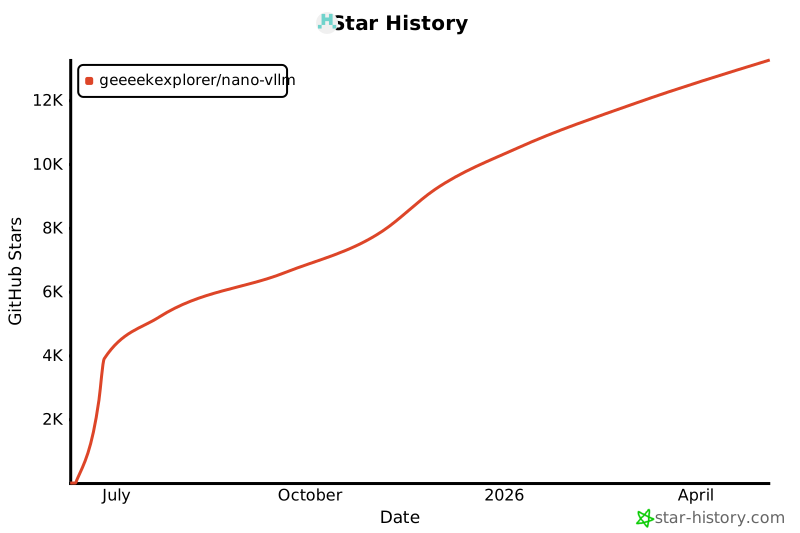
Star History


Download files
Download the file for your platform. If you're not sure which to choose, learn more about installing packages.
Source Distribution
Built Distribution
Filter files by name, interpreter, ABI, and platform.
If you're not sure about the file name format, learn more about wheel file names.
Copy a direct link to the current filters
File details
Details for the file wicky_vllm-0.1.1.tar.gz.
File metadata
- Download URL: wicky_vllm-0.1.1.tar.gz
- Upload date:
- Size: 14.9 kB
- Tags: Source
- Uploaded using Trusted Publishing? No
- Uploaded via: uv/0.9.26 {"installer":{"name":"uv","version":"0.9.26","subcommand":["publish"]},"python":null,"implementation":{"name":null,"version":null},"distro":{"name":"macOS","version":null,"id":null,"libc":null},"system":{"name":null,"release":null},"cpu":null,"openssl_version":null,"setuptools_version":null,"rustc_version":null,"ci":null}
File hashes
| Algorithm | Hash digest | |
|---|---|---|
| SHA256 |
edbc23a3f435ec825cf6ea59d4026b1982bcfb2202662b1e814582e2a30a4936
|
|
| MD5 |
4298eb18436dfcb3fd6de7fa5e72e4c6
|
|
| BLAKE2b-256 |
2e5e30d2ab834410350c90cd428b9d71f871803045dab7f02e5cd796c973e714
|
File details
Details for the file wicky_vllm-0.1.1-py3-none-any.whl.
File metadata
- Download URL: wicky_vllm-0.1.1-py3-none-any.whl
- Upload date:
- Size: 20.2 kB
- Tags: Python 3
- Uploaded using Trusted Publishing? No
- Uploaded via: uv/0.9.26 {"installer":{"name":"uv","version":"0.9.26","subcommand":["publish"]},"python":null,"implementation":{"name":null,"version":null},"distro":{"name":"macOS","version":null,"id":null,"libc":null},"system":{"name":null,"release":null},"cpu":null,"openssl_version":null,"setuptools_version":null,"rustc_version":null,"ci":null}
File hashes
| Algorithm | Hash digest | |
|---|---|---|
| SHA256 |
bc48fb7d010c8730a0c8cc58807f0d2c4c8c915b8107648175e08f707770256d
|
|
| MD5 |
bd3b7e842455cd71d6509eb4dcdd8468
|
|
| BLAKE2b-256 |
aac61563aa5891985e4bfb937078479dd3e756fc6b500943d4099cab0911f08f
|






