
wifikit
A terminal UI + CLI for driving an ESP32 running the ESP32 Marauder firmware — for authorized WiFi security testing and learning.




wifikit turns the raw Marauder serial command line into a single-screen,
target-oriented dashboard. Instead of memorising commands or juggling the
multi-terminal aircrack-ng workflow (airodump here, aireplay there, aircrack in
a third window), you scan, pick a target from a live table, and act on
it from a menu or with hotkeys — then run the host-side crack from the same UI.
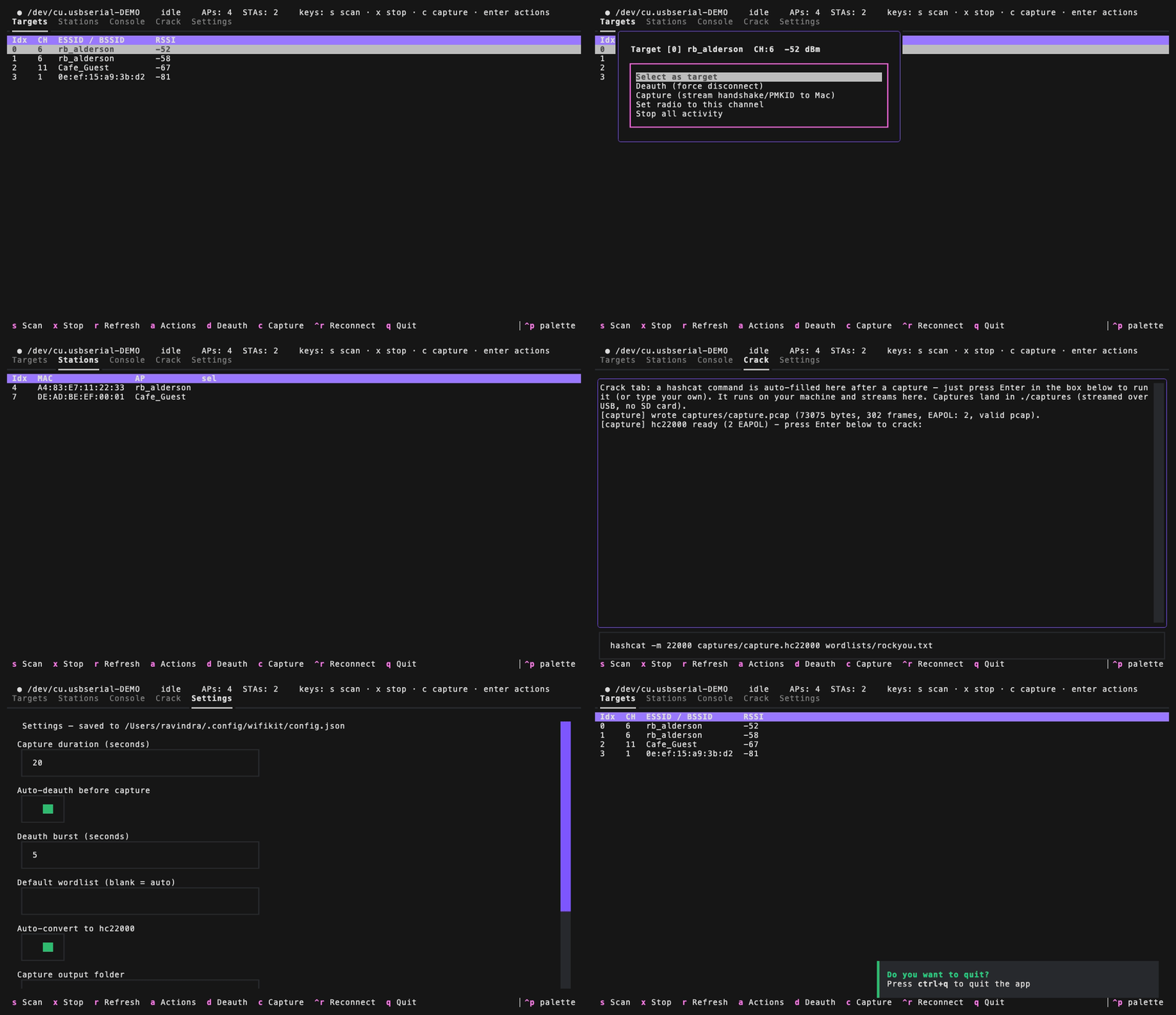
The demo above runs with
wifikit --demo(sample data, no board required).
⚠️ Legal & authorized-use notice
This is a tool for authorized security testing and education only. Attacking networks you do not own or lack explicit written permission to test is illegal in most jurisdictions.
- Only use
wifikitagainst your own networks/devices or those you are contractually authorized to assess. - Deauthentication and handshake capture affect real users on a network — never run them against third parties.
- The authors accept no liability for misuse. By using this software you agree you are solely responsible for complying with all applicable laws.
wifikit is a front-end: it drives the already-open-source ESP32 Marauder
firmware and standard tools like hashcat/aircrack-ng. It contains no novel
attack code.
Features
- 🖥️ Textual TUI (default): live AP table, tabbed layout, mouse + keyboard.
- 🎯 Target-oriented: select an AP, then Deauth / Capture PMKID / Capture handshake / set channel — via an Actions menu (Enter or right-click) or hotkeys.
- 👥 Stations tab: clients grouped by AP (via Marauder's
list -c), populated live during a scan; select a station to deauth it directly. - 📥 SD-free capture:
wifikit --capture --channel Nstreams the pcap over USB (Marauder's-serial) intocaptures/— no microSD card needed. - 🔌 Auto-detects the ESP32's serial port (by USB-UART chip), ignoring Bluetooth/debug ports.
- ⌨️ Nice REPL (
--cli): local echo, history and tab-completion — a painless replacement forscreen, which Marauder's non-echoing CLI makes miserable. - 🤖 Scriptable one-shot mode (
--exec "scanall"). - 🧨 Integrated cracking: run
hashcat/aircrack-ngin a Crack tab with live streaming output — scan → deauth → capture → crack in one place. - ⚡ One-command flashing of the correct classic-ESP32 build (
wifikit-flash).
 ● /dev/cu.usbserial-….   |   SCANNING   |   APs: 4   | [s]can [x]stop [r]efresh
┌ Targets ─┬ Console ─┬ Crack ─────────────────────────────────────────────────┐
│ Idx  CH   ESSID / BSSID          RSSI                                          │
│  0    3   rb_alderson            -72   ← cursor; press Enter for Actions       │
│  1    3   8e:86:dd:a0:8b:68      -73                                           │
│  2    3   rb_alderson            -84                                           │
└──────────────────────────────────────────────────────────────────────────────┘
 s Scan  x Stop  r Refresh  a Actions  d Deauth  p PMKID  ^r Reconnect  q Quit
Documentation
Full guides live in docs/:
- Overview & mental model — what wifikit is and how to navigate.
- Architecture — modules, data flow, threading.
- Usage — flashing, the TUI, the CLI/REPL, hotkeys.
- Capture → crack — the SD-free
-serialworkflow. - Performance & GPU — measured crack rates,
--benchmark. - Firmware — the Marauder build,
-serial, future plans. - Troubleshooting — ports, baud, captures, and more.
Hardware
- An ESP32 board (developed and tested on a classic ESP32-WROOM-32 DevKit) flashed with ESP32 Marauder.
- A microSD module (SPI) is optional — capture streams over USB via
Marauder's
-serial, so an SD card is only needed for untethered capture (running the board off the host).
Install
Requires Python 3.10+. Using uv (recommended):
uv tool install wifikit          # once published to PyPI
# or run from a clone:
uv venv && uv pip install -e .
With pipx:
pipx install wifikit
Installing wifikit pulls its Python dependencies automatically (including
esptool for flashing). Nothing else is needed to scan, deauth, or capture.
Requirements: external tools (for cracking)
The cracking half of the workflow shells out to native CLI tools that pip cannot install — grab them from your OS package manager. They're optional: everything except cracking works without them.
wifikit --setup     # auto-install the missing tools (brew/apt/dnf/pacman)
wifikit --doctor    # just report what's present + how to install the rest
--setup detects your package manager, shows the exact command, and installs the
missing tools; the underlying commands are:
| Tool | Needed for | macOS | Debian/Ubuntu |
|---|---|---|---|
hashcat |
crack WPA (Crack tab, --benchmark) |
brew install hashcat |
sudo apt install hashcat |
hcxtools (hcxpcapngtool) |
convert .pcap → .hc22000 |
brew install hcxtools |
sudo apt install hcxtools |
aircrack-ng |
alternative cracker (optional) | brew install aircrack-ng |
sudo apt install aircrack-ng |
The ESP32 firmware is not a manual dependency — wifikit-flash downloads the
correct Marauder build on demand from the official release.
Flash the ESP32
wifikit-flash downloads the correct classic-ESP32 build (the old_hardware
app plus the matching bootloader/partition table) and writes it. It does not
vendor Marauder's binaries — they are fetched from the official release.
wifikit-flash            # auto-detect port, flash at a safe 115200 baud
wifikit-flash --erase    # wipe flash first
Note: the Marauder
flipperbuild is for the ESP32-S2 and will not run on a classic WROOM-32 (Unexpected chip ID).wifikit-flashpicks the right one for you.
Usage
wifikit                       # launch the TUI (auto-detect the board)
wifikit --cli                 # line-based REPL instead of the TUI
wifikit --exec "scanall" --timeout 15   # one-shot, print output, exit
wifikit --capture --channel 3 # stream a pcap over USB into captures/ (no SD)
wifikit --list-ports          # show candidate serial ports
wifikit --demo                # try the TUI with sample data (no board needed)
wifikit --benchmark           # measure this GPU's WPA crack rate + time table
wifikit --doctor              # check external tools (hashcat, hcxtools) + hints
wifikit --setup               # auto-install missing external tools (--yes to skip prompt)
--capture also accepts --seconds S, --mode pmkid|handshake, and --out PATH. It enables Marauder's SavePCAP, sniffs with -serial, and reassembles
the streamed .pcap on the host.
TUI hotkeys: s scan · x stop · r refresh list · a/Enter actions ·
d deauth selected · p PMKID selected · Ctrl-R reconnect · q quit. The
Stations tab lists clients grouped by AP and fills live during a scan.
The capture → crack loop (on your own network)
No SD card required — the capture streams over USB straight to your Mac.
sto scan,xto stop — the table fills live from Marauder'slist -a.- Highlight your AP, press Enter → Capture (stream to Mac), or from the
CLI run
wifikit --capture --channel N(add--seconds S,--mode pmkid|handshake,--out PATH). - Deauth briefly to force a client to reconnect (generates a handshake).
wifikitenables Marauder'sSavePCAP, runs the sniff with-serial, and reassembles the streamed.pcapintocaptures/— then converts it viahcxpcapngtoolto anhc22000line.- In the Crack tab, run e.g.
hashcat -m 22000 capture.hc22000 wordlist.txt— output streams live.
How it works
              ┌────────────── wifikit (Python) ──────────────┐
  ESP32  <──USB serial──>  session.py  ──>  tui.py / cli.py
  Marauder                 (threaded I/O)     (UI + parsing)
                                   │
                              marauder.py  (command set + `list` parser)
                                   │
                              flash.py  (esptool + firmware fetch)
session.py— port auto-detect + a threaded serial reader/writer.marauder.py— the firmware's command set andlistparser (APs + stations).capture.py— demuxes Marauder's-serialpcap stream into a.pcapand (optionally) converts it tohc22000viahcxpcapngtool.cli.py/tui.py— the two front-ends (REPL and Textual dashboard).flash.py— one-command flashing viaesptool.
Development
uv sync                       # create venv + install deps (incl. dev group)
uv run ruff check .           # lint
uv run ruff format .          # format
uv run pytest                 # tests (parser/port logic run without hardware)
Please read CONTRIBUTING.md and the Code of Conduct. Security reports: see SECURITY.md.
Acknowledgements & credits
wifikit stands entirely on the shoulders of these projects — please star and
support them:
- ESP32 Marauder by justcallmekoko — the firmware
that does all the actual WiFi/BLE work.
wifikitis only a host-side driver for it; the firmware binaries it flashes are built and distributed by that project. - Textual & Rich by Textualize — the TUI framework.
- pyserial — serial transport.
- esptool by Espressif — flashing.
- prompt_toolkit — the REPL experience.
- hashcat and aircrack-ng — the cracking tools the Crack tab drives.
License
MIT © 2026 Ravindra Singh. The ESP32 Marauder firmware is the property of its respective authors under its own license.
1 maintainer

Metadata
1 maintainer
Release files for wifikit 0.1.0
For a detailed explanation of source distributions (sdists) and built distributions (wheels), please see the package formats documentation.
Source distribution (sdist)
| File | Size | Uploaded | Provenance | Actions |
|---|---|---|---|---|
| wifikit-0.1.0.tar.gz | 246.1 kB | Without provenance | Details for wifikit-0.1.0.tar.gz |
Built distribution (wheel)
| File | Interpreter | ABI | Platform | Actions Reset |
|---|---|---|---|---|
| wifikit-0.1.0-py3-none-any.whl | Python 3 | none | any | Details for wifikit-0.1.0-py3-none-any.whl |
Total release size: 287.7 kB
Release files / wifikit-0.1.0.tar.gz
| Download URL | wifikit-0.1.0.tar.gz |
|---|---|
| Size | 246.1 kB |
| Tags | Source |
|
SHA-256 checksum How to use checksums |
5021ec8a5787e42e640eb8d0c87425bb6926d26b032be2735cd738f7bc255c38
|
|
BLAKE2b-256 checksum How to use checksums |
cfb80a1e28f13bfa24dc22f561988639e35ee42cf1783bcd737da3552e7e2e68
|
| Upload date | |
|
Uploaded using Trusted Publishing? What is trusted publishing? |
No |
| Uploaded via |
twine/6.1.0 CPython/3.13.12
|
Release files / wifikit-0.1.0-py3-none-any.whl
| Download URL | wifikit-0.1.0-py3-none-any.whl |
|---|---|
| Size | 41.6 kB |
| Tags | Python 3 |
|
SHA-256 checksum How to use checksums |
ef232fceece1f9e349f99544807ba2781565ee03f6ec3bcc712ee404795138a4
|
|
BLAKE2b-256 checksum How to use checksums |
e91d57075295e1a3afb548946fc253c6161442b9f5d52d7514864673277416cd
|
| Upload date | |
|
Uploaded using Trusted Publishing? What is trusted publishing? |
No |
| Uploaded via |
twine/6.1.0 CPython/3.13.12
|
Security for wifikit 0.1.0
Provenance
Provenance describes where a file came from. On PyPI, provenance is shared via attestations, which provide a verifiable record of the build or publishing details. View details, limitations and caveats.
No provenance found
None of the files in this release were uploaded with provenance metadata.
A note on package security
PyPI is a repository for distributing packages, not a service for auditing them. While third-party security researchers and our staff do their best to detect and remove malicious packages, PyPI cannot guarantee the quality, security or suitability of any given package.
To learn more about protecting yourself from malicious actors, visit our package security documentation.













