
Collection of Anywidget Widgets

Project description
wigglystuff

"A collection of creative AnyWidgets for Python notebook environments."
The project uses anywidget under the hood so our tools should work in marimo, Jupyter, Shiny for Python, VSCode, Colab, Solara, etc. Because of the anywidget integration you should also be able interact with ipywidgets natively.
Online demos
We've made some demos of the widgets and shared them on the Marimo gallery for easy exploration.
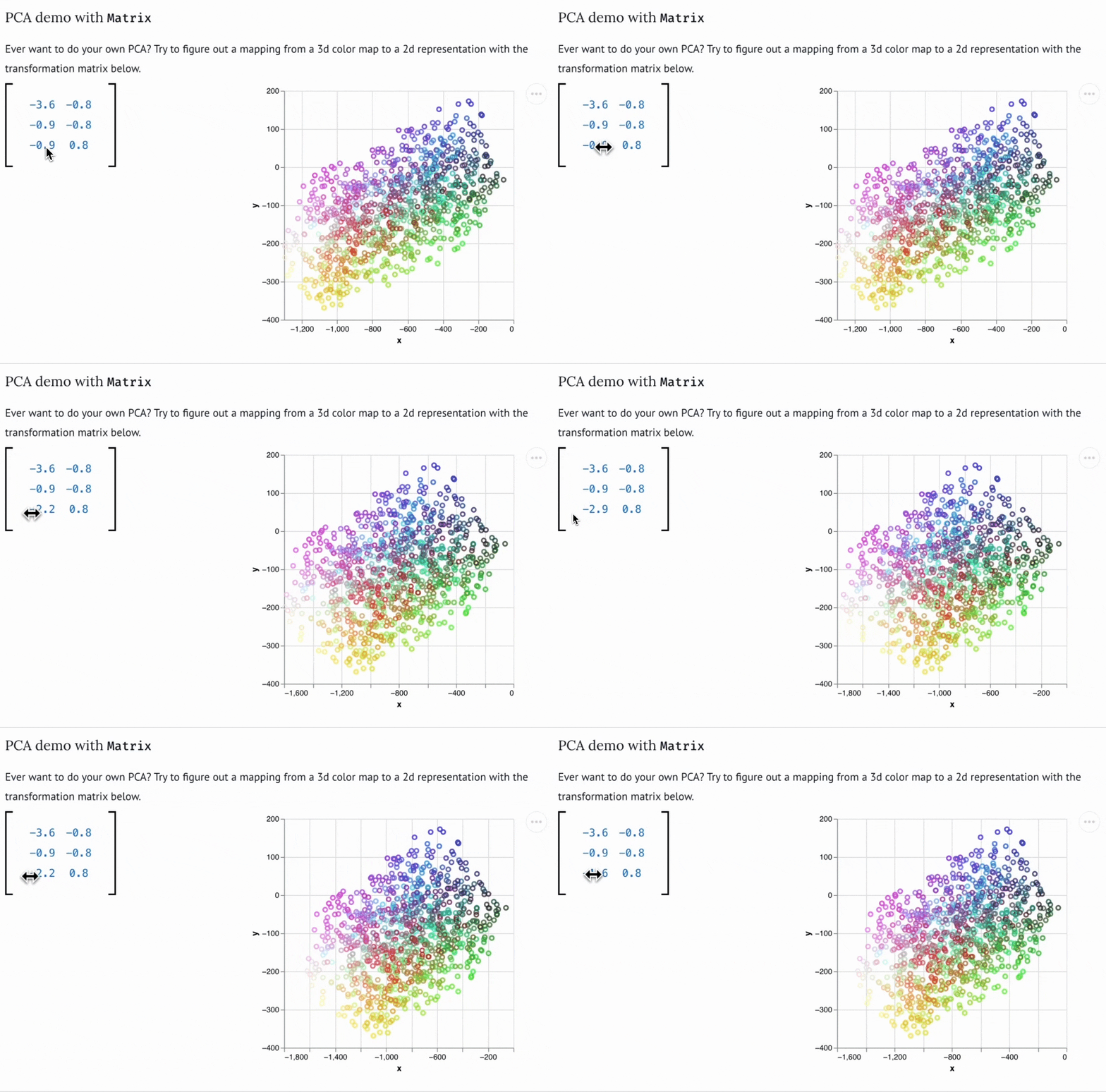
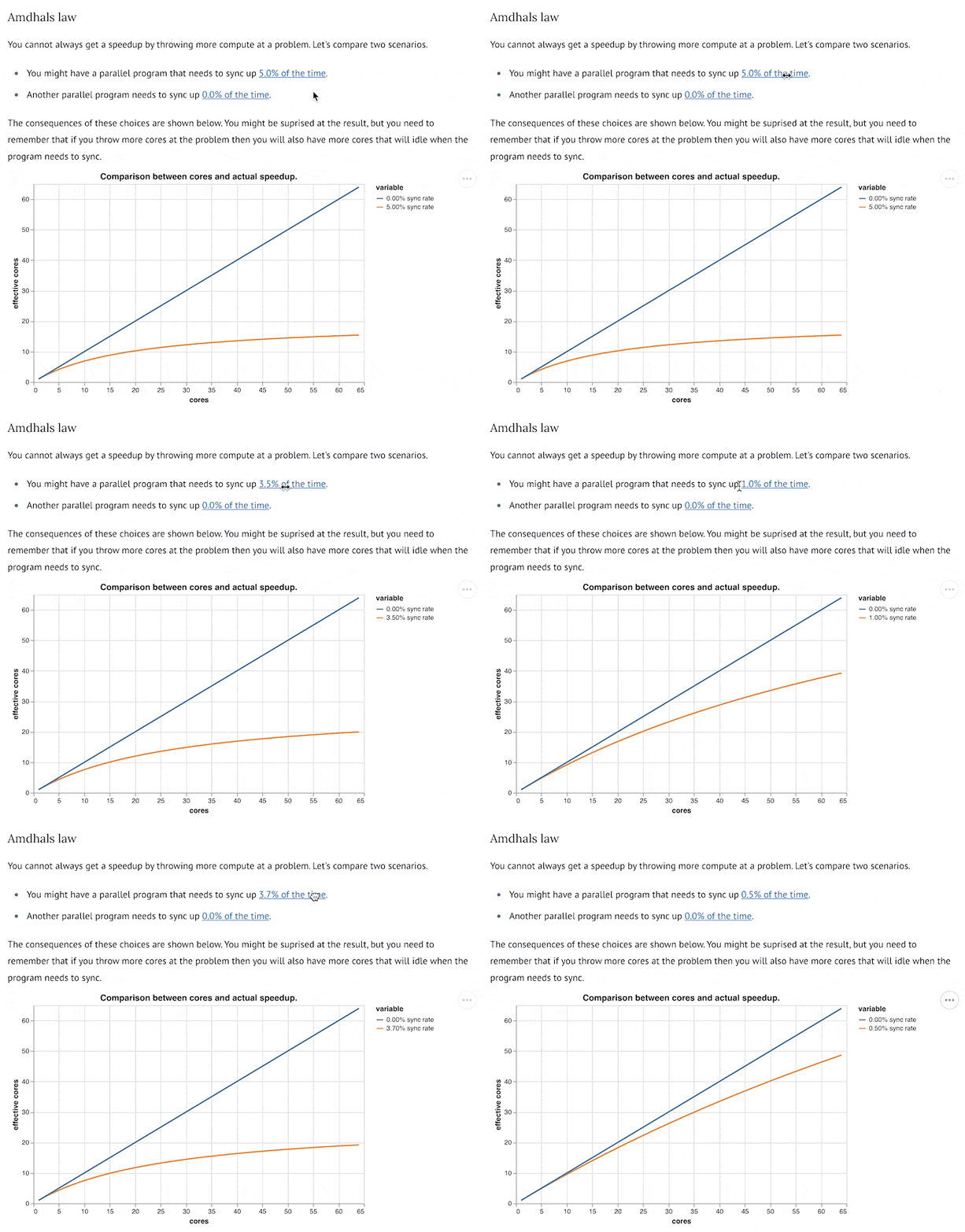
| Matrix demo with PCA | Tangle Widgets for exploration |
 |
 |
Installation
Installation occurs via pip or uv. We prefer uv.
uv pip install wigglystuff
Usage
Slider2D
from wigglystuff import Slider2D

widget = Slider2D()
widget

This widget allows you to grab the widget.x and widget.y properties to get the current position of the slider. But you can also use the widget.observe method to listen to changes in the widget.
Example of widget.observe
import ipywidgets
from wigglystuff import Slider2D

widget = Slider2D()
output = ipywidgets.Output()
state = [[0.0, 0.0]]

@output.capture(clear_output=True)
def on_change(change):
    if abs(widget.x - state[-1][0]) > 0.01:
        if abs(widget.y - state[-1][1]) > 0.01:
            state.append([widget.x, widget.y])
    for elem in state[-5:]:
        print(elem)

widget.observe(on_change)
on_change(None)
ipywidgets.HBox([widget, output])
Matrix
If you want to get an intuition of linear algebra, the Matrix object might really help. It can generate a matrix for you that allows you to update all the values in it.
from wigglystuff import Matrix

arr = Matrix(rows=1, cols=2, step=0.1)
mat = Matrix(matrix=np.eye(2), mirror=True, step=0.1)

TangleSlider
Sliders are neat, but maybe you'd prefer to have something more inline. For that use-case the TangleSlider can be just what you need.
from wigglystuff import TangleSlider

TangleChoice & TangleSelect
This is similar to the TangleSlider but for discrete choices.
from wigglystuff import TangleChoice

TangleSelect is just like TangleChoice but with a dropdown.
from wigglystuff import TangleSelect
CopyToClipboard
This is a simple button, but one that allows you to copy anything of interest to the clipboard. This can be very helpful for some interactive Marimo apps where the output needs to be copied into another app.
from wigglystuff import CopyToClipboard

CopyToClipboard("this can be copied")
ColorPicker
This is a base HTML color picker, ready for use in a notebook.
from wigglystuff import ColorPicker

ColorPicker()
KeystrokeWidget
Capture the latest keyboard shortcut pressed inside a notebook cell. The widget stores the last key event (including modifier state) in the last_key trait so you can respond to shortcuts in Python.
from wigglystuff import KeystrokeWidget

keyboard = KeystrokeWidget()
keyboard
keyboard.last_key  # => {"key": "K", "ctrlKey": True, ...}
SortableList
An interactive drag-and-drop sortable list widget. By default, it's just sortable, but you can enable additional features as needed.
from wigglystuff import SortableList

# Just sortable (default)
SortableList(["Action", "Comedy", "Drama", "Thriller"])

# Full-featured todo list
SortableList(["Task 1", "Task 2"], addable=True, removable=True, editable=True)

# Edit-only mode
SortableList(["Click to edit me"], editable=True)
WebkitSpeechToTextWidget
This widget wraps the browser's Webkit Speech API so you can dictate text directly into Python notebooks without dealing with API keys. It exposes two traits: transcript for the current text and listening so you can start or stop recording from Python if you prefer.
from wigglystuff import WebkitSpeechToTextWidget

widget = WebkitSpeechToTextWidget()
widget

# Access the transcript at any time
widget.transcript
### `Paint`

A port of the [mopaint](https://github.com/koaning/mopaint) widget that offers simple MS Paint style sketching straight from a notebook. You can start with an empty canvas or load an existing image and later export the result as a PIL image or base64 string.

```python
from wigglystuff import Paint

canvas = Paint(height=400)
canvas
Development
I am currently exploring how we might move some of these components to react, mainly in an attempt to keep things flexible in the future. There's no need to port everything just yet but I have ported the clipboard button. You should be able to develop it via:
npm run dev-copy-btn
This assumes that you ran npm install beforehand.
Release history Release notifications | RSS feed


Download files
Download the file for your platform. If you're not sure which to choose, learn more about installing packages.
Source Distribution
Built Distribution
Filter files by name, interpreter, ABI, and platform.
If you're not sure about the file name format, learn more about wheel file names.
Copy a direct link to the current filters
File details
Details for the file wigglystuff-0.2.1.tar.gz.
File metadata
- Download URL: wigglystuff-0.2.1.tar.gz
- Upload date:
- Size: 361.2 kB
- Tags: Source
- Uploaded using Trusted Publishing? No
- Uploaded via: uv/0.7.13
File hashes
| Algorithm | Hash digest | |
|---|---|---|
| SHA256 |
07ced4b1f16ca6d64c43db5d6683b9a620502d48e67659c2da92d36f3d5bef81
|
|
| MD5 |
eafd63c6bcb7e89eaa34fb69ee7a3dd9
|
|
| BLAKE2b-256 |
05d0b5abba9d1c0c585b11cdc0729b5f4cca69e58447400eea44eeee7f67aaa0
|
File details
Details for the file wigglystuff-0.2.1-py3-none-any.whl.
File metadata
- Download URL: wigglystuff-0.2.1-py3-none-any.whl
- Upload date:
- Size: 371.7 kB
- Tags: Python 3
- Uploaded using Trusted Publishing? No
- Uploaded via: uv/0.7.13
File hashes
| Algorithm | Hash digest | |
|---|---|---|
| SHA256 |
40ba20cdb8015b7ecee6448a0cfc96bba7620e8519697a8764cf352309f84781
|
|
| MD5 |
f16b69baf558a7359c00a2734a98caf5
|
|
| BLAKE2b-256 |
cdcd9f5d8dd0930d684b3c98b60d67929a37953f786a1daa2fa2765c6317ee1f
|






