
WiiBalance
The modern Python controller for the Wii Balance Board.


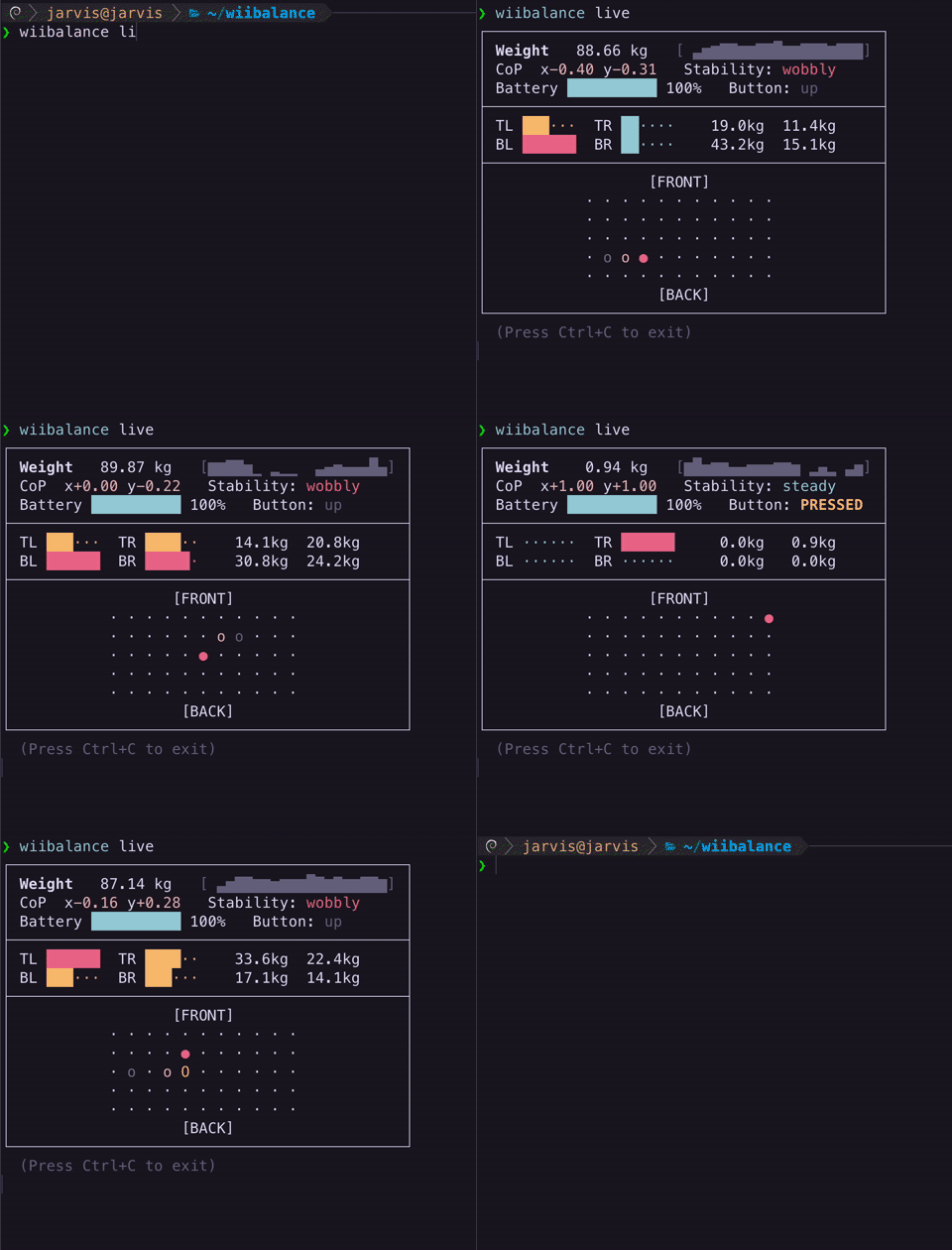
Features
- Connect to a Wii Balance Board via Bluetooth
- Read sensors, battery, button, and LED states
- Control LED
Why WiiBalance?
- Permanent pairing via daemon! Only press sync once
- Fast and modern
- CLI interface
- Easy to use
- Looks super cool
- Developer friendly
Installation
Installing WiiBalance is incredibly easy!
Make sure you have Python 3.10+ installed. Then, you'll need to install the package using pip:
python3 -m pip install --upgrade pip
pip install wiibalance
Initial Setup
To use WiiBalance, you'll need to know the Bluetooth address of your Wii Balance Board. If you've connected to it before, WiiBalance can discover it for you, but it is heavily recommended to find it manually.
Manual Pairing
- Run the following command in your terminal. This will discover the Bluetooth address of your Wii Balance Board.
bluetoothctl --timeout 20 scan on | grep --line-buffered "RVL-WBC-01"
- While the command above is running, press the red SYNC button on the Wii Balance Board, within the battery compartment. You may have to press it more than once.
- Save the outputted Bluetooth address of the Wii Balance Board (it looks like
XX:XX:XX:XX:XX:XX) for later use. You can then stop the command withCtrl+C. - Pair with the board, substituting the Bluetooth address you saved earlier:
bluetoothctl pair XX:XX:XX:XX:XX:XX
You are now ready to use WiiBalance!
CLI Quickstart
If you just paired with the board, you can jump right into the live demo:
wiibalance live
However, the connection is lost when you finish a command. When you run your next command, you must press the red SYNC button in the battery compartment again. To fix this, set up the daemon!
You can use the --json flag to get a stream of computer-readable live data. You can also use wiibalance weight to
get the current weight with units.
Full documentation is available here.
Python Quickstart
If you paired above, you're ready to use the library out-of-the-box.
from wiibalance import create_balance_board

board = create_balance_board()
print(board.read_state())
board.disconnect()
exit()
Note that, if you are not using the daemon, create_balance_board will hang until after you press the red SYNC button
in the battery compartment of the board. You will also need to press the red SYNC button again if you disconnect and
attempt to reconnect. To fix this, set up the daemon!
Full documentation is available here.
Play Balance Jump
WiiBalance comes with an optional little demo game called Balance Jump. Stand on your board and lean left or right to steer a character up through the sky. Land on the platforms to bounce higher. Step onto the board to start a run, and step off when you want to stop.
The game is optional, so a normal install does not include it. Add it like this:
pip install "wiibalance[demo]"
Then start playing:
wiibalance-jump
Pair your board first, using the steps above. If you set up the daemon, you can leave the board connected and jump straight into the next game.
No board nearby? You can still try the game with your keyboard:
wiibalance-jump --mock-input
A and D, or the left and right arrow keys, lean for you. Space steps on, and Shift steps off.
The full guide is here.
Issues & Contributing
Please open an issue or submit a pull request! :)
1 maintainer

Metadata
1 maintainer
Release files for wiibalance 1.4.1
For a detailed explanation of source distributions (sdists) and built distributions (wheels), please see the package formats documentation.
Source distribution (sdist)
| File | Size | Uploaded | |
|---|---|---|---|
| wiibalance-1.4.1.tar.gz | 127.1 kB | Details |
Built distribution (wheel)
| File | Interpreter | ABI | Platform | Reset |
|---|---|---|---|---|
| wiibalance-1.4.1-py3-none-any.whl | Python 3 | none | any | Details |
Total release size: 171.7 kB
Release files / wiibalance-1.4.1.tar.gz
| Download URL | wiibalance-1.4.1.tar.gz |
|---|---|
| Size | 127.1 kB |
| Tags | Source |
|
SHA-256 checksum How to use checksums |
e6e9ac3b160d462a04879802325175d6c390d098e550002b07cd79a5fa7c6960
|
|
BLAKE2b-256 checksum How to use checksums |
a123c29cc3aab1e249dd862f4b0f3f2f1279150e5fb06f8f2ed552ac78978d5d
|
| Upload date | |
|
Uploaded using Trusted Publishing? What is trusted publishing? |
Yes |
| Uploaded via |
twine/7.0.0 CPython/3.13.14
|
Provenance
Provenance describes where a file came from. On PyPI, provenance is shared via attestations, which provide a verifiable record of the build or publishing details. View details, limitations and caveats.


PyPI Publish Attestation
PyPI verified that this artifact, at this checksum, originated from the publisher listed below.
Signed by GitHub Actions, verified by PyPI on Oct 5, 2026.
Transparency logRelease files / wiibalance-1.4.1-py3-none-any.whl
| Download URL | wiibalance-1.4.1-py3-none-any.whl |
|---|---|
| Size | 44.6 kB |
| Tags | Python 3 |
|
SHA-256 checksum How to use checksums |
2b39cfc7a1c9fac2e5b55d24ca48634fa720179d19047a1137e32e1c2c5406e5
|
|
BLAKE2b-256 checksum How to use checksums |
8d14025fec4cad16d821e06d93ba3d9519562b56cec36ede089359fd0740726f
|
| Upload date | |
|
Uploaded using Trusted Publishing? What is trusted publishing? |
Yes |
| Uploaded via |
twine/7.0.0 CPython/3.13.14
|
Provenance
Provenance describes where a file came from. On PyPI, provenance is shared via attestations, which provide a verifiable record of the build or publishing details. View details, limitations and caveats.
PyPI Publish Attestation
PyPI verified that this artifact, at this checksum, originated from the publisher listed below.
Signed by GitHub Actions, verified by PyPI on Oct 5, 2026.
Transparency log













