
Wijjit
Wijjit Is Just Jinja In Terminal
A declarative TUI framework for Python — your UI is a template, so you can lint it, dump it, and drive it headlessly. No TTY, no test code.




Wijjit builds Terminal User Interfaces out of Jinja2 templates, wired up with view decorators and reactive state. Because the UI is a template rather than a tree of widget classes, it stays a static artifact your tools can read — so you can lint it, dump its DOM, and drive it with scripted keys, all without a terminal:
wijjit validate app.py --json                  # structured findings + exit code
wijjit tree app.py --json                      # the DOM, without running the app
wijjit render app.py --keys "tab,type:alice"   # the rendered screen, no TTY
wijjit llm-help > WIJJIT.md                    # brief an LLM on the whole API
Your UI is text, and so is everything the tooling hands back. That is what makes a Wijjit app easy to write, test, and understand — whether the author is a person or an LLM.
Coming from web dev? Wijjit is "Flask for the console" on the surface —
@app.view, Jinja2 templates,@app.on_action, reactive state — with a virtual-DOM reconciler underneath, so re-renders are diffed rather than redrawn.
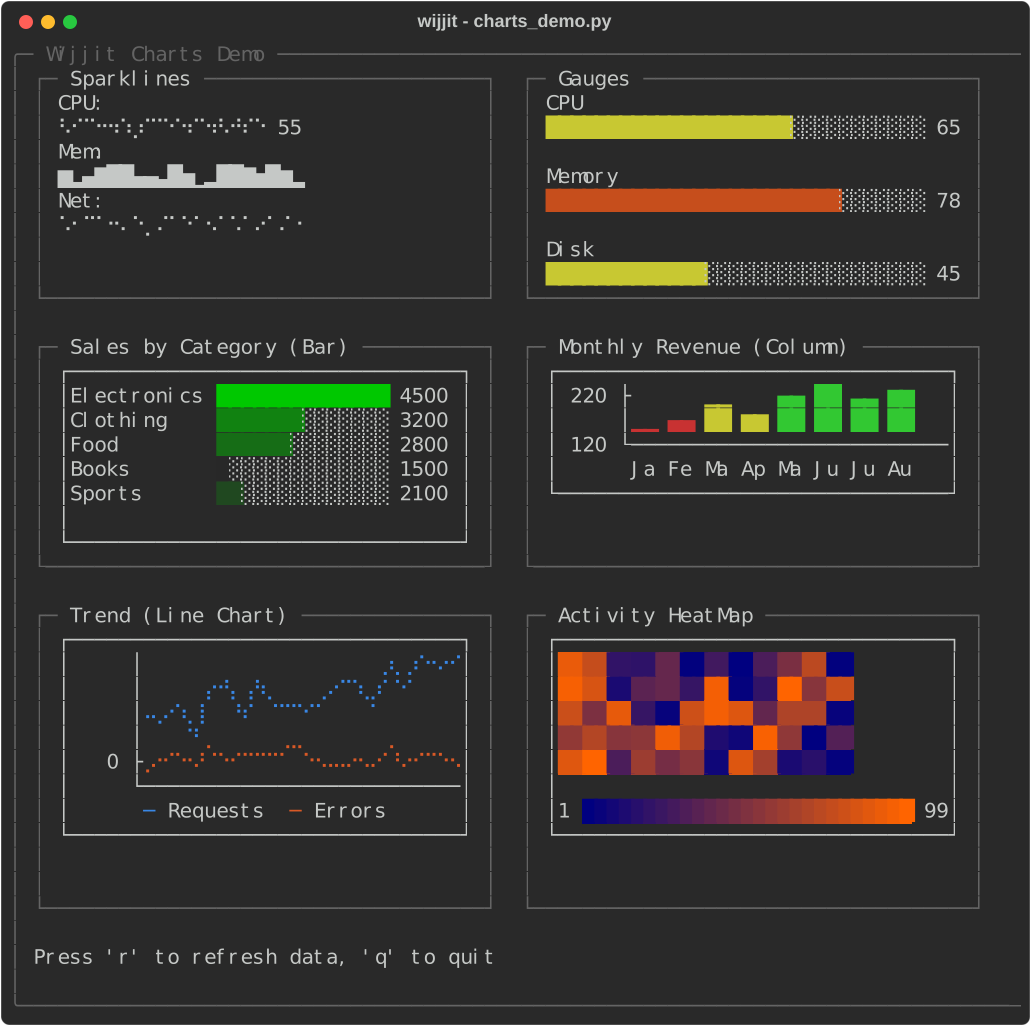
Why Wijjit?
The terminal-UI space in Python already has great tools, and Wijjit is deliberately a different point on the spectrum:
- Rich is for output — beautiful styled text, tables, and progress bars printed to the terminal. Wijjit uses Rich internally for exactly that, then adds a full interactive application layer on top (focus, events, overlays, re-rendering).
- Textual is a full app framework built around object-oriented widgets composed in Python and styled with a CSS-like language. It's powerful and deep.
- Wijjit takes the web mental model instead of the widget-tree one: you write Jinja2 templates for layout and Flask-style decorators (
@app.view,@app.on_action,@app.on_key) for behavior, backed by reactiveState. A virtual-DOM reconciler diffs re-renders so cursor, scroll, and selection state survive them.
The template is the point. A UI expressed as text — rather than as classes, a
compose() generator, and a stylesheet — is one an external tool can read
without executing it. That's what buys you a static linter that catches a missing
loop key= before you run, a JSON DOM dump, and a one-command headless render.
If you think in templates and request handlers rather than widget classes, Wijjit
will feel like home.
Features
- Declarative UI: Define layouts using Jinja2 templates, not procedural positioning code
- Lintable before it runs:
wijjit validatestatically catches unknown tags, undefined variables, bad attributes, and a missing loopkey=— the reordering bug you'd otherwise ship - Drivable without a terminal: Scripted keys and mouse through the real event loop — from a shell command, a pytest fixture, or an agent
- Byte-diffed rendering: An idle frame writes nothing; a one-widget change writes ~37 bytes instead of repainting 15,980 — and those budgets are asserted in CI, not measured once and forgotten
- Flask-like API: View decorators, routing, and state management that feels like web development
- Rich Component Library: 36 elements — forms, tables, trees, six chart types, a code editor with autocomplete, an editable data grid, an image viewer, dialogs, and more
- Reactive State Management: State changes automatically trigger re-renders
- Automatic Focus Navigation: Tab/Shift+Tab between interactive elements, with
autofocus=Trueto pick the field the app starts in - Modal Dialogs: Built-in confirm, alert, and input dialogs
- Layout System: Flexible frames with stacks (vertical/horizontal), split panels, scrolling, and flexbox-style sizing
- Mouse Support: Click buttons, scroll content, and interact with elements
- Inline Rendering: Output styled UI to terminal scrollback without alternate screen
- Third-party elements: Ship a widget as its own pip-installable package via a
wijjit.pluginsentry point — no fork, no monkeypatching - Job Control: Ctrl+Z suspend/resume support on Unix systems (Linux, macOS)
- ANSI-Aware: Proper handling of colors and styling throughout
Installation
# Add to your project using uv (recommended)
uv add wijjit

# Or with pip from PyPI
pip install wijjit

# Optional extra for ImageView / ASCII image rendering (Pillow)
uv add "wijjit[images]"
pip install "wijjit[images]"
Wijjit requires Python 3.11+ and is tested on Linux, macOS, and Windows.
Clipboard note (Linux): copy/paste uses the system clipboard via
pyperclip, which needsxcliporxselinstalled. Without them, Wijjit falls back to an internal in-process clipboard (copy/paste still works inside the app, just not across other programs).
Quick Start
The fastest start is to generate a runnable app and read it:
wijjit new tasks          # one file, runnable immediately
wijjit run tasks.py
Add --template project for the fuller layout: the template in its own
templates/ file, headless harness tests, and a pyproject.toml.
Hello World
The simplest possible Wijjit app:
from wijjit import Wijjit, render_template_string

app = Wijjit()

@app.view("main", default=True)
def main_view():
    return render_template_string("""
{% frame %}
Hello, World! Press 'q' to quit.
{% endframe %}
""")

@app.on_key("q")
def on_quit(event):
    app.quit()

if __name__ == "__main__":
    app.run()
Login Form
A complete login form with validation, showing the power of templates:
from wijjit import Wijjit, render_template_string

app = Wijjit(initial_state={
    'username': '',
    'password': '',
    'status': 'Please enter your credentials',
})

@app.view("login", default=True)
def login_view():
    return render_template_string("""
{% frame title="Login" border="single" width=50 height=15 %}
  {% vstack spacing=1 padding=1 %}
    {{ state.status }}

    {% vstack spacing=0 %}
      Username:
      {% textinput id="username" placeholder="Enter username" width=30 autofocus=True %}{% endtextinput %}
    {% endvstack %}

    {% vstack spacing=0 %}
      Password:
      {% textinput id="password" placeholder="Enter password" width=30 password=True action="login" %}{% endtextinput %}
    {% endvstack %}

    {% hstack spacing=2 %}
      {% button action="login" %}Login{% endbutton %}
      {% button action="quit" %}Quit{% endbutton %}
    {% endhstack %}
  {% endvstack %}
{% endframe %}
        """)

@app.on_action("login")
def handle_login(event):
    if app.state['username'] == 'admin' and app.state['password'] == 'password':
        app.state['status'] = 'Success! Welcome, admin!'
    else:
        app.state['status'] = 'Error: Invalid credentials'

@app.on_action("quit")
def handle_quit(event):
    app.quit()

if __name__ == '__main__':
    app.run()
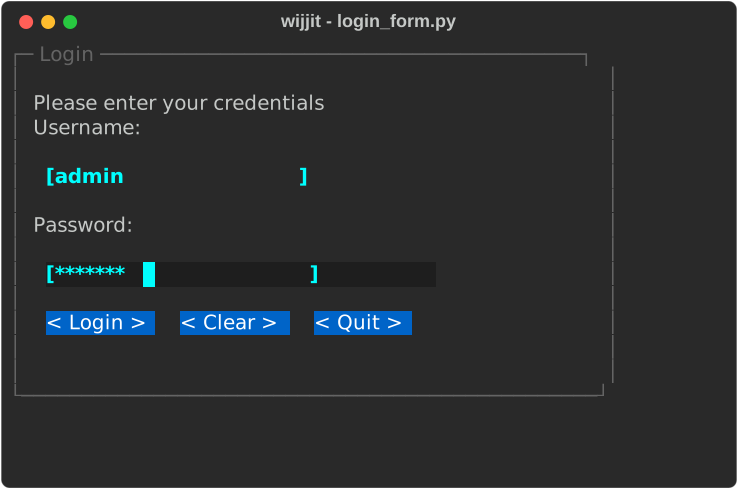
That login form renders like this (the password field masks input with password=True):
Screenshots
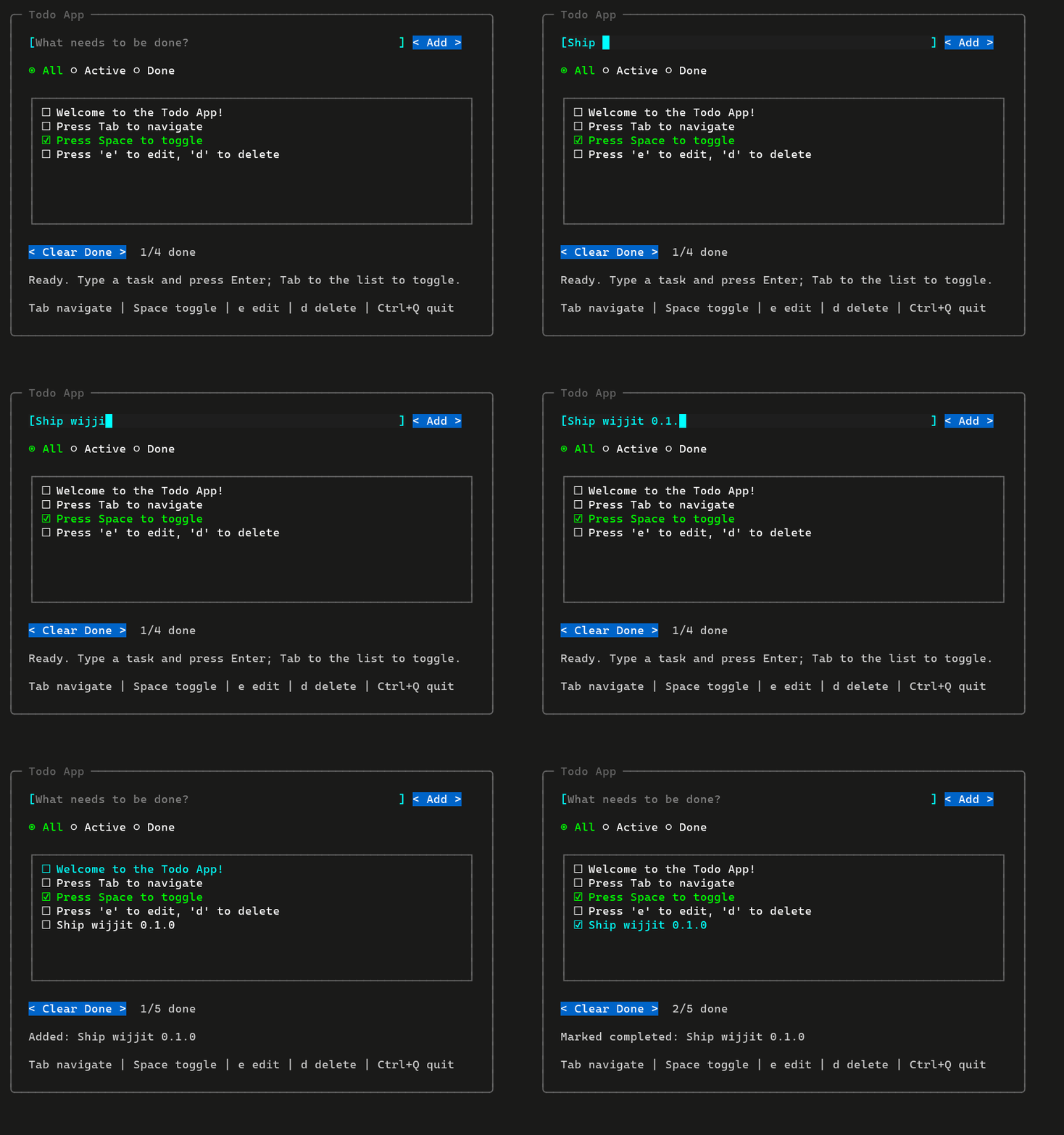
Adding a task, tabbing through the list, and checking it off. This GIF was
recorded without a terminal — the frames come from the same headless harness
the tests use, one capture per keystroke, rasterized with Pillow
(scripts/make_demo_gif.py). No asciinema, no
ffmpeg, and the recording is byte-reproducible.
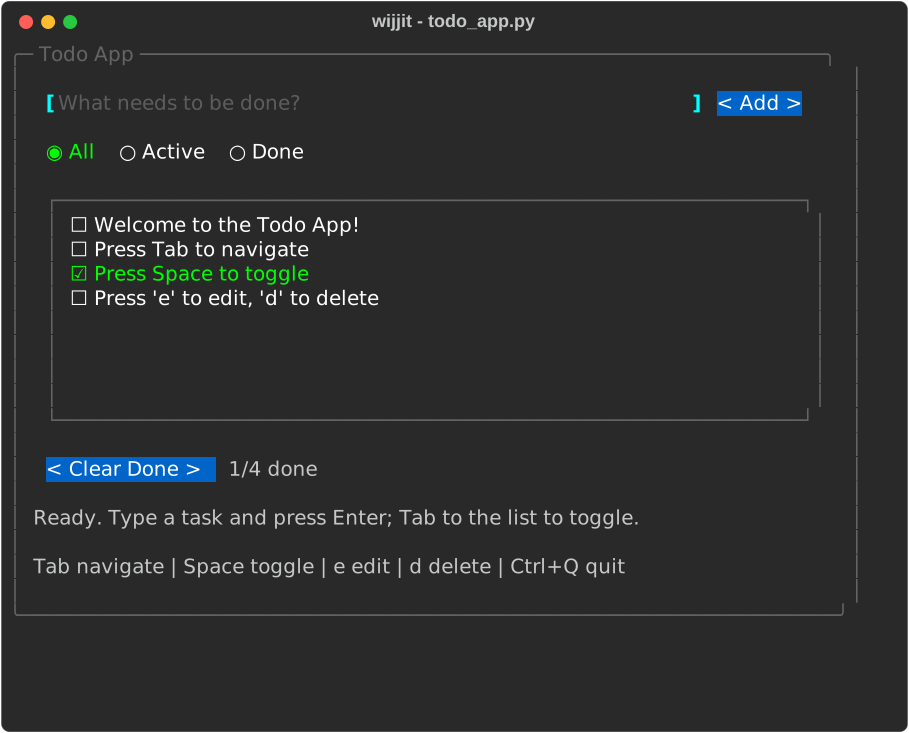 examples/apps/todo_app.py — a complete app: add/toggle/filter with a status bar.
|
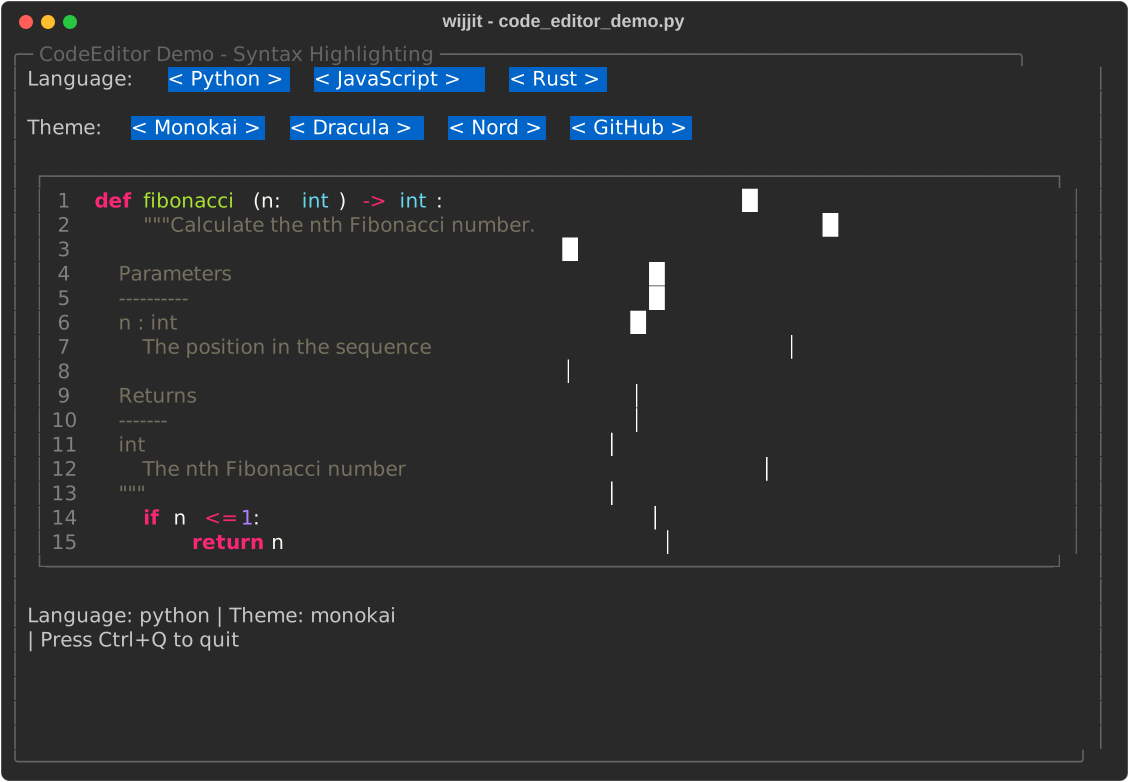 examples/widgets/code_editor_demo.py — syntax highlighting with language/theme switching.
|
See the full gallery -> — 20 more screens covering charts, split panels, tables, trees, dialogs, image rendering and theming, each with the command to reproduce it.
All screenshots are generated headlessly and reproducibly by
scripts/make_screenshots.py — no terminal
recording involved, and re-running it only changes an image when the example or
the framework did. Run any of the 75 bundled examples yourself with
wijjit run examples/<dir>/<name>.py.
Core Concepts
Views and Routing
Like Flask, Wijjit uses decorators to define views. A view returns
render_template_string(...) for an inline template or render_template(...)
for a file in your templates/ directory; lifecycle hooks go on the decorator:
from wijjit import render_template_string, render_template

@app.view("main", default=True, on_enter=fn, on_exit=fn)
def main_view():
    # Inline template + context (state is auto-injected):
    return render_template_string("...", title="Home", items=items)

@app.view("dashboard")
def dashboard_view():
    # Or load templates/dashboard.wij.j2:
    return render_template("dashboard.wij.j2", stats=get_stats())

# Navigate to a different view
app.navigate("other_view", param=value)
File templates live in a templates/ directory next to your app module
(auto-discovered, Flask-style) or wherever Wijjit(template_dir=...) points.
They are conventionally named *.wij.j2 so editors syntax-highlight them as
Jinja, but the extension is not enforced.
Pass changing values as context kwargs rather than interpolating them into the template source string — the source is compiled once and cached.
State Management
Wijjit provides reactive state that automatically triggers re-renders when changed:
# Initialize with state
app = Wijjit(initial_state={'count': 0})

# Access state (dict-style or attribute-style)
app.state['count'] = 1
app.state.count = 2

# State changes automatically re-render the UI.
# Elements with matching IDs automatically bind to state.
Templates
Use Jinja2 templates with custom tags for UI elements:
{# Layout containers #}
{% frame title="My App" border="rounded" width=60 %}
  {% vstack spacing=1 %}
    Content here
  {% endvstack %}
{% endframe %}

{# Input elements #}
{% textinput id="name" placeholder="Enter name" %}{% endtextinput %}
{% textarea id="bio" width=40 height=5 %}{% endtextarea %}
{% button action="submit" %}Submit{% endbutton %}
{% checkbox id="agree" label="I agree" %}{% endcheckbox %}
{% select id="theme" options=["dark", "light"] %}{% endselect %}
{% slider id="volume" min=0 max=100 value=50 %}{% endslider %}
{% toggle id="dark_mode" label="Dark Mode" %}{% endtoggle %}

{# Multi-select elements - state holds lists #}
{% select id="toppings" multiple=True %}
  {"value": "cheese", "label": "Cheese"}
  {"value": "pepperoni", "label": "Pepperoni"}
{% endselect %}

{# Display elements #}
{% table data=state.users columns=["name", "email"] %}{% endtable %}
{% tree data=state.files %}{% endtree %}
{% progressbar value=state.progress max_value=100 %}{% endprogressbar %}
{% contentview content_type="markdown" content=state.readme %}{% endcontentview %}
Event Handling
Handle user interactions with decorators:
# Action handlers (from buttons, inputs with an `action` attribute)
@app.on_action("submit")
def handle_submit(event):
    ...

# Key handlers
@app.on_key("ctrl+s")
def save(event):
    ...
Elements also expose callback attributes for direct event handling —
on_double_click, on_context_menu, Table.on_row_click,
TextInput.on_submit, and low-level drag-and-drop hooks. See the
event handling guide
for the complete reference.
Layout System
Wijjit composes UIs from a handful of layout containers. Sizes accept a fixed
integer (width=50), "fill" (take remaining space), "auto" (size to
content), or a percentage ("50%").
{# Frame: a bordered, optionally-scrollable box #}
{% frame title="Settings" border="single" width=60 height=20 scrollable=True %}
  {% vstack spacing=1 align_h="center" %}   {# vertical stack #}
    Top
    Bottom
  {% endvstack %}
{% endframe %}

{# HStack: horizontal stack with flexbox-style justify + wrap #}
{% hstack justify="space-between" wrap=True gap=1 width="fill" %}
  {% for tag in tags %}
    {% button %}{{ tag }}{% endbutton %}
  {% endfor %}
{% endhstack %}

{# SplitPanel: draggable, resizable, collapsible divider #}
{% splitpanel orientation="horizontal" ratio="30:70" id="main_split" %}
  {% frame title="Sidebar" %}Navigation{% endframe %}
  {% frame title="Main" %}Content{% endframe %}
{% endsplitpanel %}

{# Pager: wizard-style pagination #}
{% pager id="wizard" nav_position="bottom" show_indicator=True %}
  {% page title="Welcome" %}Step one{% endpage %}
  {% page title="Done" %}All set!{% endpage %}
{% endpager %}
See the Layout guide for the complete reference.
Modal Dialogs
from wijjit import ConfirmDialog, AlertDialog, TextInputDialog

dialog = ConfirmDialog(
    title="Confirm",
    message="Are you sure?",
    on_confirm=lambda: print("Confirmed!"),
    on_cancel=lambda: print("Cancelled"),
)
app.show_modal(dialog)
AlertDialog and TextInputDialog follow the same shape.
Inline Rendering
For CLI tools that don't need full-screen mode, Wijjit renders styled content directly to terminal scrollback:
from wijjit import render_inline

render_inline('''
{% frame title="Results" border="rounded" %}
  {% vstack %}
    Status: {{ status }}
    Count: {{ count }}
  {% endvstack %}
{% endframe %}
''', status="Complete", count=42)
InlineApp extends this to interactive, in-place-updating output (progress
bars, live status, even keyboard input) without taking over the screen:
import asyncio
from wijjit import InlineApp

async def main():
    template = '{% progressbar value=state.progress max_value=100 %}{% endprogressbar %}'
    async with InlineApp(template, initial_state={"progress": 0}) as app:
        for i in range(101):
            app.state.progress = i
            await asyncio.sleep(0.05)

asyncio.run(main())
Component Library
Wijjit ships 36 elements plus the layout primitives below — charts, an image viewer, a code editor with autocomplete, and an editable data grid all included, no plugins required. Each has a template tag and a Python class; see the component reference for every attribute.
- Input: TextInput (with
passwordmasking), TextArea, CodeEditor (syntax-highlighted, 500+ languages, with autocomplete), DataGrid (spreadsheet-style, editable), Button, Checkbox, CheckboxGroup, Radio, RadioGroup, Select (single/multi), Slider, Toggle, Link. - Display: ContentView (plain/ANSI/HTML/Markdown/Rich/code), Table
(sortable, Rich-powered), Tree (single/multi-select), ListView, LogView,
ProgressBar, Spinner, StatusIndicator, StatusBar, Notification, Modal,
ImageView (ASCII/ANSI images — needs the
imagesextra). - Charts: BarChart, ColumnChart, LineChart (braille), Gauge, HeatMap,
Sparkline — with
color_mode/color_scalepalettes (plus a per-seriescoloron LineChart and Sparkline). - Layout: Frame, VStack, HStack, SplitPanel, TabbedPanel, Pager.
- Dialogs & menus: ConfirmDialog, AlertDialog, TextInputDialog, DropdownMenu, ContextMenu.
Performance
Wijjit renders through a virtual DOM into a cell-based screen buffer. Each frame it writes only the cells that actually changed, and on the incremental path it also skips re-painting elements whose content and position did not change at all.
On a 200x60 terminal, a full repaint of a dashboard (a table, two charts, and a button row) writes 15,980 bytes. Advancing the sparkline by one tick writes 37 bytes. A frame in which nothing changed writes nothing at all. That is what keeps a Wijjit app flicker-free and responsive over SSH.
| Dashboard frame | 80x24 | 200x60 |
|---|---|---|
| Bytes written, full repaint | 3,676 B | 15,980 B |
| Bytes written, one change | 37 B | 37 B |
| Bytes written, idle frame | 0 B | 0 B |
| Render time, full repaint | ~7 ms | ~10 ms |
| Render time, one change | ~7 ms | ~7 ms |
Reproduce with uv run python scripts/bench_perf.py. The byte counts are
deterministic and regression-tested; the timings come from one Windows machine,
vary by tens of percent with system load, and are rounded accordingly.
The steady-state render is cheaper than a full repaint, not just quieter on the wire. The incremental paint path — the one a running app uses — starts each frame from a copy of the previous one, skips the elements that did not change, and diffs only what moved, so a localized edit does work proportional to what changed rather than to the size of the view. A full repaint (the worst case: first paint or a terminal resize) still touches every cell. The dashboard's one-change render is only modestly cheaper because its table repaints wholesale; a form of independent widgets sees roughly a 2x steady-state speedup. The performance guide has the full picture, including how to profile your own app.
Accessibility
Wijjit honors the NO_COLOR environment variable and
can fall back to ASCII box-drawing, so apps stay usable on limited terminals:
NO_COLOR=1 python myapp.py                       # no ANSI color
WIJJIT_UNICODE_SUPPORT=disable python myapp.py   # ASCII borders, not box-drawing
Under NO_COLOR, text attributes such as bold and reverse video are preserved,
so focus and selection remain visible without relying on color.
Examples
The examples/ directory contains 75 working examples in five categories —
basic/ (15), widgets/ (30), advanced/ (22), styling/ (2), and apps/
(6) — all using template-based UI and decorator event handlers.
python examples/basic/hello_world.py     # smallest possible app
python examples/widgets/table_demo.py    # a single widget in focus
python examples/apps/todo_app.py         # a complete application
Highlights: apps/todo_app.py (full todo app), apps/chatbot.py (streaming
chat), apps/spreadsheet.py (editable DataGrid + live chart), apps/gcommit.py
(interactive git commit builder, inline), widgets/charts_demo.py (all six
charts), advanced/dashboard_demo.py (monitoring dashboard),
advanced/plugin_element.py (a third-party element in ~30 lines), and
advanced/filesystem_browser.py (tree-based file browser). See
examples/README.md for the full categorized catalog.
Every example runs on the base install except apps/system_monitor.py, which
needs psutil.
Developer Tooling & Testing
Wijjit ships a wijjit command-line tool for inspecting, validating, and
driving apps. validate and tree accept either a raw template file or
a full .py app (auto-detected by the .py suffix). Every command is
text-in/text-out and needs no TTY, so the same loop works at your prompt, in CI,
and for an LLM writing the UI.
# Start from a runnable app instead of a blank file. The default is a single
# ~90-line file; --template project adds a file-based template, headless
# harness tests, and packaging metadata.
wijjit new tasks
wijjit new my-notes --template project

# Lint a template (or app): reports syntax errors, unknown tags, undefined
# variables, unknown element types/attributes. Add --render for a snapshot.
wijjit validate myform.wij.j2 --render
wijjit validate examples/advanced/login_form.py
wijjit validate myform.wij.j2 --json       # machine-readable findings

# Dump the VNode "DOM" tree a template produces (text or JSON)
wijjit tree myform.wij.j2 --json
wijjit tree myform.wij.j2 --context ctx.json --size 100x30

# Render an app headlessly with scripted input
wijjit render examples/widgets/spinner_demo.py --tick 5
wijjit render examples/advanced/login_form.py \
    --size 100x30 --keys "type:admin,tab,type:secret,enter" --ansi

# Launch a .py app interactively, or run your tests
wijjit run examples/advanced/login_form.py
wijjit test -k login tests/
wijjit --version

# Brief an LLM: one paste-able Markdown doc, with the tag/attribute reference
# introspected from your installed version so it cannot go stale
wijjit llm-help > WIJJIT.md
wijjit llm-help --tags-only
python -m wijjit <command> works as well.
The same checks are importable, so you can lint templates in your own CI without shelling out:
from wijjit.devtools import validate_file

report = validate_file("myform.wij.j2")
if not report.ok:
    for finding in report.errors():
        print(f"{finding.code}: {finding.message}")
Writing Wijjit apps with an LLM
Templates make the UI a static artifact, which closes the loop an agent needs:
it writes a template, validate --json hands back findings with stable codes and
an exit code, tree --json shows the DOM it actually produced, and render --keys shows the screen a user would see — all without a terminal or a line of
test code.
The linter is aimed squarely at the mistakes a generator makes: an attribute that
looks plausible but isn't (unknown-attribute introspects the element's real
constructor signature), and a {% for %} loop whose elements lack key= — which
silently migrates a user's typed text or scroll position to the wrong row when the
list reorders. That check is only possible statically: by render time the loop
is unrolled and the evidence is gone.
Testing your own apps
Installing Wijjit registers a pytest plugin providing wijjit_harness and
wijjit_make_app fixtures (opt out with -p no:wijjit). The harness drives a
real app without a TTY, feeding scripted keys and mouse events through the
actual event-loop dispatch:
TEMPLATE = """
{% frame title="Login" width=40 height=8 %}
  {% textinput id="user" width=20 %}{% endtextinput %}
  {% button id="ok" action="login" %}Log in{% endbutton %}
{% endframe %}
"""

def test_login_flow(wijjit_harness):
    h = wijjit_harness(TEMPLATE, state={"user": ""})
    h.press("tab"); h.type("admin"); h.press("tab"); h.press("enter")
    h.assert_text("admin")
    h.assert_tree_contains(type="Button", key="ok")
    h.assert_no_errors()
Outside pytest, app_from_template(...) builds a drivable app from a bare
template. assert_no_errors() fails the test on a render error the app would
otherwise swallow, assert_screen(snapshot) does syrupy-backed screen snapshots,
and emitted_frames / emitted_ansi() expose the raw ANSI bytes the app
wrote — so you can assert on the actual diff output, not a re-serialized
buffer. Waits are measured in frames rather than wall-clock, so tests stay
deterministic across CI runners. See the
testing guide.
Project Status
Wijjit 0.1.2 builds out ContentView for document-style apps (live OSC 8
links, click and hover positions, content laid out per width, palette colors
that follow the terminal's theme) and fixes a broad batch of correctness bugs
found in a roadmap sweep. The core framework is stable and feature-complete for
this milestone: the element, layout, event, and rendering pipelines are all
implemented and covered by roughly 4,200 tests running on Linux, macOS, and
Windows across Python 3.11–3.13.
See the CHANGELOG for what shipped and
roadmap.md for what's next.
Known limitations
- No virtual scrolling. Every row of a
Table,ListView, orTreeis laid out on each render. A few thousand rows is comfortable; a hundred thousand is not — page or filter large datasets before rendering them. - Wide characters are column-correct everywhere except one narrow path.
Element painting all goes through the wide-aware
PaintContextwrite APIs, and pre-rendered ANSI content (content_type="ansi", Rich tables and Markdown) is laid out the same way, so CJK/emoji/decomposed accents render at their true width. The exception isTextArea'swrap_mode="none"horizontal scroll, which still slices by character rather than by display column. - Third-party elements are leaf-only. The plugin seam registers self-closing and simple-body widgets; custom containers (which need layout-tree and validator integration) are deferred.
- Template auto-reload is development-only. File-backed templates can reload automatically during development, but packaged or embedded templates still require a restart to pick up changes.
RUN_SYNC_IN_EXECUTORdoes not cover action handlers. It moves blocking@app.on_key/ mouse / change handlers onto a worker thread, but@app.on_actionhandlers (what buttons fire) are invoked inline, so the setting has no effect on them. Either way the event loop awaits the handler before the next repaint, so a long action still holds the screen. Tracked for 0.2.0.- Some Windows alt-key combinations are not delivered by the underlying terminal input layer.
Documentation
- Full documentation — guides and API reference
- CONTRIBUTING.md — development setup, tests, and the CI gates
- CLAUDE.md — architecture guide for AI agents working in this repo
examples/— 75 working examplestests/— a large test suite that doubles as usage documentation
Build the docs locally with cd docs && make html.
Related projects
- wijjit-ssh
(PyPI) — serve Wijjit apps over SSH.
Wijjit draws the UI,
asyncsshhandles the transport and PTY, and every connection gets its own live app instance. It plugs into thewijjit.terminal.backend.TerminalBackendseam in this package, so an app written against Wijjit runs remotely unchanged:Wijjit(backend=session.backend). Early, but past the prototype stage — see its README for what is not yet hardened.
Contributing
Contributions are welcome — see CONTRIBUTING.md for setup and
the CI gates (black, ruff, mypy --strict, pytest).
Areas where help would be particularly valuable:
- Performance optimization (virtual scrolling, render caching)
- Wide-character / East-Asian text support in the screen buffer
- Windows terminal compatibility
- Additional examples and tutorials
License
MIT License. See LICENSE.
Credits
Wijjit is built on the shoulders of giants: Jinja2 for templating, prompt-toolkit for cross-platform terminal I/O, Rich for ANSI rendering and tables, Pygments for syntax highlighting, tinycss2 for CSS theming, wcwidth for correct wide-character widths, and pyperclip for the system clipboard.
Why "Wijjit"?
Wijjit Is Just Jinja In Terminal
1 maintainer

Metadata
1 maintainer
Release files for wijjit 0.1.2
For a detailed explanation of source distributions (sdists) and built distributions (wheels), please see the package formats documentation.
Source distribution (sdist)
| File | Size | Uploaded | |
|---|---|---|---|
| wijjit-0.1.2.tar.gz | 1.2 MB | Details |
Built distribution (wheel)
| File | Interpreter | ABI | Platform | Reset |
|---|---|---|---|---|
| wijjit-0.1.2-py3-none-any.whl | Python 3 | none | any | Details |
Total release size: 1.9 MB
Release files / wijjit-0.1.2.tar.gz
| Download URL | wijjit-0.1.2.tar.gz |
|---|---|
| Size | 1.2 MB |
| Tags | Source |
|
SHA-256 checksum How to use checksums |
f86090d9a50ea3c877721abe42ced9820519fad295140c0ee051b4e1736261ba
|
|
BLAKE2b-256 checksum How to use checksums |
f660f6bcbe63f2ba10f9ebda3e85838ccc0470609085907e5dd544f64c294293
|
| Upload date | |
|
Uploaded using Trusted Publishing? What is trusted publishing? |
Yes |
| Uploaded via |
twine/7.0.0 CPython/3.13.14
|
Provenance
Provenance describes where a file came from. On PyPI, provenance is shared via attestations, which provide a verifiable record of the build or publishing details. View details, limitations and caveats.


PyPI Publish Attestation
PyPI verified that this artifact, at this checksum, originated from the publisher listed below.
Signed by GitHub Actions, verified by PyPI on Oct 7, 2026.
Transparency logRelease files / wijjit-0.1.2-py3-none-any.whl
| Download URL | wijjit-0.1.2-py3-none-any.whl |
|---|---|
| Size | 692.8 kB |
| Tags | Python 3 |
|
SHA-256 checksum How to use checksums |
c44251c6efacfbd5ae026e2563ed50f18a2fc6935ffd12f3fb4ff8f9371ca3dd
|
|
BLAKE2b-256 checksum How to use checksums |
970c76fdb43ff75ed17039fd615e5358a397daf816a8f7daf5b2505a0415ef2f
|
| Upload date | |
|
Uploaded using Trusted Publishing? What is trusted publishing? |
Yes |
| Uploaded via |
twine/7.0.0 CPython/3.13.14
|
Provenance
Provenance describes where a file came from. On PyPI, provenance is shared via attestations, which provide a verifiable record of the build or publishing details. View details, limitations and caveats.
PyPI Publish Attestation
PyPI verified that this artifact, at this checksum, originated from the publisher listed below.
Signed by GitHub Actions, verified by PyPI on Oct 7, 2026.
Transparency log













