
LLM-maintained knowledge bases with deterministic linking

Project description
WikiLoom
LLM-maintained knowledge bases with deterministic linking




WikiLoom turns raw documents into a persistent, compounding knowledge base. Ingest a PDF, markdown file, or URL — the LLM reads the source and writes structured wiki pages with deterministic linking, structural provenance, and human-edit protection. Every operation is committed to git automatically.
Inspired by Andrej Karpathy's LLM wiki gist.
Why WikiLoom vs. naive RAG? Instead of re-embedding documents into an opaque vector store, WikiLoom builds a persistent, human-readable knowledge graph — deterministic wikilinking, structural provenance back to source chunks, and atomic git commits on every operation.
Heads-up: WikiLoom calls paid LLM APIs by default. Anthropic, OpenAI, and Google providers cost money — typically cents per document ingested. A pre-flight budget check refuses runs that would exceed
monthly_budget_usdinwikiloom.toml(default $50/mo). For zero-cost local operation, use theollamaprovider — see Provider options.
Table of contents
- How it works
- Installation
- Quick start
- Concepts you should know
- Commands
- Project structure
- Configuration
- Provider options
- Workflows
- Tips
- Development
- Contributing
- License
How it works
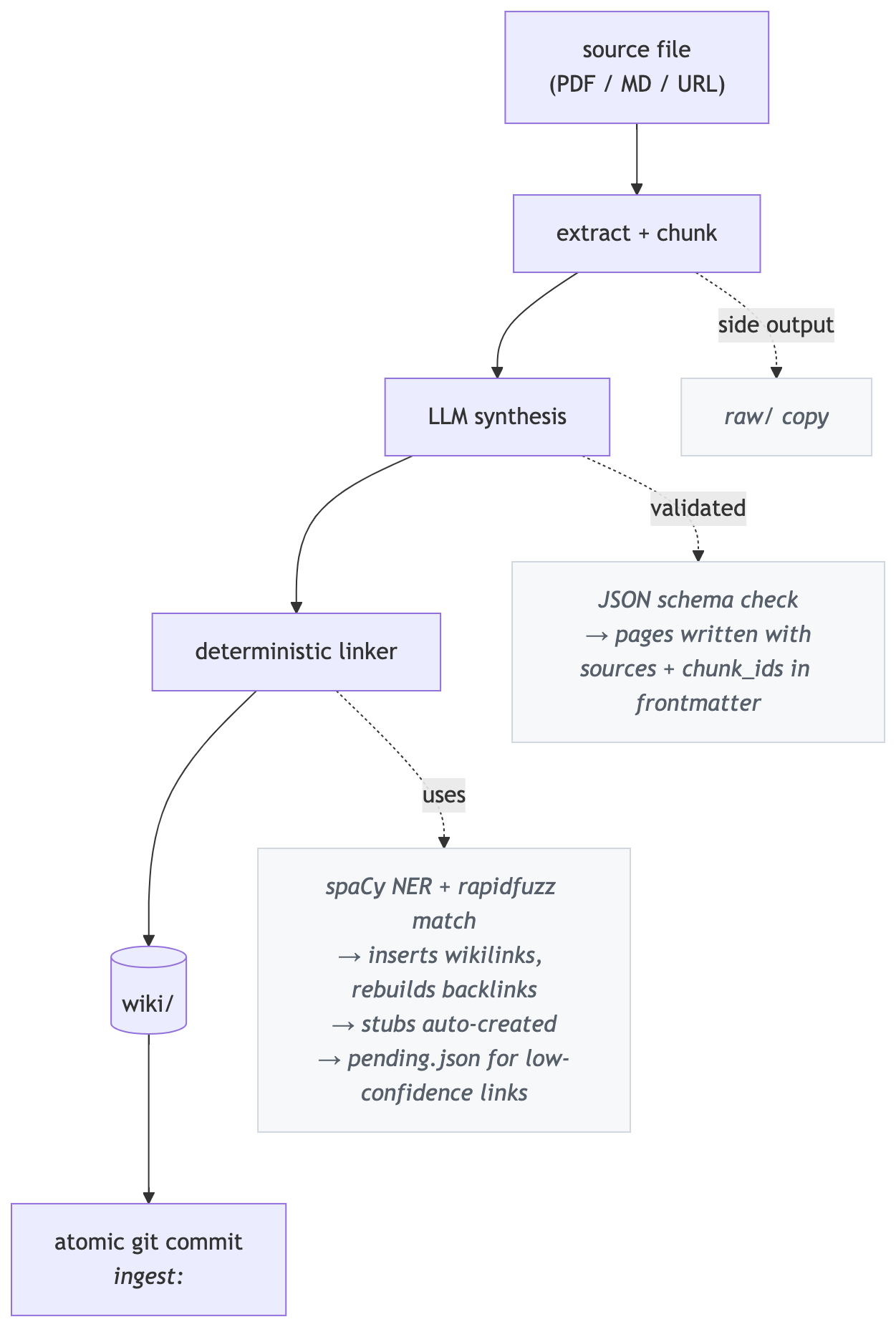
The LLM handles judgment (reading sources, extracting claims, assessing confidence). Everything after the LLM call is deterministic: linking, backlink graph, index regeneration, git commit. Every WikiLoom command that modifies state auto-commits with a classifying prefix (ingest:, lint:, merge:, etc.) so you never have to type git.
Installation
Supported Python versions:
- Linux, Windows, Apple Silicon Macs: Python 3.10–3.13.
- Intel Macs: Python 3.10–3.12.
onnxruntime(a transitive dependency for embeddings) no longer publishes Intel macOS wheels for Python 3.13+. - Python 3.14: not yet supported on any platform — spaCy hasn't published a 3.14 wheel.
pip install wikiloom

# Required for the linking engine
python -m spacy download en_core_web_sm
API keys are managed per-project via a .env file created during
wikiloom init (see Quick start). If you prefer shell exports, those
still work and take precedence over .env.
From source
git clone https://github.com/do-y-lee/wikiloom.git && cd wikiloom
pip install -e ".[dev]"
python -m spacy download en_core_web_sm
Quick start
# 1. Create a project with your preferred LLM provider.
#    Presets: anthropic (default), openai, google, ollama.
#    Init prompts you to paste your API key into .env (skippable).
wikiloom init my-wiki --domain "AI research" --provider anthropic
cd my-wiki

# 2. Ingest a source
wikiloom ingest path/to/paper.pdf

# 3. See what was created
wikiloom status
ls wiki/concepts/ wiki/entities/ wiki/sources/

# 4. Ask a question
wikiloom query "What are the key contributions of this paper?"

# 5. Save the answer as a synthesis page (re-usable, queryable)
wikiloom query --save-last

# 6. Inspect a page's metadata
wikiloom show concepts/transformer
That's it. Every step above auto-commits to git.
Heads-up on first-run downloads: the default fastembed embedding model (~66MB) is downloaded once and cached in a durable per-user location (~/Library/Caches/wikiloom/fastembed on macOS, ~/.cache/wikiloom/fastembed on Linux, %LOCALAPPDATA%\wikiloom\Cache\fastembed on Windows). wikiloom init offers to fetch it up front so the slow step is predictable; if you decline (or skip with --no-interactive), the first command that needs embeddings (ingest, query, related) will download it instead. Subsequent calls reuse the cached weights. To use a different backend or disable embeddings, see Provider options.
Tip on cost: ingest is the token-heavy operation. For a significant
saving, configure a cheap model for ingest and a stronger model for
query reasoning in wikiloom.toml (see Configuration):
[llm]
default_model = "claude-sonnet-4-6"
ingest_model  = "claude-haiku-4-5-20251001"
query_model   = "claude-sonnet-4-6"
Concepts you should know
Page lifecycle: active, dormant, deprecated
Every page has one of three statuses:
active— current, in active use, surfaced everywheredormant— older than its time window, but still visible and usable. Dormant is informational ("you might want to refresh this"), not a verdict on usefulness. Marking is a user action viawikiloom dormant <page>.deprecated— retired. Page moves towiki/archive/, hidden from most workflows. Reached viawikiloom mergeorwikiloom deprecate. Permanent removal viawikiloom purge(which requires deprecation first).
Lifecycle: active → dormant (optional) → deprecated → purged (gone).
Two layers of human-edit protection
When you edit a page by hand and run wikiloom save:
- Commit prefix (
human-edit:) — a soft, short-term protection.lint --fixskips the page; auto-tools leave it alone. Cleared by the next auto-action (e.g. a re-ingest). - The
<!-- wikiloom:auto -->marker — a durable boundary. Anything above the marker survives every operation, includingwikiloom ingest <file> --force(the only command that wipes the auto region).
For normal updates (re-ingesting a different source that updates the page), new content is appended to the auto region — your edits anywhere on the page survive. The marker only matters when you re-synthesize from scratch via --force.
Tip: to pin a permanent personal note, put it above the marker:
# Transformer

> **My note:** the original paper used post-norm; modern impls use pre-norm.

<!-- wikiloom:auto -->

## Architecture

... (LLM-generated content)
Structural provenance
Every chunk of a source document is persisted to a SQLite cache with a stable chunk_id derived from sha256(source_hash + chunk_index). Pages reference their contributing chunks under each entry in their sources frontmatter array — every source dict carries its own chunk_ids list. So you can trace every claim back to a specific chunk of a specific document.
wikiloom show concepts/transformer --field sources   # see contributing sources
wikiloom source <chunk_id>                            # see the original chunk text
Auto-commits and wikiloom save
Every command that modifies wiki content auto-commits with a classifying prefix:
| Prefix | Created by |
|---|---|
init: |
wikiloom init |
ingest: |
wikiloom ingest |
lint: |
wikiloom lint --fix |
relink: / review: / related: |
linker workflow commands |
merge: / deprecate: |
page lifecycle commands |
dormant: |
wikiloom dormant mark/unmark |
human-edit: |
you, via wikiloom save after editing pages, wikiloom.toml, or prompts by hand |
Writer commands also block if you have uncommitted edits under wiki/, telling you to run wikiloom save first — so manual page edits never accidentally land inside an ingest: commit. Dirty wikiloom.toml or prompt edits produce a passive nudge but don't block, since they can't collide with an auto-commit's output.
Tiered linking confidence
The linker scores each potential wikilink on a 0–100 scale:
- High (≥ 95): auto-inserted into the page body
- Medium (≥ 85): auto-inserted, flagged in
backlinks.json - Low (≥ 70): deferred to
pending.jsonfor review viawikiloom review - Below 70: ignored
Configurable in wikiloom.toml under [linking].
Per-chunk page context (Layer 1)
When ingesting a new source, the synthesis loop embeds each chunk and retrieves the top-K most semantically similar existing pages. The LLM sees this list when deciding whether to UPDATE an existing page or CREATE a new one — reduces duplicate page creation without any code-side merging.
Disable per-run with wikiloom ingest <file> --no-page-context or per-project via [ingest] use_page_context = false.
Budget enforcement
Before running synthesis, ingest estimates the token cost and refuses if it would exceed [llm] monthly_budget_usd in wikiloom.toml. After the run, if month-to-date spend exceeds the budget, a stderr warning fires (no mid-run abort — pre-flight is the only enforcement point).
Disable with [ingest] enable_budget_check = false.
Commands
26 commands grouped by purpose. All commands accept --project <path> (defaults to walking upward from the current directory to find wikiloom.toml).
Run wikiloom --help for the command list and wikiloom <command> --help for a specific command's flags (e.g. wikiloom query --help, wikiloom ingest --help).
Project lifecycle
| Command | Description |
|---|---|
wikiloom init <name> [--domain <text>] [--provider <id>] [--model <id>] [--no-interactive] |
Create a new project: directory tree, config, scaffolded indexes, git repo, and per-project README. --provider picks from anthropic (default), openai, google, ollama. An interactive prompt offers to paste your API key into .env; --no-interactive skips it (CI-friendly) |
wikiloom save [-m "msg"] [--dry-run] |
Commit your manual edits with a human-edit: prefix. Covers pages under wiki/, wikiloom.toml, and prompts under .wikiloom/prompts/ — one command for every human-editable file. Auto-bumps frontmatter.modified, freshens dormant → active |
wikiloom rebuild-cache |
Regenerate the SQLite query cache from manifest + frontmatter. Required after switching the [embeddings] provider or model so existing pages get re-embedded in the new vector space; otherwise occasional recovery tool |
Ingestion
| Command | Description |
|---|---|
wikiloom ingest <file-or-url> [--force] [--no-page-context] |
Ingest a source, synthesize pages, link, commit. --force re-runs even if the source was already ingested. --no-page-context disables per-chunk semantic retrieval for this run |
What ingests well
| Tier | Formats | Notes |
|---|---|---|
| Best — clean extraction, strong synthesis | .md, .txt, .rst, text-based .pdf, URLs (http://, https://) |
Markdown / plain text are native. PDFs need a text layer — scanned PDFs extract as empty (no OCR). The URL extractor strips nav, ads, and boilerplate before synthesis. |
| Good — supported with caveats | .docx, .pptx, code files (.py, .sql, .js, .ts, .tsx, .jsx, .go, .rs, .java, .rb, .cs, .cpp, .c, .sh), config / IaC (.yaml, .yml, .json, .toml, .dockerfile, .tf, .hcl, .proto, .graphql) |
Office docs flatten tables / layout and skip embedded images. Code and config ingest as plain text with language context — strong on docs, comments, and schemas; weaker on pure algorithmic code (the LLM tends to re-describe behavior rather than extract domain knowledge). |
| Not supported today | .xls, .xlsx, .csv (large), images (.png, .jpg, .jpeg, .webp, .gif), standalone .html |
Excel: export to .csv or .md first. Large CSV tables don't synthesize well — small ones may work as plain text. Images currently emit a placeholder (no vision / OCR). For HTML, host at a URL and ingest the URL instead. |
URL ingestion: wikiloom ingest https://example.com/page works on static HTML sites — documentation, blog posts, Wikipedia, most MkDocs/Docusaurus/Sphinx-rendered docs. The http:// or https:// scheme is required — bare hostnames like example.com/page are treated as local file paths and fail with "No such file." It does not work on:
- JavaScript-rendered pages (React / Vue / Next.js client-side apps, most modern product pages)
- Paywalled or login-gated content
- Sites with bot protection / WAF (most banks, Cloudflare-protected sites)
For unsupported pages, download as PDF and ingest the PDF instead. URL ingests go through the same extract → synthesize → link → commit pipeline as files; dedup keys on the hash of the extracted text so re-ingesting the same URL with unchanged content is a cheap no-op.
Reading and exploring
| Command | Description |
|---|---|
wikiloom query "<question>" [--detail] [--max-pages N] |
Ask a question grounded in wiki content. --detail shows sources, confidence, and last-modified per source |
wikiloom query --last-detail |
Show detail for the most recent query (no LLM call) |
wikiloom query --save-last |
Save the most recent answer as a wiki/syntheses/ page |
wikiloom queries [--show <id>] [--save <id>] [--all] |
Browse the rolling cache of past query runs. Default lists the 20 most recent (id, timestamp, question snippet, confidence). --show prints the full answer + sources for an entry (no LLM call); --save promotes that entry to a synthesis page. Retention controlled by [query] history_size |
wikiloom show <page> [--field <name>] [--json] |
Show a page's frontmatter. --field extracts one field; chunk_ids flattens across sources |
wikiloom links <page> |
Show all pages linked to and from a given page |
wikiloom related <page> [-n N] [--save] [--link] |
Find pages semantically similar to one. --save writes them into frontmatter; --link appends a "Related Pages" wikilink section to the body |
wikiloom orphans |
List pages with no inbound or outbound wikilinks |
wikiloom duplicates [--review] [--auto-merge] |
Find near-duplicate pairs by slug fuzzy match + embedding cosine. --review walks each pair interactively; --auto-merge batches obvious singular/plural variants |
wikiloom source <chunk_id> |
Print the exact source text the LLM saw for a chunk |
Page lifecycle
| Command | Description |
|---|---|
wikiloom merge <loser> <winner> [--yes] |
Combine two pages — LOSER first, WINNER second (matches "merge X into Y"). Union bodies (preserving human regions), rewrite inbound [[loser]] wikilinks to [[winner]], deprecate the loser |
wikiloom deprecate <page> [--superseded-by <other>] [--yes] |
Soft-remove a page: move to wiki/archive/, set status: deprecated. With --superseded-by, also rewrites every inbound [[X]] wikilink across non-archived pages to the replacement |
wikiloom purge <page> [--yes] |
Permanently remove an already-deprecated page (deletes the archive file AND the manifest entry). Requires typed confirmation by default |
wikiloom dormant |
List candidates (active pages past their window) |
wikiloom dormant --list-marked |
List currently-marked dormant pages |
wikiloom dormant --windows |
Show window config by type |
wikiloom dormant <page> [--unmark] |
Manually mark/unmark a page as dormant |
wikiloom dormant --review |
Walk through dormant candidates interactively |
Maintenance
| Command | Description |
|---|---|
wikiloom lint [--fix] |
Run health checks (broken links, missing frontmatter, duplicates, dormant candidates). Default is check-only — prints a report and exits 1 if issues are found. --fix applies auto-repairs (broken links, frontmatter only — never auto-marks dormant) |
wikiloom relink |
Re-run the linker across every page (useful when new pages were added that earlier pages should link to) |
wikiloom review |
List low-confidence link candidates from pending.json |
wikiloom review --accept-all |
Insert every pending link into its source page |
wikiloom review --clear |
Discard all pending candidates |
wikiloom reindex |
Regenerate root and sub-index files |
wikiloom protect |
Scan for pages whose human-edit flag drifted from git history |
wikiloom protect --sync |
Apply git truth to the manifest + frontmatter |
Observability
| Command | Description |
|---|---|
wikiloom status |
Project overview: page counts by type/status, human-edited count, backlinks, chunks, sources, last event, total tokens + cost |
wikiloom log [-n N] |
Recent LLM / system events from wiki/log.md, newest first |
wikiloom edits [-n N] |
Recent human edits committed via wikiloom save (date, author, subject, hash). Complements wikiloom log for multi-user audit |
wikiloom cost |
Token usage and spend breakdown by event type, with monthly budget percentage |
Project structure
my-wiki/
  README.md               # Per-project orientation (domain, commands, workflow)
  wikiloom.toml           # Project config (LLM, budget, thresholds, dormant windows)
  .env                    # Your API key (gitignored, created via init prompt)
  .env.example            # Committed template showing the env var for your provider
  .wikiloom/              # Customizable templates
    schema.md             # Page schema reference
    prompts/
      ingest.md           # Synthesis prompt — iterate this for quality
      query.md            # Query prompt
      lint.md             # (reserved for future use)
    output_formats/
      ingest_response.json   # JSON schema the LLM must match
      query_response.json
  wiki/                   # The wiki itself (markdown + YAML frontmatter)
    index.md              # Root index
    log.md                # Event log (auto-appended)
    concepts/             # Concept pages
    entities/             # People, orgs, products, tools
    sources/              # One page per ingested document
    syntheses/            # Saved query answers
    decisions/            # Reserved for ADR-style decision pages
    archive/              # Deprecated pages
  raw/                    # Copies of ingested source files
    papers/   articles/   images/   code/   misc/
  _registry/              # Derived state (mostly committed; some gitignored)
    manifest.json         # Page registry (committed)
    backlinks.json        # Wikilink graph (committed)
    pending.json          # Low-confidence link candidates (committed)
    sources.json          # Content-addressed source catalog (committed)
    schema_version.json   # Schema marker for future migrations (committed)
    wiki.db               # SQLite query cache + chunks table (gitignored)
    query_history.json    # Rolling cache of past query results (gitignored)
    ingest_state.json     # Per-chunk progress checkpoint (gitignored)
Configuration
wikiloom.toml lives at the project root. All sections optional — defaults are sensible.
[project]
name = "my-wiki"
domain = "AI research"
schema_version = 1

[llm]
provider = "anthropic"
default_model = "claude-sonnet-4-6"   # Fallback for any LLM-backed command
ingest_model  = ""                    # Optional override for `wikiloom ingest`
query_model   = ""                    # Optional override for `wikiloom query`
max_tokens_per_operation = 8000
monthly_budget_usd = 50.0             # Pre-flight refuses runs that exceed this
parse_retry_count    = 2              # Retries when the LLM returns unparseable JSON; set to 0 to disable

[linking]
ner_model = "en_core_web_sm"
auto_create_stubs = false       # Whether to create stub pages for unresolved entities
high_confidence_threshold = 95
medium_confidence_threshold = 85
low_confidence_threshold = 70

[ingest]
max_file_size_mb = 50           # 0 disables
min_extracted_chars = 16        # Reject empty extractions (e.g. scanned PDFs without OCR)
enable_budget_check = true
use_page_context = true         # Per-chunk semantic retrieval before synthesis
page_context_top_k = 10

[dormant]
default_window_days = 90
entity_window_days = 180
concept_window_days = 120
synthesis_window_days = 60

[search]
engine = "grep"

[query]
history_enabled = true          # Cache successful query results in _registry/query_history.json
history_size    = 100           # How many past queries to retain (newest first; older are trimmed)

[embeddings]
provider = "fastembed"          # local, no API key needed
# provider = "openai"           # needs OPENAI_API_KEY
# provider = "sentence-transformers"  # heavier install
enabled = true
Per-page overrides go in the page's frontmatter — for example, dormant_window_days: 365 on a page makes it slower to go dormant.
Provider options
WikiLoom uses two providers at runtime: an LLM provider for synthesis and query, and an embeddings provider for semantic search and per-chunk page context retrieval. Both are configured in wikiloom.toml and can be swapped without touching code.
LLM providers
wikiloom init accepts --provider with any of the four presets below.
Each preset writes the right provider + default model to wikiloom.toml
and generates a matching .env.example. Behind the scenes WikiLoom
delegates to litellm, so the model naming convention follows litellm's
and other providers litellm supports may also work via manual config.
| Provider preset | Where it runs | Requirements | Default model |
|---|---|---|---|
anthropic (default) |
Anthropic API | ANTHROPIC_API_KEY |
claude-sonnet-4-6 |
openai |
OpenAI API | OPENAI_API_KEY |
gpt-5 |
google |
Google AI Studio API (Gemini) | GEMINI_API_KEY |
gemini/gemini-2.5-pro |
ollama |
Local machine | Ollama installed + model pulled locally | llama3 |
Anthropic (default):
wikiloom init my-wiki --provider anthropic
[llm]
provider = "anthropic"
default_model = "claude-sonnet-4-6"
OpenAI:
wikiloom init my-wiki --provider openai
[llm]
provider = "openai"
default_model = "gpt-5"
Google (Gemini):
wikiloom init my-wiki --provider google
[llm]
provider = "google"
default_model = "gemini/gemini-2.5-pro"
Ollama (local, no API key, no cost):
# 1. Install Ollama from https://ollama.com and pull a model
ollama pull llama3
ollama serve
# 2. Init with the ollama preset
wikiloom init my-wiki --provider ollama
# 3. Override model if you want something other than llama3
wikiloom init my-wiki --provider ollama --model gemma3
[llm]
provider = "ollama"
default_model = "llama3"
Split-model setup (recommended for cost): configure ingest_model
to a cheap model and query_model to a stronger one. wikiloom ingest
does bulk text-to-JSON synthesis that Haiku / Flash / mini-class
models handle fine; wikiloom query is low-volume and benefits from
the frontier reasoning of Sonnet / 2.5-pro / gpt-5.
Embedding providers
| Provider | Where it runs | Requirements | Default model | Disk impact |
|---|---|---|---|---|
fastembed |
Local | Bundled with the default install | BAAI/bge-small-en-v1.5 |
~66MB, cached in user cache dir |
openai |
OpenAI API | OPENAI_API_KEY; pip install openai |
text-embedding-3-small |
none |
sentence-transformers |
Local | pip install sentence-transformers |
all-MiniLM-L6-v2 |
~500MB on first use |
The model field in [embeddings] is optional — omit it to use the provider's default (column above).
Default (fastembed):
[embeddings]
provider = "fastembed"
enabled = true
OpenAI:
[embeddings]
provider = "openai"
model = "text-embedding-3-small"  # optional; defaults to provider default
enabled = true
sentence-transformers:
[embeddings]
provider = "sentence-transformers"
model = "all-MiniLM-L6-v2"        # optional
enabled = true
To disable embeddings entirely (FTS-only search, no semantic retrieval):
[embeddings]
enabled = false
LLM and embeddings providers are independent — you can mix any LLM with any embeddings backend (e.g., Ollama LLM + fastembed embeddings for fully local operation, or Anthropic LLM + OpenAI embeddings).
Workflows
Ingest a corpus of related documents
for pdf in papers/*.pdf; do
  wikiloom ingest "$pdf"
done

# Then surface duplicates the LLM may have created
wikiloom duplicates --auto-merge      # safe singular/plural pairs
wikiloom duplicates --review          # interactive triage for the rest
Edit a page by hand
$EDITOR wiki/concepts/transformer.md
wikiloom save                         # commits as human-edit:
If you forget to save, the next writer command (ingest, lint --fix, etc.) will block with a friendly error pointing you here.
Find and merge near-duplicates
wikiloom duplicates                   # see suspect pairs with suggested winner
wikiloom merge concepts/transformer-architecture concepts/transformer
Reconcile contradictions
When ingest detects a contradiction between a new source and an existing page, the contradiction is recorded in frontmatter. To inspect and resolve:
wikiloom show concepts/foo --field contradictions
$EDITOR wiki/concepts/foo.md          # pick the right fact, remove the entry
wikiloom save
Recover from an aborted ingest
If wikiloom ingest aborts mid-way (rate limit, credit exhaustion):
# 1. Fix the underlying problem (top up API credits, wait out rate limit)
# 2. Re-run with --force to retry from scratch
wikiloom ingest path/to/paper.pdf --force
--force re-processes all chunks (including ones that succeeded the first time).
Find what already exists before writing manually
wikiloom query "what do we have on transaction posting?"
wikiloom related concepts/transactions     # semantically similar pages
wikiloom links concepts/transactions       # what's linked to/from it
Clean up periodically
wikiloom lint                         # see issues without fixing
wikiloom lint --fix                   # auto-repair what can be fixed
wikiloom dormant                      # see candidates past their window
wikiloom dormant --review             # decide which to mark
wikiloom orphans                      # pages with no links
wikiloom relink                       # re-run linker across all pages
Tips
Ask specific, well-scoped queries. Retrieval is strongest when your
question shares concrete terms with page content. "What's the overdraft
fee cap?" pulls the right page cleanly; "tell me about banking" returns
a noisy mix and comes back with low confidence. Before querying, skim
wiki/concepts/index.md and wiki/sources/index.md to see what's
actually covered — you'll write sharper questions and know when a gap
is a real coverage issue vs. a retrieval miss. If confidence is low,
run --detail to see which sources were consulted: tangential sources
mean retrieval didn't find the right pages; relevant-but-thin sources
mean the wiki genuinely doesn't cover the topic yet.
Use wikiloom show for inspection. Faster than opening files:
wikiloom show concepts/foo --field sources
wikiloom show concepts/foo --field aliases
wikiloom show concepts/foo --json | jq .source_count
wikiloom save is the only git command you need. Don't git commit manually unless you really want to. WikiLoom auto-commits everything else with the right classifying prefix.
Pin permanent notes above the auto marker. This is the only place that survives wikiloom ingest <file> --force.
Ingesting many files at once. wikiloom ingest accepts more than one source. Pick the input mode that fits — they're mutually exclusive and each feeds the same sequential per-file pipeline with a three-bucket (complete / partial / failed) grand summary at the end:
wikiloom ingest a.pdf b.pdf c.pdf          # variadic positional
wikiloom ingest --batch-file paths.txt     # paths from a text file (blanks and '#' comments skipped)
wikiloom ingest --batch-dir ~/docs/        # every file in a directory (non-recursive, sorted)
find ~/docs -name '*.pdf' | wikiloom ingest --batch-file -   # paths from stdin
Failures are isolated per file: a missing path, extraction error, or rate-limit abort on one file doesn't halt the batch. The grand summary lists any partial / failed files with a retry hint.
Batches above 20 files pause for a confirmation prompt with a rough wall-clock estimate (≈5 minutes per file at max_workers=1). Pass --yes / -y to skip the prompt — required for non-interactive contexts like scripts or backgrounded runs.
For long overnight batches, redirect the stream so your terminal is free:
wikiloom ingest --batch-file paths.txt --yes > batch.log 2>&1 &
tail -f batch.log       # watch progress
wikiloom log            # per-ingest summaries, durable in git
Run wikiloom duplicates after every batch ingest. The LLM occasionally creates near-duplicates (pending-transactions vs pending-transactions-banking); catching them early keeps the wiki clean.
Listing commands are pipeable. wikiloom orphans, wikiloom dormant (both candidate and --list-marked views), wikiloom duplicates, wikiloom related <page>, wikiloom links --list, wikiloom log, and wikiloom edits all detect when stdout isn't a terminal and switch to tab-separated one line per item with no headers or tips, so shell pipelines work cleanly:
wikiloom dormant | grep concept              # only concept-type candidates
wikiloom dormant | wc -l                     # total candidate count
wikiloom orphans | head -20                  # first 20 orphans
wikiloom dormant --list-marked | cut -f1     # just page_ids
wikiloom duplicates | grep -i auth           # duplicate pairs mentioning "auth"
wikiloom log | grep ingest                   # ingest events only
wikiloom log | awk -F'\t' '{print $1, $5}'   # timestamp and cost columns
Tab-separated keeps column positions stable when fields like titles or descriptions contain spaces, so cut -f and awk -F'\t' work reliably. Action modes (--review, --auto-merge, --save, --link, --accept-all, --clear) keep their interactive or confirmation output intact. The pretty view also stays when you run commands directly in a terminal. Run wikiloom <command> --help for each command's exact column order.
Customize the synthesis prompt. Open .wikiloom/prompts/ingest.md and iterate — every page WikiLoom produces is a function of that prompt + the chunk. The default works but is generic. For domain-specific corpora, tailored prompts produce noticeably better output.
Read wiki/log.md to see what happened. Every operation appends a structured event with timestamps, token usage, and cost. Useful for cost reviews and auditing.
Browse past query answers without re-running them. Every successful wikiloom query run is appended to _registry/query_history.json (newest first, default 100 entries). wikiloom queries lists recent runs; wikiloom queries --show <id> reprints the full answer + sources without an LLM call; wikiloom queries --save <id> promotes any past entry to a synthesis page. Privacy note: the file is gitignored (per-machine cache, not project state) but stored in plaintext on disk and may contain sensitive prompts. Disable with [query] history_enabled = false in wikiloom.toml, or shrink retention via history_size.
Switching LLM providers. Either re-init in a fresh directory with --provider / --model, or edit [llm] provider + default_model (and optionally ingest_model / query_model) in wikiloom.toml directly. WikiLoom uses litellm under the hood, so any provider it supports works. The model name follows litellm's naming convention.
Backup is just git push. The whole project — wiki, manifest, source catalog, configuration — is in git. Push to any remote and you have a full backup.
Development
Running tests
pytest                       # Full suite (live-API tests skipped by default)
pytest -m live               # Run live-API tests (requires ANTHROPIC_API_KEY)
pytest tests/test_llm.py     # Just the LLM client unit tests
Extensive pytest suite. All deterministic in the default run; live API tests live in test_llm_live.py and are skipped unless explicitly requested.
Customizing prompts
Edit files under .wikiloom/prompts/. Each project's prompts override the packaged defaults. The synthesis loop loads from the project first, falls back to the package.
Customizing JSON output schemas
Edit files under .wikiloom/output_formats/. The synthesis loop validates LLM responses against ingest_response.json before accepting them. Tighten the schema to make the LLM's output more reliable.
Contributing
Issues and pull requests welcome at github.com/do-y-lee/wikiloom. For PRs: keep diffs focused, land green tests (pytest), and explain the why in the PR body — the what is in the diff. See Development above for local setup.
License
MIT


Download files
Download the file for your platform. If you're not sure which to choose, learn more about installing packages.
Source Distribution
Built Distribution
Filter files by name, interpreter, ABI, and platform.
If you're not sure about the file name format, learn more about wheel file names.
Copy a direct link to the current filters
File details
Details for the file wikiloom-0.1.7.tar.gz.
File metadata
- Download URL: wikiloom-0.1.7.tar.gz
- Upload date:
- Size: 298.7 kB
- Tags: Source
- Uploaded using Trusted Publishing? No
- Uploaded via: twine/6.2.0 CPython/3.12.13
File hashes
| Algorithm | Hash digest | |
|---|---|---|
| SHA256 |
e01fbb72b438af8b86e1be685a669afe7774c5da777ff9fdcb1304b1a1939e90
|
|
| MD5 |
fbf5591d5be1e417f85518be1e921c56
|
|
| BLAKE2b-256 |
2d8ae75dc871d1c6e81ee12529b3ddc19833b932594bb1fe4680a0801771ecc4
|
File details
Details for the file wikiloom-0.1.7-py3-none-any.whl.
File metadata
- Download URL: wikiloom-0.1.7-py3-none-any.whl
- Upload date:
- Size: 216.6 kB
- Tags: Python 3
- Uploaded using Trusted Publishing? No
- Uploaded via: twine/6.2.0 CPython/3.12.13
File hashes
| Algorithm | Hash digest | |
|---|---|---|
| SHA256 |
a934c90373725c1cd8fa308d045e056113564ff47f03822921ef09d23a973690
|
|
| MD5 |
02471d9a66c4b00ecf132230034e9b79
|
|
| BLAKE2b-256 |
f29b0764c9a5702cc21cbcac79b6888169fb51e5e725976214f7fac66ef13f0f
|






