
Wilfred








Wilfred is a command-line interface for running and managing game servers locally. It uses Docker to run game servers in containers, which means they are completely separated. Wilfred can run any game that can run in Docker.
⚠️ Wilfred is currently under development and should not be considered stable. Features may break or may not be implemented yet. Use with caution.
Documentation
The official documentation is available here. For support, use our Discord Chat. For bugs, you can open an issue here.
Supported games
As long as your server can run in Docker, it can probably run using Wilfred (after some tinkering). These are the games supported by default. You can submit new games to wilfred-dev/images.
- Minecraft
- Vanilla Minecraft
- BungeeCord
- Paper
- Spigot
- SpongeVanilla
- Waterfall
- Bedrock
- Multi Theft Auto
- Voice Servers
- Mumble
Installation
Please refer to the official documentation for further installation instructions and documentation.
Quickstart
Make sure you have Docker installed (see the official documentation for more info). The recommended way of installing Wilfred is via Homebrew. Once brew is installed, Wilfred can easily be installed from the official tap.
brew tap wilfred-dev/wilfred
brew install wilfred
Want the bleeding edge? You can install the latest commit using --HEAD (bugs are to be expected, don't use in production environments!).
brew tap wilfred-dev/wilfred
brew install --HEAD wilfred
Wilfred can also be installed using pip. You need to use Python 3.7 or newer to run Wilfred.
pip install wilfred --upgrade
Once you got Wilfred installed, run wilfred setup to set a path for Wilfred to use to store server files.
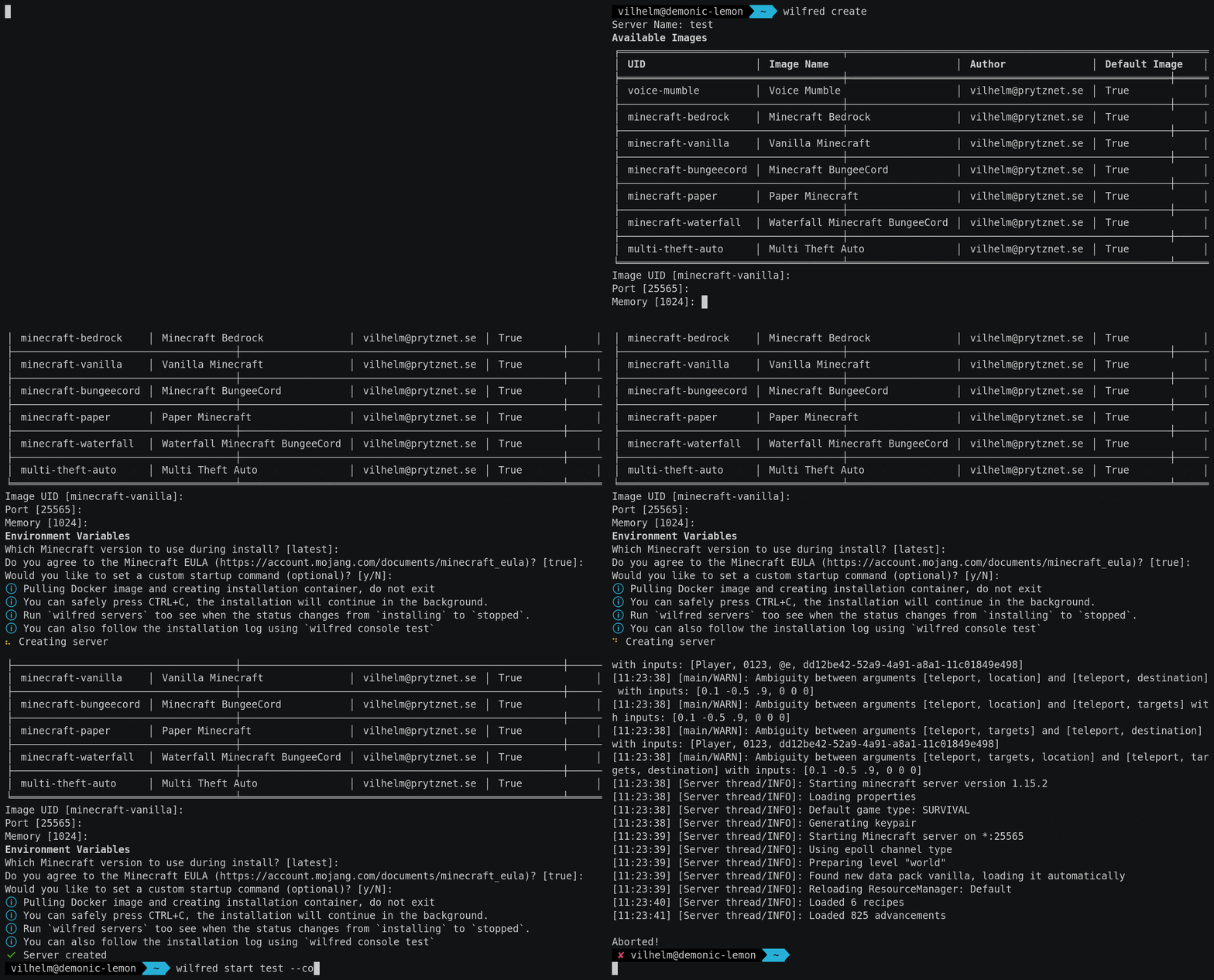
To create your first server, use wilfred create. Most values have a default value, where you can just press return to use them.
Wilfred will ask you which "image" to use. An image is a set of configuration files that defines a specific game within Wilfred. These images are not to be confused with Docker images, Wilfred images sort of wrap around the Docker images. A couple of games are already built into Wilfred, but you can also create your own.
Then, Wilfred will ask you to set any environment variables (if available for that image). The environment variables differ from game to game and most of them have a default value.
Once the server is created, you can use wilfred servers to list available servers. To start it, use wilfred start <name>. To attach to the server console, you can use wilfred console <name>. If you want to start the server and attach to the server console in a single command, you can use wilfred start <name> --console (it will start the server and then immediately attach to the server console).
Helping
The best places to contribute are through the issue tracker and the official Discord server. For code contributions, pull requests and patches are always welcome!
Contributors ✨
Created, written, and maintained by Vilhelm Prytz.
Copyright (C) 2020-2022, Vilhelm Prytz, vilhelm@prytznet.se
1 maintainer

Metadata
1 maintainer
Release files for wilfred 0.10.1
For a detailed explanation of source distributions (sdists) and built distributions (wheels), please see the package formats documentation.
Source distribution (sdist)
| File | Size | Uploaded | |
|---|---|---|---|
| wilfred-0.10.1.tar.gz | 1.3 MB | Details |
Built distribution (wheel)
| File | Interpreter | ABI | Platform | Reset |
|---|---|---|---|---|
| wilfred-0.10.1-py37-none-any.whl | Python 3.7 | none | any | Details |
Total release size: 1.3 MB
Release files / wilfred-0.10.1.tar.gz
| Download URL | wilfred-0.10.1.tar.gz |
|---|---|
| Size | 1.3 MB |
| Tags | Source |
|
SHA-256 checksum How to use checksums |
57d73fb94fc9b168f071fafa6a91612f2c5ebb495f9deb6683d65b78291dbe98
|
|
BLAKE2b-256 checksum How to use checksums |
7539f69d29048133e09888219d2aad3c5c7ffad75cf9f71179c460e2703ead00
|
| Upload date | |
|
Uploaded using Trusted Publishing? What is trusted publishing? |
No |
| Uploaded via |
twine/4.0.0 CPython/3.9.12
|
Release files / wilfred-0.10.1-py37-none-any.whl
| Download URL | wilfred-0.10.1-py37-none-any.whl |
|---|---|
| Size | 30.1 kB |
| Tags | Python 3.7 |
|
SHA-256 checksum How to use checksums |
72f5f29609c052d4edfcb817ed99484b0414cfef0da51fdf6d819361b5aebb62
|
|
BLAKE2b-256 checksum How to use checksums |
9d31671b189d3bae07176a20e06a496deb323f1c3a114bf2d55e6cf3a24fed6d
|
| Upload date | |
|
Uploaded using Trusted Publishing? What is trusted publishing? |
No |
| Uploaded via |
twine/4.0.0 CPython/3.9.12
|














