
win-llmtop




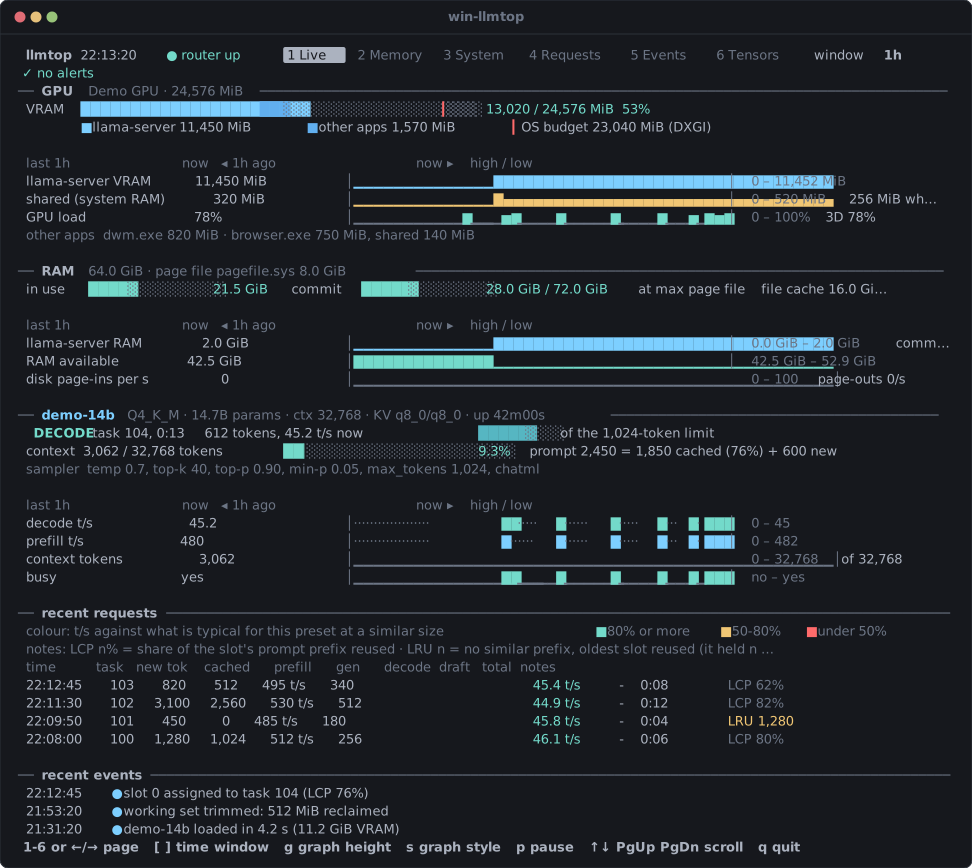
A live, read-only terminal panel for llama.cpp's llama-server on Windows — see where your VRAM, shared GPU memory and system RAM go while a model runs.
What it shows · Who it is for · Quick start · Install · Requirements · Get more out of it · Common options · Documentation
What it shows
win-llmtop is strictly read-only: it reads the server's HTTP API, log files and Windows performance counters, and never changes the server.
- Dedicated and shared GPU memory per process against the DXGI OS budget, with alerts when Windows demotes VRAM into system RAM.
- System RAM, commit charge and the page file — working sets by consumer, private commit headroom and disk page-ins/page-outs.
- Live in-flight request progress — active phase (
PREFILLorDECODE), prompt batch progress, ETA, live tokens/s and KV context fill. - Finished request history and speed — prefill and decode throughput compared across similar prompt sizes and context depths, draft acceptance and prefix cache reuse.
- Model memory map and tensor placement — weights, KV cache, recurrent state and compute buffers derived from the GGUF header and checked against
llama-fit-params, plus per-layer GPU/CPU placement. - Router and threshold events — model loads, queueing, evictions and sustained memory alerts persisted across restarts.
Who it is for
Built by Aaron Kane (@insane-kane) for Windows users running llama.cpp's llama-server — either in router mode across multiple presets or serving a single model — on the same machine. It answers whether a preset fits inside Windows' VRAM budget, when shared GPU memory spillover slows decoding down, and where host RAM goes.
Quick start
pipx install win-llmtop
win-llmtop --check
win-llmtop
pipx install win-llmtop— installswin-llmtopinto an isolated environment and puts it onPATH.win-llmtop --check— checks Windows counters, the GPU budget, the runningllama-server, logs and state directory, and exits0when the server is reachable and either GPU telemetry is present or the machine has no GPU adapters (1otherwise).win-llmtop— opens the live six-page terminal panel (1–6orTabswitch pages,qquits).
Install options at a glance
See the full installation guide (docs/install.md) for commands, upgrades, uninstalls and package verification.
| Method | Command | Best for |
|---|---|---|
| pipx (recommended) | pipx install win-llmtop |
Most users; isolated CLI environment on PATH |
| uv tool | uv tool install win-llmtop |
Machines that already use uv |
| pip | py -m pip install win-llmtop |
Existing virtual environments or --user installs |
| GitHub release wheel | py -m pip install win_llmtop-*.whl |
Offline or air-gapped Windows machines |
| From source | py llmtop.py |
Running directly from a git checkout (zero dependencies) |
Standalone .exe and winget |
Planned for 0.2.0 | Machines without Python installed (SignPath-signed win-llmtop.exe) |
Requirements
- Windows 10 version 1709 or later — provides the per-process
GPU Process MemoryandGPU Engineperformance counters. - 64-bit Python 3.11 or later — 32-bit Python cannot inspect a 64-bit
llama-serverprocess. - No third-party Python packages — uses the Python standard library only.
- A local
llama-server— running in router mode or single-model mode on the same machine.
Get more out of it
win-llmtop works with zero configuration, and unlocks deeper telemetry when llama-server exposes logs and slots:
- Per-model log file with timestamps — pass
--log-fileand--log-timestampstollama-server(win-llmtop reads the path from its command line;--log-dironly when it can't) for request history, cache hit rates, draft acceptance and wall-clock times (usage guide). - Live
/slotstelemetry — startllama-serverwith--slotsto see live prefill/decode progress, current tokens/s, ETA and context fill (usage guide). - Router event log — pass
--router-logor--log-dirsowin-llmtopcan tail router model loads, request queueing and preset evictions (usage guide).
Common options
See win-llmtop(1) for the complete reference of every command-line option, environment variable and default.
| Option | Environment variable | Default | Purpose |
|---|---|---|---|
--check |
— | off | Check prerequisites and reachable sources, then exit |
--once |
— | off | Print a single snapshot and exit (combine with --page) |
--plan [PRESET] |
— | off | Project preset VRAM against the OS budget without loading |
--router URL |
LLMTOP_ROUTER |
find it | llama-server URL (http://127.0.0.1:8080 or discovered) |
--log-dir DIR |
LLMTOP_LOG_DIR |
(none) | Directory containing per-model and router log files |
--router-log PATH |
— | (none) | Path to the router's own log file |
--api-key KEY |
LLMTOP_API_KEY or LLAMA_API_KEY |
(none) | Bearer token for llama-server HTTP requests |
--window {1m,5m,15m,1h,6h,24h} |
— | 5m |
Initial time window for trend charts |
Documentation
- Documentation index (
docs/README.md) — one-line map of all documentation pages. - Installation (
docs/install.md) — every deployment method, offline wheels, provenance verification, 64-bit Python and terminal setup. - Usage (
docs/usage.md) —--checkoutput, the six pages, keyboard controls,llama-serverflags,--once,--planand state files. - Troubleshooting (
docs/troubleshooting.md) — symptom, cause and fix for every--checkfailure, notice and warning. - Manual page (
docs/llmtop.1.md) —win-llmtop(1)reference: all options, alert rules, data sources and measurement limits.
Contributing, support and security
- Contributing and support — see
CONTRIBUTING.mdto report bugs or submit pull requests, andSUPPORT.mdfor usage help. - Security — see
SECURITY.mdto report a vulnerability privately through GitHub's private vulnerability reporting. - Code of conduct — participation is governed by
CODE_OF_CONDUCT.md.
Citing
If you use win-llmtop in research or benchmarks, see CITATION.cff for citation metadata.
Licence
GNU General Public License v3.0 or later (GPL-3.0-or-later); see LICENSE.
1 maintainer

Metadata
1 maintainer
Release files for win-llmtop 0.1.1
For a detailed explanation of source distributions (sdists) and built distributions (wheels), please see the package formats documentation.
Source distribution (sdist)
| File | Size | Uploaded | Provenance | |
|---|---|---|---|---|
| win_llmtop-0.1.1.tar.gz | 105.3 kB | With provenance | Details |
Built distribution (wheel)
| File | Interpreter | ABI | Platform | Reset |
|---|---|---|---|---|
| win_llmtop-0.1.1-py3-none-any.whl | Python 3 | none | any | Details |
Total release size: 187.2 kB
Release files / win_llmtop-0.1.1.tar.gz
| Download URL | win_llmtop-0.1.1.tar.gz |
|---|---|
| Size | 105.3 kB |
| Tags | Source |
|
SHA-256 checksum How to use checksums |
7ba336b14bb5eab8a461a5909365e1e40d81244585f435011ab27003c40e8d82
|
|
BLAKE2b-256 checksum How to use checksums |
164a8ec967a341833b6890da76e871135ddd38576de1e42f189bde6dddce099d
|
| Upload date | |
|
Uploaded using Trusted Publishing? What is trusted publishing? |
Yes |
| Uploaded via |
twine/7.0.0 CPython/3.13.16
|
Provenance
Provenance describes where a file came from. On PyPI, provenance is shared via attestations, which provide a verifiable record of the build or publishing details. View details, limitations and caveats.


PyPI Publish Attestation
PyPI verified that this artifact, at this checksum, originated from the publisher listed below.
Signed by GitHub Actions, verified by PyPI on Oct 21, 2026.
Transparency logRelease files / win_llmtop-0.1.1-py3-none-any.whl
| Download URL | win_llmtop-0.1.1-py3-none-any.whl |
|---|---|
| Size | 81.9 kB |
| Tags | Python 3 |
|
SHA-256 checksum How to use checksums |
9268ad45eb8273a6570b0d9540b58ab8c6e325160602b6911ff713b0d4f2c5a0
|
|
BLAKE2b-256 checksum How to use checksums |
6fb225ce62c825a2cdf487f068e0969ff3d9ec9eed2c64d1619296ae4d3ca384
|
| Upload date | |
|
Uploaded using Trusted Publishing? What is trusted publishing? |
Yes |
| Uploaded via |
twine/7.0.0 CPython/3.13.16
|
Provenance
Provenance describes where a file came from. On PyPI, provenance is shared via attestations, which provide a verifiable record of the build or publishing details. View details, limitations and caveats.
PyPI Publish Attestation
PyPI verified that this artifact, at this checksum, originated from the publisher listed below.
Signed by GitHub Actions, verified by PyPI on Oct 21, 2026.
Transparency logSecurity for win-llmtop 0.1.1
Provenance
Provenance describes where a file came from. On PyPI, provenance is shared via attestations, which provide a verifiable record of the build or publishing details. View details, limitations and caveats.
Full provenance
All 2 files in this release have been uploaded with provenance metadata.
Attestation for win_llmtop-0.1.1.tar.gz
PyPI Publish Attestation
PyPI verified that this artifact, at this checksum, originated from the publisher listed below.
Signed by GitHub Actions, verified by PyPI on Oct 21, 2026.
Transparency logA note on package security
PyPI is a repository for distributing packages, not a service for auditing them. While third-party security researchers and our staff do their best to detect and remove malicious packages, PyPI cannot guarantee the quality, security or suitability of any given package.














