
Windows Capture 


Windows Capture is a highly efficient Rust and Python library that enables you to capture the screen using the Graphics Capture API effortlessly. This library allows you to easily capture the screen of your Windows-based computer and use it for various purposes, such as creating instructional videos, taking screenshots, or recording your gameplay. With its intuitive interface and robust functionality, Windows Capture is an excellent choice for anyone looking for a reliable, easy-to-use screen-capturing solution.
Note this README.md is for Python library Rust library can be found here
Features
- Only Updates The Frame When Required.
- High Performance.
- Easy To Use.
- Latest Screen Capturing API.
Installation
Run this command
pip install windows-capture
Usage
from windows_capture import WindowsCapture, Frame, InternalCaptureControl

# Every Error From on_closed and on_frame_arrived Will End Up Here
capture = WindowsCapture(
    cursor_capture=None,
    draw_border=None,
    monitor_index=None,
    window_name=None,
)


# Called Every Time A New Frame Is Available
@capture.event
def on_frame_arrived(frame: Frame, capture_control: InternalCaptureControl):
    print("New Frame Arrived")

    # Save The Frame As An Image To The Specified Path
    frame.save_as_image("image.png")

    # Gracefully Stop The Capture Thread
    capture_control.stop()


# Called When The Capture Item Closes Usually When The Window Closes, Capture
# Session Will End After This Function Ends
@capture.event
def on_closed():
    print("Capture Session Closed")


capture.start()
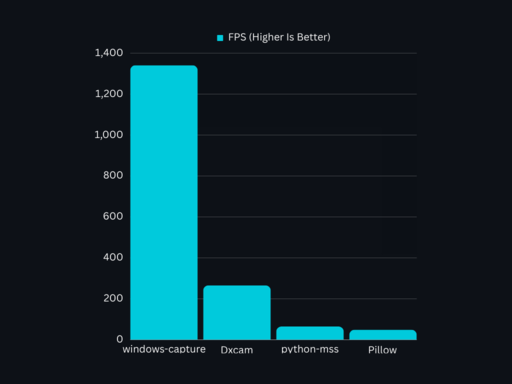
Benchmark
Windows Capture Is The Fastest Python Screen Capture Library
Contributing
Contributions are welcome! If you find a bug or want to add new features to the library, please open an issue or submit a pull request.
License
This project is licensed under the MIT License.
1 maintainer

Metadata
1 maintainer
Release files for windows-capture-interpreter 1.5.1
For a detailed explanation of source distributions (sdists) and built distributions (wheels), please see the package formats documentation.
Built distribution (wheel)
| File | Interpreter | ABI | Platform | Reset |
|---|---|---|---|---|
| windows_capture_interpreter-1.5.1-cp39-abi3-win_amd64.whl | CPython 3.9 | abi3 | Windows x86-64 | Details |
Release files / windows_capture_interpreter-1.5.1-cp39-abi3-win_amd64.whl
| Download URL | windows_capture_interpreter-1.5.1-cp39-abi3-win_amd64.whl |
|---|---|
| Size | 215.6 kB |
| Tags | CPython 3.9 Windows x86-64 abi3 |
|
SHA-256 checksum How to use checksums |
b8b897b016181d495f907320c7eece57d92e5033c06cfb89a08e7d01ecbb0fed
|
|
BLAKE2b-256 checksum How to use checksums |
a2cd96b3f51d910225f964c8079330446dc632bc4b2a98e5a5d4acd3cc465a70
|
| Upload date | |
|
Uploaded using Trusted Publishing? What is trusted publishing? |
No |
| Uploaded via |
uv/0.9.21 {"installer":{"name":"uv","version":"0.9.21","subcommand":["publish"]},"python":null,"implementation":{"name":null,"version":null},"distro":null,"system":{"name":null,"release":null},"cpu":null,"openssl_version":null,"setuptools_version":null,"rustc_version":null,"ci":null}
|
Security for windows-capture-interpreter 1.5.1
Provenance
Provenance describes where a file came from. On PyPI, provenance is shared via attestations, which provide a verifiable record of the build or publishing details. View details, limitations and caveats.
No provenance found
None of the files in this release were uploaded with provenance metadata.
A note on package security
PyPI is a repository for distributing packages, not a service for auditing them. While third-party security researchers and our staff do their best to detect and remove malicious packages, PyPI cannot guarantee the quality, security or suitability of any given package.
To learn more about protecting yourself from malicious actors, visit our package security documentation.













