
Windows Capture 


Windows Capture is a highly efficient Rust and Python library that enables you to capture the screen using the Graphics Capture API effortlessly. This library allows you to easily capture the screen of your Windows-based computer and use it for various purposes, such as creating instructional videos, taking screenshots, or recording your gameplay. With its intuitive interface and robust functionality, Windows Capture is an excellent choice for anyone looking for a reliable, easy-to-use screen-capturing solution.
Note this README.md is for Python library Rust library can be found here
Features
- Updates frames only when required
- High performance
- Easy to use
- Uses the latest screen capture API
- Optional DXGI Desktop Duplication capture pipeline
Installation
Install from PyPI:
pip install windows-capture
Usage
Graphics Capture API
from windows_capture import WindowsCapture, Frame, InternalCaptureControl

# Any error from on_closed and on_frame_arrived will surface here
capture = WindowsCapture(
    cursor_capture=None,
    draw_border=None,
    monitor_index=None,
    window_name=None,
)


# Called every time a new frame is available
@capture.event
def on_frame_arrived(frame: Frame, capture_control: InternalCaptureControl):
    print("New frame arrived")

    # Save the frame as an image to the specified path
    frame.save_as_image("image.png")

    # Gracefully stop the capture thread
    capture_control.stop()


# Called when the capture item closes (usually when the window closes).
# The capture session will end after this function returns.
@capture.event
def on_closed():
    print("Capture session closed")


capture.start()
minimum_update_interval optionally requests a minimum interval between eligible Graphics Capture
updates, in milliseconds. It limits the update rate but does not guarantee a constant frame rate;
None leaves the Windows setting unchanged.
DXGI Desktop Duplication API
from windows_capture import DxgiDuplicationSession

# Create a duplication session for the primary monitor
session = DxgiDuplicationSession()

# Grab a frame (returns None if no frame is available within the timeout)
frame = session.acquire_frame(timeout_ms=33)
if frame is not None:
    image = frame.to_numpy()  # shape: (height, width, 4)

    # Save as PNG using OpenCV
    frame.save_as_image("duplication.png")

# Recreate the session if DXGI reports access loss
try:
    session.acquire_frame()
except RuntimeError:
    session.recreate()
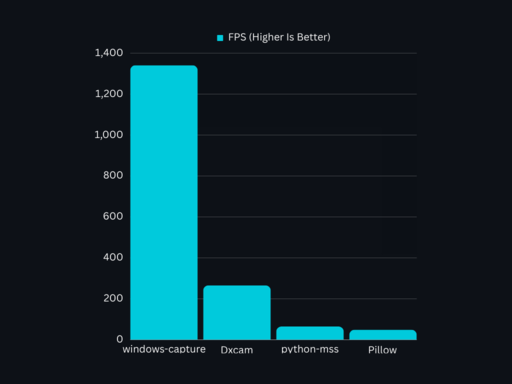
Benchmark
Windows Capture Is The Fastest Python Screen Capture Library
Contributing
Contributions are welcome! If you find a bug or want to add new features to the library, please open an issue or submit a pull request.
License
This project is licensed under the MIT License.
1 maintainer

Download files
Download the file for your platform. If you're not sure which to choose, learn more about installing packages.
Source Distribution
Built Distribution
Filter files by name, interpreter, ABI, and platform.
If you're not sure about the file name format, learn more about wheel file names.
Copy a direct link to the current filters
File details
Details for the file windows_capture-2.0.1.tar.gz.
File metadata
- Download URL: windows_capture-2.0.1.tar.gz
- Upload date:
- Size: 148.4 kB
- Tags: Source
- Uploaded using Trusted Publishing? No
- Uploaded via:
maturin/1.14.1
File hashes
| Algorithm | Hash digest | |
|---|---|---|
| SHA256 |
2c2b394f4587b067cf520456f7f64c11b00380851b077a4d061fe5356a9a7645
|
|
| MD5 |
7da790670d0b8333ce69e174c54fe027
|
|
| BLAKE2b-256 |
8500326a51bc2b27bc53e2a3e6d0c8f320af7e65f8315fb0d1d149699ca45995
|
File details
Details for the file windows_capture-2.0.1-cp39-abi3-win_amd64.whl.
File metadata
- Download URL: windows_capture-2.0.1-cp39-abi3-win_amd64.whl
- Upload date:
- Size: 229.1 kB
- Tags: CPython 3.9+, Windows x86-64
- Uploaded using Trusted Publishing? No
- Uploaded via:
maturin/1.14.1
File hashes
| Algorithm | Hash digest | |
|---|---|---|
| SHA256 |
209c2318e2168802b9afd1005e99499639e8835e71a1e188a3ddc77c7ccc3f04
|
|
| MD5 |
23ed9d04aa129fecfb19fe65054bab0a
|
|
| BLAKE2b-256 |
6c02cdb3c75e60863e94fbd53c2b3607e61af5d464a4f9301e45897fcb08dbfa
|














