
Windows Context Menus
Create native Windows Explorer context menus declaratively in Python
Quick example
Its common to download an image file, just for it to be some .jfif nonsense.
Or maybe you have some .jpg but you need a .ico for uploading icons?
And now you need to upload them to some thirdparty site that converts it to .jpg or .ico for you.
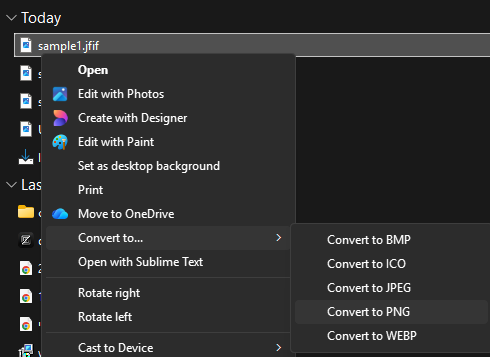
What if you could do that natively from your Windows Explorer?
Provided imagemagick is installed:
# /// script
# requires-python = ">=3.12"
# dependencies = [
#     "windows_context_menus",
# ]
#
# [tool.uv.sources]
# windows_context_menus = { git = "https://github.com/orishamir/WindowsContextMenus", tag = "0.1.3" }
# ///
"""Adds a context menu for converting images from and to formats."""

from windows_context_menus import CommandPlaceholder, Condition, ContextMenu, ContextMenuBinding, ExplorerItemType, RegistryHandler

CONVERT_IMAGE_COMMAND = f'cmd.exe /c magick "{CommandPlaceholder.FIRST_SELECTED}" "{CommandPlaceholder.FIRST_SELECTED}".{{}}'

convert_to_png_entry = ContextMenu(
    display_text="Convert to PNG",
    command=CONVERT_IMAGE_COMMAND.format("png"),
    condition=Condition.model_validate({"extension": {"ne": ".png"}}),
)

convert_to_jpeg_entry = ContextMenu(
    display_text=("Convert to JPEG"),
    command=CONVERT_IMAGE_COMMAND.format("jpeg"),
    condition=Condition.model_validate({"extension": {"ne": ".jpeg"}}),
)

convert_to_ico_entry = ContextMenu(
    display_text=("Convert to ICO"),
    command=CONVERT_IMAGE_COMMAND.format("ico"),
    condition=Condition.model_validate({"extension": {"ne": ".ico"}}),
)

convert_to_bmp_entry = ContextMenu(
    display_text=("Convert to BMP"),
    command=CONVERT_IMAGE_COMMAND.format("bmp"),
    condition=Condition.model_validate({"extension": {"ne": ".bmp"}}),
)

main: ContextMenu = ContextMenu(
    display_text=("Convert to..."),
    selection_limit=1,  # This menu supports only 1 file at a time.
    condition=Condition.model_validate(
        {
            "extension": {
                "in": [
                    ".png",
                    ".jpeg",
                    ".jpg",
                    ".bmp",
                    ".ico",
                    ".webp",
                    ".avif",
                    ".jfif",
                ],
            },
        },
    ),
    submenus=[convert_to_png_entry, convert_to_ico_entry, convert_to_jpeg_entry, convert_to_bmp_entry],
)

if __name__ == "__main__":
    RegistryHandler().apply_context_menu(
        main,
        bindings=[
            ContextMenuBinding(
                ExplorerItemType.ALL_FILES,
            ),
        ],
    )
Produces:
For a more complicated example, see Documentation
1 maintainer

Metadata
1 maintainer
Release files for windows-context-menus 0.1.4
For a detailed explanation of source distributions (sdists) and built distributions (wheels), please see the package formats documentation.
Source distribution (sdist)
| File | Size | Uploaded | Provenance | Actions |
|---|---|---|---|---|
| windows_context_menus-0.1.4.tar.gz | 160.6 kB | With provenance | Details for windows_context_menus-0.1.4.tar.gz |
Built distribution (wheel)
| File | Interpreter | ABI | Platform | Actions Reset |
|---|---|---|---|---|
| windows_context_menus-0.1.4-py3-none-any.whl | Python 3 | none | any | Details for windows_context_menus-0.1.4-py3-none-any.whl |
Total release size: 198.8 kB
Release files / windows_context_menus-0.1.4.tar.gz
| Download URL | windows_context_menus-0.1.4.tar.gz |
|---|---|
| Size | 160.6 kB |
| Tags | Source |
|
SHA-256 checksum How to use checksums |
61584517773ea2b6bf221156ad0a0c4717776d977db14bab9b0e5aa90ce2b1d9
|
|
BLAKE2b-256 checksum How to use checksums |
a686af8fa5059fa5b8f522736bc703a90f9e5420962ad8372bc42f4ed41b80b6
|
| Upload date | |
|
Uploaded using Trusted Publishing? What is trusted publishing? |
Yes |
| Uploaded via |
twine/7.0.0 CPython/3.13.14
|
Provenance
Provenance describes where a file came from. On PyPI, provenance is shared via attestations, which provide a verifiable record of the build or publishing details. View details, limitations and caveats.


PyPI Publish Attestation
PyPI verified that this artifact, at this checksum, originated from the publisher listed below.
Signed by GitHub Actions, verified by PyPI on Aug 15, 2026.
Transparency logRelease files / windows_context_menus-0.1.4-py3-none-any.whl
| Download URL | windows_context_menus-0.1.4-py3-none-any.whl |
|---|---|
| Size | 38.3 kB |
| Tags | Python 3 |
|
SHA-256 checksum How to use checksums |
429616d8468f72bbb028d60265180d68c239cbeec1754ab634e95a278bc879f6
|
|
BLAKE2b-256 checksum How to use checksums |
d83a1e9df92e9d43bcbdbc74c12bdc819278ff1401dc1f569cf27c819f49fde8
|
| Upload date | |
|
Uploaded using Trusted Publishing? What is trusted publishing? |
Yes |
| Uploaded via |
twine/7.0.0 CPython/3.13.14
|
Provenance
Provenance describes where a file came from. On PyPI, provenance is shared via attestations, which provide a verifiable record of the build or publishing details. View details, limitations and caveats.
PyPI Publish Attestation
PyPI verified that this artifact, at this checksum, originated from the publisher listed below.
Signed by GitHub Actions, verified by PyPI on Aug 15, 2026.
Transparency logSecurity for windows-context-menus 0.1.4
Provenance
Provenance describes where a file came from. On PyPI, provenance is shared via attestations, which provide a verifiable record of the build or publishing details. View details, limitations and caveats.
Full provenance
Both files in this release have been uploaded with provenance metadata.
Attestation for windows_context_menus-0.1.4.tar.gz
PyPI Publish Attestation
PyPI verified that this artifact, at this checksum, originated from the publisher listed below.
Signed by GitHub Actions, verified by PyPI on Aug 15, 2026.
Transparency logA note on package security
PyPI is a repository for distributing packages, not a service for auditing them. While third-party security researchers and our staff do their best to detect and remove malicious packages, PyPI cannot guarantee the quality, security or suitability of any given package.
To learn more about protecting yourself from malicious actors, visit our package security documentation.














