
🪟 Windows-MCP






Windows MCP is a lightweight, open-source project that enables seamless integration between AI agents and the Windows operating system. Acting as an MCP server bridges the gap between LLMs and the Windows operating system, allowing agents to perform tasks such as file navigation, application control, UI interaction, QA testing, and more.
🎥 Demos
https://github.com/user-attachments/assets/d0e7ed1d-6189-4de6-838a-5ef8e1cad54e
https://github.com/user-attachments/assets/d2b372dc-8d00-4d71-9677-4c64f5987485
✨ Key Features
-
Seamless Windows Integration
Interacts natively with Windows UI elements, opens apps, controls windows, simulates user input, and more. -
Use Any LLM (Vision Optional) Unlike many automation tools, Windows MCP doesn't rely on any traditional computer vision techniques or specific fine-tuned models; it works with any LLMs, reducing complexity and setup time.
-
Rich Toolset for UI Automation 25 tools for keyboard, mouse, clipboard, shell, window management, element search, UI state capture, notifications, process management, OCR, and audio control.
-
Command Security Built-in protection against dangerous commands (format, shutdown, rm, etc.), injection attacks (blocked operators and encoded command arguments), working directory restrictions, and command length limits.
-
Lightweight & Open-Source Minimal dependencies and easy setup with full source code available under MIT license.
-
Customizable & Extendable
Easily adapt or extend tools to suit your unique automation or AI integration needs. -
Real-Time Interaction
Typical latency between actions (e.g., from one mouse click to the next) ranges from 1.5 to 2.3 secs, and may slightly vary based on the number of active applications and system load, also the inferencing speed of the llm.
Supported Operating Systems
- Windows 7
- Windows 8, 8.1
- Windows 10
- Windows 11
Installation
Prerequisites
- Python 3.13+
- Anthropic Claude Desktop app or other MCP Clients
- UV (Package Manager) from Astra, install with
pip install uv - DXT (Desktop Extension) from Antropic, install with
npm install -g @anthropic-ai/dxt
🏁 Getting Started
PyPI (Any MCP Client)
Install from PyPI:
pip install windows-mcp-server
Then configure your MCP client to run windows-mcp as the command.
Claude Code
claude mcp add windows-mcp -- windows-mcp
Gemini CLI
-
Navigate to
%USERPROFILE%/.geminiin File Explorer and opensettings.json. -
Add the
windows-mcpconfig in thesettings.jsonand save it.
{
  "theme": "Default",
  "selectedAuthType": "oauth-personal",
//MCP Server Config
  "mcpServers": {
    "windows-mcp": {
      "command": "uv",
      "args": [
        "--directory",
        "<path to the windows-mcp directory>",
        "run",
        "main.py"
      ]
    }
  }
}
- Rerun Gemini CLI in terminal. Enjoy 🥳
Claude Desktop
- Clone the repository.
git clone https://github.com/CursorTouch/Windows-MCP.git
cd Windows-MCP
- Build Desktop Extension
DXT:
npx @anthropic-ai/dxt pack
- Open Claude Desktop:
Go to Claude Desktop: Settings->Extensions->Install Extension (locate the .dxt file)-> Install
Finally Enjoy 🥳.
For additional Claude Desktop integration troubleshooting, see the MCP documentation. The documentation includes helpful tips for checking logs and resolving common issues.
🛠️MCP Tools
Claude can access the following tools to interact with Windows:
| Tool | Description |
|---|---|
State-Tool |
Combined snapshot of active apps, interactive/textual/scrollable elements, and optional annotated screenshot |
Click-Tool |
Click on the screen at given coordinates (single, double, or triple click) |
Type-Tool |
Type text on an element (optionally clears existing text) |
Clipboard-Tool |
Copy or paste using the system clipboard |
Scroll-Tool |
Scroll vertically or horizontally on the window or specific regions |
Drag-Tool |
Drag from one point to another |
Move-Tool |
Move mouse pointer |
Shortcut-Tool |
Press keyboard shortcuts (Ctrl+C, Alt+Tab, etc.) |
Key-Tool |
Press a single key |
Wait-Tool |
Pause for a defined duration |
Launch-Tool |
Launch an application from the start menu |
Switch-Tool |
Switch to a running application |
Powershell-Tool |
Execute PowerShell commands with security validation and optional working directory |
Command-History-Tool |
Retrieve history of executed commands with timestamps and exit codes |
Screenshot-Tool |
Take a screenshot of the full screen or a specific region |
Window-Tool |
Minimize, maximize, restore, or close windows by name |
Find-Element-Tool |
Search UI elements by text and return coordinates |
Wait-For-Tool |
Poll until a UI element or text appears, with timeout |
Scrape-Tool |
Scrape a webpage for information (with SSRF protection) |
Notification-Tool |
Show a Windows toast notification |
Process-Tool |
List running processes or kill by name/PID |
File-Dialog-Tool |
Type a path into an open/save file dialog and confirm |
Multi-Monitor-Tool |
Get display count, resolutions, and positions |
OCR-Tool |
Extract text from screen or region using Windows built-in OCR |
Audio-Tool |
Get/set system volume, mute/unmute |
System-Info-Tool |
Get comprehensive system info (OS, CPU, RAM, disks, GPU, network, battery, top processes) |
📡 MCP Resources
| Resource URI | Description |
|---|---|
windows-mcp://current-directory |
Server's current working directory |
windows-mcp://security-config |
Active security rules (blocked commands, arguments, operators, allowed paths) |
🔒 Command Security
The Powershell-Tool includes multiple layers of protection:
- Blocked commands:
format,shutdown,rm,del,regedit,net, and more - Blocked arguments:
-enc,-encodedcommand,--exec, and other injection-risk flags - Blocked operators:
;and`(backtick) to prevent command chaining and injection - Path restriction:
workingDirlimited to user home directory and server working directory - Length limit: Commands capped at 2000 characters
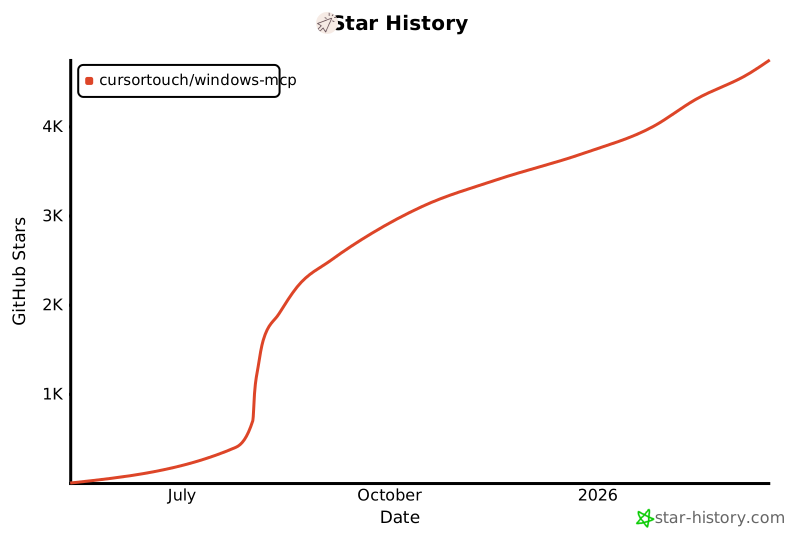
Star History
⚠️Caution
This MCP interacts directly with your Windows operating system to perform actions. Use with caution and avoid deploying it in environments where such risks cannot be tolerated.
📝 Limitations
- Selecting specific sections of the text in a paragraph, as the MCP is relying on a11y tree. (⌛ Working on it.)
Type-Toolis meant for typing text, not programming in IDE because of it types program as a whole in a file. (⌛ Working on it.)
🪪License
This project is licensed under the MIT License - see the LICENSE file for details.
🤝Contributing
Contributions are welcome! Please see CONTRIBUTING for setup instructions and development guidelines.
Made with ❤️ by Jeomon George
Citation
@software{
  author       = {George, Jeomon},
  title        = {Windows-MCP: Lightweight open-source project for integrating LLM agents with Windows},
  year         = {2024},
  publisher    = {GitHub},
  url={https://github.com/CursorTouch/Windows-MCP}
}
1 maintainer

Metadata
1 maintainer
Release files for windows-mcp-server 0.5.3
For a detailed explanation of source distributions (sdists) and built distributions (wheels), please see the package formats documentation.
Source distribution (sdist)
| File | Size | Uploaded | |
|---|---|---|---|
| windows_mcp_server-0.5.3.tar.gz | 39.9 kB | Details |
Built distribution (wheel)
| File | Interpreter | ABI | Platform | Reset |
|---|---|---|---|---|
| windows_mcp_server-0.5.3-py3-none-any.whl | Python 3 | none | any | Details |
Total release size: 76.1 kB
Release files / windows_mcp_server-0.5.3.tar.gz
| Download URL | windows_mcp_server-0.5.3.tar.gz |
|---|---|
| Size | 39.9 kB |
| Tags | Source |
|
SHA-256 checksum How to use checksums |
4b82ba2ccbfde702da79ea08b9ba1c925ff45f929208f5d614256eaafa6228f4
|
|
BLAKE2b-256 checksum How to use checksums |
e36145ad17bd23eec7704eb4edd3d588d3071ead4fa1f831d1eb51d32943ba8c
|
| Upload date | |
|
Uploaded using Trusted Publishing? What is trusted publishing? |
No |
| Uploaded via |
twine/6.2.0 CPython/3.14.3
|
Release files / windows_mcp_server-0.5.3-py3-none-any.whl
| Download URL | windows_mcp_server-0.5.3-py3-none-any.whl |
|---|---|
| Size | 36.2 kB |
| Tags | Python 3 |
|
SHA-256 checksum How to use checksums |
2b6da3fd468f2ac0b3d7c4b9759c6cc5108fd5d6d8940093c43dd200d3c0e462
|
|
BLAKE2b-256 checksum How to use checksums |
a52a135f0770ab15ec916698936b02af8b34e1fe3f251821c350503233f7f87b
|
| Upload date | |
|
Uploaded using Trusted Publishing? What is trusted publishing? |
No |
| Uploaded via |
twine/6.2.0 CPython/3.14.3
|














