
Wingbox: Code Graph and Blast Radius Analysis for AI Coding Agents
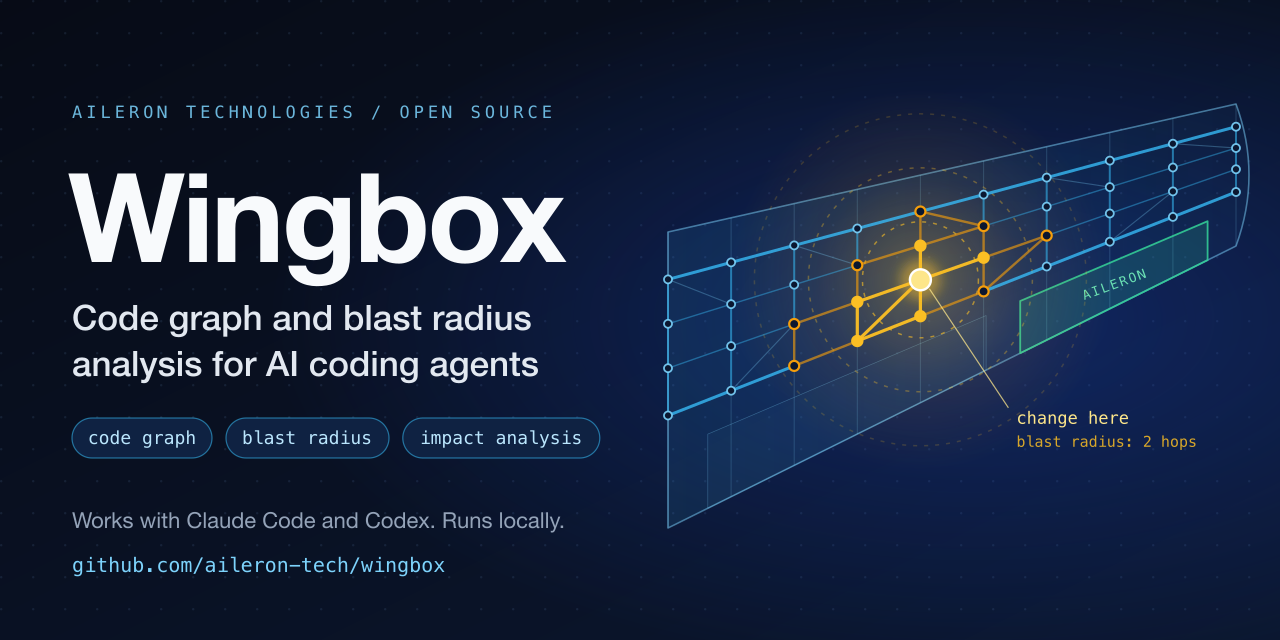
Wingbox builds a local code graph of your repository so that AI coding agents and developers can see dependencies, call flows, architecture boundaries and the blast radius of a change before editing code. It works as an agent skill in Claude Code and Codex and supports Python, TypeScript, Rust, C#, Java, Go, Ruby, Rails, Free Pascal, and Lazarus.
Install the agent skill:
npx skills add aileron-tech/wingbox| skills.shInstall the command:
pipx install wingbox| PyPIRelease notes: Changelog
Note: Wingbox was formerly published as
codespaces. The skill, the scripts and the generated files were renamed on 2026-11-15; see the Changelog for the old and new names.
Understand a large codebase before you change it. Wingbox is an architecture-aware code search and impact analysis tool for Python, TypeScript, TSX, Rust, C#, Java, Go, Ruby, Ruby on Rails, Free Pascal, and Lazarus repositories. It helps developers and AI coding agents find the right module, trace dependencies, measure change impact, and read only the source files that matter.
Use it for codebase architecture discovery, dependency graph search, blast-radius analysis, call-flow tracing, monorepo navigation, and safer AI-assisted coding.
Everything runs on your machine. The code graph is built by deterministic static parsing: no LLM call, no embeddings, no vector database, and no network access to build or query it.
See it in action
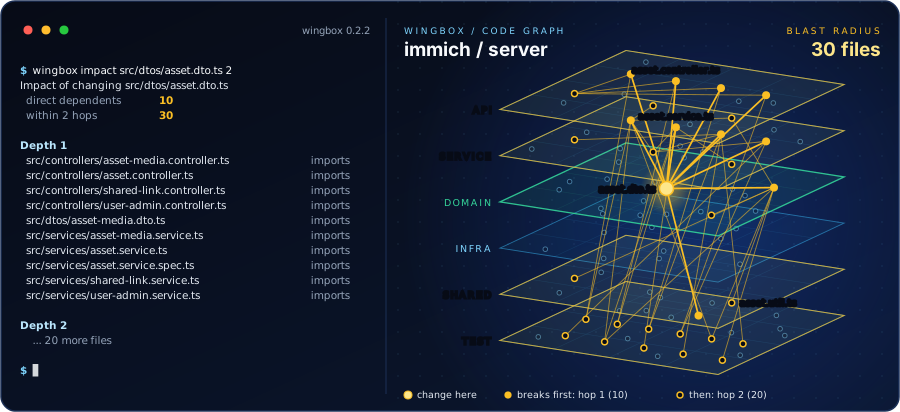
Once the graph is built, an agent asks what a change breaks before it edits
anything. Real output, Wingbox 0.2.0 on the server of
immich (commit e5d6eb7, 707 modules):
$ wingbox impact src/dtos/asset.dto.ts 2
Impact of changing src/dtos/asset.dto.ts
  direct dependents   10
  within 2 hops       30

Depth 1
  src/controllers/asset-media.controller.ts   imports
  src/controllers/asset.controller.ts         imports
  src/controllers/shared-link.controller.ts   imports
  src/controllers/user-admin.controller.ts    imports
  src/dtos/asset-media.dto.ts                 imports
  src/services/asset-media.service.ts         imports
  src/services/asset.service.ts               imports
  src/services/asset.service.spec.ts          imports
  src/services/shared-link.service.ts         imports
  src/services/user-admin.service.ts          imports

Depth 2
  src/controllers/index.ts                                 imports
  src/controllers/asset-media.controller.spec.ts           imports
  src/controllers/asset.controller.spec.ts                 imports
  ...
The answer is 30 files in about 600 tokens, and it is exact: a TypeScript import resolver written separately from Wingbox finds the same 3,795 dependencies between the 707 modules, none extra and none missing.
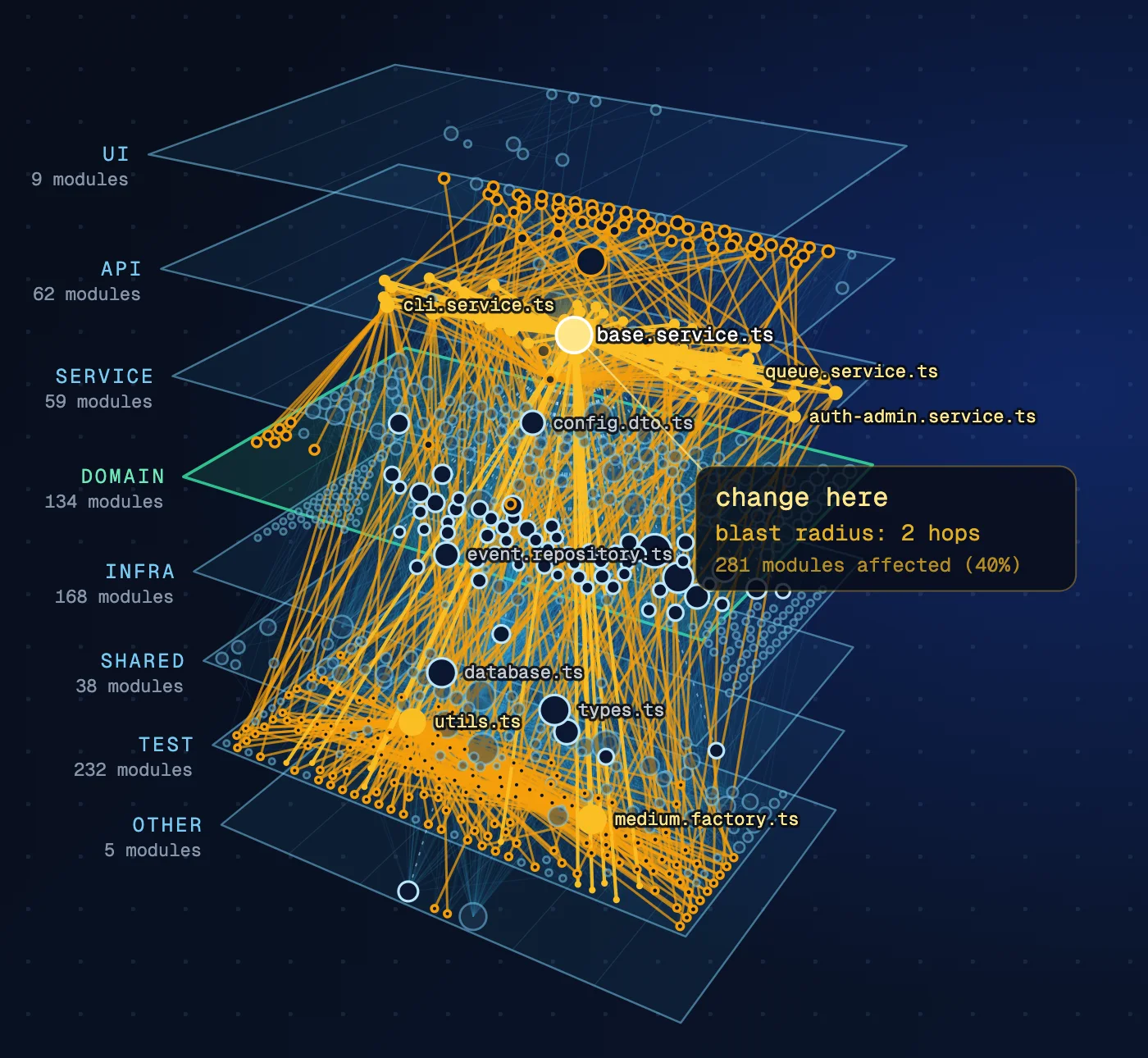
wingbox build also writes wingbox-out/map.html. Its layers view stacks the
architecture in 3D; click a file and its blast radius lights up across the
layers:
| One DTO changes: 30 files within two hops | The base service changes: 281 of 707 modules |
|---|---|
 |
 |
More pictures and a short walk-through: aileron-tech.fr/wingbox.
What can Wingbox answer?
- Where is authentication, billing, upload, or another feature implemented?
- Which modules depend on this service, class, function, or type?
- What could break if I change this file?
- Which two or three files should I read before fixing a bug?
- How does a request or data value move through the system?
- Does this dependency cross an architecture boundary?
- Which Rails models, services, jobs, mailers, concerns, and specs are affected?
- Can you draw a call-flow, data-flow, or sequence diagram from the code?
Instead of searching a repository one text match at a time, Wingbox turns code into a queryable code graph of modules, entities, imports, references, call relationships, architecture layers, and infrastructure connections.
What is a code graph?
A code graph describes a codebase as facts instead of text. Modules, classes,
functions and types are nodes; imports, references, data flows, calls and
architecture layers are edges. Wingbox writes the graph to .code_graph.sexp
as plain S-expression facts, so the bundled query tool and ordinary text search
can both read it.
What is blast radius analysis?
The blast radius of a change is everything that depends, directly or
transitively, on the code you are about to edit. Wingbox computes it from the
reverse dependencies in the code graph. impact path/to/file prints the
dependents by depth and the files to read first; rdeps and boundary give
the same facts as a tree and as a change boundary.
$ python3 scripts/code_graph_search.py impact scripts/lang/treesitter.py

Impact of changing scripts/lang/treesitter.py
  direct dependents   4
  within 2 hops       11

Depth 1
  scripts/lang/csharp/parser.py   imports
  scripts/lang/go/parser.py       imports
  scripts/lang/java/parser.py     imports
  scripts/lang/ruby/parser.py     imports
...
The text form is for people. Agents add --sexp to get the same facts as
compact S-expressions.
Measured: Wingbox, Graphify and plain search
Five "which files depend on this file" questions in four public repositories (TypeScript, Rust, Python), answered by Claude Code in three setups, 15 trials per setup:
| Setup | Answer accuracy (F1) | Tokens per answer | Cost per answer |
|---|---|---|---|
| Built-in search only | 0.999 | 59,367 | 0.075 USD |
| Search plus Wingbox 0.2.0 | 1.000 | 25,598 | 0.016 USD |
| Search plus Graphify 0.9.110 | 0.997 | 109,071 | 0.095 USD |
Without an agent, wingbox impact names the exact list of dependent files in
5 of the 5 questions; graphify affected in 1 of 5. Checked against every
import statement of FastAPI (1,801 file pairs, the same pairs the import graph
of grimp gives), Wingbox has no wrong and no missing dependency. Building the
graph of FastAPI (1,227 files) from a fresh checkout takes Wingbox 2.2 s and
Graphify 17.9 s on a GitHub-hosted runner.
The scripts, the reference lists and every result file are in benchmarks/graphify. One command reproduces the tests that need no model.
Quick start for AI coding agents
Install the skill:
npx skills add aileron-tech/wingbox
Then ask your agent a natural question:
Use the Wingbox skill before reading source.
Find where file uploads are handled, analyze that module, show its dependencies
and blast radius, then list only the boundary files needed for the change.
Wingbox works with Codex, Claude Code, and other clients that support Agent Skills.
Quick start from the command line
Install the wingbox command (Python 3.11 or newer, macOS or Linux):
pipx install wingbox
Or run it without installing:
uvx wingbox --help
Build the code graph of a project, then ask what a change will break:
cd /path/to/project
wingbox build .
wingbox impact path/to/file.py
wingbox quick "file upload"
wingbox build [PATH] accepts the builder options described below, and every
query command in Common code searches is available as
wingbox <command>. The command installs the parsers for all supported
languages and finds .code_graph.sexp in the current directory or its parents.
The report and the map
wingbox build writes three things into the project:
| File | For whom | What it is |
|---|---|---|
.code_graph.sexp |
AI coding agents | The code graph in a compact form that the query commands read |
wingbox-out/REPORT.md |
People | Key findings, the most depended-on files, architecture layers, boundary violations, where to start reading |
wingbox-out/map.html |
People | An interactive map of the code graph: one file, opens in a browser, works without a network connection |
On the map, click a file to see its blast radius: the files that depend on it
move onto rings, one ring per hop. The layers view stacks the architecture
layers as planes in 3D and can be turned with the mouse. A link such as
map.html#select=src/app.ts opens the map on that file.
Both files are rewritten on every build. Add wingbox-out/ to .gitignore
unless you want them in the repository.
Run in Docker, with nothing installed
git clone https://github.com/aileron-tech/wingbox
docker build -t wingbox wingbox

cd /path/to/project
docker run --rm --network none -v "$PWD":/repo wingbox
docker run --rm --network none -v "$PWD":/repo wingbox impact path/to/file.py
The first docker run builds the code graph, the report and the map of the
mounted project; any other Wingbox command goes after the image name. The
container needs no network, and --network none shows it: nothing leaves the
machine. On Linux add --user "$(id -u):$(id -g)" so that the written files
belong to you.
Running the scripts from a clone
Clone the repository:
git clone https://github.com/aileron-tech/wingbox.git
cd wingbox
Build the code graph for an explicit project directory:
python3 scripts/build_code_graph.py --root /absolute/path/to/project
Exclude tracked source snapshots or generated fixture trees by directory name. The option is repeatable and applies at any depth:
python3 scripts/build_code_graph.py \
  --root /absolute/path/to/project \
  --exclude-dir review-bundles \
  --exclude-dir generated-fixtures
When the target is inside a Git worktree, the builder also honors repository
ignore rules through Git itself. This applies to source files and language
configuration such as tsconfig.json, package.json, Cargo.toml, go.mod,
and LSP project discovery. Tracked snapshot paths that still match
.gitignore are excluded as well.
Parser packages are loaded only for languages found in that project. Python needs no extra parser package. If another detected language is not installed, the builder stops before publishing and prints its exact install command, for example:
python3 -m pip install -r requirements/typescript.txt
python3 -m pip install -r requirements/csharp.txt
python3 -m pip install -r requirements/ruby.txt
Install only the files for languages you use, then run the same build command
again. requirements.txt contains the separate infrastructure-topology
dependency.
Run a relevant search and get the first matching module with its full context:
python3 scripts/code_graph_search.py \
  --map /absolute/path/to/project/.code_graph.sexp \
  --root /absolute/path/to/project \
  quick "file upload"
The code graph is written to .code_graph.sexp. Wingbox does not modify the
source files it analyzes.
Common code searches
| Goal | Command |
|---|---|
| Find and analyze a feature | quick "payments" |
| Search for a module | search "payment.*service" |
| See full module context | analyze path/to/module |
| Find files needed for a change | boundary path/to/module --files-only |
| Trace dependencies | deps path/to/module 2 |
| See what a change will break | impact path/to/file.py |
| Measure blast radius as a tree | rdeps path/to/module 2 |
| Find a class, module, interface, enum, or type | find_type OrderService |
| Find a function or method | find_function createOrder |
| Find callers | find_callers createOrder 2 |
| Trace a call path | find_callchain handleRequest createOrder 5 |
| Search inside function bodies | grep_functions "validate.*input" |
| Check architecture boundaries | boundaries all |
| Check naming conventions | invariants all |
| Inspect changed functions | diff_functions HEAD~1 |
analyze and impact always print the complete counts and list at most 200
dependent files, nearest first; add --all for every file. boundaries reports
an import of TypeScript types only apart from the violations: the compiler
erases it, but a change of the type still reaches the importing file.
Pass the same --map and --root options shown in the quick start when the map
is outside the current directory.
Supported languages and projects
| Language | What is indexed |
|---|---|
| Python | Modules, imports, classes, functions, methods, inheritance, and references |
| TypeScript, TSX and JavaScript | Imports, re-exports, classes, interfaces, functions, types, decorators, aliases, and references |
| Rust | Cargo crates, modules, use dependencies, structs, traits, enums, functions, implementations, and methods |
| C# | Namespaces, types, interfaces, records, enums, methods, attributes, inheritance, and local type dependencies |
| Java | Packages, imports, classes, interfaces, records, enums, methods, annotations, inheritance, and local type dependencies |
| Go | Modules, packages, imports, structs, interfaces, functions, constants, variables, receiver methods, and local package dependencies |
| Ruby and Rails | Ruby classes, modules, instance and singleton methods, inheritance, requires, Zeitwerk constants, concerns, associations, callbacks, jobs, mailers, and impacted specs |
| Free Pascal and Lazarus | Units, programs, uses/includes, classes, records, interfaces, inheritance, methods, and routines |
Wingbox is designed for single repositories and monorepos. It understands Python project roots, TypeScript configuration and package aliases, Cargo package names and local Rust crate dependencies, .NET solutions and projects, Maven and Gradle projects, Go modules and workspaces, and Rails application/autoload roots with project acronyms.
Pascal dependencies resolve by case-insensitive unit identity and explicit
UnitName in 'path.pas' paths, then by a unique same-directory unit. Other
ambiguous unit names remain unlinked, compiler conditionals are indexed
conservatively, and Pascal does not use LSP enrichment. Automatic Pascal copies
under Lazarus backup/ directories are excluded without excluding other
supported languages stored under the same path.
It can also map infrastructure relationships from Kustomize, Helm, and Terraform.
Ruby and Rails dependency search
Rails code often depends on constants without an explicit require. Wingbox
builds a project-local constant index and follows conservative Zeitwerk naming
rules, so changing a shared model, concern, service, job, or mailer can reveal
its likely callers and affected specs.
The default Ruby map does not boot Rails. Ambiguous reopened constants remain unlinked, polymorphic associations stay open, and external or dynamic Ruby calls are not guessed. This keeps blast-radius results useful without executing application code.
A simple workflow
- Build the map for the exact repository you want to understand.
- Search for a feature, type, function, or module instead of guessing a path.
- Analyze the returned module to see dependencies, reverse dependencies, layers, references, and the minimal boundary files.
- Read only those files and make the change.
- Rebuild the map after structural changes and check boundaries again.
This keeps code exploration focused and gives AI coding agents less irrelevant context, clearer ownership, and better evidence for implementation decisions.
Call graphs and diagrams
The default static analysis builds import, reference, data-flow, and architecture
edges. Add --lsp when supported language servers are installed to enrich the map
with precise call-site information:
python3 scripts/build_code_graph.py \
  --root /absolute/path/to/project \
  --lsp
You can then ask an agent to render Mermaid diagrams from the graph:
Use Wingbox to trace the file upload flow and render a Mermaid sequence diagram.
Base every participant and edge on the code-graph facts.
Accuracy and limits
Wingbox is an architecture and impact-analysis tool, not a compiler replacement. The default map comes from deterministic static parsing. Optional LSP enrichment adds call hierarchy and reference detail when the relevant language server is available.
For generated imports, runtime dependency injection, reflection, or framework behavior that is not explicit in source, verify the result against the running application or the owning framework.
FAQ
Does Wingbox send my code anywhere?
No. The code graph is built and queried locally by deterministic static parsing. Building and querying need no LLM, no embeddings, no vector database and no network access.
Which AI coding agents does Wingbox work with?
Codex, Claude Code, and other clients that support Agent Skills. The scripts can also be run directly from the command line.
How is a code graph different from text search with grep or ripgrep?
Text search finds lines that match a pattern. A code graph answers structural questions: which modules depend on this one, what a change can break, which architecture boundary a dependency crosses, and which few files are worth reading first.
Does Wingbox replace a compiler or a language server?
No. It is an architecture and impact-analysis tool. Optional LSP enrichment adds call hierarchy and reference detail; behavior that is not explicit in source, such as generated imports, runtime dependency injection or reflection, must be verified against the running application.
Which languages are supported?
Python, TypeScript, TSX and JavaScript, Rust, C#, Java, Go, Ruby and Ruby on Rails, Free Pascal and Lazarus, plus infrastructure relationships from Kustomize, Helm and Terraform.
Project resources
- Skill workflow and complete command reference
- S-expression map format
- Composable query language
- Changelog
- Completion log
License
MIT
1 maintainer

Metadata
1 maintainer
Release files for wingbox 0.2.1
For a detailed explanation of source distributions (sdists) and built distributions (wheels), please see the package formats documentation.
Source distribution (sdist)
| File | Size | Uploaded | Provenance | Actions |
|---|---|---|---|---|
| wingbox-0.2.1.tar.gz | 240.4 kB | Without provenance | Details for wingbox-0.2.1.tar.gz |
Built distribution (wheel)
| File | Interpreter | ABI | Platform | Actions Reset |
|---|---|---|---|---|
| wingbox-0.2.1-py3-none-any.whl | Python 3 | none | any | Details for wingbox-0.2.1-py3-none-any.whl |
Total release size: 501.7 kB
Release files / wingbox-0.2.1.tar.gz
| Download URL | wingbox-0.2.1.tar.gz |
|---|---|
| Size | 240.4 kB |
| Tags | Source |
|
SHA-256 checksum How to use checksums |
48549c1400ffc26fbd2141fdb71d4b003e0afd89d88aa756be95c40127fdde1d
|
|
BLAKE2b-256 checksum How to use checksums |
d5567034741d1cdd24934d6b9dd974feb5d3cd4a32af4350509d66ad53445104
|
| Upload date | |
|
Uploaded using Trusted Publishing? What is trusted publishing? |
No |
| Uploaded via |
uv/0.6.6
|
Release files / wingbox-0.2.1-py3-none-any.whl
| Download URL | wingbox-0.2.1-py3-none-any.whl |
|---|---|
| Size | 261.3 kB |
| Tags | Python 3 |
|
SHA-256 checksum How to use checksums |
ea686b9c423350a01993c64b908b63418b0feb38d3dc2124fec409a6ef6418ae
|
|
BLAKE2b-256 checksum How to use checksums |
5deeb19797464f777f07dabb5318d44c268e7412aa9591682deac67dfdca6cac
|
| Upload date | |
|
Uploaded using Trusted Publishing? What is trusted publishing? |
No |
| Uploaded via |
uv/0.6.6
|
Security for wingbox 0.2.1
Provenance
Provenance describes where a file came from. On PyPI, provenance is shared via attestations, which provide a verifiable record of the build or publishing details. View details, limitations and caveats.
No provenance found
None of the files in this release were uploaded with provenance metadata.
A note on package security
PyPI is a repository for distributing packages, not a service for auditing them. While third-party security researchers and our staff do their best to detect and remove malicious packages, PyPI cannot guarantee the quality, security or suitability of any given package.
To learn more about protecting yourself from malicious actors, visit our package security documentation.














