
📊 Winload: A real-time terminal network traffic monitor inspired by nload. Dual implementations in 🦀Rust and 🐍Python, with cross-platform support for Windows, Linux, macOS and Android Termux. 🖥️

Project description

Winload 
A lightweight, real-time CLI tool for monitoring network bandwidth and traffic, inspired by Linux's nload.













🚀 Introduction
Winload brings an intuitive, visual network monitor to the modern terminal. It started as a Windows-focused tool to fill the nload gap, and now targets Linux and macOS as well.
🙏 Acknowledgements
Winload is inspired by the classic 「nload」 project by Roland Riegel. Many thanks for the original idea and experience. https://github.com/rolandriegel/nload
✨ Key Features
- Dual implementations
- Rust edition: fast, memory-safe, single static binary—great for everyday monitoring.
- Python edition: easy to hack and extend for prototyping or integrations.
- Cross-platform: Windows, Linux, and macOS (x64 & ARM64).
- Real-time visualization: live incoming/outgoing graphs and throughput stats.
- Minimal UI: clean TUI that mirrors nload's ergonomics.
📊 Performance Benchmarks
⚡ Winload (Rust) achieves ~10ms startup and <2MB binary size, significantly outperforming Python and matching C++ nload in efficiency.

🔧 Run from Source
Python
git clone https://github.com/VincentZyuApps/winload.git
# or clone from Gitee (faster in China Mainland):
# git clone https://gitee.com/vincent-zyu/winload.git
cd winload/python
uv run python -m winload
Rust
git clone https://github.com/VincentZyuApps/winload.git
cd winload/rust
cargo run --release
cargo run --release -- --help    # Show help
cargo run --release -- --version # Show version
🐍 Python Edition Installation
💡 Implementation Note: Only PyPI and GitHub/Gitee provide Python edition.
Only Cargo provides Rust source code for local compilation.
All other package managers (Scoop, AUR, npm, APT, RPM) and GitHub Releases distribute Rust binaries only.
Python (pip)
pip install winload
# recommend use uv:
# https://docs.astral.sh/uv/getting-started/installation/
# https://gitee.com/wangnov/uv-custom/releases
uv venv --python 3.13
uv pip install winload
uv run winload
uv run python -c "import shutil; print(shutil.which('winload'))"
📥 Rust Edition Installation (recommended)
npm (cross-platform)
# Recommended (scoped)
npm install -g @vincentzyuapps/winload
# Alternative (unscoped)
npm install -g winload-rust-bin
# Alternative (GitHub Packages)
npm install -g @vincentzyuapps/winload --registry https://npm.pkg.github.com
# on Windows, use win-nload to avoid conflict with System32\winload.exe
# on Linux/macOS, both winload and win-nload work
# or use npx directly
npx @vincentzyuapps/winload
Includes 4 precompiled binaries for x86_64 & ARM64 across Windows, Linux, and macOS.
Cargo (Build from source)
cargo install winload
cargo install --list
Windows (Scoop)
scoop bucket add vincentzyu https://github.com/VincentZyuApps/scoop-bucket
# or from Gitee:
# scoop bucket add vincentzyu https://gitee.com/vincent-zyu/scoop-bucket
scoop update   # optional: manually refresh bucket list before install
scoop install winload
# execute bin file
win-nload
Get-Command win-nload # Powershell
where win-nload # CMD
💡 Recommended: use Windows Terminal instead of the legacy Windows Console for correct CJK character rendering and better TUI experience.
scoop bucket add versions
scoop install windows-terminal-preview
wtp
💡 All builds require Windows 10+ (Rust 1.77+ dropped Windows 7/8 support). Scoop and npm provide MSVC + Npcap for x86_64 and ARM64 by default. These builds now delay-load
wpcap.dll, reducing startup failures before--npcapis used, but loopback capture still requires Npcap installed on the system.
Arch Linux (AUR):
paru -S winload-rust-bin
which winload
Debian & RedHat Distros / Termux (one-liner)
Supports Debian/Ubuntu and derivatives — Linux Mint, Pop!_OS, Deepin, UOS, etc. (apt)
Supports Fedora/RHEL and derivatives — Rocky Linux, AlmaLinux, CentOS Stream, etc. (dnf)
Also supports Termux on Android (aarch64)
curl -fsSL https://raw.githubusercontent.com/VincentZyuApps/winload/main/docs/scripts/install/install.sh | bash
which winload
🇨🇳 Gitee mirror (faster in China Mainland):
curl -fsSL https://gitee.com/vincent-zyu/winload/raw/main/docs/scripts/install/install_gitee.sh | bash
which winload
⚠️ The two
curl ... | bashinstall scripts above support x86_64 / aarch64 systems with apt (Debian/Ubuntu), dnf (Fedora/RHEL), or Termux (Android). For other platforms, use npm (npm install -g @vincentzyuapps/winload) or Cargo (cargo install winload) instead.
macOS / Linux (Homebrew)
📄 Homebrew Formula (GitHub) 📄 Homebrew Formula (Gitee) Recent Homebrew versions may require trusting third-party tap formulae before installation.
brew tap vincentzyuapps/tap
brew trust vincentzyuapps/tap
# or from Gitee (manual tap clone):
# git clone https://gitee.com/vincent-zyu/homebrew-tap.git "$(brew --prefix)/Library/Taps/vincentzyuapps/homebrew-tap"
brew update && brew install winload
which winload
💡 Homebrew supports macOS (Intel & Apple Silicon) and Linux (x86_64 & ARM64).
Manual install
DEB (Debian/Ubuntu):
# Download the latest .deb from GitHub Releases
sudo dpkg -i ./winload*.deb
# or use apt (auto-resolves dependencies)
sudo apt install ./winload*.deb
which winload
RPM (Fedora/RHEL):
sudo dnf install ./winload*.rpm
which winload
Or download binaries directly from GitHub Releases.
⌨️ Usage
winload              # Monitor all active network interfaces
winload -t 200       # Set refresh interval to 200ms
winload -d "Wi-Fi"   # Start with a specific device
winload --title "My Monitor" # Use a custom header title
winload -e           # Enable emoji decorations 🎉
winload --max-mode smart --max-half-life 10 # Smooth adaptive Y-axis (default)
winload --max-mode legacy # nload-style visible-history scaling
winload --max-mode fixed --max-y-value 10M # Fixed Y-axis max
winload --npcap      # Capture 127.0.0.1 loopback traffic (Windows, requires Npcap)
winload --netlink    # Manually enable RTNETLINK (Linux/Android, off by default)
Options
| Flag | Description | Default |
|---|---|---|
-t, --interval <MS> |
Refresh interval in milliseconds | 500 |
-a, --average <SEC> |
Average calculation window in seconds | 300 |
-d, --device <NAME> |
Default device name (partial match) | — |
--title [TITLE] |
Add a title line above device header: no value shows winload <version>; empty string (or omitted) shows only the default device header |
— |
-e, --emoji |
Enable emoji decorations in TUI 🎉 | off |
-U, --unicode |
Use Unicode block characters for graph (█▓░·) | off |
-u, --unit <UNIT> |
Display unit: bit or byte |
bit |
-b, --bar-style <STYLE> |
Bar style: fill, color, or plain |
plain |
--in-color <HEX> |
Incoming graph color, hex RGB (e.g. 0x00d7ff) |
cyan |
--out-color <HEX> |
Outgoing graph color, hex RGB (e.g. 0xffaf00) |
gold |
--max-mode <MODE> |
Y-axis scaling mode: smart, legacy, or fixed |
smart |
--max-half-life <SECS> |
Half-life for smart Y-axis decay | 10 |
--max-y-value <VALUE> |
Fixed Y-axis max for --max-mode fixed (e.g. 10M, 1G, 500K) |
— |
-n, --no-graph |
Hide graph, show stats only | off |
--hide-separator |
Hide the separator line (row of equals signs) | off |
--no-color |
Disable all TUI colors (monochrome mode) | off |
--npcap |
[Windows Rust Only] Capture loopback traffic via Npcap (recommended) | off |
--netlink |
[Linux/Android Only] Use RTNETLINK instead of the default backend (for Termux proot distro or restricted environments) | off |
--debug-info |
Print network interface debug info and exit | — |
-h, --help |
Print help (--help --emoji for emoji version!) |
— |
-V, --version |
Print version | — |
Y-axis scaling modes
Mode Flag Behavior smart --max-mode smart --max-half-life 10Default. Jumps up on traffic spikes, then smoothly decays back down. legacy --max-mode legacynload-style scaling based on the visible graph history peak. fixed --max-mode fixed --max-y-value 10MLocks the Y-axis to the specified value.
--max-y-valueis only valid with--max-mode fixed;--max-half-lifeis only valid with--max-mode smart.
Keyboard Shortcuts
| Key | Action |
|---|---|
← / → or ↑ / ↓ |
Switch network device |
F3 |
Toggle debug info overlay (Minecraft-style) |
= |
Toggle separator line visibility |
c |
Toggle color on/off |
q / Esc |
Quit |
🪟 Windows Loopback (127.0.0.1)
Windows cannot report loopback traffic through standard APIs — this is a functional deficiency in Windows' network stack.
To capture loopback traffic on Windows, use the --npcap flag:
winload --npcap
This requires Npcap installed with "Support loopback traffic capture" enabled during setup.
I previously tried polling Windows' own
GetIfEntryAPI directly, but the counters are always 0 for loopback — there is simply no NDIS driver behind the loopback pseudo-interface to count anything. That code path has been removed.
📖 For a deep dive into why Windows loopback is broken, see docs/win_loopback.md
🐧 Linux / Android / Termux Netlink
On Linux and macOS, loopback traffic works out of the box — no extra flags needed.
On Linux/Android, if /proc/net/dev is not accessible (e.g. inside a Termux proot distro or other restricted environments), use --netlink to collect network stats via RTNETLINK directly:
winload --netlink
Note:
--netlinkis an opt-in backend, similar to--npcap; it is never enabled unless you pass the flag. Normal Linux/Android runs still use the default backend (Rust: sysinfo, Python: psutil). The Python edition usespyroute2for RTNETLINK on Linux/Android. macOS does not support netlink.📖 For a deep dive into Linux/Android network statistics collection, see docs/linux_android_netlink.md
🖼️ Previews
Python Edition Preview

Rust Edition Preview

Rust Edition Preview GIF

Terminal Recording
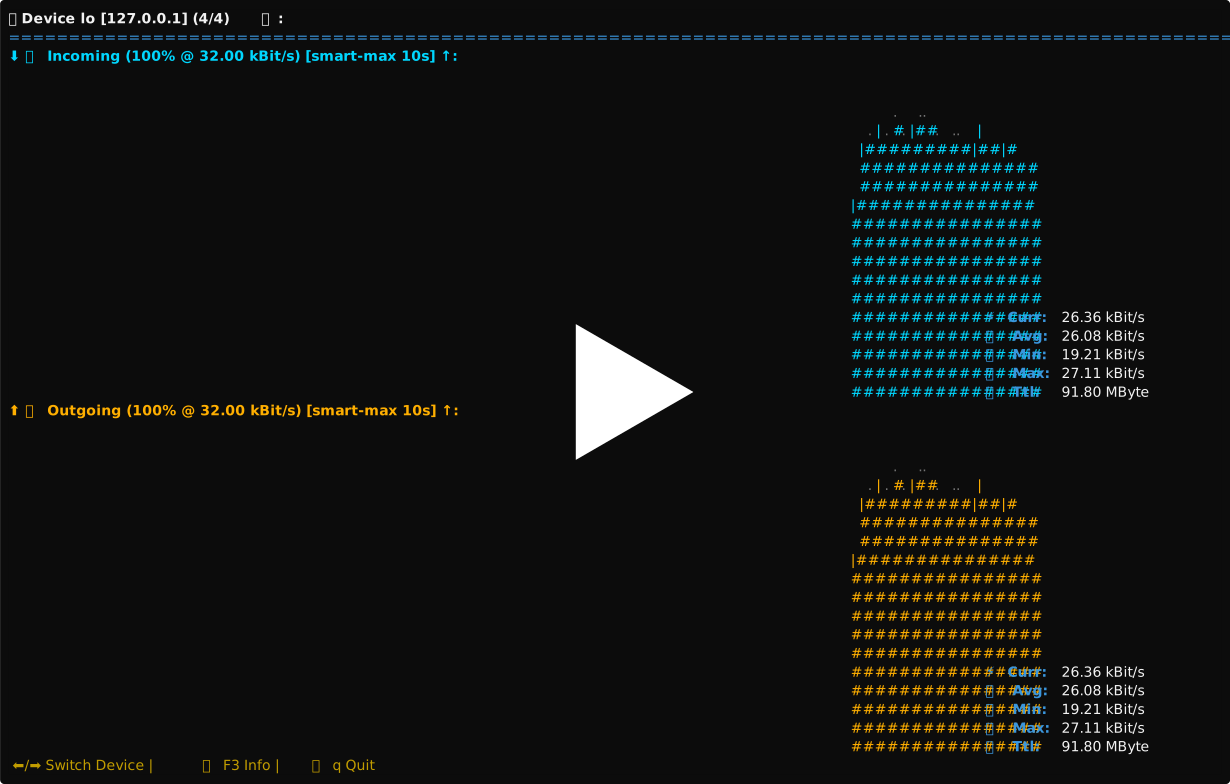
↑ Recorded by asciinema
📦 Dependencies
Python Edition
| Package | Version | Description |
|---|---|---|
 |
3.13.11 | Programming language |
 |
≥7.0 | Process and system utilities |
 |
≥0.9.6 | RTNETLINK backend on Linux/Android |
 |
≥2.0 | Windows curses support |
Rust Edition
| Package | Version | Description |
|---|---|---|
 |
1.93.0 | Programming language |
 |
0.29 | Terminal UI framework |
 |
0.28 | Cross-platform terminal library |
 |
0.32 | System information library |
 |
4 | Command-line argument parser |
 |
2 | Packet capture (optional, Windows) |
🧭 Epilogue
Network traffic flows formless through the void — yet Winload gives it shape. Packets traverse the terminal, silent and unseen, but through this window, every thread of throughput takes form before your eyes. If you seek to know the pulse of a machine's connection to the world, this tool is at once a humble lamp upon your desk and a guiding star for the journey ahead.
Release history Release notifications | RSS feed


Download files
Download the file for your platform. If you're not sure which to choose, learn more about installing packages.
Source Distribution
Built Distribution
Filter files by name, interpreter, ABI, and platform.
If you're not sure about the file name format, learn more about wheel file names.
Copy a direct link to the current filters
File details
Details for the file winload-0.1.12b2.tar.gz.
File metadata
- Download URL: winload-0.1.12b2.tar.gz
- Upload date:
- Size: 36.9 kB
- Tags: Source
- Uploaded using Trusted Publishing? No
- Uploaded via: uv/0.11.28 {"installer":{"name":"uv","version":"0.11.28","subcommand":["publish"]},"python":null,"implementation":{"name":null,"version":null},"distro":{"name":"Ubuntu","version":"24.04","id":"noble","libc":null},"system":{"name":null,"release":null},"cpu":null,"openssl_version":null,"setuptools_version":null,"rustc_version":null,"ci":true}
File hashes
| Algorithm | Hash digest | |
|---|---|---|
| SHA256 |
315330702d4050d8b70bdd556be1ce002aefc7028ed731f4286db24143678ed5
|
|
| MD5 |
f806d1fe8d6e019ff5d91a305ded9beb
|
|
| BLAKE2b-256 |
22165e03562916803e29129bd349fa73067909c626f9beb5c0cdf83b98f0aa40
|
File details
Details for the file winload-0.1.12b2-py3-none-any.whl.
File metadata
- Download URL: winload-0.1.12b2-py3-none-any.whl
- Upload date:
- Size: 38.8 kB
- Tags: Python 3
- Uploaded using Trusted Publishing? No
- Uploaded via: uv/0.11.28 {"installer":{"name":"uv","version":"0.11.28","subcommand":["publish"]},"python":null,"implementation":{"name":null,"version":null},"distro":{"name":"Ubuntu","version":"24.04","id":"noble","libc":null},"system":{"name":null,"release":null},"cpu":null,"openssl_version":null,"setuptools_version":null,"rustc_version":null,"ci":true}
File hashes
| Algorithm | Hash digest | |
|---|---|---|
| SHA256 |
3cd5e67f28cd70e9909fe9b4ab7e8998f15ec5e36066ad803e89be66e9ad3f96
|
|
| MD5 |
7b65f7ee5f1cc75132d14a76caacdc67
|
|
| BLAKE2b-256 |
323e4b79a68ccae3ce1011241c31c0158d0b0060d62256a57771185cb7179dd6
|






