
WinOCR


Installation
pip install winocr
Full install
pip install winocr[all]
Usage
Pillow
The language to be recognized can be specified by the lang parameter (second argument).
import winocr
from PIL import Image

img = Image.open('test.jpg')
(await winocr.recognize_pil(img, 'ja')).text

OpenCV
import winocr
import cv2

img = cv2.imread('test.jpg')
(await winocr.recognize_cv2(img, 'ja')).text

Connect to local runtime on Colaboratory
Create a local connection by following these instructions.
pip install jupyterlab jupyter_http_over_ws
jupyter serverextension enable --py jupyter_http_over_ws
jupyter notebook --NotebookApp.allow_origin='https://colab.research.google.com' --ip=0.0.0.0 --port=8888 --NotebookApp.port_retries=0
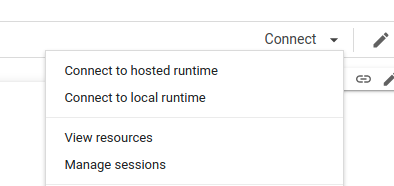
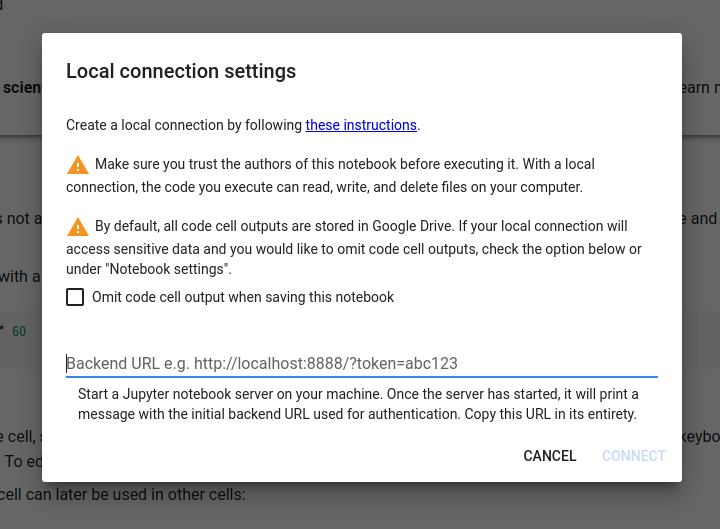
Also available on Jupyter / Jupyter Lab.
REPL
import cv2
from winocr import recognize_cv2_sync

img = cv2.imread('testocr.png')
recognize_cv2_sync(img)['text']
'This is a lot of 12 point text to test the ocr code and see if it works on all types of file format. The quick brown dog jumped over the lazy fox. The quick brown dog jumped over the lazy fox. The quick brown dog jumped over the lazy fox. The quick brown dog jumped over the lazy fox.'
from PIL import Image
from winocr import recognize_pil_sync

img = Image.open('testocr.png')
recognize_pil_sync(img)['text']
'This is a lot of 12 point text to test the ocr code and see if it works on all types of file format. The quick brown dog jumped over the lazy fox. The quick brown dog jumped over the lazy fox. The quick brown dog jumped over the lazy fox. The quick brown dog jumped over the lazy fox.'
Multi-Processing
from PIL import Image
import concurrent.futures
from winocr import recognize_pil_sync

images = [Image.open('testocr.png') for i in range(1000)]

with concurrent.futures.ProcessPoolExecutor() as executor:
  results = list(executor.map(recognize_pil_sync, images))
print(results)
Web API
Run server
pip install winocr[api]
winocr_serve
curl
curl localhost:8000?lang=ja --data-binary @test.jpg

Python
import requests

bytes = open('test.jpg', 'rb').read()
requests.post('http://localhost:8000/?lang=ja', bytes).json()['text']

You can run OCR with the Colaboratory runtime with ./ngrok http 8000
from PIL import Image
from io import BytesIO

img = Image.open('test.jpg')
# Preprocessing
buf = BytesIO()
img.save(buf, format='JPEG')
requests.post('https://15a5fabf0d78.ngrok.io/?lang=ja', buf.getvalue()).json()['text']

import cv2
import requests

img = cv2.imread('test.jpg')
# Preprocessing
requests.post('https://15a5fabf0d78.ngrok.io/?lang=ja', cv2.imencode('.jpg', img)[1].tobytes()).json()['text']

JavaScript
If you only need to recognize Chrome and English, you can also consider the Text Detection API.
// File
const file = document.querySelector('[type=file]').files[0]
await fetch('http://localhost:8000/', {method: 'POST', body: file}).then(r => r.json())

// Blob
const blob = await fetch('https://image.itmedia.co.jp/ait/articles/1706/15/news015_16.jpg').then(r=>r.blob())
await fetch('http://localhost:8000/?lang=ja', {method: 'POST', body: blob}).then(r => r.json())
It is also possible to run OCR Server on Windows Server.
Information that can be obtained
You can get angle, text, line, word, BoundingBox.
import pprint

result = await winocr.recognize_pil(img, 'ja')
pprint.pprint({
    'text_angle': result.text_angle,
    'text': result.text,
    'lines': [{
        'text': line.text,
        'words': [{
            'bounding_rect': {'x': word.bounding_rect.x, 'y': word.bounding_rect.y, 'width': word.bounding_rect.width, 'height': word.bounding_rect.height},
            'text': word.text
        } for word in line.words]
    } for line in result.lines]
})

Language installation
# Run as Administrator
Add-WindowsCapability -Online -Name "Language.OCR~~~en-US~0.0.1.0"
Add-WindowsCapability -Online -Name "Language.OCR~~~ja-JP~0.0.1.0"

# Search for installed languages
Get-WindowsCapability -Online -Name "Language.OCR*"
# State: Not Present language is not installed, so please install it if necessary.
Name         : Language.OCR~~~hu-HU~0.0.1.0
State        : NotPresent
DisplayName  : ハンガリー語の光学式文字認識
Description  : ハンガリー語の光学式文字認識
DownloadSize : 194407
InstallSize  : 535714

Name         : Language.OCR~~~it-IT~0.0.1.0
State        : NotPresent
DisplayName  : イタリア語の光学式文字認識
Description  : イタリア語の光学式文字認識
DownloadSize : 159875
InstallSize  : 485922

Name         : Language.OCR~~~ja-JP~0.0.1.0
State        : Installed
DisplayName  : 日本語の光学式文字認識
Description  : 日本語の光学式文字認識
DownloadSize : 1524589
InstallSize  : 3398536

Name         : Language.OCR~~~ko-KR~0.0.1.0
State        : NotPresent
DisplayName  : 韓国語の光学式文字認識
Description  : 韓国語の光学式文字認識
DownloadSize : 3405683
InstallSize  : 7890408
If you hate Python and just want to recognize it with PowerShell, click here
Multi-Processing
By processing in parallel, it is 3 times faster. You can make it even faster by increasing the number of cores!
from PIL import Image

images = [Image.open('testocr.png') for i in range(1000)]
1 core(elapsed 48s)
The CPU is not used up.

import winocr

[(await winocr.recognize_pil(img)).text for img in images]

4 cores(elapsed 16s)
I'm using 100% CPU.

Create a worker module.
%%writefile worker.py
import winocr
import asyncio

async def ensure_coroutine(awaitable):
    return await awaitable

def recognize_pil_text(img):
    return asyncio.run(ensure_coroutine(winocr.recognize_pil(img))).text
import worker
import concurrent.futures

with concurrent.futures.ProcessPoolExecutor() as executor:
  # https://stackoverflow.com/questions/62488423
  results = executor.map(worker.recognize_pil_text, images)
list(results)

1 maintainer

Metadata
1 maintainer
Release files for winocr 0.0.15
For a detailed explanation of source distributions (sdists) and built distributions (wheels), please see the package formats documentation.
Source distribution (sdist)
| File | Size | Uploaded | Provenance | Actions |
|---|---|---|---|---|
| winocr-0.0.15.tar.gz | 8.1 kB | Without provenance | Details for winocr-0.0.15.tar.gz |
Built distribution (wheel)
| File | Interpreter | ABI | Platform | Actions Reset |
|---|---|---|---|---|
| winocr-0.0.15-py3-none-any.whl | Python 3 | none | any | Details for winocr-0.0.15-py3-none-any.whl |
Total release size: 15.8 kB
Release files / winocr-0.0.15.tar.gz
| Download URL | winocr-0.0.15.tar.gz |
|---|---|
| Size | 8.1 kB |
| Tags | Source |
|
SHA-256 checksum How to use checksums |
767f85e8331f6348985813f37763b21838090d23acd9afdd372fb1f7cabc3881
|
|
BLAKE2b-256 checksum How to use checksums |
46d698fa493ecd6b9c411351e1d01ab6da770ae5c534046fd158fe53b689550b
|
| Upload date | |
|
Uploaded using Trusted Publishing? What is trusted publishing? |
No |
| Uploaded via |
twine/5.1.1 CPython/3.12.7
|
Release files / winocr-0.0.15-py3-none-any.whl
| Download URL | winocr-0.0.15-py3-none-any.whl |
|---|---|
| Size | 7.7 kB |
| Tags | Python 3 |
|
SHA-256 checksum How to use checksums |
48ff0a0a2dbcd1f7e84b4fb22575f5d4aba0ec99fdfe07fb0d04254d00826f18
|
|
BLAKE2b-256 checksum How to use checksums |
cb6cc076c34b70df9fbb84df1dc61cc5be5f36438afc81ecde6dc0e33ed68d24
|
| Upload date | |
|
Uploaded using Trusted Publishing? What is trusted publishing? |
No |
| Uploaded via |
twine/5.1.1 CPython/3.12.7
|
Security for winocr 0.0.15
Provenance
Provenance describes where a file came from. On PyPI, provenance is shared via attestations, which provide a verifiable record of the build or publishing details. View details, limitations and caveats.
No provenance found
None of the files in this release were uploaded with provenance metadata.
A note on package security
PyPI is a repository for distributing packages, not a service for auditing them. While third-party security researchers and our staff do their best to detect and remove malicious packages, PyPI cannot guarantee the quality, security or suitability of any given package.
To learn more about protecting yourself from malicious actors, visit our package security documentation.














