
Windows.Media.Ocr

Project description
WinOCR


Installation
pip install winocr
Full install
pip install winocr[all]
Usage
Pillow
The language to be recognized can be specified by the lang parameter (second argument).
import winocr
from PIL import Image

img = Image.open('test.jpg')
(await winocr.recognize_pil(img, 'ja')).text

OpenCV
import winocr
import cv2

img = cv2.imread('test.jpg')
(await winocr.recognize_cv2(img, 'ja')).text

Connect to local runtime on Colaboratory
Create a local connection by following these instructions.
pip install jupyterlab jupyter_http_over_ws
jupyter serverextension enable --py jupyter_http_over_ws
jupyter notebook --NotebookApp.allow_origin='https://colab.research.google.com' --ip=0.0.0.0 --port=8888 --NotebookApp.port_retries=0
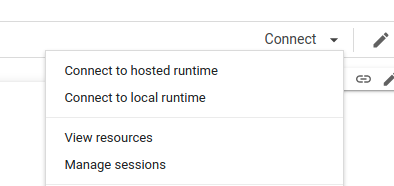
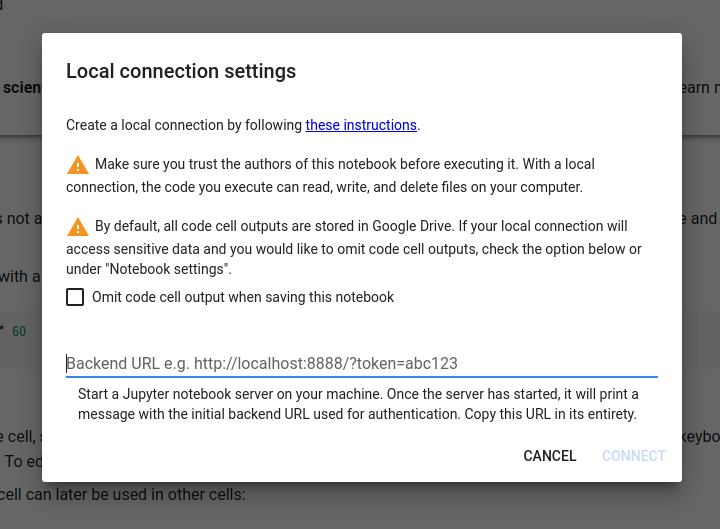
Also available on Jupyter / Jupyter Lab.
REPL
import cv2
from winocr import recognize_cv2_sync

img = cv2.imread('testocr.png')
recognize_cv2_sync(img)['text']
'This is a lot of 12 point text to test the ocr code and see if it works on all types of file format. The quick brown dog jumped over the lazy fox. The quick brown dog jumped over the lazy fox. The quick brown dog jumped over the lazy fox. The quick brown dog jumped over the lazy fox.'
from PIL import Image
from winocr import recognize_pil_sync

img = Image.open('testocr.png')
recognize_pil_sync(img)['text']
'This is a lot of 12 point text to test the ocr code and see if it works on all types of file format. The quick brown dog jumped over the lazy fox. The quick brown dog jumped over the lazy fox. The quick brown dog jumped over the lazy fox. The quick brown dog jumped over the lazy fox.'
Multi-Processing
from PIL import Image
import concurrent.futures
from winocr import recognize_pil_sync

images = [Image.open('testocr.png') for i in range(1000)]

with concurrent.futures.ProcessPoolExecutor() as executor:
  results = list(executor.map(recognize_pil_sync, images))
print(results)
Web API
Run server
pip install winocr[api]
winocr_serve
curl
curl localhost:8000?lang=ja --data-binary @test.jpg

Python
import requests

bytes = open('test.jpg', 'rb').read()
requests.post('http://localhost:8000/?lang=ja', bytes).json()['text']

You can run OCR with the Colaboratory runtime with ./ngrok http 8000
from PIL import Image
from io import BytesIO

img = Image.open('test.jpg')
# Preprocessing
buf = BytesIO()
img.save(buf, format='JPEG')
requests.post('https://15a5fabf0d78.ngrok.io/?lang=ja', buf.getvalue()).json()['text']

import cv2
import requests

img = cv2.imread('test.jpg')
# Preprocessing
requests.post('https://15a5fabf0d78.ngrok.io/?lang=ja', cv2.imencode('.jpg', img)[1].tobytes()).json()['text']

JavaScript
If you only need to recognize Chrome and English, you can also consider the Text Detection API.
// File
const file = document.querySelector('[type=file]').files[0]
await fetch('http://localhost:8000/', {method: 'POST', body: file}).then(r => r.json())

// Blob
const blob = await fetch('https://image.itmedia.co.jp/ait/articles/1706/15/news015_16.jpg').then(r=>r.blob())
await fetch('http://localhost:8000/?lang=ja', {method: 'POST', body: blob}).then(r => r.json())
It is also possible to run OCR Server on Windows Server.
Information that can be obtained
You can get angle, text, line, word, BoundingBox.
import pprint

result = await winocr.recognize_pil(img, 'ja')
pprint.pprint({
    'text_angle': result.text_angle,
    'text': result.text,
    'lines': [{
        'text': line.text,
        'words': [{
            'bounding_rect': {'x': word.bounding_rect.x, 'y': word.bounding_rect.y, 'width': word.bounding_rect.width, 'height': word.bounding_rect.height},
            'text': word.text
        } for word in line.words]
    } for line in result.lines]
})

Language installation
# Run as Administrator
Add-WindowsCapability -Online -Name "Language.OCR~~~en-US~0.0.1.0"
Add-WindowsCapability -Online -Name "Language.OCR~~~ja-JP~0.0.1.0"

# Search for installed languages
Get-WindowsCapability -Online -Name "Language.OCR*"
# State: Not Present language is not installed, so please install it if necessary.
Name         : Language.OCR~~~hu-HU~0.0.1.0
State        : NotPresent
DisplayName  : ハンガリー語の光学式文字認識
Description  : ハンガリー語の光学式文字認識
DownloadSize : 194407
InstallSize  : 535714

Name         : Language.OCR~~~it-IT~0.0.1.0
State        : NotPresent
DisplayName  : イタリア語の光学式文字認識
Description  : イタリア語の光学式文字認識
DownloadSize : 159875
InstallSize  : 485922

Name         : Language.OCR~~~ja-JP~0.0.1.0
State        : Installed
DisplayName  : 日本語の光学式文字認識
Description  : 日本語の光学式文字認識
DownloadSize : 1524589
InstallSize  : 3398536

Name         : Language.OCR~~~ko-KR~0.0.1.0
State        : NotPresent
DisplayName  : 韓国語の光学式文字認識
Description  : 韓国語の光学式文字認識
DownloadSize : 3405683
InstallSize  : 7890408
If you hate Python and just want to recognize it with PowerShell, click here
Multi-Processing
By processing in parallel, it is 3 times faster. You can make it even faster by increasing the number of cores!
from PIL import Image

images = [Image.open('testocr.png') for i in range(1000)]
1 core(elapsed 48s)
The CPU is not used up.

import winocr

[(await winocr.recognize_pil(img)).text for img in images]

4 cores(elapsed 16s)
I'm using 100% CPU.

Create a worker module.
%%writefile worker.py
import winocr
import asyncio

async def ensure_coroutine(awaitable):
    return await awaitable

def recognize_pil_text(img):
    return asyncio.run(ensure_coroutine(winocr.recognize_pil(img))).text
import worker
import concurrent.futures

with concurrent.futures.ProcessPoolExecutor() as executor:
  # https://stackoverflow.com/questions/62488423
  results = executor.map(worker.recognize_pil_text, images)
list(results)

Release history Release notifications | RSS feed

Download files
Download the file for your platform. If you're not sure which to choose, learn more about installing packages.
Source Distribution
Built Distribution
Filter files by name, interpreter, ABI, and platform.
If you're not sure about the file name format, learn more about wheel file names.
Copy a direct link to the current filters
File details
Details for the file winocrfix-0.0.15.tar.gz.
File metadata
- Download URL: winocrfix-0.0.15.tar.gz
- Upload date:
- Size: 8.4 kB
- Tags: Source
- Uploaded using Trusted Publishing? No
- Uploaded via: twine/6.1.0 CPython/3.13.9
File hashes
| Algorithm | Hash digest | |
|---|---|---|
| SHA256 |
27ac54931aa3cc158a4b09c1e16ea3698d15b7b0564a8087290dd8b943c666d3
|
|
| MD5 |
b79f2f9ac93641042574d11177c94ab8
|
|
| BLAKE2b-256 |
5f68f9e38dac8c25c570e8b3b1cc047112beecd170dd2f344a3f227f1d602b16
|
File details
Details for the file winocrfix-0.0.15-py3-none-any.whl.
File metadata
- Download URL: winocrfix-0.0.15-py3-none-any.whl
- Upload date:
- Size: 7.9 kB
- Tags: Python 3
- Uploaded using Trusted Publishing? No
- Uploaded via: twine/6.1.0 CPython/3.13.9
File hashes
| Algorithm | Hash digest | |
|---|---|---|
| SHA256 |
f1c1b6cec979c13c45f7f11d65c1925551950b0e662a640718bb74cbec91bf53
|
|
| MD5 |
fdfec6d2e590fa57e55fb3cd28f014c1
|
|
| BLAKE2b-256 |
4a7323109ec78209d672865046c9a4109595b85af296c5c5ed21795485fac9cd
|






