
Runtime PII leak detector for Django — find personal data leaking from your API responses and third-party calls

Project description
Wiregraph
Detect and visualize live PII flow inside running Django apps.
Your view returns more than you think. Your OpenAI call ships customer emails to a third party. Your Stripe webhook echoes an SSN into a log line. Static analysis won't catch it. APM won't flag it.
Wiregraph is a runtime PII leak detector that sits inside your Django app and watches the traffic you're actually serving — inbound, outbound, and egress to third parties.
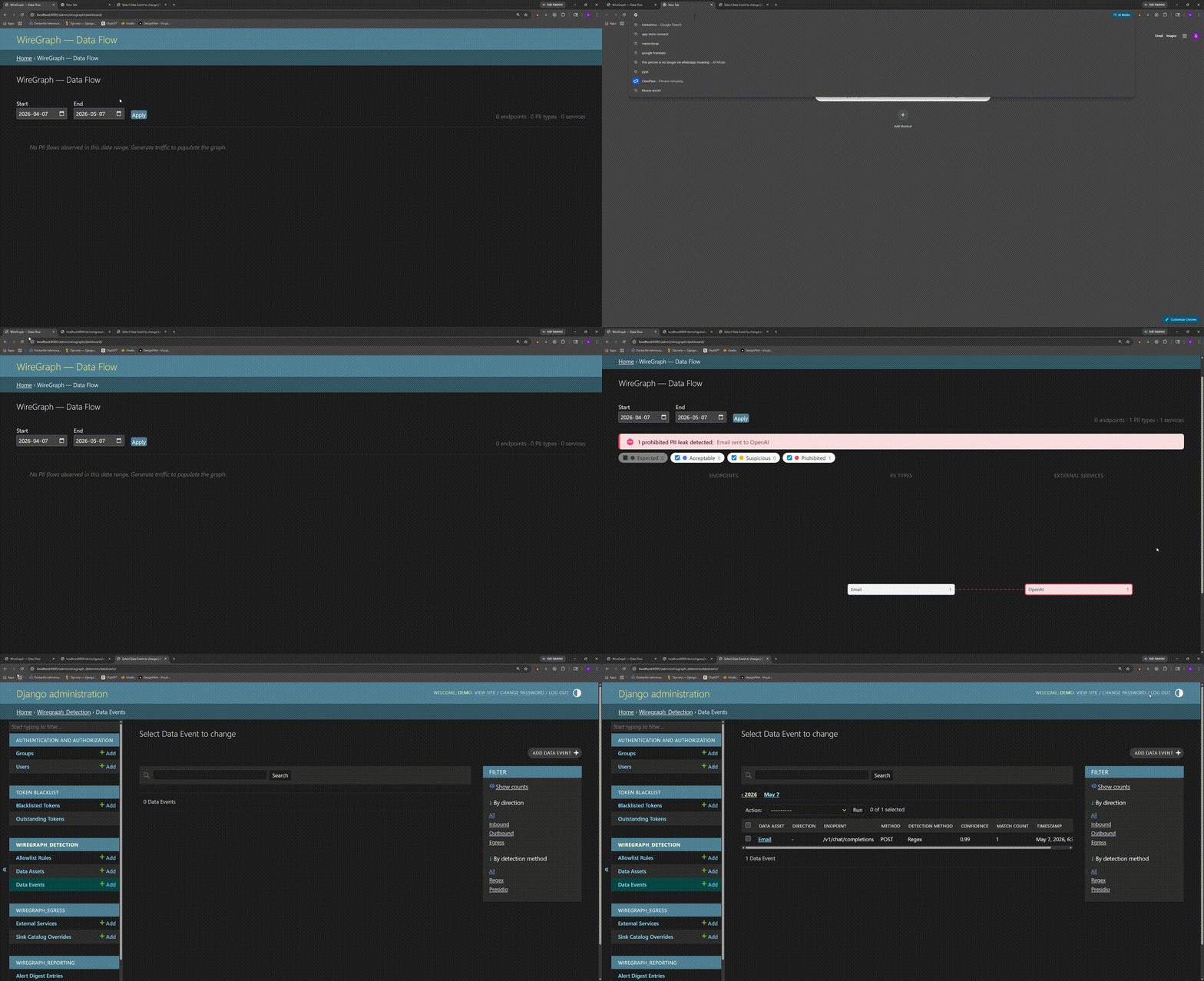
The alarm moment
A user hits /api/v1/support/ticket/. Your view enriches the response with an OpenAI summary. Wiregraph sees this:
[egress] POST api.openai.com/v1/chat/completions
  └─ EMAIL_ADDRESS  (confidence 0.99)  asset: request.body.messages[1].content
  └─ US_SSN         (confidence 0.95)  asset: request.body.messages[1].content

[response] 200 /api/v1/support/ticket/
  └─ PHONE_NUMBER   (confidence 0.90)  asset: response.body.ticket.notes
You didn't write code to log that. You didn't know it was happening. Now you do.
Try the demo
Want to see Wiregraph catch a leak without touching your own app?
git clone https://github.com/gchin108/wiregraph-django-demo.git
cd wiregraph-demo
docker compose up
Then in another terminal:
curl http://localhost:8000/demo/egress/openai/
Open http://localhost:8000/admin/wiregraph/dashboard/ (login demo / demo) — you'll see the email and SSN that just got shipped to OpenAI.
Why runtime detection?
PII leaks happen at runtime, not in source:
- Serializers mutate fields you didn't expect to expose
- LLM calls forward whatever the prompt builder concatenates
- Middleware rewrites responses after your view returns
- Third-party SDKs ship payloads you never see in your repo
- Dynamic queries return columns that weren't in the original spec
Grep won't find any of these. APM tells you a request was slow. Logs tell you what you decided to log. Wiregraph tells you what your app actually sent.
What you get
- Runtime visibility into every PII-bearing field crossing your app's boundary — inbound, outbound, egress
- Audit trail of which endpoints leak what, by tenant
- Compliance evidence — exportable PDF/JSON reports of observed flows
- Zero raw PII at rest — detections are hashed, masked, or truncated before storage
Quick start
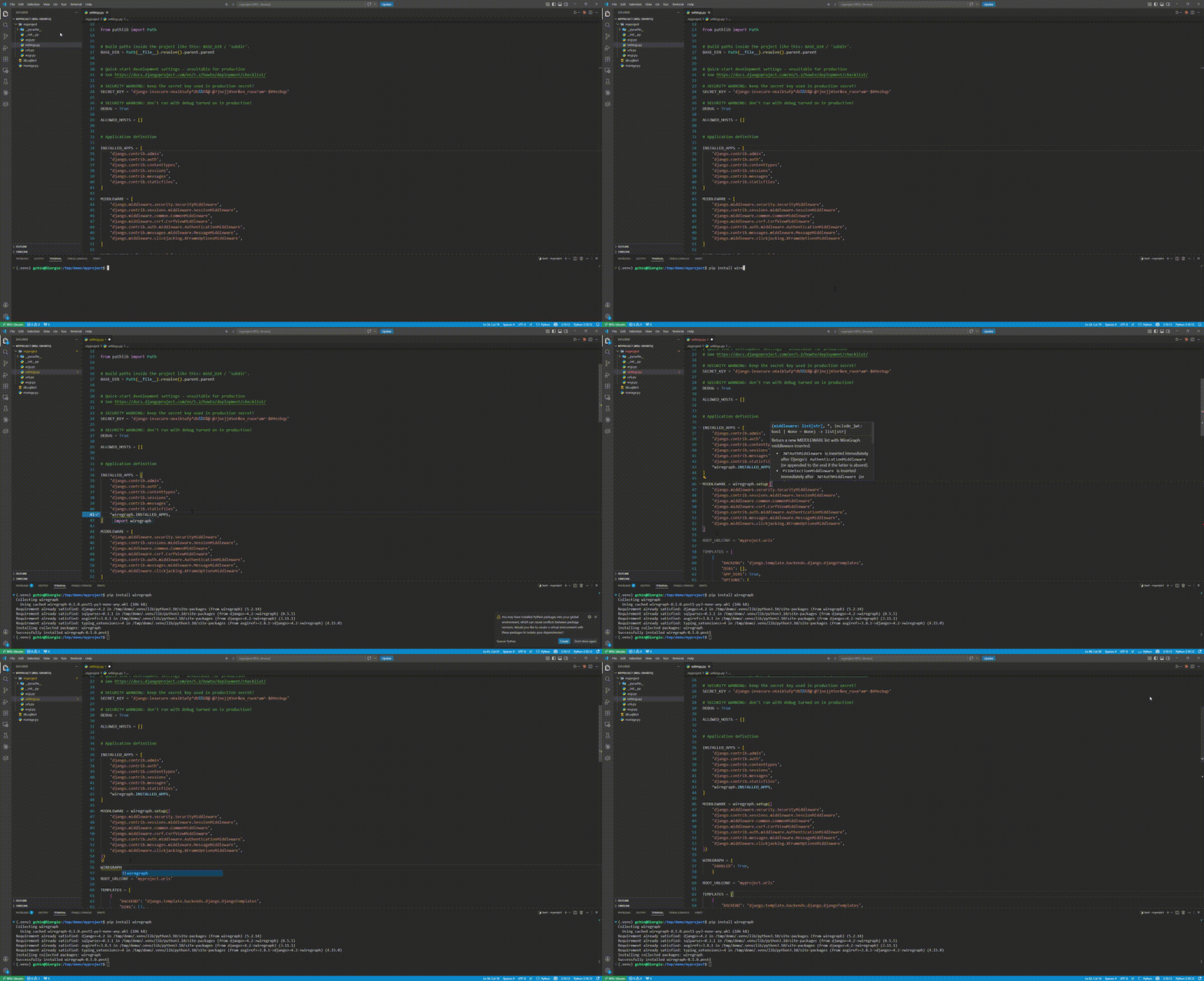
1. Install and configure
pip install wiregraph
# settings.py
import wiregraph

INSTALLED_APPS = [*INSTALLED_APPS, *wiregraph.INSTALLED_APPS]
MIDDLEWARE = wiregraph.setup(MIDDLEWARE)
WIREGRAPH = {"ENABLED": True}
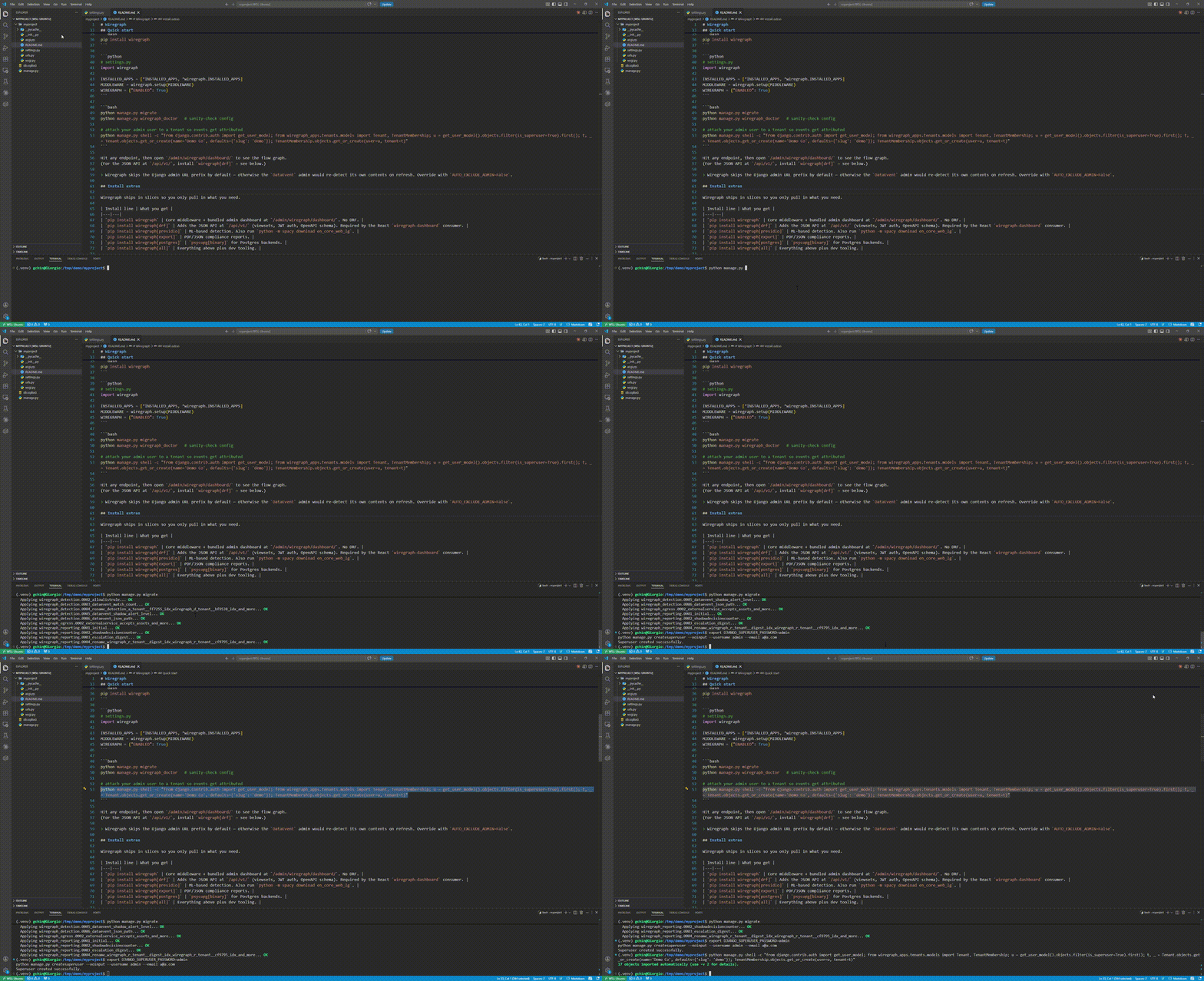
2. Migrate and attach a superuser to a tenant
python manage.py migrate
python manage.py wiregraph_doctor   # sanity-check config

# create a superuser if you don't already have one
export DJANGO_SUPERUSER_PASSWORD=admin
python manage.py createsuperuser --noinput --username admin --email a@a.com

# attach your admin user to a tenant so events get attributed
python manage.py shell -c "from django.contrib.auth import get_user_model; from wiregraph_apps.tenants.models import Tenant, TenantMembership; u = get_user_model().objects.filter(is_superuser=True).first(); t, _ = Tenant.objects.get_or_create(name='Demo Co', defaults={'slug': 'demo'}); TenantMembership.objects.get_or_create(user=u, tenant=t)"
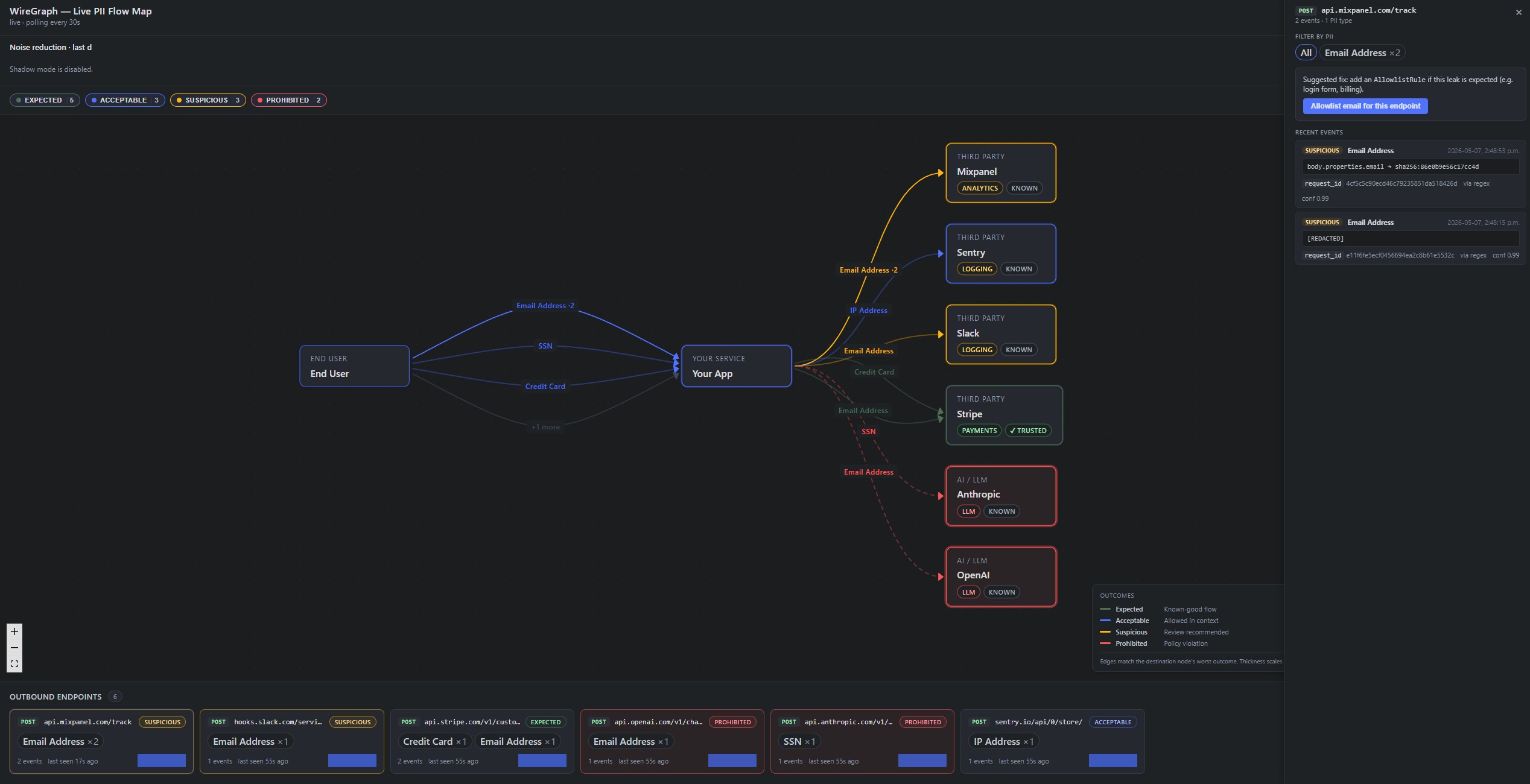
3. Hit an endpoint and watch the leak
Hit any endpoint, then open /admin/wiregraph/dashboard/ to see the flow graph.
(For the JSON API at /api/v1/, install wiregraph[drf] — see below.)
Wiregraph skips the Django admin URL prefix by default — otherwise the
DataEventadmin would re-detect its own contents on refresh. Override withAUTO_EXCLUDE_ADMIN=False.
Architecture
   ┌─────────────┐
   │  Request    │
   └──────┬──────┘
          ▼
   ┌─────────────────────┐
   │  Wiregraph          │  ← scans request body, headers, query
   │  middleware         │
   └──────┬──────────────┘
          ▼
   ┌─────────────┐         ┌──────────────────┐
   │  Your view  │────────▶│  Egress hook     │ ← scans outbound
   └──────┬──────┘         │  (OpenAI, Stripe)│   third-party calls
          ▼                └──────────────────┘
   ┌─────────────────────┐
   │  Response scanner   │  ← scans response body
   └──────┬──────────────┘
          ▼
   ┌─────────────────┐
   │  DataEvent      │  → classified, redacted, stored
   │  (hashed PII)   │  → /admin/wiregraph/dashboard/
   └─────────────────┘
Classification
Not every PII hit is a leak. An email to api.stripe.com is the product working; the same email to api.openai.com is an incident. Wiregraph classifies every DataEvent on what × where × policy and writes the verdict to DataEvent.outcome:
| Outcome | Meaning |
|---|---|
expected |
Asset flowed to a sink that accepts it (Stripe ← email) |
acceptable |
Trusted sink, asset not on its accept-list but not dangerous |
suspicious |
Unknown sink, new flow, or known sink receiving an unexpected asset |
prohibited |
Sensitive asset to a sink that should never receive it |
A built-in catalog (~15 vendors: Stripe, OpenAI, Anthropic, Bedrock, Twilio, SendGrid, Segment, S3, Auth0, …) means a fresh install gets meaningful outcomes with zero setup. Override per-host via SINK_OVERRIDES (settings) or SinkCatalogOverride (DB, tenant-scoped). LLM strictness is tunable: LLM_POLICY = "strict" (default — medium+ PII to LLM is prohibited) or "relaxed".
Detection
Regex out of the box: emails, phones, SSNs, credit cards, and more. Add your own:
WIREGRAPH = {
    "ENABLED": True,
    "CUSTOM_PATTERNS": [
        {"name": "emp_id", "regex": r"\bEMP-\d{6}\b", "confidence": 0.9},
    ],
}
Optional Presidio (ML NER for names, addresses, IBANs, 50+ entity types) runs async via Celery so the request path stays fast:
WIREGRAPH = {"ENABLED": True, "ENABLE_PRESIDIO": True}
See Installing Presidio. Presidio matches that overlap a regex hit on the same asset are deduped (regex wins).
Security guarantee
Wiregraph never persists raw PII. Every detection is redacted (hash / mask / truncate, configurable) before it touches storage. The matched value lives in memory only long enough to classify and redact.
Install extras
Wiregraph ships in slices so you only pull in what you need.
| Install line | What you get |
|---|---|
pip install wiregraph |
Core middleware + bundled admin dashboard at /admin/wiregraph/dashboard/. No DRF. |
pip install wiregraph[drf] |
Adds the JSON API at /api/v1/ (viewsets, JWT auth, OpenAPI schema). Required by the React wiregraph-dashboard consumer. |
pip install wiregraph[presidio] |
ML-based detection. Also run python -m spacy download en_core_web_lg. |
pip install wiregraph[export] |
PDF/JSON compliance reports. |
pip install wiregraph[postgres] |
psycopg[binary] for Postgres backends. |
pip install wiregraph[httpx] |
Egress interception for httpx (sync + async clients). |
pip install wiregraph[aiohttp] |
Egress interception for aiohttp.ClientSession. |
pip install wiregraph[all] |
Everything above plus dev tooling. |
Egress transport coverage
Wiregraph monkey-patches outbound HTTP clients at app start so PII leaving via third-party calls is recorded the same way as response PII. requests is patched whenever it's importable; httpx and aiohttp are picked up automatically once their extras are installed.
| Client | Patch target | Body shapes scanned |
|---|---|---|
requests |
Session.send |
bytes, str (MAX_BODY_SIZE cap) |
httpx (sync) |
Client.send |
bytes |
httpx (async) |
AsyncClient.send |
bytes (recorder dispatched via sync_to_async) |
aiohttp |
ClientSession._request |
json=, data= (bytes/str/dict); streams and FormData get an ExternalService touch but no body scan |
Raw sockets, urllib3 direct, http.client, and gRPC are out of scope.
Set DISABLE_EGRESS_PATCHING=True (via the WIREGRAPH settings dict) to bypass patching entirely — useful in tests that use responses/respx/aioresponses without our wrapper in the chain.
If you skip [drf], the /api/v1/ routes are not registered — the admin dashboard still works.
Tenant resolution
By default Wiregraph walks request.user.tenant_memberships. Point TENANT_RESOLVER at your own callable if your project stores tenancy differently (FK, subdomain, header).
Retention purge
Delete events older than DATA_RETENTION_DAYS:
python manage.py wiregraph_purge [--dry-run]
Or via Celery Beat:
import wiregraph.celery as wg_celery
CELERY_BEAT_SCHEDULE = {**wg_celery.schedule(hour=3, minute=0)}
API
Requires
pip install wiregraph[drf]. Without the extra,/api/v1/routes are not registered.
Versioned under /api/v1/, JWT Bearer auth (obtain via /api/v1/auth/token/). OpenAPI at /api/v1/schema/, Swagger at /api/v1/schema/docs/.
| Method | Path | Description |
|---|---|---|
| POST | /api/v1/auth/token/ |
Obtain access + refresh token |
| POST | /api/v1/auth/token/refresh/ |
Rotate refresh token |
| GET | /api/v1/detection/events/ |
List events (filter: direction, data_asset, endpoint, timestamp__gte, timestamp__lte) |
| GET | /api/v1/detection/events/{id}/ |
Retrieve event |
| GET | /api/v1/detection/assets/ |
PII categories seen in traffic |
| GET | /api/v1/detection/stats/summary/ |
Dashboard counts |
See docs/settings.md for all config keys.
Requirements
Python ≥ 3.10 · Django ≥ 4.2 · Celery + Redis (async detection) · PostgreSQL recommended
Roadmap
A standalone React dashboard is in development — interactive graph exploration, historical flow analysis, and per-tenant views beyond what the bundled Django admin dashboard offers today.
License
MIT
Release history Release notifications | RSS feed


Download files
Download the file for your platform. If you're not sure which to choose, learn more about installing packages.
Source Distribution
Built Distribution
Filter files by name, interpreter, ABI, and platform.
If you're not sure about the file name format, learn more about wheel file names.
Copy a direct link to the current filters
File details
Details for the file wiregraph-0.1.1.tar.gz.
File metadata
- Download URL: wiregraph-0.1.1.tar.gz
- Upload date:
- Size: 74.4 kB
- Tags: Source
- Uploaded using Trusted Publishing? No
- Uploaded via: twine/6.2.0 CPython/3.10.12
File hashes
| Algorithm | Hash digest | |
|---|---|---|
| SHA256 |
e545fa770cf8ffb429445d96935ce4b70709ea7e44b23ac72ca57997b8350918
|
|
| MD5 |
382a39f8b6a6f80df16de2c60b98142b
|
|
| BLAKE2b-256 |
18d8c26c4ae7b1591757d395575fc6492ab3b79cd9c91ebbb76d4acad2250c2d
|
File details
Details for the file wiregraph-0.1.1-py3-none-any.whl.
File metadata
- Download URL: wiregraph-0.1.1-py3-none-any.whl
- Upload date:
- Size: 115.1 kB
- Tags: Python 3
- Uploaded using Trusted Publishing? No
- Uploaded via: twine/6.2.0 CPython/3.10.12
File hashes
| Algorithm | Hash digest | |
|---|---|---|
| SHA256 |
fa1d7cde5103fce34f89b7cca16ef8f51d175b96e5f39171dbe06288e5fac9e6
|
|
| MD5 |
cd1f83574c3d376ab5d6c77a4f431220
|
|
| BLAKE2b-256 |
3d3716eaa0236d534f2a2b03138e59aba1c8a6be3ffd5b93ed077a2f8a6312cb
|






