
Wirenote
Private meeting notes for Linux: detects calls, records, transcribes and summarizes locally.
When an app starts using your microphone for a call, Wirenote asks whether to record. After the call it writes a Markdown note with a transcript, who said what, a summary, decisions and action items. By default nothing leaves your computer: transcription runs with faster-whisper, speakers are told apart with sherpa-onnx, and summaries come from a local model through Ollama.
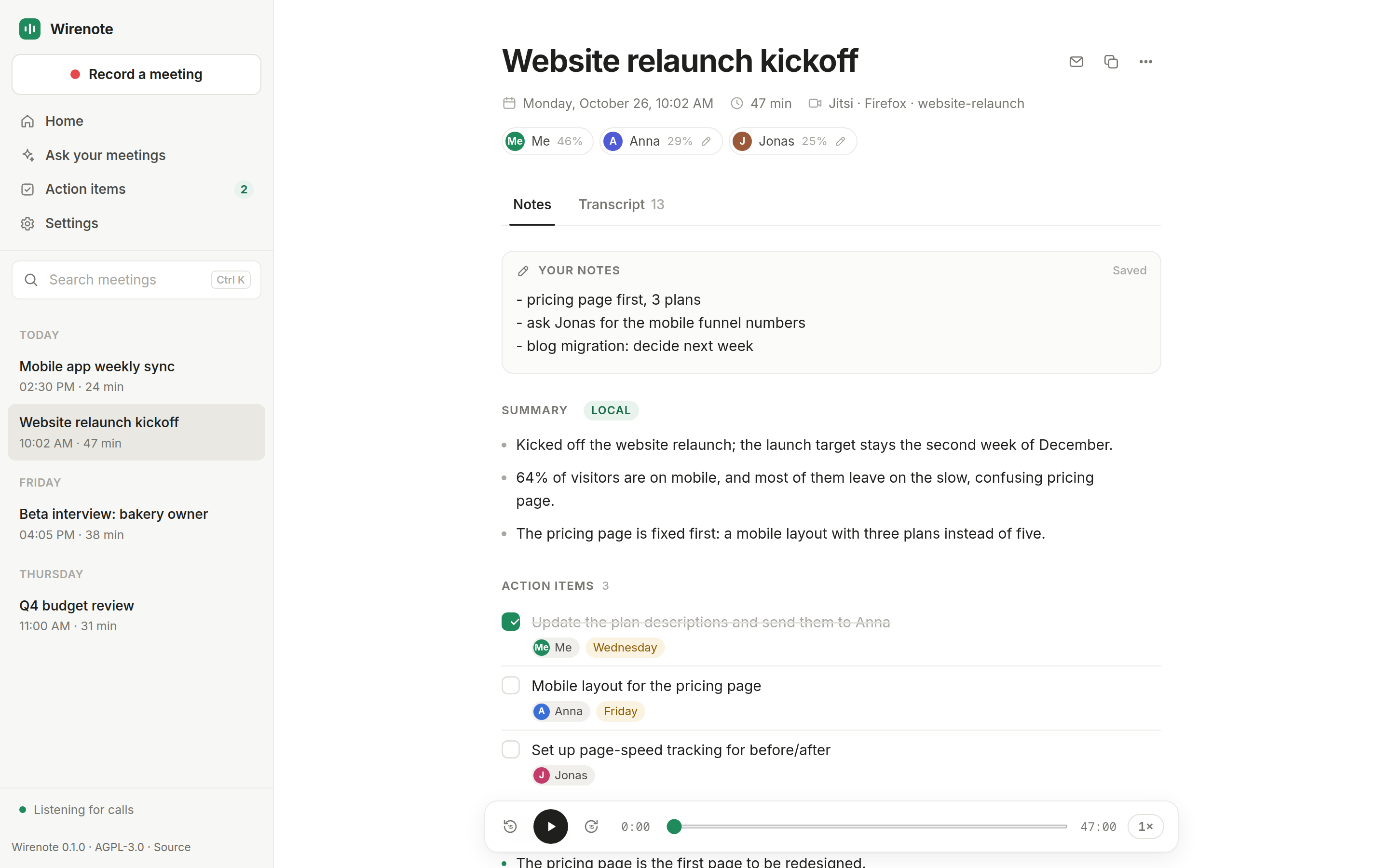
- Notices calls by itself. It watches PipeWire for apps that open the mic: Jitsi or any web call in Chrome, Brave or Firefox, Discord, Rocket.Chat, and whatever you add to
apps.toml. No bot joins your call. - Two clean tracks. Your mic and the system audio are recorded separately, so "Me" and the others are never mixed up.
- Notes you own. Plain Markdown files in
~/Meetings, plus a local web app to search calls, play back moments, name speakers, tick off action items and ask questions about past meetings. - Private by default. Files are readable only by you, the web app only by your user, and the cloud is opt-in. See PRIVACY.md.
Requirements
- Linux on x86_64 or ARM64 with PipeWire (most current distributions), and a desktop with notifications. Tested on KDE Plasma 6 (Wayland); GNOME and others should work but are not tested yet. macOS and Windows are not supported.
- Python 3.11 to 3.14, and uv. uv downloads a matching Python if yours is newer or older.
- ffmpeg (for playback in the web app).
- About 2 GB of disk for the speech models, downloaded once on the first note.
- Optional: Ollama for local summaries, or an Anthropic API key for summaries by Claude.
Install
uv tool install wirenote
wirenote setup install     # systemd user services and an app-menu entry; no root needed
wirenote doctor            # checks PipeWire, notifications, models, summaries
To install from source instead: uv tool install git+https://github.com/knowhrishi/wirenote.
For local summaries, install Ollama and pull the default model:
ollama pull qwen3:4b
Your first note
- Join a call. After a few seconds a notification asks Record or Ignore.
- Click Record and tell the others. If you set a consent line in Settings, it is now on your clipboard, ready to paste into the call chat.
- Leave the call. The call opens in the meetings app in your browser, and the note fills in a few minutes later, when "Meeting note ready" appears.
- To come back to it later, click Open note, or open Wirenote from the app menu.
Everything else, from calendars to commands to files, is in docs/usage.md.
Recording law
You are responsible for getting consent; in many countries (for example Germany, §201 StGB) recording without it is a crime. Wirenote never records without your click, shows a notification for as long as it records, and can copy a consent line for the call chat. Set it in the app's Settings.
Privacy in brief
- Audio, transcripts, notes, voice prints and settings stay on your computer, readable only by your user.
- The meetings app listens on 127.0.0.1 and only lets your own user in.
- Speech models are downloaded once from Hugging Face. There is no telemetry.
- Claude is opt-in. If you choose it, transcripts and notes are sent to Anthropic; the app shows exactly what before you switch, and marks each call "Local" or "Sent to Claude".
Details: PRIVACY.md. Security reports: SECURITY.md.
Update
wirenote update # newest version from PyPI; restarts Wirenote, never during a call
After an update, the meetings app shows what is new. To hear about new versions, turn on update checks in Settings (off by default; see PRIVACY.md).
Uninstall
wirenote setup uninstall           # services and app-menu entry; your data stays
wirenote setup uninstall --purge   # also recordings, transcripts and settings (asks first); notes stay
uv tool uninstall wirenote
Contributing
Bug reports and pull requests are welcome; see CONTRIBUTING.md. Pull requests need a one-time Contributor License Agreement, so that the project can later offer a supported edition for companies; your contributions stay available as open source. Please follow the code of conduct.
License
Wirenote is free software under the GNU Affero General Public License v3.0 or later. Third-party components and models are listed in THIRD_PARTY.md.
1 maintainer

Metadata
1 maintainer
Release files for wirenote 0.3.1
For a detailed explanation of source distributions (sdists) and built distributions (wheels), please see the package formats documentation.
Source distribution (sdist)
| File | Size | Uploaded | Provenance | |
|---|---|---|---|---|
| wirenote-0.3.1.tar.gz | 463.3 kB | With provenance | Details |
Built distribution (wheel)
| File | Interpreter | ABI | Platform | Reset |
|---|---|---|---|---|
| wirenote-0.3.1-py3-none-any.whl | Python 3 | none | any | Details |
Total release size: 781.9 kB
Release files / wirenote-0.3.1.tar.gz
| Download URL | wirenote-0.3.1.tar.gz |
|---|---|
| Size | 463.3 kB |
| Tags | Source |
|
SHA-256 checksum How to use checksums |
75590e4406b9cc6a7a462cbc293cb9b36ad38c302805c9411ea1feb7d6bb2a77
|
|
BLAKE2b-256 checksum How to use checksums |
ed9bfe83019ad2622c75a1bd9ba8e6352bdc27dac7b16ede70e1c4ca4dfb9812
|
| Upload date | |
|
Uploaded using Trusted Publishing? What is trusted publishing? |
Yes |
| Uploaded via |
twine/7.0.0 CPython/3.13.16
|
Provenance
Provenance describes where a file came from. On PyPI, provenance is shared via attestations, which provide a verifiable record of the build or publishing details. View details, limitations and caveats.


PyPI Publish Attestation
PyPI verified that this artifact, at this checksum, originated from the publisher listed below.
Signed by GitHub Actions, verified by PyPI on Oct 27, 2026.
Transparency logRelease files / wirenote-0.3.1-py3-none-any.whl
| Download URL | wirenote-0.3.1-py3-none-any.whl |
|---|---|
| Size | 318.6 kB |
| Tags | Python 3 |
|
SHA-256 checksum How to use checksums |
6e4f978a6dc8de4ed981c037459e352475c776feada25ae0b0b88ab49624c800
|
|
BLAKE2b-256 checksum How to use checksums |
4f20b51e1d2fbc3504f9543f3a69ca91da0db23bdc3ce023dfcf6a8a0160a70d
|
| Upload date | |
|
Uploaded using Trusted Publishing? What is trusted publishing? |
Yes |
| Uploaded via |
twine/7.0.0 CPython/3.13.16
|
Provenance
Provenance describes where a file came from. On PyPI, provenance is shared via attestations, which provide a verifiable record of the build or publishing details. View details, limitations and caveats.
PyPI Publish Attestation
PyPI verified that this artifact, at this checksum, originated from the publisher listed below.
Signed by GitHub Actions, verified by PyPI on Oct 27, 2026.
Transparency logSecurity for wirenote 0.3.1
Provenance
Provenance describes where a file came from. On PyPI, provenance is shared via attestations, which provide a verifiable record of the build or publishing details. View details, limitations and caveats.
Full provenance
All 2 files in this release have been uploaded with provenance metadata.
Attestation for wirenote-0.3.1.tar.gz
PyPI Publish Attestation
PyPI verified that this artifact, at this checksum, originated from the publisher listed below.
Signed by GitHub Actions, verified by PyPI on Oct 27, 2026.
Transparency logA note on package security
PyPI is a repository for distributing packages, not a service for auditing them. While third-party security researchers and our staff do their best to detect and remove malicious packages, PyPI cannot guarantee the quality, security or suitability of any given package.
To learn more about protecting yourself from malicious actors, visit our package security documentation.














