
WITCH - A Multiple Sequence Alignment Tool

Project description





- Developer:
Chengze Shen
News
(NEW) Added new parameter option to allow users to specify a customized config file to override main.config. Use -c <user config file>. An example can be found at examples/user.config. For example usage please see Scenario E.
Added an option -y/--bypass-setup to avoid being asked where to put the config file when running WITCH for the first time. Usage: witch.py -y [...additional parameters]. You only need to use this option once and you are all set!
Now support PyPI installation! Please install the latest release with pip install witch-msa.
Automatically infer data type if None is specified (use --molecule to specify).
Checkpoint system set up for most steps except HMMSearch jobs (ongoing).
Added progress bar (python package tqdm) to visualize the alignment progress at various stages.
Implemented WITCH-ng’s way to align each query sequence with additional tweaks. Now the alignment process for query sequences is fast and memory-efficient, particularly for short/fragmentary sequences.
TODO list
5.14.2024 - Add the last missing checkpoint systems (for initial HMMBuild and HMMSearch steps).
5.5.2024 - Add a sanity check for each step so that runtime errors are easier to identify.
Method Overview
WITCH is a new multiple sequence alignment (MSA) tool that combines techniques from UPP and MAGUS. It aims to solve alignment problems, particularly when input sequences contain fragments. The whole pipeline can be described as follows:
Given a set of unaligned sequences S, pick at most 1,000 “full-length” sequences to form a backbone alignment B and a backbone tree T (Full-length sequences refer to sequences of lengths that are within 25% of the median length).
Create an ensemble of HMMs (eHMM, see UPP for more details) from B and T.
For each remaining unaligned sequence, align it to high-ranked HMMs to obtain a set of weighted support alignments; then, merge the support alignments using Graph Clustering Merger (GCM, an alignment merger technique introduced in MAGUS). 4. Transitively add the merged alignment of each query to B, and report the final alignment on S.
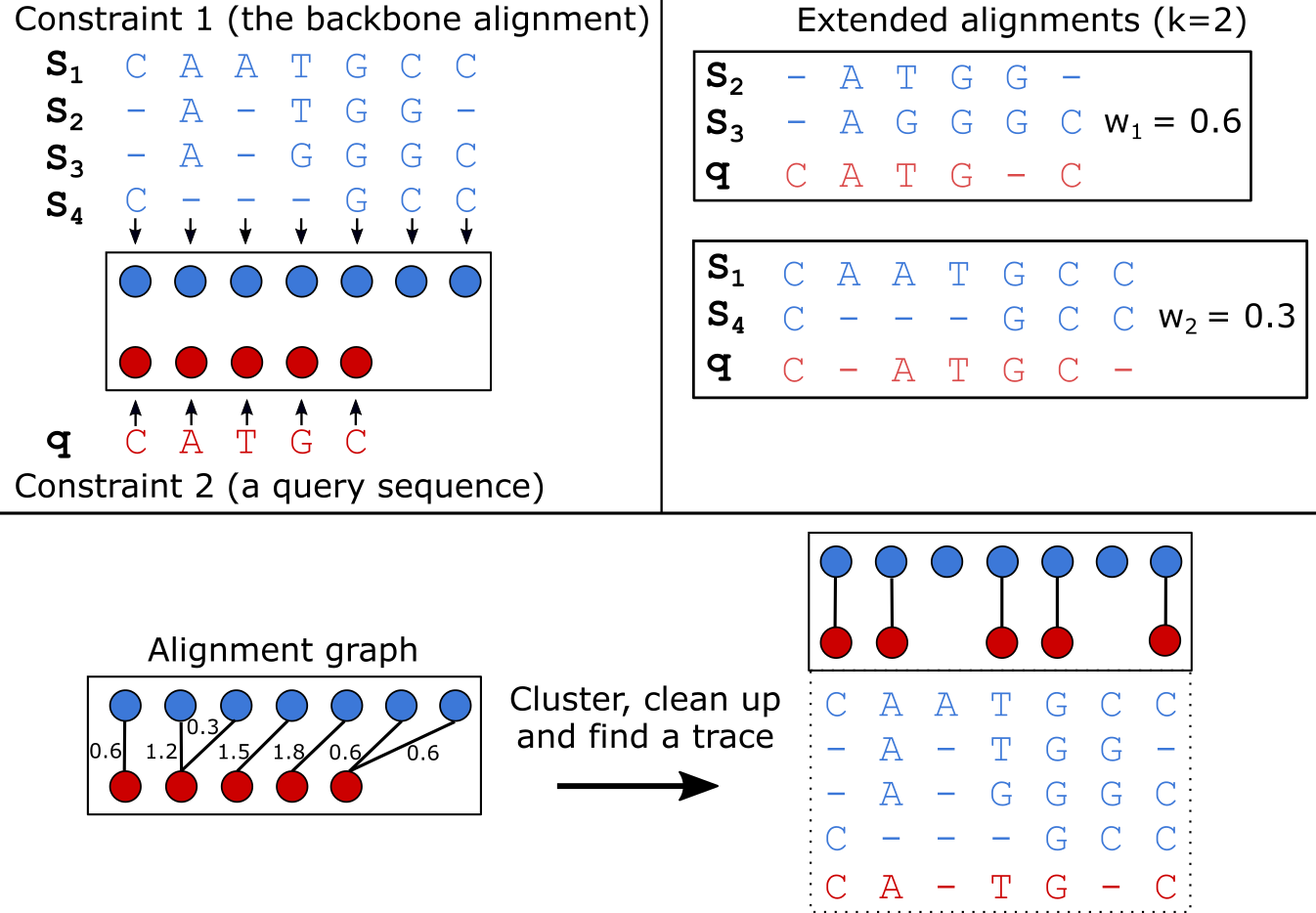
For a more detailed explanation of the WITCH algorithm, please refer to the publication below:
Publication |
|---|
Shen, Chengze, Minhyuk Park, and Tandy Warnow. “WITCH: Improved Multiple Sequence Alignment Through Weighted Consensus Hidden Markov Model Alignment.” Journal of Computational Biology, May 17, 2022. https://doi.org/10.1089/cmb.2021.0585. |
Note and Acknowledgement
WITCH includes and uses:
MAGUS (we use the Github version updated on April 5th 2021).
HMMER suites (v3.1b2 - hmmbuild, hmmsearch, hmmalign).
UPP (v4.5.1; we use only partial functionalities).
FastTreeMP (v2.1).
MAFFT (macOS v7.490).
MCL (linux version from MAGUS; macOS version 21-257).
Installation
This section lays out the necessary steps to run WITCH. WITCH was tested and passed builds on Python 3.7 to 3.11.
Now, the program fully supports Linux and macOS systems. We provide necessary binary executables for both systems, but you can supplement your own by changing the paths in the main.config file. In cases of conflicting installations (e.g., different versions of MAFFT), please supplement with the version on your system. If you experience any difficulty running WITCH, please contact Chengze Shen (chengze5@illinois.edu).
For the macOS system on the latest chips (e.g., M1/M2), you may need to compile and supply your own binaries for WITCH to run successfully. That is, change the paths of binaries in main.config (or use -c /path/to/user/config to avoid changing the default config file) to the ones on your system.
Install with PyPI (pip)
The easiest way to install WITCH is to use the PyPI distribution.
# 1. Install with pip (--user if no root access)
pip3 install witch-msa [--user]

# 2. After installation, users can run WITCH with either "witch-msa" or "witch.py" anywhere in the system
#    (Optional) Include "-y" or "--bypass-setup" to avoid being asked where to put the WITCH config file.
#               Using this option will default to use "~/.witch_msa" as the config directory. You only
#               need to use this option once.
witch-msa [-h] [-y]   # or,
witch.py [-h] [-y]
Install from the source file
Requirements
python>=3.7
cython>=0.29
configparser>=5.0.0
DendroPy>=4.4.0,<4.6.0
numpy>=1.15
psutil>=5.0
tqdm>=4.0.0
Installation Steps
# 1. Install via GitHub repo
git clone https://github.com/c5shen/WITCH.git

# 2. Install all requirements
# If you do not have root access, use "pip3 install -r requirements.txt --user"
cd WITCH
pip3 install -r requirements.txt

# 3. (Optional) Run setup.py to set up main.config. Please refer to "witch_msa/default.config"
#    Additionally, software binaries available in the user's environment will be prioritized for usage.
#    Use "-c" if want to install to WITCH/.witch_msa/main.config
#    Default is to ~/.witch_msa/main.config
python3 setup.py config [-c]

# 4. Execute the WITCH python script with -h to see allowed commandline parameter settings
#    When running WITCH normally, if step 3 is not run, you will be prompted to generate
#    "main.config" when running WITCH for the first time.
#    (Optional) Include "-y" or "--bypass-setup" to avoid being asked where to put the
#               WITCH config file. Using this option will default to use "~/.witch_msa"
#               as the config directory. You only need to use this option once.
python3 witch.py [-h] [-y]
main.config
main.config file will be created after running WITCH for the first time or created with python setup.py config [-c]. If it is not found, you will be prompted to choose where to create the file (default: ~/.witch_msa/main.config). As mentioned above, you can use -y or --bypass-setup to bypass this prompt by defaulting to ~/.witch_msa/main.config.
user-specified config file
In addition, a user can specify a customized config file with the -c or --config-file parameter option. This user.config file will override any default settings in main.config (if they overlap). Command-line arguments still have the highest priority and will override both main.config and the user config file, if any settings overlap.
Usage
The general command to run WITCH:
python3 witch.py -i [unaligned sequence file] -d [output directory] -o [output filename]Default behavior: WITCH will pick at most 1,000 sequences from the input around the median length as the backbone sequences. Then, it uses MAGUS to align the backbone sequences and FastTree2 to estimate a tree. It uses UPP decomposition strategy to generate an eHMM, and uses HMMSearch to calculate bit scores between HMMs and unaligned sequences. Bit scores are used to calculate weights, and each unaligned sequence is aligned to top k=10 HMMs ranked by weights.
Examples
All the following examples can be found in the examples/run.sh bash script.
Scenario A
Unaligned sequences only. Running WITCH for the first time and bypassing the prompt for setting up the configuration file (-y).
python3 witch.py -y -i examples/data/unaligned_all.txt \
   -d scenarioA_output -o aligned.txt
Scenario B
Unaligned sequences only; using bit scores (instead of the default weighted bit scores); using 10 HMMs to align a sequence.
python3 witch.py -i examples/data/unaligned_all.txt \
   -d scenarioB_output -o aligned.txt -w 0 -k 10
Scenario C
Backbone alignment available; backbone tree missing; query sequences available.
python3 witch.py -b examples/data/backbone.aln.fasta \
   -q examples/data/unaligned_frag.txt -d scenarioC_output \
   -o aligned.txt
Scenario D - additional options
Backbone alignment available; backbone tree available; query sequences available; saving weights to local; saving decomposition results for future usage (e.g., faster rerun).
python3 witch.py -b examples/data/backbone.aln.fasta \
   -e examples/data/backbone.tre -q examples/data/unaligned_frag.txt \
   -d scenarioD_output -o aligned.txt \
   --save-weight 1 --keep-decomposition 1
Scenario E - with user-specified config file
It is the same scenario as Scenario D but with a user-specified config file.
python3 witch.py -b examples/data/backbone.aln.fasta \
   -e examples/data/backbone.tre -q examples/data/unaligned_frag.txt \
   -d scenarioE_output -o aligned.txt \
   --save-weight 1 --keep-decomposition 1 \
--config-file user.configRelease history Release notifications | RSS feed


Download files
Download the file for your platform. If you're not sure which to choose, learn more about installing packages.
Source Distribution
Built Distribution
Filter files by name, interpreter, ABI, and platform.
If you're not sure about the file name format, learn more about wheel file names.
Copy a direct link to the current filters
File details
Details for the file witch_msa-1.0.5.tar.gz.
File metadata
- Download URL: witch_msa-1.0.5.tar.gz
- Upload date:
- Size: 29.0 MB
- Tags: Source
- Uploaded using Trusted Publishing? No
- Uploaded via: twine/5.1.1 CPython/3.9.20
File hashes
| Algorithm | Hash digest | |
|---|---|---|
| SHA256 |
763c687788f13fa3532bf92d01d7bdbd27d6809491e352e70e663364de0b42b5
|
|
| MD5 |
ecec83695f5f415c40a3a539f11bda5d
|
|
| BLAKE2b-256 |
609827d8396492b8f4f8498bc6c6983fa5c573ccf080c0adaf810ddd59dcc39d
|
File details
Details for the file witch_msa-1.0.5-py3-none-any.whl.
File metadata
- Download URL: witch_msa-1.0.5-py3-none-any.whl
- Upload date:
- Size: 29.1 MB
- Tags: Python 3
- Uploaded using Trusted Publishing? No
- Uploaded via: twine/5.1.1 CPython/3.9.20
File hashes
| Algorithm | Hash digest | |
|---|---|---|
| SHA256 |
504b6d630a3e33eaed342ca2ea11750c4fd685a5938c74a2ef017faa63f233f3
|
|
| MD5 |
44bcfa3cf02019b45c78f3db196163b5
|
|
| BLAKE2b-256 |
ab85168cf73fa75cef0d3f889ec9d1b3a6541304dfd6c3042a682debc53200b8
|






