
Compute seismic sources of ambient noise using wave model hindcast outputs.

Project description
WMSAN Python Package

Description
This package is built to help computation of seismic ambient noise source maps and other products based on the WAVEWATCHIII hindcast output.
Documentation
A detailed documentation is available on this page.
Contents
ww3-source-maps/
|-- LICENSE
|-- pyproject.toml
|-- README.md
|-- mkdocs.yml
|-- docs/
|-- site/
|-- src/
│   └── wmsan/
│       ├── readWW31.py
│       ├── read_hs_p2l.py
│       ├── subfunctions_body_waves.py
│       ├── subfunctions_rayleigh_waves.py
│       └── synthetics.py
│       └── wmsan_to_noisi.py
│       └── temporal_variation.py
│       └── synthetic_CCF.ipynb
│
|-- notebooks/
|   └── body_waves/
│       ├── amplification_coeff.ipynb
│       └── microseismic_sources.ipynb
│   └── rayleigh_waves/
│       ├── amplification_coeff.ipynb
│       ├── microseismic_sources.ipynb
│       ├── spectrograms.ipynb
│       ├── rayleigh_source.ipynb
│       └── synthetic_CCF.ipynb
│       └── wmsan_to_noisi.ipynb
│       └── temporal_variations.ipynb
|-- data/
│   ├── C.nc
│   ├── cP.nc
│   ├── cS.nc
│   ├── longuet_higgins.txt
│   ├── stations_pair.txt
│   └── ww3.07121700.dpt
- src/ : contains all Python scripts and subfunctions.
- notebooks/ : contains Jupyter Notebooks with detailed examples on how to use this package. Rayleigh waves and body waves are separated.
- data/: contains additional files used in computation.
Installation
PyPI
The package is available on PyPI.
-
Create an environment and install
-
if you use Conda environments:
  conda create --name wmsan
  conda activate wmsan
  conda install pip
  python3 -m pip install wmsan
to deactivate your environment:
conda deactivate -
otherwise
  python3 -m venv venv
  source venv/bin/activate
  python3 -m pip install wmsan
to deactivate your environment:
deactivate
-
From Source
- Clone the repository
cd path_to_your_wmsan_directory/
git clone https://gricad-gitlab.univ-grenoble-alpes.fr/tomasetl/ww3-source-maps.git
cd ww3-source-maps/
- Create an environment and install
- if you use Conda environments:
conda create --name wmsan
conda activate wmsan
conda install pip
pip install .
to deactivate your environment:
conda deactivate
- otherwise
python3 -m venv venv
source venv/bin/activate
python3 -m pip install .
to deactivate your environment:
deactivate
Dependencies
- numpy
- matplotlib
- cartopy
- xarray
- netCDF4
- obspy
- datetime
- scipy
- pandas
- dask
- ipykernel
- pyproj
- h5py
- tqdm
- notebook
Where should I start ?
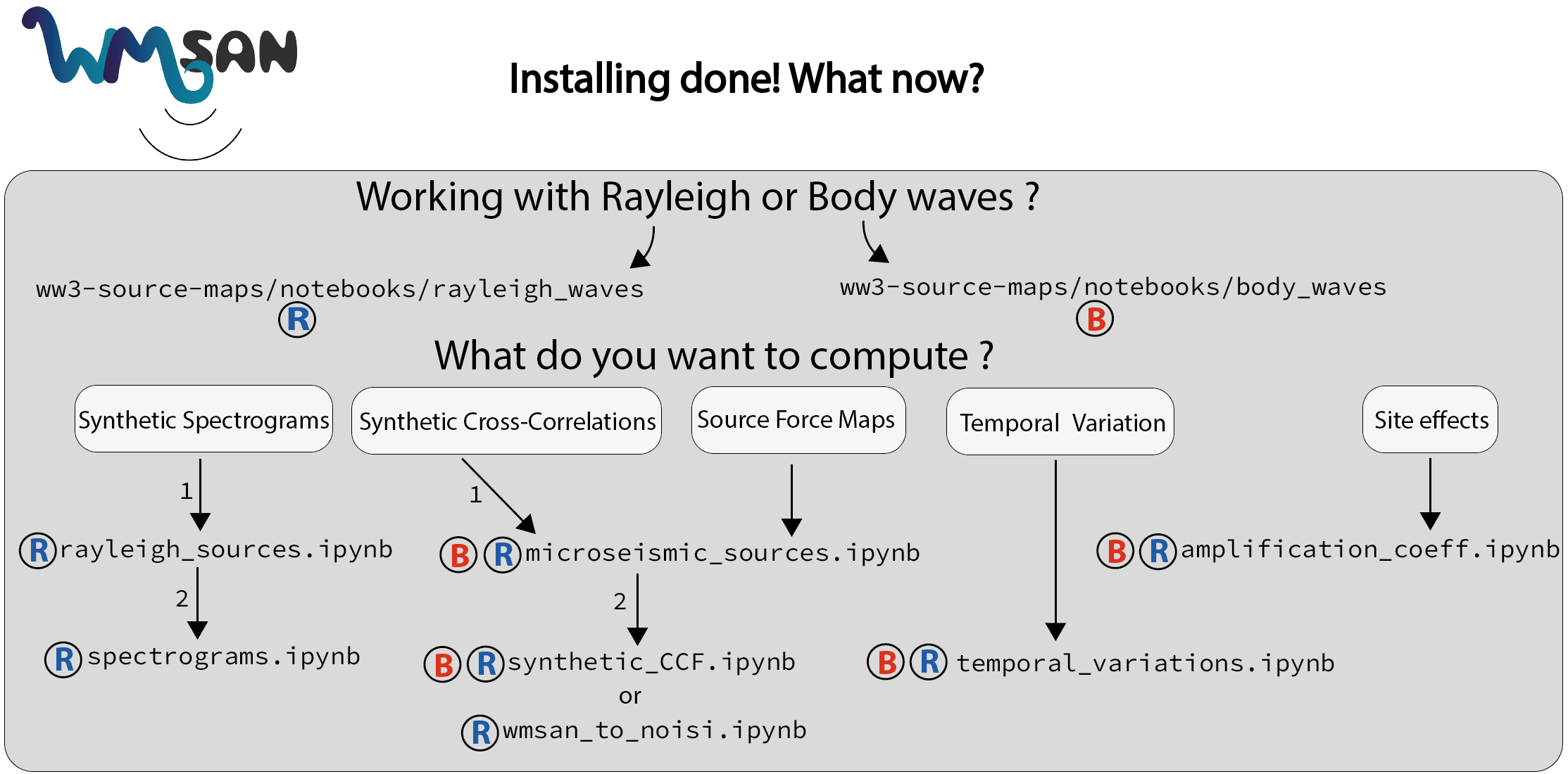
Architecture of WMSAN Python Package

Release history Release notifications | RSS feed


Download files
Download the file for your platform. If you're not sure which to choose, learn more about installing packages.
Source Distribution
Built Distribution
Filter files by name, interpreter, ABI, and platform.
If you're not sure about the file name format, learn more about wheel file names.
Copy a direct link to the current filters
File details
Details for the file wmsan-2024.1.3.tar.gz.
File metadata
- Download URL: wmsan-2024.1.3.tar.gz
- Upload date:
- Size: 33.9 kB
- Tags: Source
- Uploaded using Trusted Publishing? No
- Uploaded via: twine/5.0.0 CPython/3.9.18
File hashes
| Algorithm | Hash digest | |
|---|---|---|
| SHA256 |
89b1b72997cc616e28649b26c9e5bcf2424f901cd70a41a3737f6b811651960a
|
|
| MD5 |
8e7003578b8a1a884d0fa3581bf45777
|
|
| BLAKE2b-256 |
c1702db702185d97be714c7a6047364cf606454529eaea7ce462242165025f89
|
File details
Details for the file wmsan-2024.1.3-py3-none-any.whl.
File metadata
- Download URL: wmsan-2024.1.3-py3-none-any.whl
- Upload date:
- Size: 37.6 kB
- Tags: Python 3
- Uploaded using Trusted Publishing? No
- Uploaded via: twine/5.0.0 CPython/3.9.18
File hashes
| Algorithm | Hash digest | |
|---|---|---|
| SHA256 |
23ef1208ec452c47f87232604e6f8bceb309a5ef48692899652932ceecf11ed7
|
|
| MD5 |
c080e95c52c71f545cf3575b9fbc0b6c
|
|
| BLAKE2b-256 |
dd5d4241a7fc8332f106d65d0ed34aa1b491f72cb2ae925d1fa44d25766aa215
|






