
Wollok kernel for Jupyter

Project description


Wollok Kernel for Jupyter notebook
wollok_kernel is a Jupyter kernel implementation, started from a wrapper kernel.
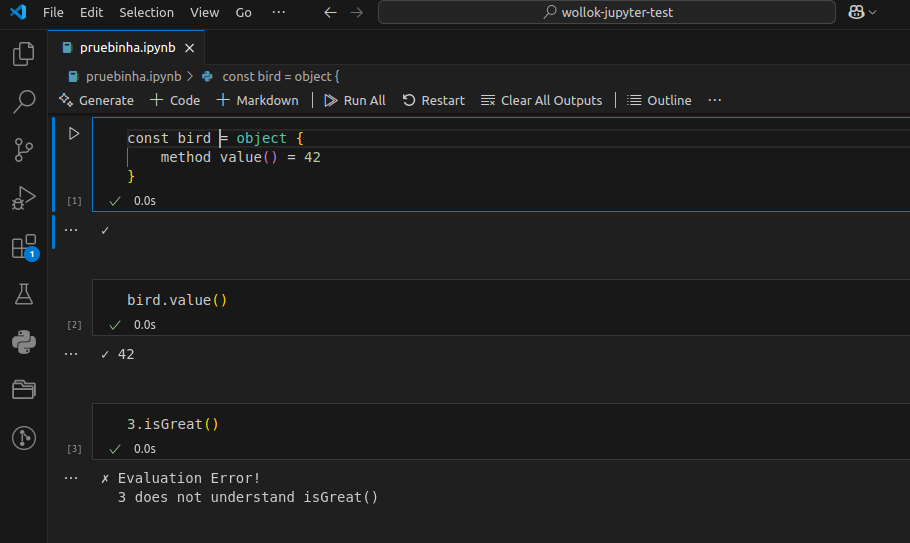
💻 Installation
Pre-requisites
You need to install Python (3.7 or newer). If you don't have Python, the recommended option is installing it using the official site, and click on Download Python X.X.X (there a different options depending on your operating system).
python --version
If python3 --version works, you should use an alias or replace python with python3.
Install Conda environment manager. Follow the instructions for your operating system.
Install Node & npm tools.
Wollok Kernel
Clone this repository:
git clone https://github.com/uqbar-project/wollok-jupyter-kernel # you can also use git@... option
Install Wollok Jupyter Kernel:
cd ./wollok-jupyter-kernel
conda init
./install_kernel.sh
At the end of the script you should see an output similar to the following:
Available kernels:
  python3    /path/to/venv/lib/python3.13/site-packages/ipykernel/resources
  wollok     /path/to/wollok-jupyter-kernel/venv/share/jupyter/kernels/wollok
If you need you can uninstall the kernel by running
./uninstall_kernel.sh
VSCode
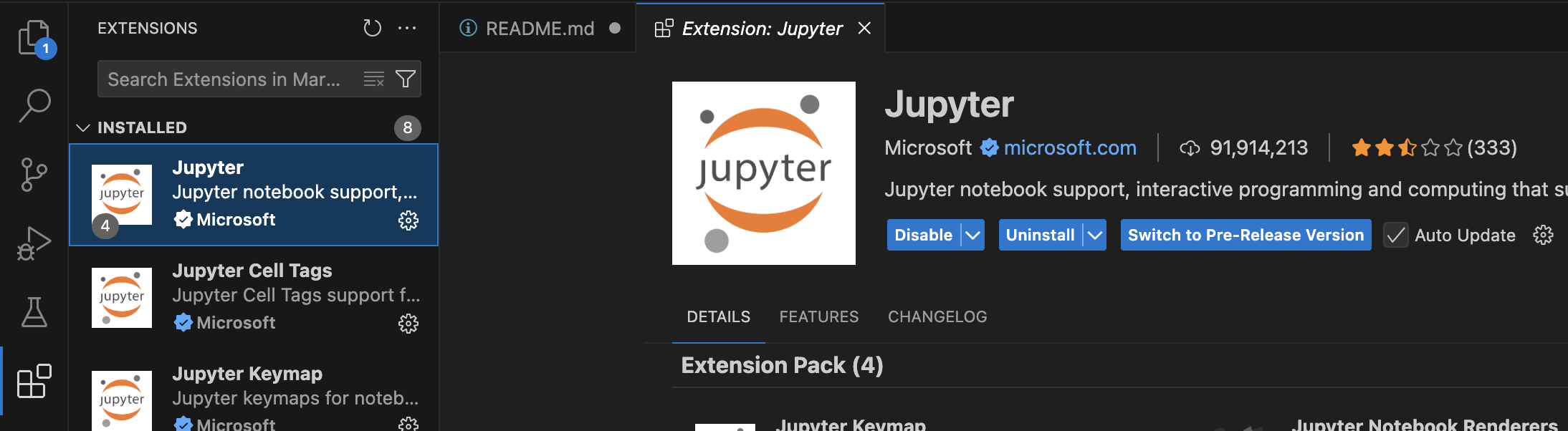
Install Jupyter extension in VSCode:
- Open Extension Tab (⇧⌘X or Ctrl+Shift+X)
- Look for "Jupyter"
- (Recommended) Install Wollok LSP extension
- Install Microsoft official extension
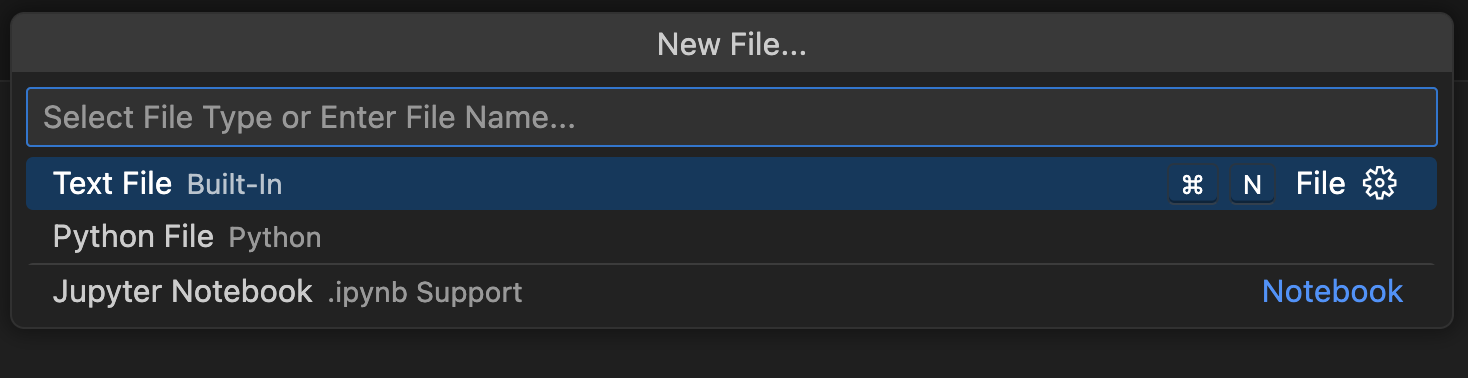
Then you can create a New File... > Jupyter Notebook
And select kernel: click on the Kernel link at the right side > Select another kernel > Jupyter Kernel > Wollok:
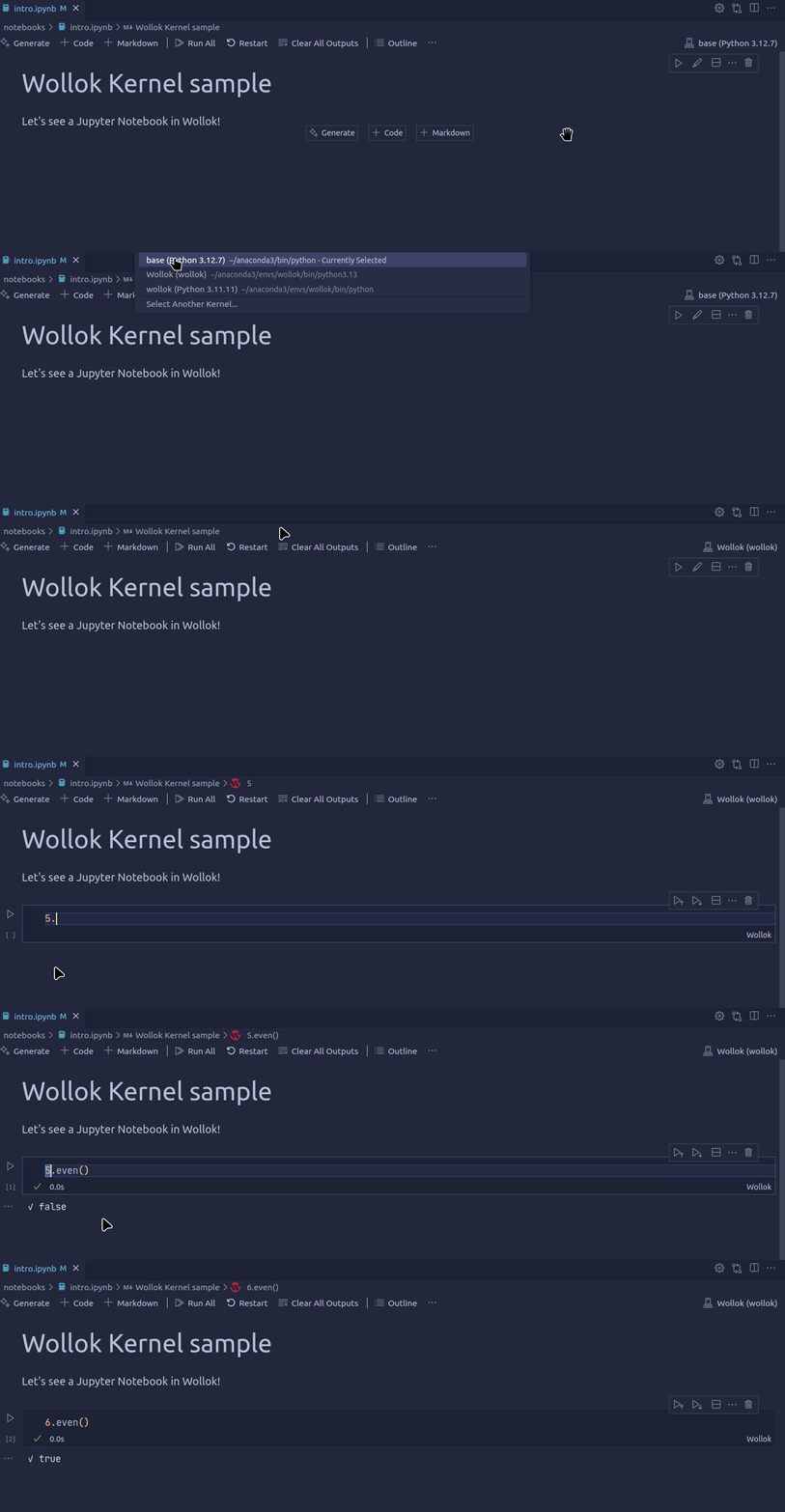
Make sure you don't select
Python Environmentbecause this will expect a Python kernel, not a Wollok kernel.
👩💻 Contribution
- If you want to collaborate, follow the developer instructions. There's also a main architecture explanation
- You can also join the Discord channel!
- Additional info is available at the wiki
🦄 Using Wollok kernel
- Notebook: The New menu in the notebook should show an option for a Wollok notebook.
- Console frontends: To use it with the console frontends, add
--kernel wollokto their command line arguments.
☁️ Using Wollok Kernel online
You can use this project as an example on how to use the Wollok kernel in MyBinder site, a Jupyter Notebook environment in the cloud. It will use the latest stable version of the Wollok kernel based on PyPI repository.
Click on the Launch binder icon, wait for the environment to be ready, and you should see a Jupyter notebook with the Wollok kernel selected.
Powered by Uqbar


Download files
Download the file for your platform. If you're not sure which to choose, learn more about installing packages.
Source Distribution
Built Distribution
Filter files by name, interpreter, ABI, and platform.
If you're not sure about the file name format, learn more about wheel file names.
Copy a direct link to the current filters
File details
Details for the file wollok_kernel-1.6.tar.gz.
File metadata
- Download URL: wollok_kernel-1.6.tar.gz
- Upload date:
- Size: 32.1 kB
- Tags: Source
- Uploaded using Trusted Publishing? No
- Uploaded via: twine/6.1.0 CPython/3.13.3
File hashes
| Algorithm | Hash digest | |
|---|---|---|
| SHA256 |
14650bd78aedf106641430f2a93f25bb307f2bf8c77408f66734c8a16fab6583
|
|
| MD5 |
6a8a7757c4417bc54b708ba14df02fc9
|
|
| BLAKE2b-256 |
3289c99cef04b8c3bff2edc285c3824d773875ea7fa9115e812dbae091c8035e
|
File details
Details for the file wollok_kernel-1.6-py3-none-any.whl.
File metadata
- Download URL: wollok_kernel-1.6-py3-none-any.whl
- Upload date:
- Size: 1.8 MB
- Tags: Python 3
- Uploaded using Trusted Publishing? No
- Uploaded via: twine/6.1.0 CPython/3.13.3
File hashes
| Algorithm | Hash digest | |
|---|---|---|
| SHA256 |
8eaf9fe0d5cbd30691a0de8d0e22d1bbb434224bf155ca88dc585ce56be25e9b
|
|
| MD5 |
13cc03a451f9901460dfdc321aaf8194
|
|
| BLAKE2b-256 |
05d5a4b5ce97eddefe5af796fb3b590d77be6b11364ae1ed0cd272eea701af3d
|






