
Wommit
Write commit tool


A package for intuitively formatting appealing commmit messages with emojis, using an assortment of different methods.

Installation:
pip install wommit
Usage:
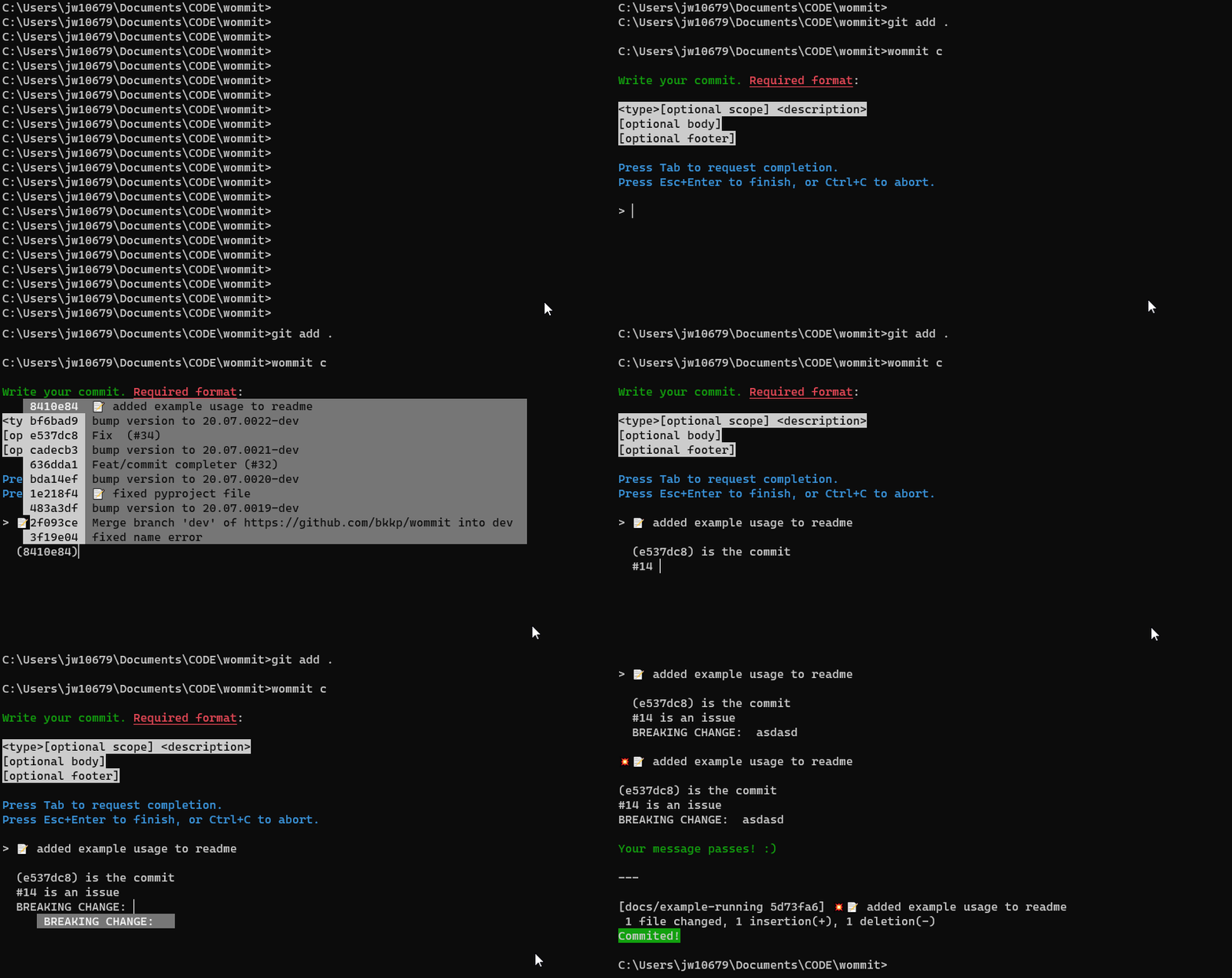
Autocomplete mode
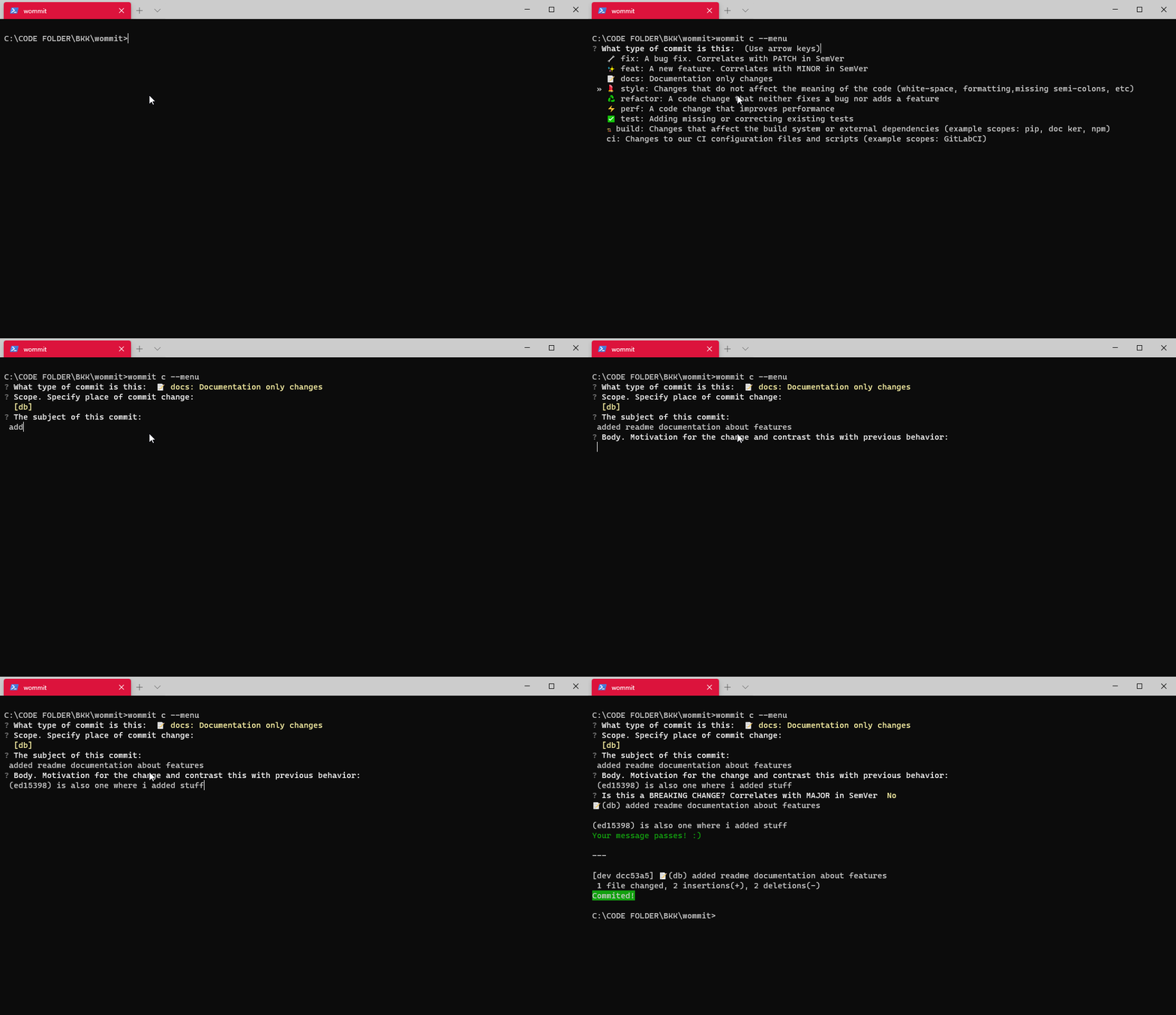
Menu mode
- Tab will call the autocompleters, although
complete while typingis activated.- Starting autocomplete mode by hitting Tab will bring up the types added to the project.
- Adding
(after the feature in autocomplete mode will autocomplete the scopes added to the project. #in the body of either mode will autocomplete active issues and PRs.(in the body of either mode will autocomplete recent commits.- Answering yes to the Breaking Change prompt in menu mode or writing
BREAKING CHANGEin the autocomplete mode will mark the commit as a breaking change.- Autocomplete mode will attempt to autocomplete
BREAKING CHANGE:if it's on a clean line.
- Autocomplete mode will attempt to autocomplete
- Both modes will only terminate if their input is correctly formatted.
Commands
wommit ...:
-
c: Commit all staged files using an intuitive selection menu or a fast autocompletion prompt.Options:
-m: Use menu mode, overriding default./-e: Use autocompletion mode, overriding default.-a: Add all files to commit. (git add .)-m [MESSAGE]: Write a manual commit message, and commits if it's in the accepted format, as well as converting known types to emojis.-g: Use global settings and data instead of local.--test: Test either of the modes without commiting.
-
check: Manually check previously added commit.Options:
-id [HASH]: Check a commit message with the specified ID.-ids [HASH1] [HASH2]: Check all commit messages between two IDs (newest ID first).-m [MESSAGE]: Check if the given string passes the check.-l: Check all local commits that have not been pushed.
-
configure ...: Opens a prompt for adding/removing types and scopes.e: Edit current types and scopes.p: Prints all types and scopes.s: Edit settings.
Options:
-g: Edit global settings.-t: Manually test the functionality.
-
changelog: Prints out a changelog generated from commits since last release.Options:
-r: Prints a changelog designed for Github releases.-b: Prints an easily readable changelog.-e: EXPERIMENTAL: edit the latest Github release with the generated changelog.post: Checks commits between two latest releases instead of latest to now.
-
format: Pastes the format a message needs to meet in order to pass the check.
Info
Use the wommit-changelog-action in your wommit project to automatically release your project with appropriate changelogs.
1 maintainer

Metadata
1 maintainer
Release files for wommit 20.8.39
For a detailed explanation of source distributions (sdists) and built distributions (wheels), please see the package formats documentation.
Source distribution (sdist)
| File | Size | Uploaded | |
|---|---|---|---|
| wommit-20.8.39.tar.gz | 23.7 kB | Details |
Built distribution (wheel)
| File | Interpreter | ABI | Platform | Reset |
|---|---|---|---|---|
| wommit-20.8.39-py3-none-any.whl | Python 3 | none | any | Details |
Total release size: 50.2 kB
Release files / wommit-20.8.39.tar.gz
| Download URL | wommit-20.8.39.tar.gz |
|---|---|
| Size | 23.7 kB |
| Tags | Source |
|
SHA-256 checksum How to use checksums |
216e3151c8448af79ed9c5f355ef2859a4c0818a4317e1f31c3f19c49b207d7a
|
|
BLAKE2b-256 checksum How to use checksums |
4cf78469bb048d25b2117d8001d8dd801241ca5fdb0b00f336bb612c92905f0d
|
| Upload date | |
|
Uploaded using Trusted Publishing? What is trusted publishing? |
No |
| Uploaded via |
twine/3.2.0 pkginfo/1.5.0.1 requests/2.24.0 setuptools/49.2.1 requests-toolbelt/0.9.1 tqdm/4.48.2 CPython/3.8.5
|
Release files / wommit-20.8.39-py3-none-any.whl
| Download URL | wommit-20.8.39-py3-none-any.whl |
|---|---|
| Size | 26.5 kB |
| Tags | Python 3 |
|
SHA-256 checksum How to use checksums |
b43b7a3817d5dfc3c33e8be860d873df1522c712b5ab1f97584f5ba57fe25eac
|
|
BLAKE2b-256 checksum How to use checksums |
1f3614e15169e27b38256a2a8f4a7b3a59e96758d83f0209e61a9922c62aa5c2
|
| Upload date | |
|
Uploaded using Trusted Publishing? What is trusted publishing? |
No |
| Uploaded via |
twine/3.2.0 pkginfo/1.5.0.1 requests/2.24.0 setuptools/49.2.1 requests-toolbelt/0.9.1 tqdm/4.48.2 CPython/3.8.5
|














