
woodwork-engine





Welcome to woodwork-engine, an AI Agent IaC tool that aims to make developing and deploying AI Agents easier.
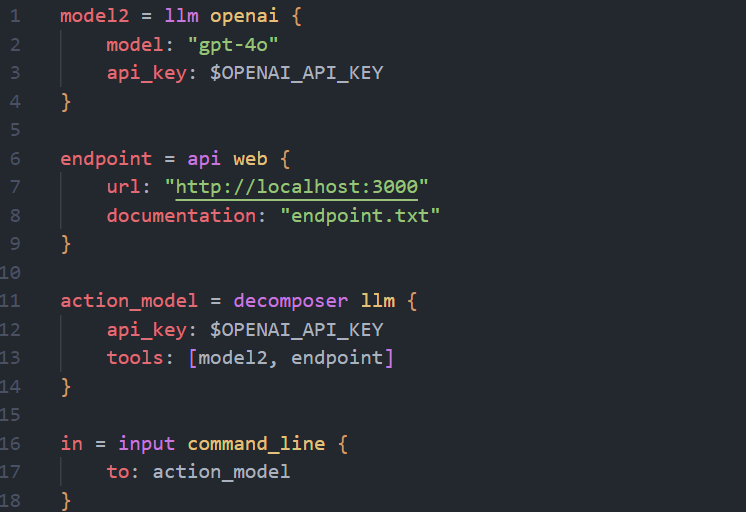
Through defining components in a configuration language, an LLM will decompose the task into actionable steps, which can be executed using the supplied tools. We use latest research to inform design decisions, and we implement this as most of the setup is copy/paste across projects. Through only focussing on the necessary components of a system, this package should make designing custom, vertical agents much easier.
Table of Contents
Features
- A custom config language, woodwork (.ww files), allowing agent components to be declared
- Integrations and communication between components are handled
- Additional customisation or extension can be provided by implementing some of our interfaces
A roadmap is provided with details on future features.
Installation
- Run
pip install woodwork-engine: This gives access to thewoodworkCLI tool, along with the ability to parse and deploy AI Agent components from .ww files - Install the Woodwork extension on VSCode if relevant: This provides syntax highlighting and intellisense for code in .ww files
Usage
- Begin by duplicating the
.env.examplefile and placing it in your project's root directory - Rename the file to
.env(ensure this is part of your project's.gitignoreso that it isn't committed) - Depending on the
.wwconfiguration file, populate the.envfile with your corresponding keys
See the .env.example file for further details.
Once you've configured your .ww config file and your .env file, there are two ways to run woodwork: A standalone application, or used as a dependency.
Standalone Application
- Create a main.ww file and write some code: This file is where component declarations are read from. For some inspiration, consult the examples
- Run
woodwork init: This installs the necessary dependencies to run your components - Run
woodwork: This activates the components and initializes a logger
As A Dependency
When using woodwork as a dependency, you will need to build your own logger implementation. Not building your own logger will result in no logs being generated but the application will still run.
- (Optional) Create a
./configdirectory: This is where the logging configuration will live. - (Optional) Copy the
log_config.jsoninto your./configdirectory: This configures your logger - In your file you'd like to utilize
woodworkin, addfrom woodwork import __main__ as m - See
dev-main.pyfor how to build your logger and configure callingwoodwork
Developer Setup
If you are interested in contributing, the following steps are used to activate a developer environment.
- Install
pre-commitif needed viapip install pre-commit - Run
pre-commit install [--hook-type pre-push]to run linting and formatting before commiting or pushing
Available Arguments
You can pass arguments to woodwork. For more details, see woodwork --help.
| Argument | Options | Default | Notes |
|---|---|---|---|
--mode |
run, debug, embed, clear |
run |
Debug is deprecated, use Run instead. If using a workflow, you must use embed or clear. |
--init |
none, isolated, all |
none |
|
--workflow |
none, add, remove, find |
none |
If specifying a workflow, you must provide a target. |
--target |
String | "" |
Defines the target for the workflow. For add workflows, specify the file path to the workflow. For remove workflows, specify the workflow ID. For find workflows, specify the search query. |
--version |
N/A | N/A | Prints the current version of Woodwork. Note: this will override any other arguments. |
When calling your script, you can pass argument to the script as long as they do not conflict with woodworks arguments.
Logging
In log_config.json, you can set the desired logging levels for stdout and the generated log file. Do this by editing the respective level property in the json for the respective handler. Options include the standard logging levels: DEBUG, INFO, WARNING, ERROR, CRITICAL.
You can monitor the log file during execution by opening a terminal and entering tail -f logs/debug_log.log (or your custom log file name if modified in the log_config.json)
Examples
For some examples, consult the examples folder. ENV variables are denotes by a '$', place a .env file in the same directory as the main.ww file and populate it with the necessary variables.
Contributing
To view the contributing guide for woodwork, the CONTRIBUTING.md file in the meta repository contains more information. We would love your help! Additionally, if you prefer working on other projects aligned with language servers or web development, woodwork-language and woodwork-website could be worth taking a look at.
License
woodwork-engine uses a GPL license, which can be read in full here.
1 maintainer

Metadata
1 maintainer
Release files for woodwork-engine 0.2.11
For a detailed explanation of source distributions (sdists) and built distributions (wheels), please see the package formats documentation.
Source distribution (sdist)
| File | Size | Uploaded | |
|---|---|---|---|
| woodwork_engine-0.2.11.tar.gz | 116.1 kB | Details |
Built distribution (wheel)
| File | Interpreter | ABI | Platform | Reset |
|---|---|---|---|---|
| woodwork_engine-0.2.11-py3-none-any.whl | Python 3 | none | any | Details |
Total release size: 248.7 kB
Release files / woodwork_engine-0.2.11.tar.gz
| Download URL | woodwork_engine-0.2.11.tar.gz |
|---|---|
| Size | 116.1 kB |
| Tags | Source |
|
SHA-256 checksum How to use checksums |
8d9f102a01f8ff09b051d7c837089271469c3ead0b3c2bed0d0508db4d03f520
|
|
BLAKE2b-256 checksum How to use checksums |
4a63b3753166571ca6b1a80dccc2e7b9dfc0220e840f2ba81f66951c14bdca08
|
| Upload date | |
|
Uploaded using Trusted Publishing? What is trusted publishing? |
No |
| Uploaded via |
twine/6.1.0 CPython/3.11.13
|
Release files / woodwork_engine-0.2.11-py3-none-any.whl
| Download URL | woodwork_engine-0.2.11-py3-none-any.whl |
|---|---|
| Size | 132.6 kB |
| Tags | Python 3 |
|
SHA-256 checksum How to use checksums |
ec87189c710c438ac75986af850b675d0c203b367ec157c08fc3084bcff2bed1
|
|
BLAKE2b-256 checksum How to use checksums |
4de19a0d10dd4264d6ff8d9d1fd5ebd70b3bdb7960c6afc0220e7ce33c69e8de
|
| Upload date | |
|
Uploaded using Trusted Publishing? What is trusted publishing? |
No |
| Uploaded via |
twine/6.1.0 CPython/3.11.13
|














