

word-mcp-live
The only MCP server that edits Word documents while they're open
Live editing · Tracked changes · Per-action undo · 120 tools · Cross-platform



word-mcp-live gives any AI assistant that supports MCP full control of Microsoft Word. Open a document, tell the AI what you need, and watch it happen — formatting, tracked changes, comments, and all. Changes appear live in your open document.
See it in action
https://github.com/user-attachments/assets/fbb09af4-1e25-4e49-94d0-45b363278810
What Sets This Apart
- Live editing — Edit documents while they're open in Word. No save-close-reopen cycle.
- Full undo — Every AI action is a single Ctrl+Z. Made a mistake? Just undo it.
- Native tracked changes — Real Word revisions with your name, not XML hacks.
- Threaded comments — Add, reply, resolve, and delete comments like a human reviewer.
- Layout diagnostics — Detects formatting problems before they become print disasters.
- Equations & cross-references — Insert math formulas and auto-updating references.
- 120 tools — The most comprehensive Word MCP server available.
Quick Start
pip install word-mcp-live
Or install from source:
git clone https://github.com/ykarapazar/word-mcp-live.git
cd word-mcp-live
pip install -e .
Client Installation
Claude Desktop
Add to your claude_desktop_config.json:
{
  "mcpServers": {
    "word": {
      "command": "uvx",
      "args": ["word-mcp-live"],
      "env": {
        "MCP_AUTHOR": "Your Name",
        "MCP_AUTHOR_INITIALS": "YN"
      }
    }
  }
}
Claude Code
Add to your .mcp.json:
{
  "mcpServers": {
    "word": {
      "command": "uvx",
      "args": ["word-mcp-live"],
      "env": {
        "MCP_AUTHOR": "Your Name",
        "MCP_AUTHOR_INITIALS": "YN"
      }
    }
  }
}
Cursor
One-click: Click the install button at the top of this page.
Manual: Add to ~/.cursor/mcp.json:
{
  "mcpServers": {
    "word": {
      "command": "uvx",
      "args": ["word-mcp-live"],
      "env": {
        "MCP_AUTHOR": "Your Name",
        "MCP_AUTHOR_INITIALS": "YN"
      }
    }
  }
}
VS Code / Copilot
One-click: Install in VS Code
Manual: Add to your VS Code settings.json:
{
  "mcp": {
    "servers": {
      "word": {
        "command": "uvx",
        "args": ["word-mcp-live"],
        "env": {
          "MCP_AUTHOR": "Your Name",
          "MCP_AUTHOR_INITIALS": "YN"
        }
      }
    }
  }
}
Windsurf
Add to ~/.codeium/windsurf/mcp_config.json:
{
  "mcpServers": {
    "word": {
      "command": "uvx",
      "args": ["word-mcp-live"],
      "env": {
        "MCP_AUTHOR": "Your Name",
        "MCP_AUTHOR_INITIALS": "YN"
      }
    }
  }
}
OpenAI Codex (CLI, desktop app, IDE)
codex mcp add word --env MCP_AUTHOR="Your Name" -- uvx word-mcp-live
Or add to ~/.codex/config.toml:
[mcp_servers.word]
command = "uvx"
args = ["word-mcp-live"]
startup_timeout_sec = 60
tool_timeout_sec = 120

[mcp_servers.word.env]
MCP_AUTHOR = "Your Name"
In the desktop app: Settings → MCP servers → Add server. On Windows, run Codex natively, not under WSL — live tools need native Windows.
Docker
{
  "mcpServers": {
    "word": {
      "command": "docker",
      "args": ["run", "-i", "--rm", "ghcr.io/ykarapazar/word-mcp-live"],
      "env": {
        "MCP_AUTHOR": "Your Name",
        "MCP_AUTHOR_INITIALS": "YN"
      }
    }
  }
}
Note: Docker mode supports cross-platform tools only. Live editing requires a native (non-Docker) install on Windows or macOS with Word running.
MCP_AUTHORsets your name on tracked changes and comments (default:"Author").MCP_AUTHOR_INITIALSsets comment initials.
Two Modes
| Works everywhere | Live editing (Word open) | |
|---|---|---|
| What it does | Create and edit saved .docx files | Edit documents live while you work in Word |
| Platform | Windows, macOS, Linux | Windows (COM) and macOS (JXA) |
| Undo | File-level saves | Per-action Ctrl+Z (Windows); per-operation undo (macOS) |
| Best for | Batch processing, document generation | Interactive editing, formatting, review |
Both modes work together. The AI picks the right one for the task.
macOS Live Editing (New in v1.5.0)
Live tools now work on macOS via JavaScript for Automation (JXA). Same tool names, same parameters — the server detects your platform and uses the right automation backend.
| Feature | Windows | macOS |
|---|---|---|
| Text read/write/find/replace | COM | JXA |
| Formatting (bold, font, style) | COM | JXA |
| Track changes & revisions | COM | JXA |
| Comments (add, delete, list) | COM | JXA |
| Tables (add, read, modify rows/cells) | COM | JXA |
| Page layout, headers, bookmarks | COM | JXA |
Table formatting (word_live_format_table) |
COM | Not available |
| Images, multi-paragraph insert | COM | Not available |
| Equations, cross-references | COM | Not available |
| Snapshot diff/status, document properties | COM | Not available |
| Threaded comment replies | COM | Not available |
| Comment resolve/unresolve | COM | Not available |
| Undo history inspection | COM | Not available |
| Watermarks | COM | Not available |
Configuration
| Variable | Default | Description |
|---|---|---|
MCP_AUTHOR |
"Author" |
Author name for tracked changes and comments |
MCP_AUTHOR_INITIALS |
"" |
Author initials for comments |
MCP_TRANSPORT |
stdio |
Transport type: stdio, sse, or streamable-http |
MCP_HOST |
0.0.0.0 |
Host to bind (for SSE/HTTP transports) |
MCP_PORT |
8000 |
Port to bind (for SSE/HTTP transports) |
For remote deployment, see RENDER_DEPLOYMENT.md.
Example Prompts
Just tell the AI what you want in plain language:
"Draft a contract with tracked changes so my colleague can review"
"Format all headings as Cambria 13pt bold and add automatic numbering"
"Add a comment on paragraph 3 asking about the deadline"
"Find every mention of 'ABC Corp' and replace with 'XYZ Ltd' as a tracked change"
"Set the page to A4 landscape with 2cm margins"
"Insert a table of contents based on the document headings"
"Add page numbers in the footer and our company name in the header"
"Insert a cross-reference to Heading 2 in paragraph 5"
Usage Examples
Example 1: Read a document (cross-platform)
Tool call: get_document_text
{ "filename": "C:/Documents/report.docx" }
Expected output:
{
  "status": "success",
  "paragraphs": [
    {"index": 0, "text": "Quarterly Report", "style": "Heading 1"},
    {"index": 1, "text": "Revenue increased by 15% compared to Q3.", "style": "Normal"},
    {"index": 2, "text": "Key Metrics", "style": "Heading 2"}
  ],
  "total_paragraphs": 3
}
Example 2: Live editing with tracked changes (Windows)
Tool call: word_live_replace_text
{
  "filename": "report.docx",
  "find_text": "ABC Corporation",
  "replace_text": "XYZ Ltd",
  "match_case": true,
  "replace_all": true,
  "track_changes": true
}
Expected output:
{
  "status": "success",
  "replacements": 4,
  "message": "Replaced 4 occurrences (tracked changes enabled)"
}
The replacements appear as tracked changes in Word with strikethrough on "ABC Corporation" and underline on "XYZ Ltd".
Example 3: Add a comment anchored to text (cross-platform)
Tool call: add_comment
{
  "filename": "C:/Documents/contract.docx",
  "target_text": "payment within 30 days",
  "comment_text": "Should we extend this to 45 days?",
  "author": "Jane Smith"
}
Expected output:
{
  "status": "success",
  "message": "Comment added by Jane Smith on 'payment within 30 days'"
}
The comment appears in Word's Review panel, anchored to the specified text.
Tool Reference
120 tools across two modes — see the complete tool reference for details.
| Category | Count |
|---|---|
| Cross-platform (python-docx) | 75 |
| Windows Live (COM automation) | 45 (44 word_live_* + word_screen_capture) |
| macOS Live (JXA automation) | 32 (of the 45 live tools) |
Requirements
- Python 3.11+
python-docx,fastmcp,msoffcrypto-tool(installed automatically)- Windows Live tools: Windows 10/11 + Microsoft Word +
pywin32(installed automatically) - macOS Live tools: macOS + Microsoft Word for Mac (uses built-in JXA — no extra dependencies)
The cross-platform tools work without Word installed — only python-docx is needed.
Contributing
See CONTRIBUTING.md for development setup, code style, and how to add new tools.
Found a bug? Open an issue. Have an idea? Request a feature.
Acknowledgments
Built on top of GongRzhe/Office-Word-MCP-Server by GongRzhe (MIT License).
Additional libraries: python-docx · FastMCP · pywin32
Privacy
This server runs entirely on your local machine. No data is collected, transmitted, or stored. See the full Privacy Policy.
Support
- Bug reports: Open an issue
- Feature requests: Request a feature
- Discussions: GitHub Discussions
License
MIT License — see LICENSE for details.
Star History
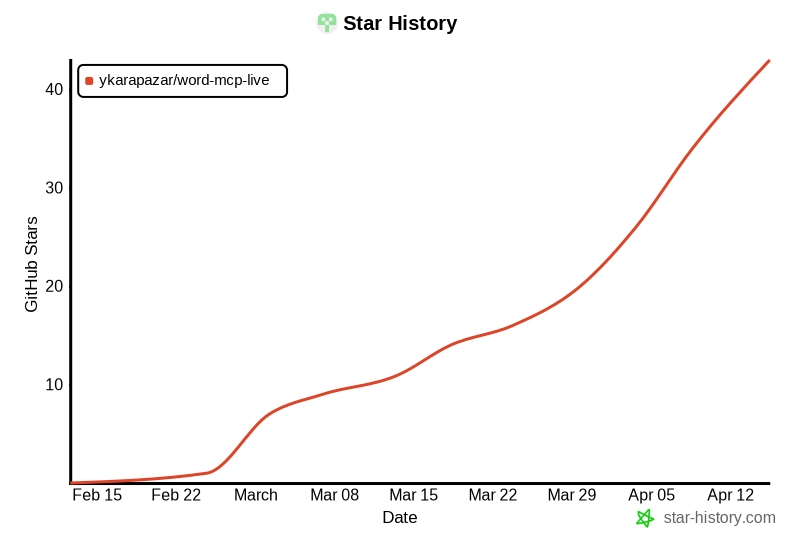
1 maintainer

Metadata
1 maintainer
Release files for word-mcp-live 1.6.22
For a detailed explanation of source distributions (sdists) and built distributions (wheels), please see the package formats documentation.
Source distribution (sdist)
| File | Size | Uploaded | Provenance | Actions |
|---|---|---|---|---|
| word_mcp_live-1.6.22.tar.gz | 272.3 kB | Without provenance | Details for word_mcp_live-1.6.22.tar.gz |
Built distribution (wheel)
| File | Interpreter | ABI | Platform | Actions Reset |
|---|---|---|---|---|
| word_mcp_live-1.6.22-py3-none-any.whl | Python 3 | none | any | Details for word_mcp_live-1.6.22-py3-none-any.whl |
Total release size: 444.2 kB
Release files / word_mcp_live-1.6.22.tar.gz
| Download URL | word_mcp_live-1.6.22.tar.gz |
|---|---|
| Size | 272.3 kB |
| Tags | Source |
|
SHA-256 checksum How to use checksums |
3496b018ae936ba69bd331e0d4ac4c35f5faa6749afdb3e265615188f0cec250
|
|
BLAKE2b-256 checksum How to use checksums |
e8e2d210332b8460ca196b7148d956fc0aa6896ea2c202631131c341ea467165
|
| Upload date | |
|
Uploaded using Trusted Publishing? What is trusted publishing? |
No |
| Uploaded via |
twine/7.0.0 CPython/3.13.2
|
Release files / word_mcp_live-1.6.22-py3-none-any.whl
| Download URL | word_mcp_live-1.6.22-py3-none-any.whl |
|---|---|
| Size | 172.0 kB |
| Tags | Python 3 |
|
SHA-256 checksum How to use checksums |
a2a6ba9cd00ab3b362d0ca00c7647cbbdce3145d992f3ecb8ff1e7f68b3447e7
|
|
BLAKE2b-256 checksum How to use checksums |
0af3ca7417918e5b4121f168054ebeff0d6ac29179a23f66992f1cd19f8373ed
|
| Upload date | |
|
Uploaded using Trusted Publishing? What is trusted publishing? |
No |
| Uploaded via |
twine/7.0.0 CPython/3.13.2
|
Security for word-mcp-live 1.6.22
Provenance
Provenance describes where a file came from. On PyPI, provenance is shared via attestations, which provide a verifiable record of the build or publishing details. View details, limitations and caveats.
No provenance found
None of the files in this release were uploaded with provenance metadata.
A note on package security
PyPI is a repository for distributing packages, not a service for auditing them. While third-party security researchers and our staff do their best to detect and remove malicious packages, PyPI cannot guarantee the quality, security or suitability of any given package.
To learn more about protecting yourself from malicious actors, visit our package security documentation.














