
MCP server for manipulating Microsoft Word documents

Project description
Office-Word-MCP-Server


Overview
Office-Word-MCP-Server implements the Model Context Protocol to expose Word document operations as tools and resources. It serves as a bridge between AI assistants and Microsoft Word documents, allowing for document creation, content addition, formatting, and analysis.
The server features a modular architecture that separates concerns into core functionality, tools, and utilities, making it highly maintainable and extensible for future enhancements.
Example
Pormpt
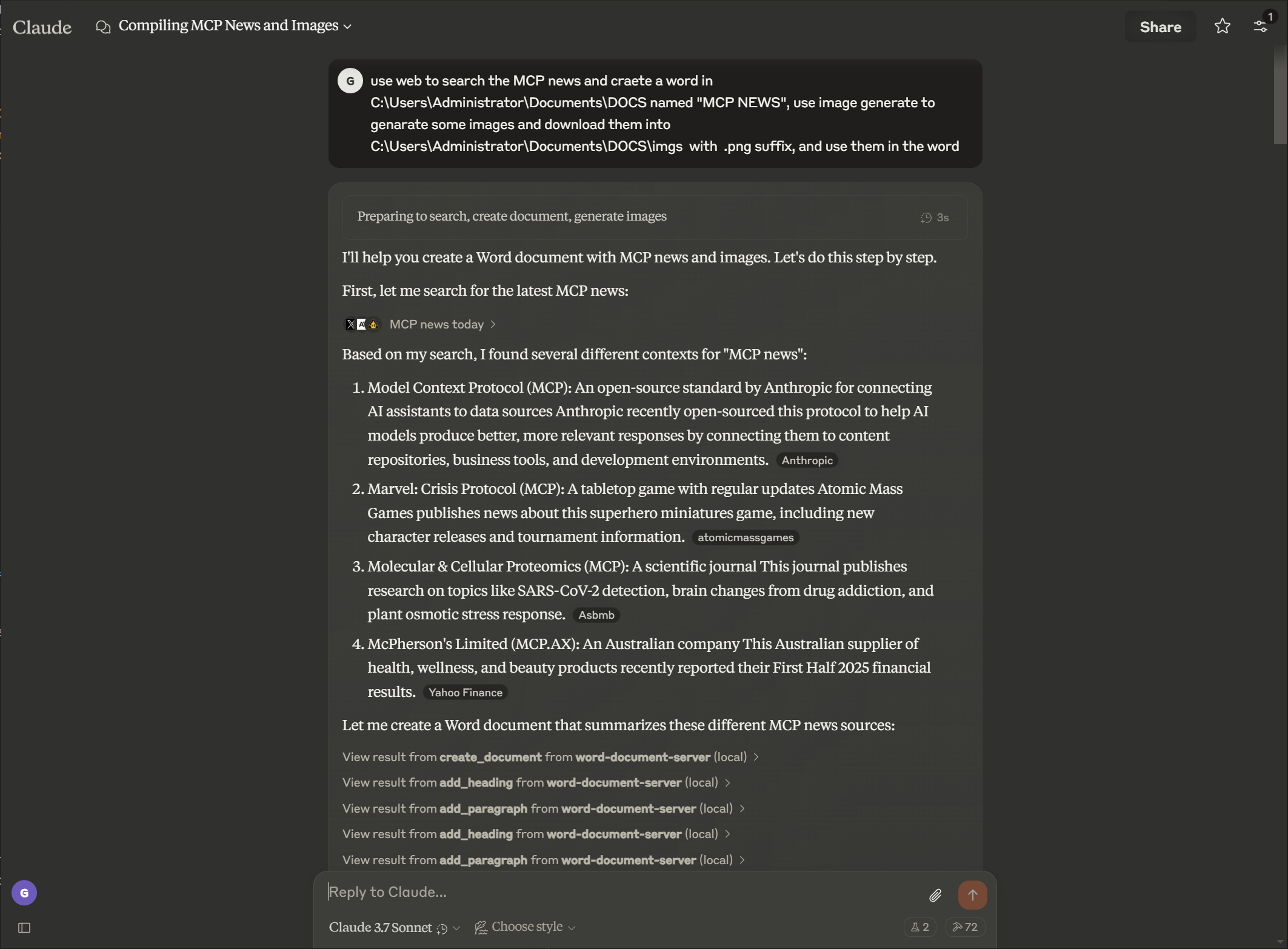
Output

Features
Document Management
- Create new Word documents with metadata
- Extract text and analyze document structure
- View document properties and statistics
- List available documents in a directory
- Create copies of existing documents
- Merge multiple documents into a single document
- Convert Word documents to PDF format
Content Creation
- Add headings with different levels
- Insert paragraphs with optional styling
- Create tables with custom data
- Add images with proportional scaling
- Insert page breaks
- Add footnotes and endnotes to documents
- Convert footnotes to endnotes
- Customize footnote and endnote styling
Rich Text Formatting
- Format specific text sections (bold, italic, underline)
- Change text color and font properties
- Apply custom styles to text elements
- Search and replace text throughout documents
Table Formatting
- Format tables with borders and styles
- Create header rows with distinct formatting
- Apply cell shading and custom borders
- Structure tables for better readability
Advanced Document Manipulation
- Delete paragraphs
- Create custom document styles
- Apply consistent formatting throughout documents
- Format specific ranges of text with detailed control
Document Protection
- Add password protection to documents
- Implement restricted editing with editable sections
- Add digital signatures to documents
- Verify document authenticity and integrity
Installation
Installing via Smithery
To install Office Word Document Server for Claude Desktop automatically via Smithery:
npx -y @smithery/cli install @GongRzhe/Office-Word-MCP-Server --client claude
Prerequisites
- Python 3.8 or higher
- pip package manager
Basic Installation
# Clone the repository
git clone https://github.com/GongRzhe/Office-Word-MCP-Server.git
cd Office-Word-MCP-Server

# Install dependencies
pip install -r requirements.txt
Using the Setup Script
Alternatively, you can use the provided setup script which handles:
- Checking prerequisites
- Setting up a virtual environment
- Installing dependencies
- Generating MCP configuration
python setup_mcp.py
Usage with Claude for Desktop
Configuration
Method 1: After Local Installation
- After installation, add the server to your Claude for Desktop configuration file:
{
  "mcpServers": {
    "word-document-server": {
      "command": "python",
      "args": ["/path/to/word_mcp_server.py"]
    }
  }
}
Method 2: Without Installation (Using uvx)
- You can also configure Claude for Desktop to use the server without local installation by using the uvx package manager:
{
  "mcpServers": {
    "word-document-server": {
      "command": "uvx",
      "args": ["--from", "office-word-mcp-server", "word_mcp_server"]
    }
  }
}
-
Configuration file locations:
- macOS:
~/Library/Application Support/Claude/claude_desktop_config.json - Windows:
%APPDATA%\Claude\claude_desktop_config.json
- macOS:
-
Restart Claude for Desktop to load the configuration.
Example Operations
Once configured, you can ask Claude to perform operations like:
- "Create a new document called 'report.docx' with a title page"
- "Add a heading and three paragraphs to my document"
- "Insert a 4x4 table with sales data"
- "Format the word 'important' in paragraph 2 to be bold and red"
- "Search and replace all instances of 'old term' with 'new term'"
- "Create a custom style for section headings"
- "Apply formatting to the table in my document"
API Reference
Document Creation and Properties
create_document(filename, title=None, author=None)
get_document_info(filename)
get_document_text(filename)
get_document_outline(filename)
list_available_documents(directory=".")
copy_document(source_filename, destination_filename=None)
convert_to_pdf(filename, output_filename=None)
Content Addition
add_heading(filename, text, level=1)
add_paragraph(filename, text, style=None)
add_table(filename, rows, cols, data=None)
add_picture(filename, image_path, width=None)
add_page_break(filename)
Content Extraction
get_document_text(filename)
get_paragraph_text_from_document(filename, paragraph_index)
find_text_in_document(filename, text_to_find, match_case=True, whole_word=False)
Text Formatting
format_text(filename, paragraph_index, start_pos, end_pos, bold=None,
            italic=None, underline=None, color=None, font_size=None, font_name=None)
search_and_replace(filename, find_text, replace_text)
delete_paragraph(filename, paragraph_index)
create_custom_style(filename, style_name, bold=None, italic=None,
                    font_size=None, font_name=None, color=None, base_style=None)
Table Formatting
format_table(filename, table_index, has_header_row=None,
             border_style=None, shading=None)
Troubleshooting
Common Issues
-
Missing Styles
- Some documents may lack required styles for heading and table operations
- The server will attempt to create missing styles or use direct formatting
- For best results, use templates with standard Word styles
-
Permission Issues
- Ensure the server has permission to read/write to the document paths
- Use the
copy_documentfunction to create editable copies of locked documents - Check file ownership and permissions if operations fail
-
Image Insertion Problems
- Use absolute paths for image files
- Verify image format compatibility (JPEG, PNG recommended)
- Check image file size and permissions
Debugging
Enable detailed logging by setting the environment variable:
export MCP_DEBUG=1  # Linux/macOS
set MCP_DEBUG=1     # Windows
Contributing
Contributions are welcome! Please feel free to submit a Pull Request.
- Fork the repository
- Create your feature branch (
git checkout -b feature/amazing-feature) - Commit your changes (
git commit -m 'Add some amazing feature') - Push to the branch (
git push origin feature/amazing-feature) - Open a Pull Request
License
This project is licensed under the MIT License - see the LICENSE file for details.
Acknowledgments
- Model Context Protocol for the protocol specification
- python-docx for Word document manipulation
- FastMCP for the Python MCP implementation
Note: This server interacts with document files on your system. Always verify that requested operations are appropriate before confirming them in Claude for Desktop or other MCP clients.
Release history Release notifications | RSS feed


Download files
Download the file for your platform. If you're not sure which to choose, learn more about installing packages.
Source Distribution
Built Distribution
Filter files by name, interpreter, ABI, and platform.
If you're not sure about the file name format, learn more about wheel file names.
Copy a direct link to the current filters
File details
Details for the file word_mcp_server-0.0.3.tar.gz.
File metadata
- Download URL: word_mcp_server-0.0.3.tar.gz
- Upload date:
- Size: 62.4 kB
- Tags: Source
- Uploaded using Trusted Publishing? No
- Uploaded via: twine/6.1.0 CPython/3.12.9
File hashes
| Algorithm | Hash digest | |
|---|---|---|
| SHA256 |
bcf8680d58320608a3aa947259550ec5187dffd15db649f4a0fda44b15601ae5
|
|
| MD5 |
fea4ee3e4b3f9d8a3cd1be5af14948bc
|
|
| BLAKE2b-256 |
70e790a72e696589e56086b60302fc4c89ead535664356ce11f9a69c27cebff0
|
File details
Details for the file word_mcp_server-0.0.3-py3-none-any.whl.
File metadata
- Download URL: word_mcp_server-0.0.3-py3-none-any.whl
- Upload date:
- Size: 40.3 kB
- Tags: Python 3
- Uploaded using Trusted Publishing? No
- Uploaded via: twine/6.1.0 CPython/3.12.9
File hashes
| Algorithm | Hash digest | |
|---|---|---|
| SHA256 |
5a6f966668bf086f3e572049950c5f19f1e4761c3a091ecea4da7bcfac53c00a
|
|
| MD5 |
98b254304d2ca4fd1a01a18d475a67f5
|
|
| BLAKE2b-256 |
5dfc2e40c850c8f670e4b04bfc180a3656ec603e0b4469dce473ff74a3a767d5
|






