
🌟 Convert a Word Doc to html

word2html turns a .docx file into a single, self-contained HTML5 file. It uses
pandoc for the conversion, and adds checks for malformed
documents, unsafe links, and hidden text.
📋 Requirements
- pandoc 3.6 or newer. This is a separate program:
uvxandpipdo not install it. - Python 3.12 or newer.
Install pandoc with one of these:
| Platform | Command |
|---|---|
| macOS | brew install pandoc |
| Debian / Ubuntu | sudo apt install pandoc |
| Windows | winget install JohnMacFarlane.Pandoc |
| Anything else | See the pandoc installation guide |
Then check the version, because Linux distribution packages can be older than word2html needs:
pandoc --version
For example, apt doesn't install a new enough pandoc on Debian 12 or 13, or on Ubuntu 24.04.
If yours is too old, use an installer from the
pandoc releases page. word2html is tested on Linux and
macOS on Python 3.12 to 3.15; Windows is not tested.
🚀 Quick Start with uvx
The easiest way to run word2html without installing it is using uvx:
uvx word2html /path/to/MyGloriousDoc.docx
This will give you a new file, /path/to/MyGloriousDoc.html.
💾 Installation
To install with uv:
uv tool install word2html
Or with pip:
pip install word2html
Then run:
word2html /path/to/MyGloriousDoc.docx
🛠️ Usage
word2html [-h] [--version] [--strict] [--timeout SECONDS]
          [--max-memory SIZE] [--max-file-size SIZE] path
| Option | Default | What it does |
|---|---|---|
--strict |
off | Refuse documents with unsafe links or hidden text instead of warning |
--timeout SECONDS |
120 |
Stop pandoc after this long |
--max-memory SIZE |
2G |
Memory limit for pandoc, such as 512M |
--max-file-size SIZE |
200M |
Largest input file to accept |
--version |
Show the version |
The output is written next to the input, with the same name and an .html extension. An
existing file with that name is replaced. The replacement is atomic: if conversion fails or is
refused, an existing file is left untouched. If the output path is a symlink, the symlink itself
is replaced and its target isn't changed.
Exit codes
| Code | Meaning |
|---|---|
0 |
Converted. Any warnings were printed to stderr |
1 |
Invalid input, a limit was exceeded, or pandoc or the output write failed |
2 |
Bad command line |
3 |
Refused for safety. Nothing was written |
🔒 Security
Word documents can contain things you don't want to publish. Here's what word2html does about them:
| Found in the document | Default | With --strict |
|---|---|---|
| Unsafe links | Warn on stderr, convert | Refuse (exit 3) |
| Hidden text | Warn on stderr, convert | Refuse (exit 3) |
| Active content | Refuse (exit 3) | Refuse (exit 3) |
⚠️ By default, flagged links and hidden text are still in the HTML. The warning is the only protection. Use
--strictin scripts and automation, where nobody may read stderr.
Unsafe links are any link or source URL that doesn't use http, https, mailto, tel, or
ftp, and isn't a relative path or #fragment. That covers javascript:, data:, and file:
links, including disguised forms such as JaVaScRiPt: or java<tab>script:. A warning looks like:
word2html: warning: unsafe link: javascript:alert(1)
Hidden text is text formatted as hidden in Word, whether directly or through a style. pandoc publishes it as ordinary visible text. The warning says how much was found and where, but never repeats the text, so it can't leak into logs:
word2html: warning: 1 run(s) of text hidden in Word will be visible in the HTML (word/document.xml)
To remove it, open the document in Word and use File › Info › Check for Issues › Inspect Document, or show hidden text and delete it.
Active content is anything that could run without being clicked, such as an "image" that is
really an HTML or JavaScript file. Word documents don't normally contain it, so it is always
refused. Embedded images (including SVG, which can't run scripts inside <img>), PDFs, video and
audio are fine.
Converting documents you don't trust
word2html's checks are not a complete HTML sanitizer. If you publish HTML made from documents you
don't trust, use --strict and also run the result through an HTML sanitizer, as
pandoc's security notes recommend.
🛡️ Malformed documents and limits
Every document is checked before pandoc sees it. These are rejected with a clear error (exit 1):
- Files that aren't really
.docx, including empty, truncated, and non-zip files - Password-protected and legacy
.docfiles - Archives with encrypted members, duplicate members, or unsafe paths such as
../evil - Missing required parts, or XML that isn't well-formed
- XML with a
DOCTYPE, which blocks external-entity and "billion laughs" attacks
These limits stop small files from running away with your machine's memory or time:
| Limit | Value | Change with |
|---|---|---|
| Input file size | 200 MiB | --max-file-size |
| pandoc memory | 2 GiB | --max-memory |
| pandoc run time | 120 seconds | --timeout |
| Total uncompressed size | 1 GiB | Fixed |
| Size of one XML part | 64 MiB | Fixed |
| Files in the archive | 10,000 | Fixed |
| XML nesting depth | 256 levels | Fixed |
The memory limit is a cap, not a target: a small hostile file can still use up to the limit before
it's stopped, so lower --max-memory if you convert untrusted documents on a shared machine.
A very long document can also reach it legitimately, because embedding images makes pandoc use
about 200 MB of memory per MB of document XML. With the default limit, that's about 10 MB of XML
in a document with images, or the full 64 MiB without them. Large images themselves cost little.
If you hit the limit, the error tells you, and --max-memory 8G (for example) allows more.
📝 Known behaviour
- Tracked changes: insertions are published as if accepted, while deletions are dropped.
- Comments and document properties (such as author) are not published.
- Linked images, meaning images stored outside the document, are dropped with a warning. They are never fetched or read from disk. Images whose file is missing from the document also warn.
- File size: images are embedded in the HTML, so output can be larger than the
.docx, and documents with images need more memory to convert. - Styling: output uses pandoc's default CSS.
⬆️ Upgrading from 0.4
- pypandoc, pytidylib, and libtidy are no longer used, and there are no Python dependencies. You now need only pandoc 3.6 or newer.
- Output is now HTML5 with a declared charset and pandoc's default CSS, rather than tidied HTML 4. Highlights and footnote sections survive, and images are embedded rather than broken.
- Exit code
3is new, and warnings on stderr have a new format. - For Python callers,
convert_to_html()now returns aConversionResultand no longer prints. Warnings are inresult.warnings. Its options arestrict=andlimits=, and errors derive fromWordToHtmlError.FileNotFoundErroris unchanged, and invalid files still raise aValueErrorsubclass.
🧪 Development
You'll need uv and pandoc. The tests fail rather than skip if pandoc isn't installed.
uv sync                     # install dependencies
uv run pytest --cov         # run tests with coverage
uv run ruff check           # lint
uv run ruff format --check  # check formatting
uv run mypy                 # check types
uv build                    # build the package
Every pull request runs all of these on GitHub Actions, across Linux and macOS, every supported Python version, and the oldest supported pandoc.
📝 Note on Licenses
This code is MIT-licensed. It runs pandoc, a separate program released under the GPL, which you install yourself. word2html doesn't include or link to any pandoc code.
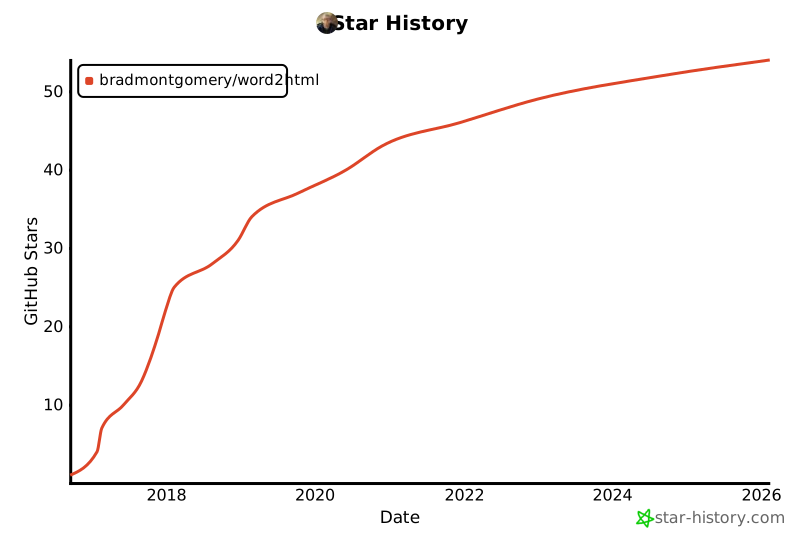
⭐ Star History
This project really started out as a joke -- although this is something I've done too many times. I'm always amazed at how many people have starred this repo. 🤩
1 maintainer

Metadata
1 maintainer
Release files for word2html 0.5.0
For a detailed explanation of source distributions (sdists) and built distributions (wheels), please see the package formats documentation.
Source distribution (sdist)
| File | Size | Uploaded | Provenance | Actions |
|---|---|---|---|---|
| word2html-0.5.0.tar.gz | 90.6 kB | Without provenance | Details for word2html-0.5.0.tar.gz |
Built distribution (wheel)
| File | Interpreter | ABI | Platform | Actions Reset |
|---|---|---|---|---|
| word2html-0.5.0-py3-none-any.whl | Python 3 | none | any | Details for word2html-0.5.0-py3-none-any.whl |
Total release size: 112.8 kB
Release files / word2html-0.5.0.tar.gz
| Download URL | word2html-0.5.0.tar.gz |
|---|---|
| Size | 90.6 kB |
| Tags | Source |
|
SHA-256 checksum How to use checksums |
ffbd6b466a9b6e45cd4febe045bc815a0b41fda234a0285a02d3dd7796ed0350
|
|
BLAKE2b-256 checksum How to use checksums |
633b977b50c6ab1971f59e2b5030551b404c7c5367acb62555066f431614482b
|
| Upload date | |
|
Uploaded using Trusted Publishing? What is trusted publishing? |
No |
| Uploaded via |
uv/0.13.0 {"installer":{"name":"uv","version":"0.13.0","subcommand":["publish"]},"python":null,"implementation":{"name":null,"version":null},"distro":{"name":"macOS","version":null,"id":null,"libc":null},"system":{"name":null,"release":null},"cpu":null,"openssl_version":null,"setuptools_version":null,"rustc_version":null,"ci":null}
|
Release files / word2html-0.5.0-py3-none-any.whl
| Download URL | word2html-0.5.0-py3-none-any.whl |
|---|---|
| Size | 22.2 kB |
| Tags | Python 3 |
|
SHA-256 checksum How to use checksums |
f937d891e6033d766983099f79a11bcf7a082e7ca9835f8a751465dbc10b6aa4
|
|
BLAKE2b-256 checksum How to use checksums |
e37e3e3b9aed8bbce038d50cd063b06aa61c328b3409dcd531d7c965703748d3
|
| Upload date | |
|
Uploaded using Trusted Publishing? What is trusted publishing? |
No |
| Uploaded via |
uv/0.13.0 {"installer":{"name":"uv","version":"0.13.0","subcommand":["publish"]},"python":null,"implementation":{"name":null,"version":null},"distro":{"name":"macOS","version":null,"id":null,"libc":null},"system":{"name":null,"release":null},"cpu":null,"openssl_version":null,"setuptools_version":null,"rustc_version":null,"ci":null}
|
Security for word2html 0.5.0
Provenance
Provenance describes where a file came from. On PyPI, provenance is shared via attestations, which provide a verifiable record of the build or publishing details. View details, limitations and caveats.
No provenance found
None of the files in this release were uploaded with provenance metadata.
A note on package security
PyPI is a repository for distributing packages, not a service for auditing them. While third-party security researchers and our staff do their best to detect and remove malicious packages, PyPI cannot guarantee the quality, security or suitability of any given package.
To learn more about protecting yourself from malicious actors, visit our package security documentation.














