
Word Cookies
Word Cookies helper


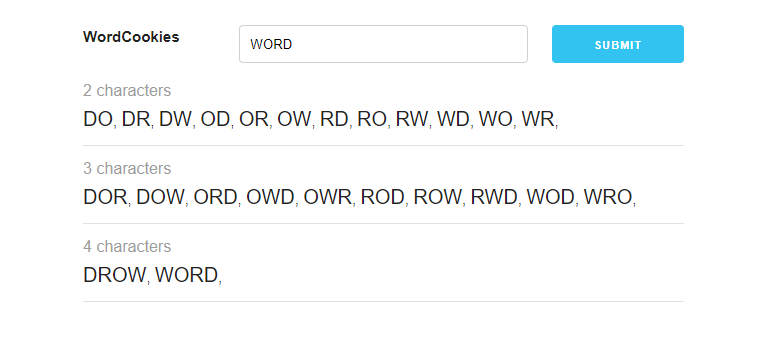
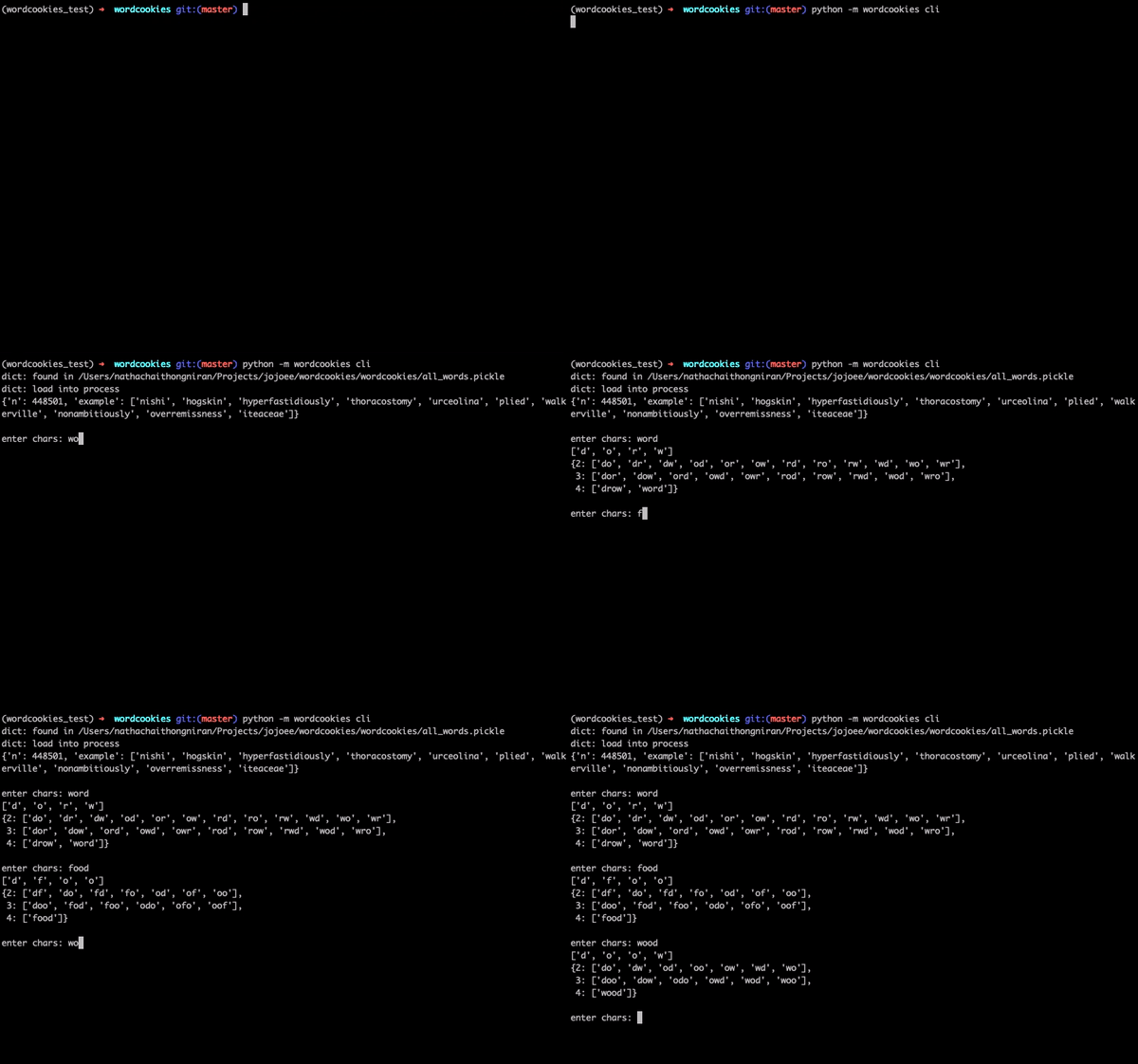
Demo
Usage
Library
Install the package then
from wordcookies import game
from pprint import pprint

word = "word"
chars = game.clean(word)
answers = game.get_possible_answers(chars)
g = game.group(answers)
pprint(g, width=120)

"""
{2: ['do', 'dr', 'dw', 'od', 'or', 'ow', 'rd', 'ro', 'rw', 'wd', 'wo', 'wr'],
 3: ['dor', 'dow', 'ord', 'owd', 'owr', 'rod', 'row', 'rwd', 'wod', 'wro'],
 4: ['drow', 'word']}
"""
CLI
Install the package then
python -m wordcookies cli
python -m wordcookies cli --word="word"
python -m wordcookies cli --word="word" --exit
Web (Docker)
Install Docker then run the jojoee/wordcookies Docker image by the command below
docker run -p 8082:9001 --name ctn_wordcookies jojoee/wordcookies
curl localhost:8082
Web (Docker Compose)
Install Docker and Docker Compose then
cd ./web
docker-compose -f docker-compose.yaml up
Installation
pip install wordcookies

# or
git clone https://github.com/jojoee/wordcookies
cd wordcookies
python setup.py install
Features
- [demo] Add cli demo gif
- [demo] Add web demo gif
- [ci] setup continuous integration
- [cd] setup continuous delivery
- [pypi] Deploy to https://pypi.org/project/wordcookies/
- [test] Add more test
- [cli] add Usage section
- [web][docker] use Python base image instead of current
- [web][docker] generate dict while building an Docker image
- [web] add web version
- [web][docker] add Docker support
- [web][cache] with file and Redis
- [web][cache] pre-caching most common word
- [web] enhance UI
- [dict] using nltk data is not good enough, so need to combine with "ahmadly/WordCookiesCheat" (you can try with beginner level, some word is missing)
- [web] add e2e test
Development
conda -V
conda deactivate
conda remove --name wordcookies --all
conda create --name wordcookies python=3.7.5
conda activate wordcookies
python -V
pip list

# lib, dev
pip install -r requirements.txt
PYTHONPATH="$PWD" python wordcookies/cli.py
pip freeze > requirements.txt

# lib, test
conda remove --name wordcookies_test --all
conda create --name wordcookies_test python=3.7.5
conda activate wordcookies_test
pip install -r requirements.txt
python -m flake8 --ignore=E501 wordcookies tests
python -m pytest tests --cov=./ --cov-report=xml
pip install .
python -m wordcookies cli
python -m wordcookies cli --word="word"
python -m wordcookies cli --word="word" --exit

# lib, test pypi
pip install twine # package for publishing
python setup.py sdist bdist_wheel # build the package

# web
cd ./web
conda remove --name wordcookies_web --all
conda create --name wordcookies_web python=3.7.5
conda activate wordcookies_web
pip install -r requirements.txt
uvicorn main:app --reload --port 9002 # dev + hot reload
uvicorn main:app --port 9002 & # dev
python main.py # run on prod

# web, util
lsof -i -n -P | grep 9002
docker run -p 6379:6379 --name ctn_redis -d redis:6.0.8

# web, Cocker
cd ./web
docker build -f Dockerfile -t jojoee/wordcookies:0.0.1 .
docker run -p 8082:9001 --name ctn_wordcookies jojoee/wordcookies:0.0.1
docker run -p 8082:9001 --name ctn_wordcookies jojoee/wordcookies
docker start ctn_wordcookies
http://localhost:8082/healthcheck
http://localhost:8082/404

# web, Docker Compose
docker-compose -f docker-compose.yaml up
docker-compose -f docker-compose.dev.yaml up --build
docker-compose -f docker-compose.dev.yaml up
Reference
- Word Cookies!®
- Word Cookies!®
- https://github.com/ahmadly/WordCookiesCheat
- Data for building word dictionary
1 maintainer

Metadata
1 maintainer
Release files for wordcookies 1.0.1
For a detailed explanation of source distributions (sdists) and built distributions (wheels), please see the package formats documentation.
Source distribution (sdist)
| File | Size | Uploaded | Provenance | Actions |
|---|---|---|---|---|
| wordcookies-1.0.1.tar.gz | 6.4 kB | Without provenance | Details for wordcookies-1.0.1.tar.gz |
Built distribution (wheel)
| File | Interpreter | ABI | Platform | Actions Reset |
|---|---|---|---|---|
| wordcookies-1.0.1-py3-none-any.whl | Python 3 | none | any | Details for wordcookies-1.0.1-py3-none-any.whl |
Total release size: 13.3 kB
Security for wordcookies 1.0.1
Provenance
Provenance describes where a file came from. On PyPI, provenance is shared via attestations, which provide a verifiable record of the build or publishing details. View details, limitations and caveats.
No provenance found
None of the files in this release were uploaded with provenance metadata.
A note on package security
PyPI is a repository for distributing packages, not a service for auditing them. While third-party security researchers and our staff do their best to detect and remove malicious packages, PyPI cannot guarantee the quality, security or suitability of any given package.
To learn more about protecting yourself from malicious actors, visit our package security documentation.














