

An essential toolset that eases WordPress site and server administration






Key Features • Usage • RoadMap • Changelog • Credits • License
WordOps.net • Documentation • Community Forum • Dashboard demo
Key Features
- Easy to install : One step automated installer with migration from EasyEngine v3 support
- Fast deployment : Fast and automated WordPress, Nginx, PHP, MySQL & Redis installation
- Custom Nginx build : Nginx 1.30.4 - TLS v1.3 HTTP/3 QUIC & Brotli support
- Up-to-date : PHP 7.4, 8.0, 8.1, 8.2, 8.3, 8.4 & 8.5 - MariaDB 11.4 LTS & Redis 7.0
- Secured : Hardened WordPress security with strict Nginx location directives
- Powerful : Optimized Nginx configurations with multiple cache backends support
- SSL : Domain, Subdomain & Wildcard Let's Encrypt SSL certificates with DNS API support
- Modern : Strong ciphers_suite, modern TLS protocols and HSTS support (Grade A+ on ssllabs)
- Monitoring : Live Nginx vhost traffic with ngx_vts_module and server monitoring with Netdata
- User Friendly : WordOps dashboard with server status/monitoring and tools (demo)
- Release cycle : WordOps stable releases are published in June and December.
Requirements
Operating System
Recommended
- Ubuntu 24.04 LTS (Noble)
- Ubuntu 22.04 LTS (Jammy)
Also compatible
- Debian 11 (Bullseye)
- Debian 12 (Bookworm)
- Debian 13 (Trixie)
For testing purpose only
- Raspbian 11 (Bullseye)
Getting Started
wget -qO wo wops.cc && sudo bash wo      # Install WordOps
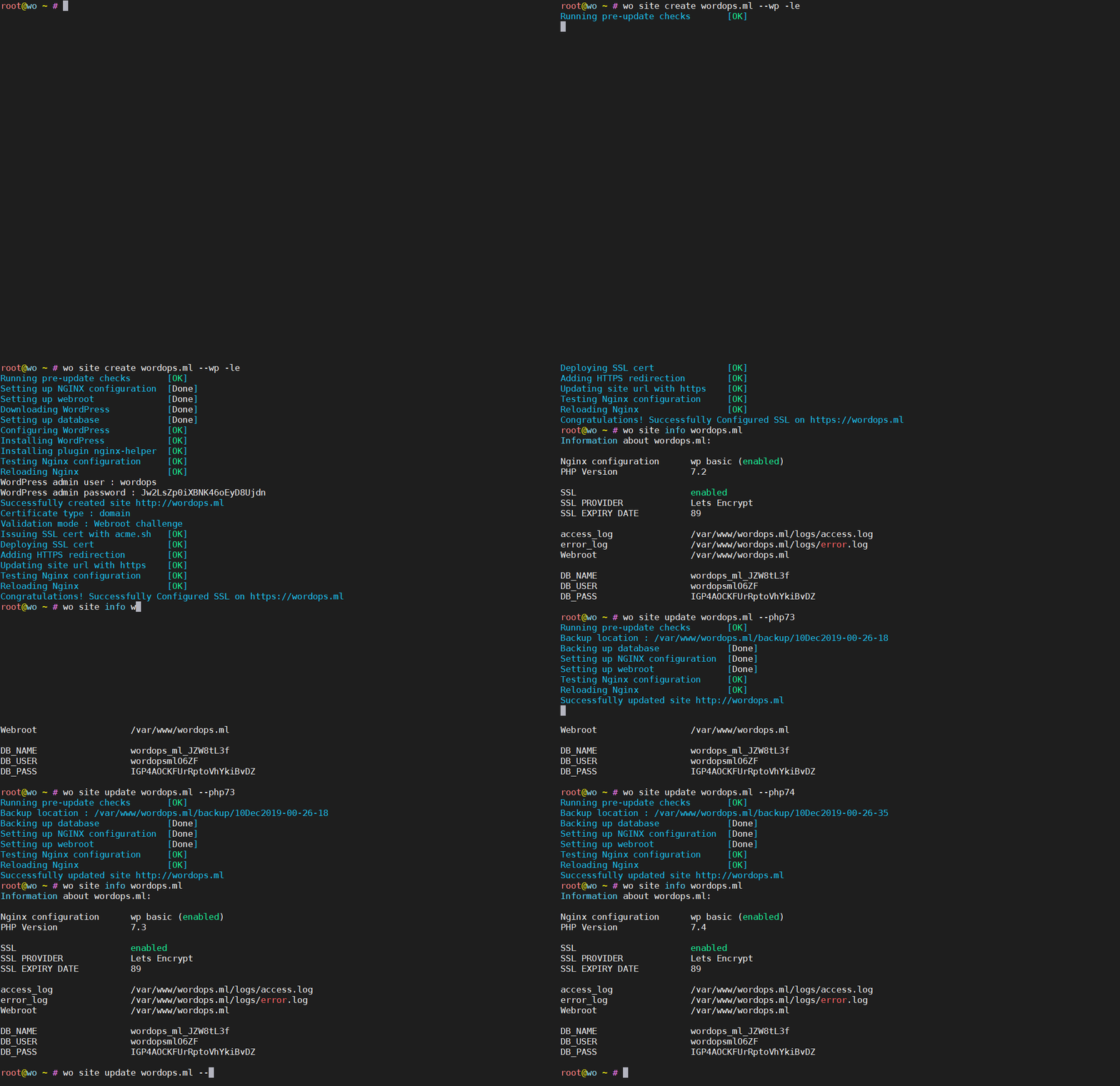
sudo wo site create example.com --wp     # Install required packages & setup WordPress on example.com
Detailed Getting Started guide with additional installation methods can be found in the documentation.
Usage
Standard WordPress sites
wo site create example.com --wp                # install wordpress with [Current supported PHP release](https://endoflife.date/php) without any page caching
wo site create example.com --wp  --php84       # install wordpress with PHP 8.4  without any page caching
wo site create example.com --wpfc              # install wordpress + nginx fastcgi_cache
wo site create example.com --wpredis           # install wordpress + nginx redis_cache
wo site create example.com --wprocket          # install wordpress with WP-Rocket plugin
wo site create example.com --wpce              # install wordpress with Cache-enabler plugin
wo site create example.com --wpsc              # install wordpress with wp-super-cache plugin
WordPress multisite with subdirectory
wo site create example.com --wpsubdir            # install wpmu-subdirectory without any page caching
wo site create example.com --wpsubdir --wpsc     # install wpmu-subdirectory with wp-super-cache plugin
wo site create example.com --wpsubdir --wpfc     # install wpmu-subdirectory + nginx fastcgi_cache
wo site create example.com --wpsubdir --wpredis  # install wpmu-subdirectory + nginx redis_cache
wo site create example.com --wpsubdir --wprocket # install wpmu-subdirectory + WP-Rocket plugin
wo site create example.com --wpsubdir --wpce     # install wpmu-subdirectory + Cache-Enabler plugin
WordPress multisite with subdomain
wo site create example.com --wpsubdomain            # install wpmu-subdomain without any page caching
wo site create example.com --wpsubdomain --wpsc     # install wpmu-subdomain with wp-super-cache plugin
wo site create example.com --wpsubdomain --wpfc     # install wpmu-subdomain + nginx fastcgi_cache
wo site create example.com --wpsubdomain --wpredis  # install wpmu-subdomain + nginx redis_cache
wo site create example.com --wpsubdomain --wprocket # install wpmu-subdomain + WP-Rocket plugin
wo site create example.com --wpsubdomain --wpce     # install wpmu-subdomain + Cache-Enabler plugin
Non-WordPress sites
wo site create example.com --html     # create example.com for static/html sites
wo site create example.com --php      # create example.com with [Current supported PHP release](https://endoflife.date/php)
wo site create example.com --php81      # create example.com with php 8.1 support
wo site create example.com --php82      # create example.com with php 8.2 support
wo site create example.com --php84      # create example.com with php 8.4 support
wo site create example.com --php85      # create example.com with php 8.5 support
wo site create example.com --mysql    # create example.com with php 8.2 & mysql support
wo site create example.com --mysql --php83   # create example.com with php 8.3 & mysql support
wo site create example.com --proxy=127.0.0.1:3000 #  create example.com with nginx as reverse-proxy
Switch between PHP versions
wo site update example.com --php74 # switch to PHP 7.4
wo site update example.com --php80 # switch to PHP 8.0
wo site update example.com --php81 # switch to PHP 8.1
wo site update example.com --php82 # switch to PHP 8.2
wo site update example.com --php83 # switch to PHP 8.3
wo site update example.com --php84 # switch to PHP 8.4
wo site update example.com --php85 # switch to PHP 8.5
Sites secured with Let's Encrypt
wo site create example.com --wp -le #  wordpress & letsencrypt
wo site create sub.example.com --wp -le # wordpress & letsencrypt subdomain
wo site create example.com --wp --letsencrypt --hsts # wordpress & letsencrypt with HSTS
wo site create example.com --wp -le=wildcard --dns=dns_cf # wordpress & wildcard SSL certificate with Cloudflare DNS API
Update WordOps
wo update
Support
If you feel there is a bug directly related to WordOps, or if you want to suggest new features for WordOps, feel free to open an issue. For any other questions about WordOps or if you need support, please use the Community Forum.
Contributing
If you'd like to contribute, please fork the repository and make changes as you'd like. Pull requests are warmly welcome. There is no need to be a developer or a system administrator to contribute to WordOps project. You can still contribute by helping us to improve WordOps documentation. Otherwise, you can still contribute to the project by making a donation on Ko-Fi.
Sponsors
Thanks to our generous sponsors for supporting the development of WordOps:
| Liquid Web |
|---|
 |
Credits
- Source : EasyEngine
Apps & Tools shipped with WordOps :
- Acme.sh
- WP-CLI
- Netdata
- phpMyAdmin
- Composer
- Adminer
- phpRedisAdmin
- opcacheGUI
- eXtplorer
- Webgrind
- MySQLTuner
- Fail2Ban
- ClamAV
- cheat.sh
- ProFTPd
- Nginx-ultimate-bad-bot-blocker
- Nanorc
Third-party debian packages shipped with WordOps :
WordPress Cache Plugins supported by WordOps :
License
1 maintainer

Download files
Download the file for your platform. If you're not sure which to choose, learn more about installing packages.
Source Distribution
Built Distribution
Filter files by name, interpreter, ABI, and platform.
If you're not sure about the file name format, learn more about wheel file names.
Copy a direct link to the current filters
File details
Details for the file wordops-3.23.1.tar.gz.
File metadata
- Download URL: wordops-3.23.1.tar.gz
- Upload date:
- Size: 157.7 kB
- Tags: Source
- Uploaded using Trusted Publishing? No
- Uploaded via:
twine/7.0.0 CPython/3.14.6
File hashes
| Algorithm | Hash digest | |
|---|---|---|
| SHA256 |
0158a4e5d26d2d5b20925bffefb38d03f3d0775996ab977b10d6c97a8d415ff1
|
|
| MD5 |
149dc93df34490fcf585b8c71df462f6
|
|
| BLAKE2b-256 |
6b9835d891104478e121cf6d0b198b9338f5707ab980a14248d1549c6a786cd8
|
File details
Details for the file wordops-3.23.1-py3-none-any.whl.
File metadata
- Download URL: wordops-3.23.1-py3-none-any.whl
- Upload date:
- Size: 230.1 kB
- Tags: Python 3
- Uploaded using Trusted Publishing? No
- Uploaded via:
twine/7.0.0 CPython/3.14.6
File hashes
| Algorithm | Hash digest | |
|---|---|---|
| SHA256 |
d835acab3fb73c3016056aada73f0f32d57d33cd6438ee8b04c8370092298ca8
|
|
| MD5 |
7fc9e88076919d11a913c6b8404c9988
|
|
| BLAKE2b-256 |
6b750f2efd6106522c70c784f6188b661dd1ab7654a298a21993ed26a5bde7a6
|







