
ADMET Workbench
Getting Started
pip install workbench
workbench
Workbench Version: 0.8.475
Bosco: Claude via Anthropic API key

Welcome to Workbench!

🐶  New to Workbench? Ask me to walk you through building your first model.

Workbench:Bosco>
No AWS account needed to start. Local mode gives you the whole chain —
DataSource → FeatureSet → Model → Endpoint — on your filesystem, training with the
same generated script SageMaker runs. pub_data reads public ADMET datasets straight
from S3, so there's real data to model from the first prompt:
Workbench:Bosco> build me a solubility model from the aqsol public data
Ask Bosco in plain language, or type Python — both land in the same session, and the variables persist for both of you. See Local Mode.
Giving Bosco a model
Bosco is the resident ML agent.
He needs a path to Claude, and status always names the one he took:
- With an AWS account — he runs on Bedrock inside it, with Zero Data Retention. Nothing to install and nothing leaves your account.
- Without one — set
ANTHROPIC_API_KEYand restart. Bring your own key, or email workbench@supercowpowers.com and we'll issue you a trial key.
Connecting your AWS account
📝 Bosco: Workbench ML Agent — a real eleven-turn session, start to finish.
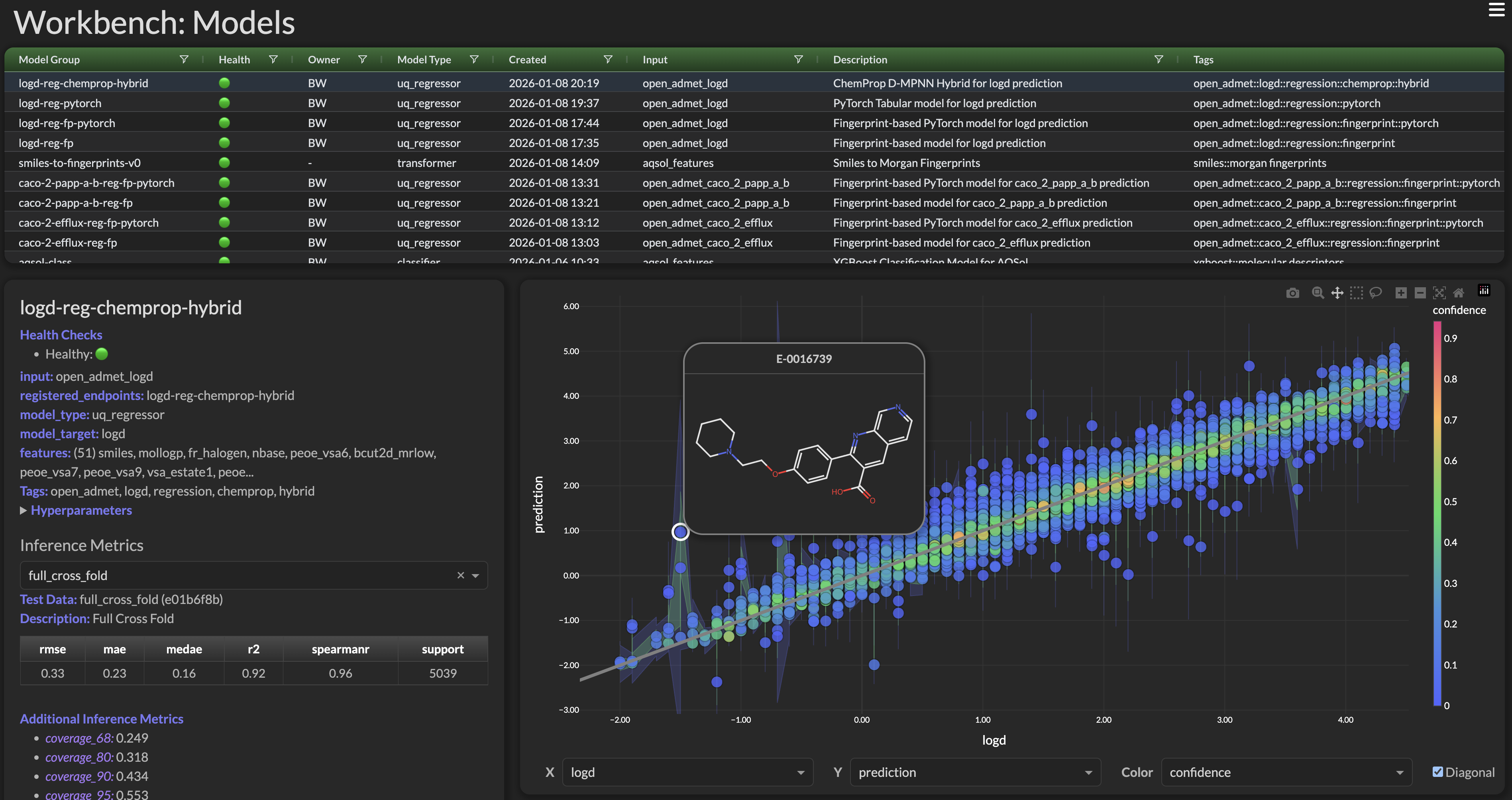
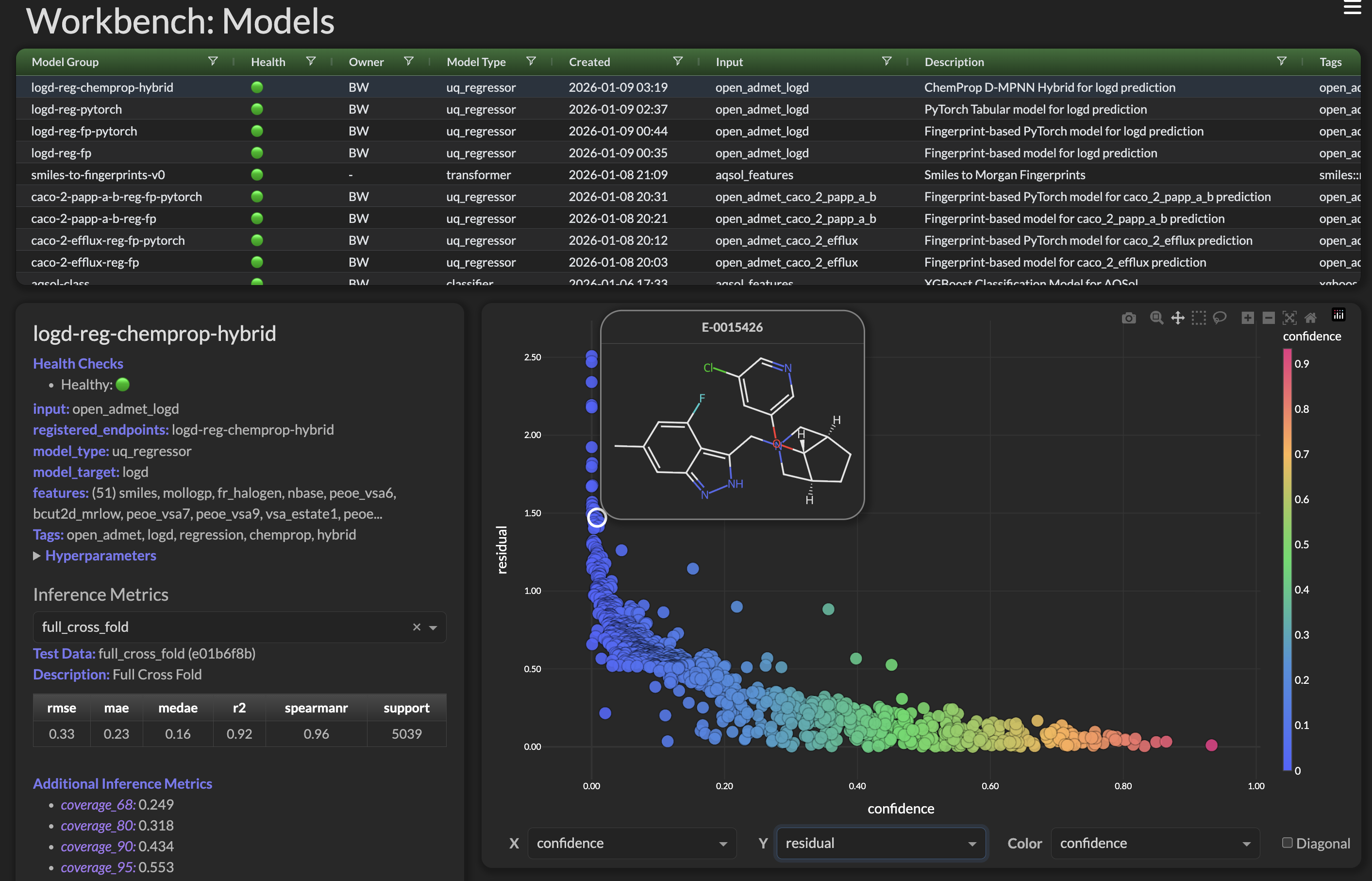
Chemprop Models
All the rage for the Open ADMET Challenge. ADMET Workbench supports:
- Single Task Chemprop Models
- Multi Task Chemprop Models
- Chemprop + Descriptors Models (MPNN + Molecular Descriptors)
- Foundation Chemprop Models (CheMeleon Pretrained)
Examples: Deploying Chemprop Models · Deploying Foundation Chemprop Models
References
- Open ADMET Challenge
- ChemProp: Yang et al. "Analyzing Learned Molecular Representations for Property Prediction" J. Chem. Inf. Model. 2019 — GitHub | Paper
- CheMeleon Github
Chemprop Action Shots!
|
|
The Dashboard
Health monitoring, dynamic updates, and a high-level summary across the whole pipeline, with drill-down views for Incoming Data, Glue Jobs, DataSources, FeatureSets, Models, and Endpoints. Try it: Workbench Dashboard Demo.
Private SaaS Architecture
Secure your Data, Empower your ML Pipelines
Workbench deploys as an AWS Stack inside your own cloud environment (BYOC), so your data never leaves it — and plugin support lets you tailor it to your own workflows. See the Private SaaS Architecture deck.
Documentation
The ADMET Workbench framework makes AWS® both easier to use and more powerful: a simple Python API over Glue, Athena, Feature Store, Models, and Endpoints, with web interfaces on top of it.
Workbench Docs covers the Python API
in depth, fully searchable, with code examples throughout. Runnable versions of every
example live in examples/.
Workbench takes something genuinely complex — the full set of AWS ML services — and makes it less complex, so there's conceptual documentation too: Workbench Presentations.
AWS Marketplace
Workbench is on the AWS Marketplace as a Dashboard for ML Pipelines and can be billed through AWS.
Installation extras
pip install workbench               # API + REPL + orchestration (the default)
pip install 'workbench[ui]'         # + plotly, dash — the Workbench Dashboard
pip install 'workbench[modeling]'   # + torch, chemprop, ray[tune], optuna
pip install 'workbench[misc]'       # + umap-learn
pip install 'workbench[dev]'        # + pytest, coverage, flake8, black
pip install 'workbench[all]'        # everything above
Quotes are needed — shells read square brackets as globs.
Cleanlab/Datalab workflows aren't bundled in any extra. Install
cleanlab[datalab]>=2.8.0 before calling cleanlab_model().
Questions?
The SuperCowPowers team is happy to answer any questions about AWS and Workbench — workbench@supercowpowers.com or Discord.
Beta Program — if your company would like to be a Workbench Beta Tester, get in touch at the same address.
Contributions are welcome, and fall under the existing project license.

® Amazon Web Services, AWS, the Powered by AWS logo, are trademarks of Amazon.com, Inc. or its affiliates
1 maintainer

Metadata
1 maintainer
Release files for workbench 0.8.498
For a detailed explanation of source distributions (sdists) and built distributions (wheels), please see the package formats documentation.
Source distribution (sdist)
| File | Size | Uploaded | |
|---|---|---|---|
| workbench-0.8.498.tar.gz | 4.7 MB | Details |
Built distribution (wheel)
| File | Interpreter | ABI | Platform | Reset |
|---|---|---|---|---|
| workbench-0.8.498-py3-none-any.whl | Python 3 | none | any | Details |
Total release size: 5.9 MB
Release files / workbench-0.8.498.tar.gz
| Download URL | workbench-0.8.498.tar.gz |
|---|---|
| Size | 4.7 MB |
| Tags | Source |
|
SHA-256 checksum How to use checksums |
70fd6ddecb5f86b49b9e41da5af734790417e65c27b169dd47e30fca5e6a352b
|
|
BLAKE2b-256 checksum How to use checksums |
380532b5fa49f27f20d47569b1f834a0ebc42d7dc4d70841e0c47c5946d9d925
|
| Upload date | |
|
Uploaded using Trusted Publishing? What is trusted publishing? |
Yes |
| Uploaded via |
twine/7.0.0 CPython/3.13.14
|
Provenance
Provenance describes where a file came from. On PyPI, provenance is shared via attestations, which provide a verifiable record of the build or publishing details. View details, limitations and caveats.


PyPI Publish Attestation
PyPI verified that this artifact, at this checksum, originated from the publisher listed below.
Signed by GitHub Actions, verified by PyPI on Oct 12, 2026.
Transparency logRelease files / workbench-0.8.498-py3-none-any.whl
| Download URL | workbench-0.8.498-py3-none-any.whl |
|---|---|
| Size | 1.2 MB |
| Tags | Python 3 |
|
SHA-256 checksum How to use checksums |
e79246eb2667748b9f85234ad8c843a01fe249247f967fcafeee56df320673d9
|
|
BLAKE2b-256 checksum How to use checksums |
8f191917c9dab989cbeeec230620a7a2659cb75e6d58edbd1e4442be987b06fb
|
| Upload date | |
|
Uploaded using Trusted Publishing? What is trusted publishing? |
Yes |
| Uploaded via |
twine/7.0.0 CPython/3.13.14
|
Provenance
Provenance describes where a file came from. On PyPI, provenance is shared via attestations, which provide a verifiable record of the build or publishing details. View details, limitations and caveats.
PyPI Publish Attestation
PyPI verified that this artifact, at this checksum, originated from the publisher listed below.
Signed by GitHub Actions, verified by PyPI on Oct 12, 2026.
Transparency log













