
Workbench: A Dashboard and Python API for creating and deploying AWS SageMaker Model Pipelines
Verified details
These details have been verified by PyPIProject links
GitHub Statistics
Maintainers

Project description
Live Dashboard Demo
You can explore a live demo of the Workbench Dashboard at: Workbench Dashboard Demo
Recent News
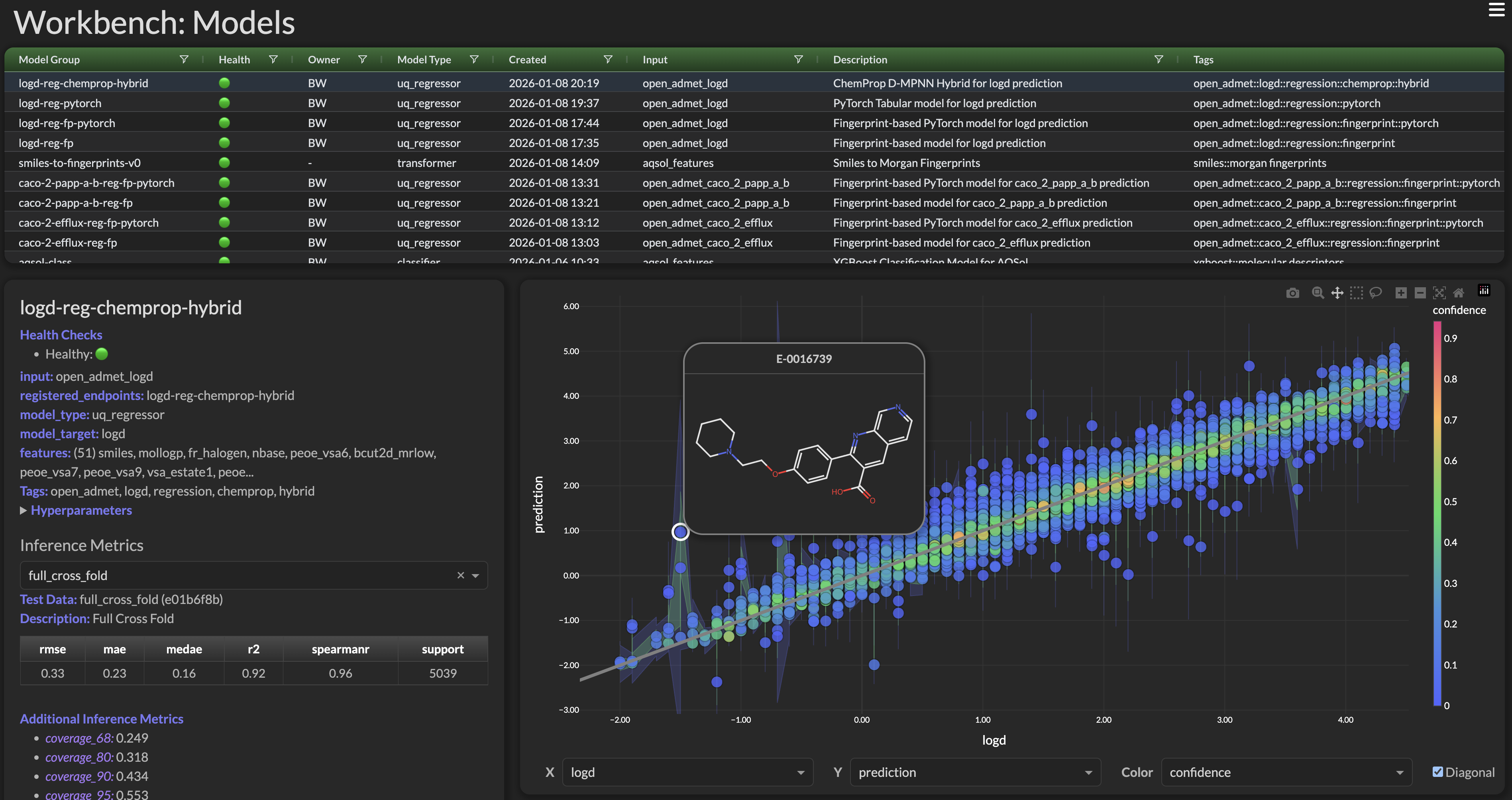
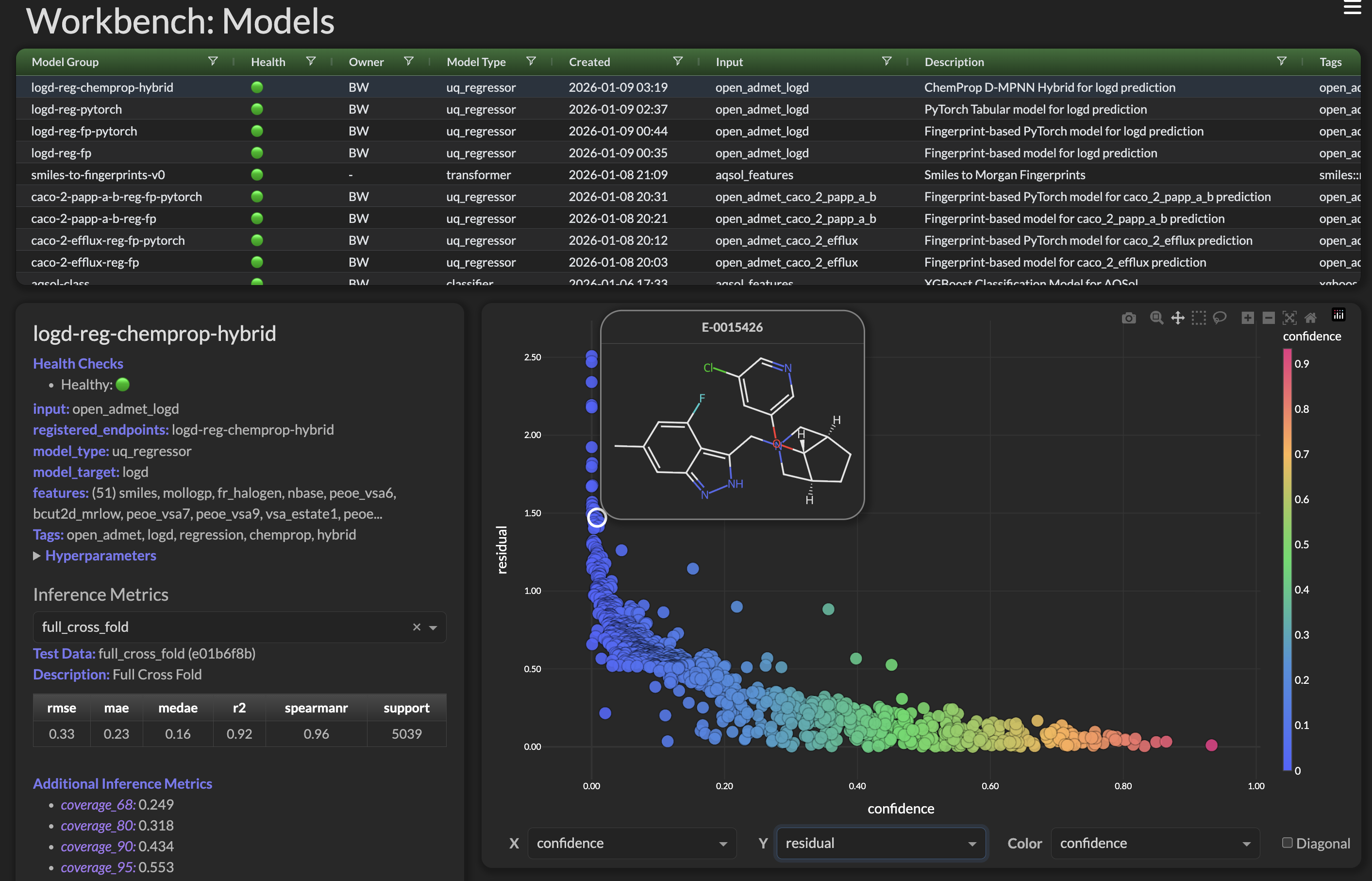
Chemprop Models! All the rage for the Open ADMET Challenge.
ADMET Workbench now supports:
- Single Task Chemprop Models
- Multi Task Chemprop Models
- Chemprop Hybrid Models (MPNN + Descriptors)
- Foundation Chemprop Models (CheMeleon Pretrained)
Examples:
References
- Open ADMET Challenge
- ChemProp: Yang et al. "Analyzing Learned Molecular Representations for Property Prediction" J. Chem. Inf. Model. 2019 — GitHub | Paper
- CheMeleon Github
Chemprop Action Shots!
|
|
Welcome to ADMET Workbench
The ADMET Workbench framework makes AWS® both easier to use and more powerful. Workbench handles all the details around updating and managing a complex set of AWS Services. With a simple-to-use Python API and a beautiful set of web interfaces, Workbench makes creating AWS ML pipelines a snap. It also dramatically improves both the usability and visibility across the entire spectrum of services: Glue Job, Athena, Feature Store, Models, and Endpoints, Workbench makes it easy to build production ready, AWS powered, machine learning pipelines.
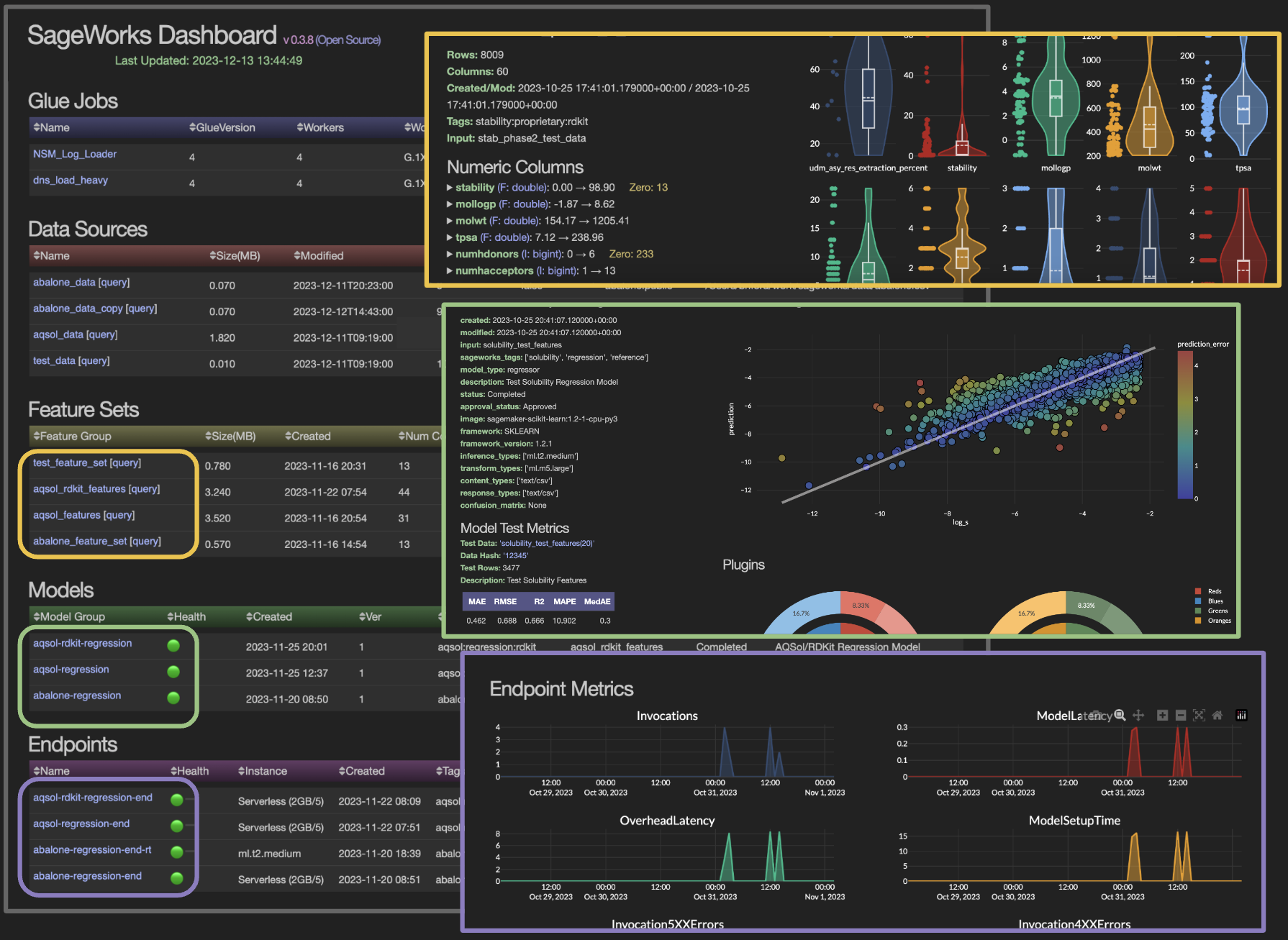
Full AWS ML OverView
- Health Monitoring 🟢
- Dynamic Updates
- High Level Summary
Drill-Down Views
- Incoming Data
- Glue Jobs
- DataSources
- FeatureSets
- Models
- Endpoints
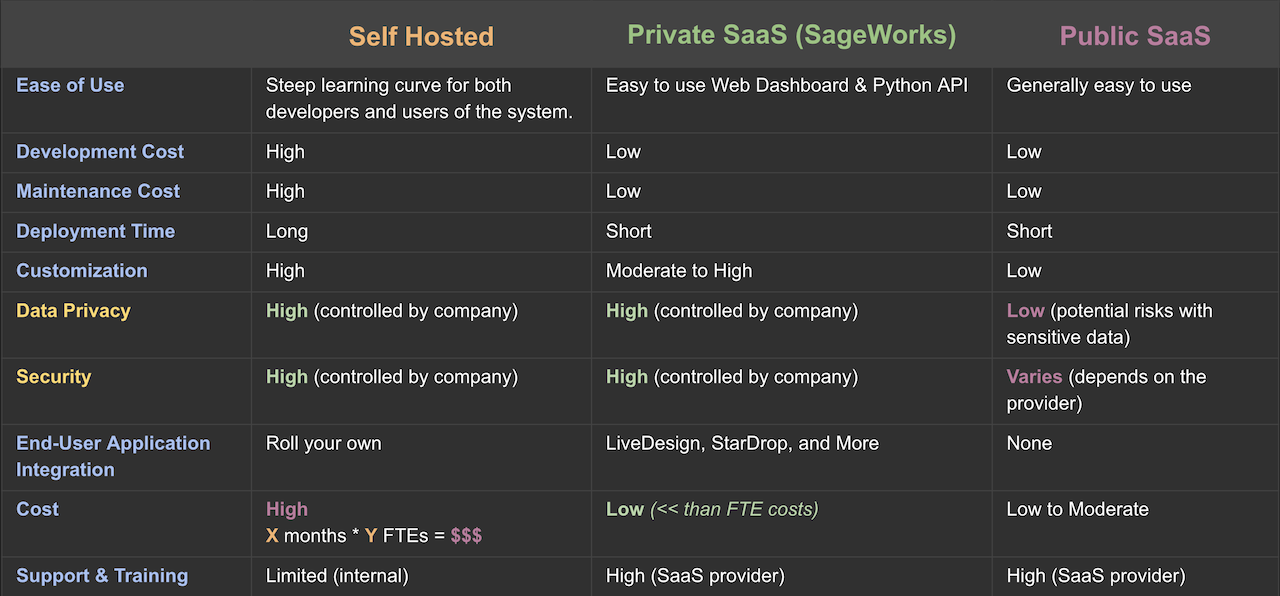
Private SaaS Architecture
Secure your Data, Empower your ML Pipelines
ADMET Workbench is architected as a Private SaaS (also called BYOC: Bring Your Own Cloud). This hybrid architecture is the ultimate solution for businesses that prioritize data control and security. Workbench deploys as an AWS Stack within your own cloud environment, ensuring compliance with stringent corporate and regulatory standards. It offers the flexibility to tailor solutions to your specific business needs through our comprehensive plugin support. By using Workbench, you maintain absolute control over your data while benefiting from the power, security, and scalability of AWS cloud services. Workbench Private SaaS Architecture
API Installation
pip install workbench    # Default — gives you the API, REPL, and
                         # orchestration. Ready to use out of the box.
workbench                # Runs the Workbench REPL / initial setup
pip install workbench is the recommended path for everyone using the
Python API or REPL. The dashboard is a separate opt-in
(pip install 'workbench[ui]') because dash/plotly/matplotlib are heavy
and most API users don't need them. See Installation extras
below for the breakdown.
For the full instructions for connecting your AWS Account see:
- Getting Started: Initial Setup
- One time AWS Onboarding: AWS Setup
ADMET Workbench up on the AWS Marketplace
Powered by AWS® to accelerate your Machine Learning Pipelines development with our new Dashboard for ML Pipelines. Getting started with Workbench is a snap and can be billed through AWS.
ADMET Workbench Presentations
Even though ADMET Workbench makes AWS easier, it's taking something very complex (the full set of AWS ML Pipelines/Services) and making it less complex. Workbench has a depth and breadth of functionality so we've provided higher level conceptual documentation See: Workbench Presentations
ADMET Workbench Documentation
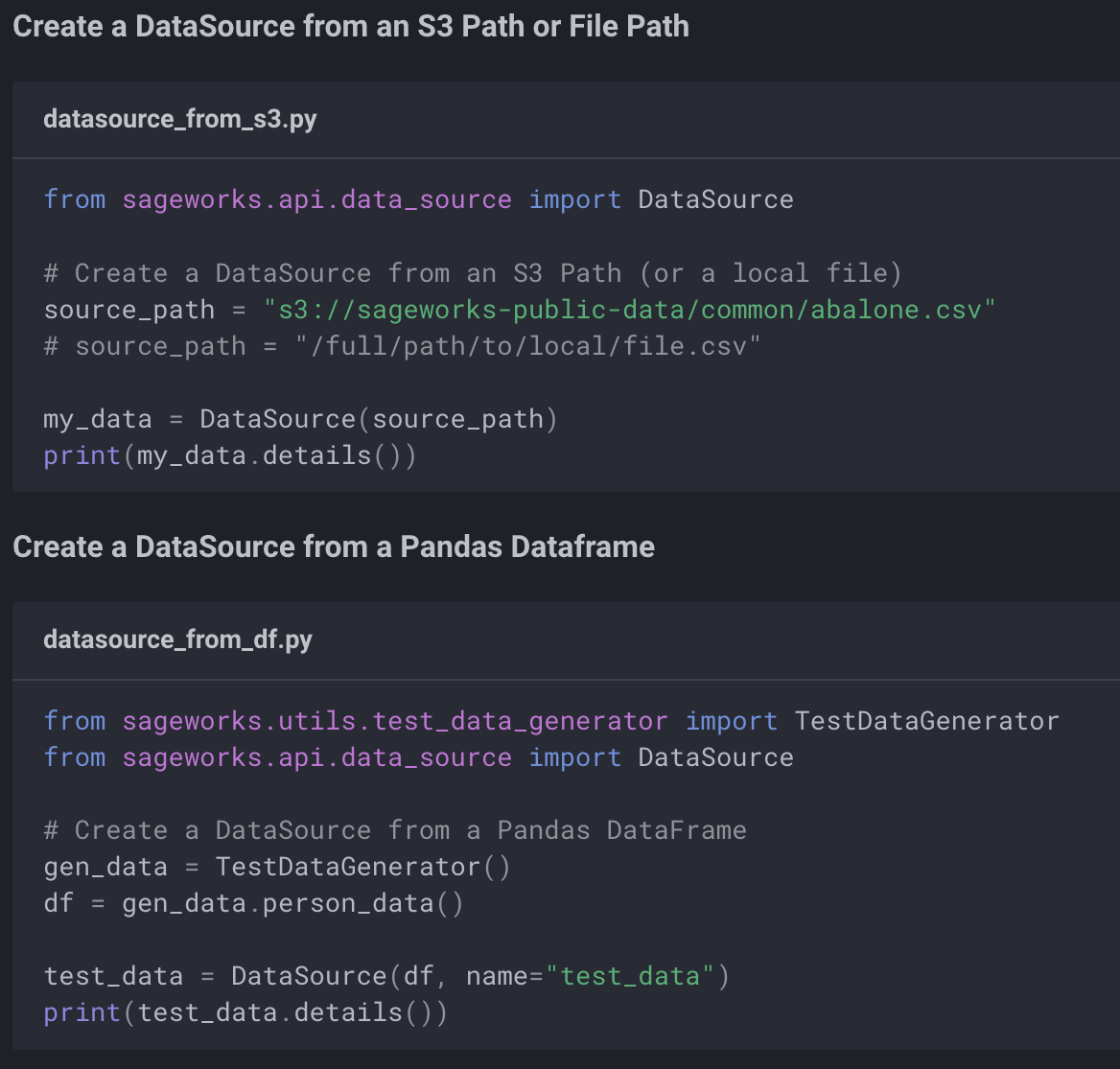
The ADMET Workbench documentation Workbench Docs covers the Python API in depth and contains code examples. The documentation is fully searchable and fairly comprehensive.
The code examples are provided in the Github repo examples/ directory. For a full code listing of any example please visit our Workbench Examples
Questions?
The SuperCowPowers team is happy to answer any questions you may have about AWS and Workbench. Please contact us at workbench@supercowpowers.com or chat us up on Discord
ADMET Workbench Beta Program
Using ADMET Workbench will minimize the time and manpower needed to incorporate AWS ML into your organization. If your company would like to be a Workbench Beta Tester, contact us at workbench@supercowpowers.com.
Installation extras
pip install workbench               # Default — API + REPL + orchestration.
                                    # Covers building pipelines, deploying
                                    # endpoints, training jobs, and most
                                    # interactive use.

pip install 'workbench[ui]'         # + plotly, dash, dash-ag-grid,
                                    #   matplotlib. The Workbench Dashboard.

pip install 'workbench[misc]'       # + networkx, umap-learn. Specialized
                                    #   analysis libs used by a handful of
                                    #   workflows.

pip install 'workbench[dev]'        # + pytest, pytest-xdist, coverage,
                                    #   flake8, black. Local development.

pip install 'workbench[all]'        # ui + misc + dev — full install for
                                    #   contributors and dashboard users.
Note: shells may interpret square brackets as globs, so the quotes are needed.
Cleanlab/Datalab: These workflows are optional and not bundled in any extra. Install
cleanlab[datalab]>=2.8.0 before calling cleanlab_model().
Contributions
If you'd like to contribute to the ADMET Workbench project, you're more than welcome. All contributions will fall under the existing project license. If you are interested in contributing or have questions please feel free to contact us at workbench@supercowpowers.com.

® Amazon Web Services, AWS, the Powered by AWS logo, are trademarks of Amazon.com, Inc. or its affiliates
Project details
Verified details
These details have been verified by PyPIProject links
GitHub Statistics
Maintainers
Release history Release notifications | RSS feed


Download files
Download the file for your platform. If you're not sure which to choose, learn more about installing packages.
Source Distribution
Built Distribution
Filter files by name, interpreter, ABI, and platform.
If you're not sure about the file name format, learn more about wheel file names.
Copy a direct link to the current filters
File details
Details for the file workbench-0.8.378.tar.gz.
File metadata
- Download URL: workbench-0.8.378.tar.gz
- Upload date:
- Size: 3.7 MB
- Tags: Source
- Uploaded using Trusted Publishing? Yes
- Uploaded via: twine/6.1.0 CPython/3.13.12
File hashes
| Algorithm | Hash digest | |
|---|---|---|
| SHA256 |
39de5275867fe22d0472c689f7b57b8977a250d29442ddb4840c35a6a934604a
|
|
| MD5 |
47cb81129cf6173931d8b08e06e4ab09
|
|
| BLAKE2b-256 |
6372b1a4f3ce22311a67e5eb79f18c0055e3af02493c62e926492f9b05322528
|
Provenance
The following attestation bundles were made for workbench-0.8.378.tar.gz:
Publisher:
publish.yml on SuperCowPowers/workbench
-
Statement:
-
Statement type:
https://in-toto.io/Statement/v1 -
Predicate type:
https://docs.pypi.org/attestations/publish/v1 -
Subject name:
workbench-0.8.378.tar.gz -
Subject digest:
39de5275867fe22d0472c689f7b57b8977a250d29442ddb4840c35a6a934604a - Sigstore transparency entry: 1917881084
- Sigstore integration time:
-
Permalink:
SuperCowPowers/workbench@ed55b280d4cdeab18eafc6cc17a3177449ec2e33 -
Branch / Tag:
refs/tags/v0.8.378 - Owner: https://github.com/SuperCowPowers
-
Access:
public
-
Token Issuer:
https://token.actions.githubusercontent.com -
Runner Environment:
github-hosted -
Publication workflow:
publish.yml@ed55b280d4cdeab18eafc6cc17a3177449ec2e33 -
Trigger Event:
push
-
Statement type:
File details
Details for the file workbench-0.8.378-py3-none-any.whl.
File metadata
- Download URL: workbench-0.8.378-py3-none-any.whl
- Upload date:
- Size: 873.6 kB
- Tags: Python 3
- Uploaded using Trusted Publishing? Yes
- Uploaded via: twine/6.1.0 CPython/3.13.12
File hashes
| Algorithm | Hash digest | |
|---|---|---|
| SHA256 |
c2471b4be6466cf973373ba454c7e5137bddd03696b05fef47db249f1fbedc9a
|
|
| MD5 |
5ecce45c592e3c08c1954a180ace4ab3
|
|
| BLAKE2b-256 |
074fa88eecc61b6d48c9fd61cbee213eeb68b600f24801087a41cc9af6651c77
|
Provenance
The following attestation bundles were made for workbench-0.8.378-py3-none-any.whl:
Publisher:
publish.yml on SuperCowPowers/workbench
-
Statement:
-
Statement type:
https://in-toto.io/Statement/v1 -
Predicate type:
https://docs.pypi.org/attestations/publish/v1 -
Subject name:
workbench-0.8.378-py3-none-any.whl -
Subject digest:
c2471b4be6466cf973373ba454c7e5137bddd03696b05fef47db249f1fbedc9a - Sigstore transparency entry: 1917881165
- Sigstore integration time:
-
Permalink:
SuperCowPowers/workbench@ed55b280d4cdeab18eafc6cc17a3177449ec2e33 -
Branch / Tag:
refs/tags/v0.8.378 - Owner: https://github.com/SuperCowPowers
-
Access:
public
-
Token Issuer:
https://token.actions.githubusercontent.com -
Runner Environment:
github-hosted -
Publication workflow:
publish.yml@ed55b280d4cdeab18eafc6cc17a3177449ec2e33 -
Trigger Event:
push
-
Statement type:






