
workedon








Work tracking from your shell.
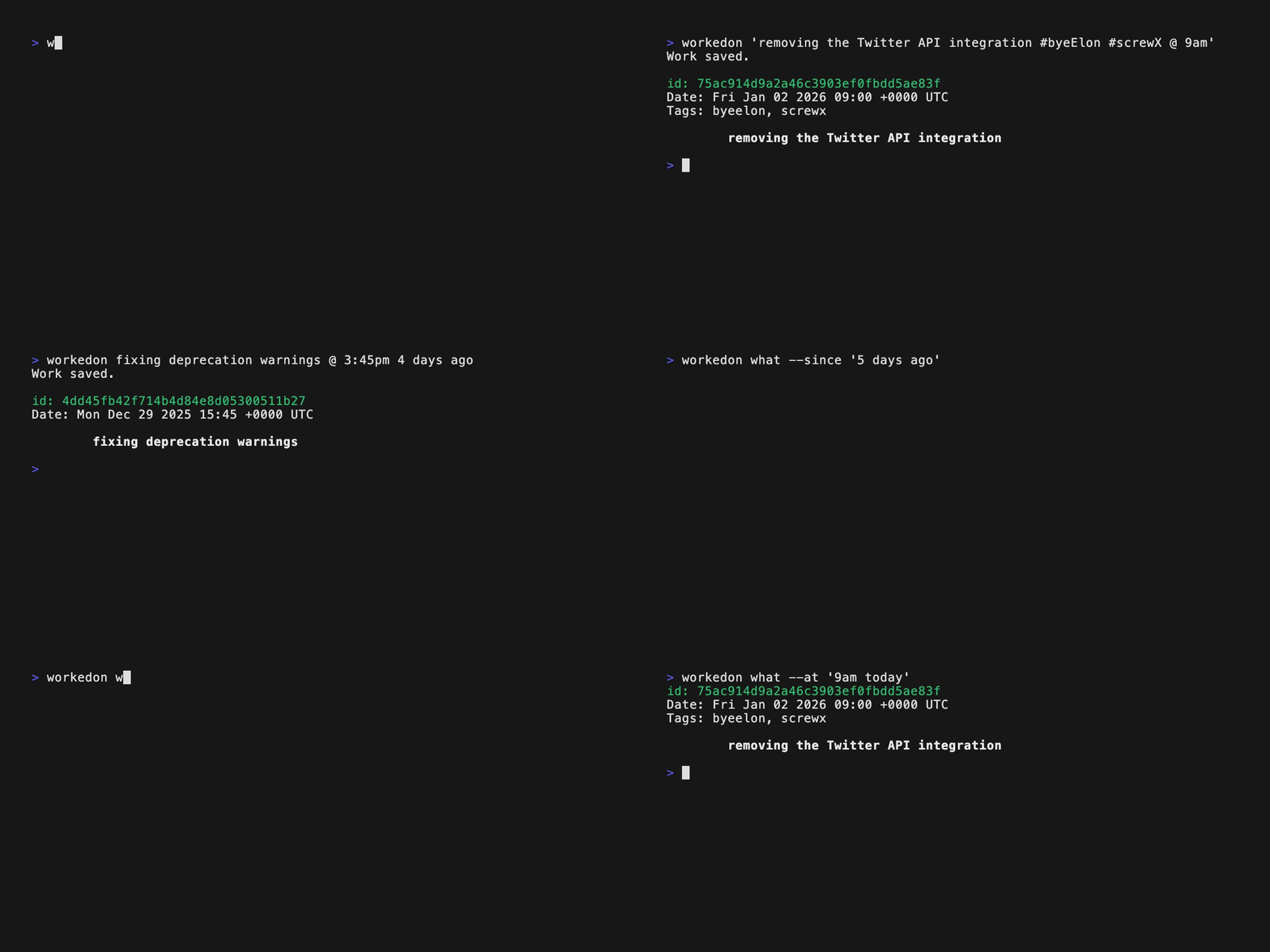
🚀 Why this project exists
I believe tracking your work is an important way of measuring productivity and is a habit that is very helpful to develop. But the thing about habits is - if they aren’t easy and accessible, you will eventually stop doing them - just like going to a gym that is 40 minutes away :) I tried different methods to log my work and failed. Google Docs, iCloud Notes, Notepad++, Sticky Notes, etc. I really wanted a way of tracking with very little effort so I could make this a habit. It's pretty obvious that we all spend most of our day on the terminal. Wouldn’t it be nice if I wrote a feature, committed it and then logged what I did right then and there without a second thought? What if I could also search this based on date so I could look at, for example, how productive I was in the past week?
workedon is another attempt of mine to make work logging a habit and
improve my productivity.
🧠 How this project works
This tool is useful in two ways - for logging work and fetching logged work.
The implementation is very simple. Work is logged in the form of
workedon <text> @ <date>or just workedon <text>
(which uses the current date/time). There is a custom parser that reads the
content, splits it at the @ to a work and a date component and then uses
the awesome dateparser library to parse human-readable dates into datetime
objects. This is then saved in a SQLite database
(File location varies based
on OS). Logged work can be fetched using multiple options that accept similar
human-readable date/times. The same parser is used again to parse into datetime
objects which are used to query the database. The output uses the current
shell's pager to display a paged list similar to git log
(your output may slightly vary based on your shell).
📐 Requirements
- Python >= 3.9
📦 Installation
pip install workedon
🧪 Usage
$ workedon --help
Usage: workedon [OPTIONS] COMMAND [ARGS]...

  Work tracking from your shell.

  Example usages:
  1. Logging work:
  workedon painting the garage
  workedon studying for the SAT @ June 23 2010
  workedon pissing my wife off @ 2pm yesterday

  2. Fetching work:
  workedon what
  workedon what --from "2pm yesterday" --to "9am today"
  workedon what --today
  workedon what --past-month

Options:
  -v, --version           Show the version and exit.
  --print-settings-path   Print the location of the settings file.
  --print-settings        Print all the current settings, including defaults.
  --list-tags             Print all saved tags.
  -T, --tag TEXT          Tag to add to your work log.
  -D, --duration TEXT     Duration to add to your work log.
  --date-format TEXT      Set the date format of the output. Must be a valid
                          Python strftime string.  [env var:
                          WORKEDON_DATE_FORMAT]
  --time-format TEXT      Set the time format of the output. Must be a valid
                          Python strftime string.  [env var:
                          WORKEDON_TIME_FORMAT]
  --datetime-format TEXT  Set the datetime format of the output. Must be a valid
                          Python strftime string.  [env var:
                          WORKEDON_DATETIME_FORMAT]
  --time-zone TEXT        Set the timezone of the output. Must be a valid
                          timezone string.  [env var: WORKEDON_TIME_ZONE]
  --duration-unit TEXT    Set the unit of the duration output. Must be one of:
                          m/min/mins/minutes or h/hr/hrs/hours. Default is
                          minutes.  [env var: WORKEDON_DURATION_UNIT]
  -h, --help              Show this message and exit.

Commands:
  what  Fetch and display logged work.

$ workedon what --help
Usage: what [OPTIONS]

  Fetch and display logged work.

  If no options are provided, work
  from the past week is returned.

Options:
  -r, --reverse           Reverse order while sorting.
  -n, --count INTEGER     Number of entries to return.
  -s, --last              Fetch the last thing you worked on
  -i, --id TEXT           id to fetch with.
  -f, --from TEXT         Start date-time to filter with.
  -t, --to TEXT           End date-time to filter with.
  --since TEXT            Fetch work done since a specified date-time in the
                          past.
  -d, --past-day          Fetch work done in the past 24 hours.
  -w, --past-week         Fetch work done in the past week.
  -m, --past-month        Fetch work done in the past month.
  -y, --past-year         Fetch work done in the past year.
  -e, --yesterday         Fetch work done yesterday.
  -o, --today             Fetch work done today.
  --on TEXT               Fetch work done on a particular date/day.
  --at TEXT               Fetch work done at a particular time on a particular
                          date/day.
  --delete                Delete fetched work.
  -g, --no-page           Don't page the output.
  -l, --text-only         Output the work log text only.
  -T, --tag TEXT          Tag to filter by. Can be used multiple times to filter
                          by multiple tags.
  -D, --duration TEXT     Duration to filter by.  [default: ""]
  --date-format TEXT      Set the date format of the output. Must be a valid
                          Python strftime string.  [env var:
                          WORKEDON_DATE_FORMAT]
  --time-format TEXT      Set the time format of the output. Must be a valid
                          Python strftime string.  [env var:
                          WORKEDON_TIME_FORMAT]
  --datetime-format TEXT  Set the datetime format of the output. Must be a valid
                          Python strftime string.  [env var:
                          WORKEDON_DATETIME_FORMAT]
  --time-zone TEXT        Set the timezone of the output. Must be a valid
                          timezone string.  [env var: WORKEDON_TIME_ZONE]
  --duration-unit TEXT    Set the unit of the duration output. Must be one of:
                          m/min/mins/minutes or h/hr/hrs/hours. Default is
                          minutes.  [env var: WORKEDON_DURATION_UNIT]
  --help                  Show this message and exit.
🛠️ Features
- Log work from your shell in plain text with human-readable dates/times.
- The date/time is optional. The default is the current date/time.
- The
@character is used to separate the text from the date/time.
- Fetch logged work with human-readable dates/times using multiple options.
- Familiar Git-like interface.
- Filter, sort, delete, format, and display logged work on your shell.
- Set date/time format of the output through settings.
- Specify tags while adding work. Tags can be specified in two ways:
- The
--tag/-Toption, one or more times for multiple tags. E.g.--tag tag1 --tag tag2. - The
#symbol in the description, one or more times. E.g.#tag1 #tag2. The description must be quoted in this case. - Tags are case-insensitive and are saved in lowercase.
- Tags can contain alphanumeric characters, underscores, and hyphens only.
- The
- Query logged work by tags using the
--tag/-Toption. Using it multiple times will match any of the specified tags. - Specify duration while adding work.
- Duration can be specified in two ways:
- The
--duration/-Doption, e.g.--duration 1h30mor--duration 90m. - The
[]symbol in the description, e.g.[1.5h]or[90m].
- The
- Duration can be specified in hours or minutes.
- For example,
1h30mis 1 hour and 30 minutes, and90mis also 1 hour and 30 minutes.
- For example,
- Duration is case-insensitive and supports
h|hr|hrs|hours|m|min|mins|minutes. - The duration is optional and defaults to an empty string.
- Only one duration can be specified per log entry.
- Duration can be specified in two ways:
- Query logged work by duration using the
--duration/-Doption, which supports comparisons (e.g.,--duration ">=1h",--duration "<30m").
🔧 Settings
Whenever workedon is run for the first time, a settings file named
wonfile.py is generated at the user's configuration directory, which
varies based on OS. To find out, run:
workedon --print-settings-path
Settings are strings used to configure the behavior of workedon.
The currently available settings are:
DATE_FORMAT: Sets the date format of the output.- Must be a valid Python strftime string.
- Option:
--date-format <value> - Environment variable:
WORKEDON_DATE_FORMAT
TIME_FORMAT: Sets the time format of the output.- Must be a valid Python strftime string.
- Option:
--time-format <value> - Environment variable:
WORKEDON_TIME_FORMAT
DATETIME_FORMAT: Sets the date and time format of the output.- Must be a valid Python strftime string.
- Setting this overrides
DATE_FORMATandTIME_FORMAT. - Option:
--datetime-format <value> - Environment variable:
WORKEDON_DATETIME_FORMAT
TIME_ZONE: Sets the time zone of the output.- Must be a valid timezone string.
- Default is the auto-detected timezone using the tzlocal library.
- Option:
--time-zone <value> - Environment variable:
WORKEDON_TIME_ZONE
Order of priority is Option > Environment variable > Setting.
To find your current settings, run:
workedon --print-settings
Check the default settings here.
🧾 Changelog
See CHANGELOG.md
⚠️ Limitations
-
Your input is limited by your shell. Certain characters like the single quote
'and the hash symbol#may be interpreted specially by your shell. Put your content within double quotes to get around special characters.For example:
workedon "repairing my wife's phone"
-
The date parser which is used may misinterpret some irregular phrases of date/time, but mostly does great.
-
#and[]are reserved characters in the description.#is used to specify tags. You can use it multiple times to specify multiple tags.[]is used to specify duration. You can use it only once per log entry.- If you want to use these characters in your description, put your description within double quotes.
For example:
workedon "fixing my wife's phone [1h30m] #phone #wife"
-
There are some reserved keywords that are used as subcommands and cannot be used as the first word of your log's content:
workedonwhat
You can use double quotes here as well to get around this.
For example, this will not work:
workedon what my wife asked me to do @ 3pm 3 days ago
This is fine:
workedon "what my wife asked me to do" @ 3pm 3 days ago
🙏 Credits
- dateparser, for an amazing date parser. This project would not be possible without it.
- peewee, for a nice and tiny ORM to interact with SQLite.
- Click, for making writing CLI tools a complete pleasure.
- jrnl, fck and Simon Willison for some inspiration.
📄 License
MIT © Visesh Prasad
1 maintainer

Metadata
1 maintainer
Release files for workedon 0.8.0
For a detailed explanation of source distributions (sdists) and built distributions (wheels), please see the package formats documentation.
Source distribution (sdist)
| File | Size | Uploaded | |
|---|---|---|---|
| workedon-0.8.0.tar.gz | 1.1 MB | Details |
Built distribution (wheel)
| File | Interpreter | ABI | Platform | Reset |
|---|---|---|---|---|
| workedon-0.8.0-py3-none-any.whl | Python 3 | none | any | Details |
Total release size: 1.2 MB
Release files / workedon-0.8.0.tar.gz
| Download URL | workedon-0.8.0.tar.gz |
|---|---|
| Size | 1.1 MB |
| Tags | Source |
|
SHA-256 checksum How to use checksums |
47f651c23b499830aead989d557f7642faf62456b1e0f59b5ae7448ab8381dae
|
|
BLAKE2b-256 checksum How to use checksums |
da541666782024a86172fe8dc5d466e98267800c1a3e84bd9e849a45d5c2852b
|
| Upload date | |
|
Uploaded using Trusted Publishing? What is trusted publishing? |
No |
| Uploaded via |
uv/0.7.8
|
Release files / workedon-0.8.0-py3-none-any.whl
| Download URL | workedon-0.8.0-py3-none-any.whl |
|---|---|
| Size | 19.9 kB |
| Tags | Python 3 |
|
SHA-256 checksum How to use checksums |
3c58966c5f34b5e633f20898042d38498fd82652ea22108421db027c6b1c6f41
|
|
BLAKE2b-256 checksum How to use checksums |
c4463984387a9e57d3d208efaba85bac0bd12db18205eea304e869c0b9f294fb
|
| Upload date | |
|
Uploaded using Trusted Publishing? What is trusted publishing? |
No |
| Uploaded via |
uv/0.7.8
|














