
Workflow Canvas



Workflow Canvas (wfc) is a Python tool for reproducible computational pipelines,
managed from the command line or a browser-based visual Canvas. It is built for
researchers and computational scientists who need to know exactly which code,
container, parameters, and inputs produced every result.
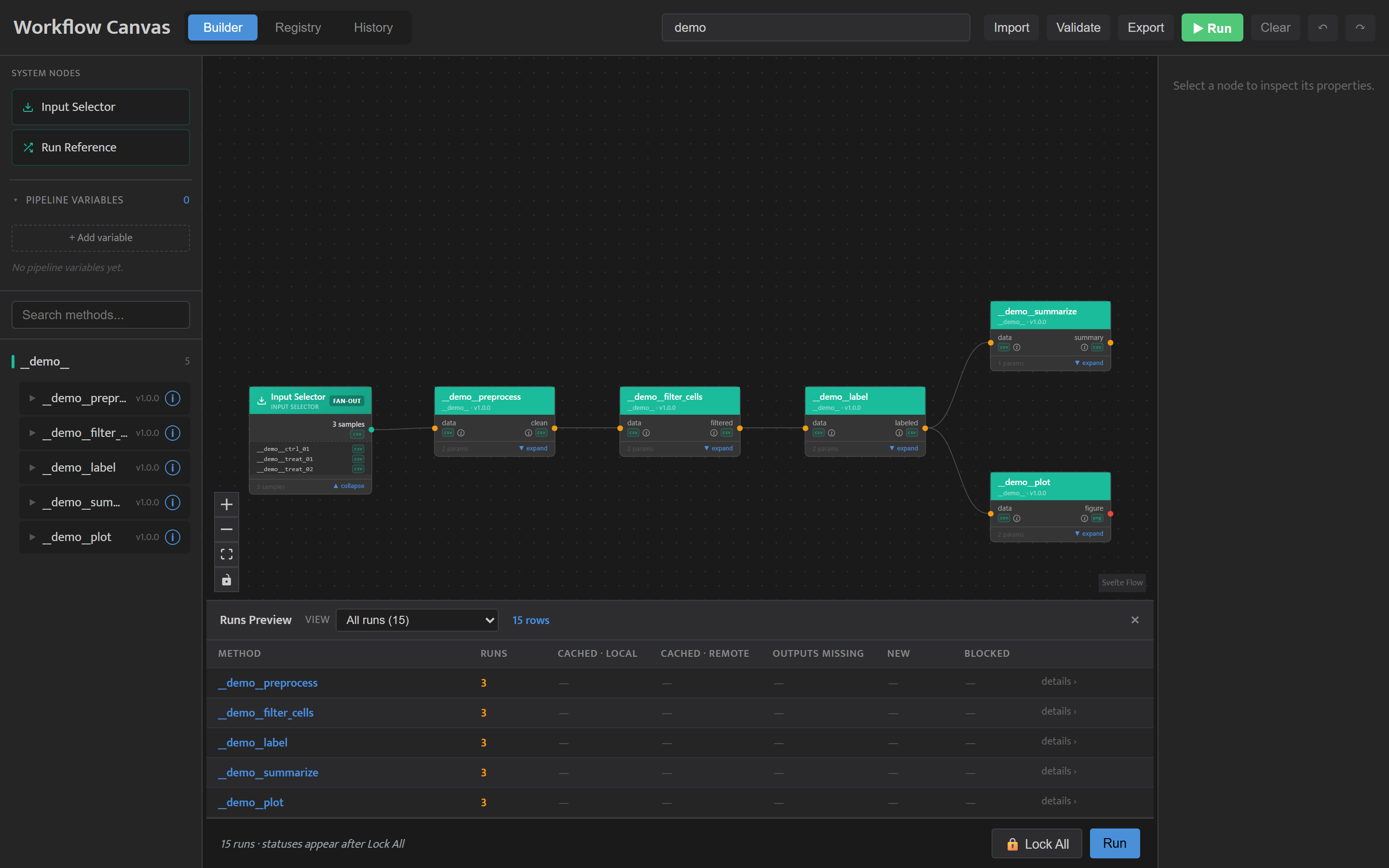
Workflow Canvas tracks your methods, their input/output contracts, run lineage, and content-addressed caching in a local SQLite database, then compiles pipelines to Snakemake Snakefiles so Snakemake handles execution, parallelism, and dependency resolution. Every method runs inside a container, and every output is stored in a content-addressed archive (DVC), so results are reproducible and re-running an unchanged pipeline does no duplicate work.
Key Features
| Feature | What it does |
|---|---|
| Core pipeline | Register modules, methods, and samples; build a pipeline in the Canvas; generate and execute a Snakefile (wfc run-pipeline). |
| Contracts | Two-tier validation (module + method) declared in method.yaml — wiring errors and missing outputs are caught before a run starts. |
| Caching | A clean-git run gate plus a SHA-256 cache key over code, inputs, parameters, and the resolved container image — unchanged steps are skipped automatically; changing one method re-runs only what it touched. |
| Lineage | Every run is recorded in SQLite; trace any output back through its full DAG ancestry (cache hits appear as audit rows). |
| Environments | Methods run in containers built from a pixi, conda, or bring-your-own (byo) backend via wfc register-env; image digests are pinned in .wfc/envs.json. |
| Parameter sweeps & fan-out | Sweep parameters, fan out across variants and per-sample overrides, and reuse values with pipeline variables. |
| Canvas | A browser-based UI (wfc canvas) with three views: a drag-and-drop Builder, a run-History viewer with lineage and artifacts, and a Registry browser. |
Requirements
- Python 3.12 — required (the config parser uses stdlib
tomllib). - Docker — required. Methods always run inside a container; nothing runs without a working Docker installation.
wfc initpre-flights it andwfc doctorchecks it. - Git — required, but local only. wfc records a commit per run and refuses to run on uncommitted code. No GitHub account, login, or network is involved; wfc never pushes.
DVC and Snakemake ship with Workflow Canvas — you do not install them separately.
Installation
# Installs the wfc CLI, plus bundled DVC and Snakemake
pip install workflow-canvas

# Verify
wfc --help
Quick Start
New to Workflow Canvas? Start with the Getting Started tutorial in the documentation.
For the fastest first look, wfc demo populates a freshly initialized project
with a complete runnable example pipeline and opens it in the Canvas
(wfc demo --remove takes it back out):
wfc init --dir ./demo_project && cd demo_project && wfc demo
The steps below show the same setup done manually with your own code and data:
# 1. Initialize a project (guided wizard: scaffolds dirs, configures an output
#    archive, sets up a local git repo, and pre-flights Docker)
wfc init --dir ./my_project
cd my_project

# Optional: check that the project is ready to run (git, archive, Docker)
wfc doctor

# 2. Build and register the container environment your methods will run in.
#    Docs → "Registering an Environment"
wfc register-env analysis conda:analysis

# 3. Register a module (from a module.yaml, recommended).
#    Docs → "Registration"
wfc register-module --name cell_analysis --module-dir modules/cell_analysis

# 4. Register a method (AST-scans the script for its inputs, outputs, and params).
#    Docs → "Authoring a Method Script" and "Writing Contracts"
wfc register-method modules/cell_analysis/preprocess --module cell_analysis

# 5. Register input data (content-hashed into the DVC store).
wfc register-sample --name CFPAC_ERKi --source /data/raw/cfpac_erki.csv

# 6. Build a pipeline in the Canvas, then run it.
#    Docs → "Running & Inspecting Results"
wfc run-pipeline --cores 4
Visual Canvas
wfc canvas # serves the UI at http://127.0.0.1:8500 by default
Use the Builder to assemble pipelines by dragging and wiring method nodes, the History view to browse past runs (lineage chains, params, metrics, artifacts), and the Registry to inspect everything registered in the project. See the Canvas how-to in the documentation for a walkthrough.
Project Structure
my_project/
  .wfc/
    wf-canvas.toml        # Project config (DB path, env root, DVC archive URL)
    wfc.db                # SQLite database — single source of truth (not in git)
    envs.json             # Registered container environments (tracked in git)
  modules/                # Nested module/method hierarchies (module.yaml + methods)
  methods/                # Flat standalone methods
  data/samples/           # Ephemeral workspace; samples restored lazily at run time
  .runs/
    sentinels/            # Zero-byte Snakemake DAG-wiring sentinels
    {run_id}/             # Transient staging; bytes are moved to the DVC archive
  .dvc/cache/             # Local content-addressed cache
  .gitignore
Output bytes are not kept in .runs/; they live in the content-addressed DVC
archive (default ~/.wfc/archives/<project>, outside the repo), indexed by
.wfc/wfc.db. Back up both .wfc/ and the archive folder to keep results recoverable.
Documentation
Full user documentation is published at workflow-canvas.readthedocs.io and covers:
- Tutorials — Getting Started, Exploring the Demo, Authoring a Method Script, Registering an Environment, Writing Contracts
- How-to — Registration, the Canvas, Running & Inspecting Results, Sweeping Parameters & Fanning Out
- Reference — CLI Reference, Python API (
wfc-client),method.yamlschema,wf-canvas.toml - Explanation — How a Run Executes, Caching & Reproducibility, Project Anatomy, Storage & Provenance
Contributing
Bug reports, questions and pull requests are welcome. See CONTRIBUTING.md for how to set up a development environment, run the tests and build the docs, and the Code of Conduct for how we work together.
License
See LICENSE.
1 maintainer

Metadata
1 maintainer
Release files for workflow-canvas 0.6.1
For a detailed explanation of source distributions (sdists) and built distributions (wheels), please see the package formats documentation.
Source distribution (sdist)
| File | Size | Uploaded | |
|---|---|---|---|
| workflow_canvas-0.6.1.tar.gz | 4.4 MB | Details |
Built distribution (wheel)
| File | Interpreter | ABI | Platform | Reset |
|---|---|---|---|---|
| workflow_canvas-0.6.1-py3-none-any.whl | Python 3 | none | any | Details |
Total release size: 9.2 MB
Release files / workflow_canvas-0.6.1.tar.gz
| Download URL | workflow_canvas-0.6.1.tar.gz |
|---|---|
| Size | 4.4 MB |
| Tags | Source |
|
SHA-256 checksum How to use checksums |
9857d814c2d5a64f8b739c089d5488780bbb47f5727fb6307d5f671c089a3a90
|
|
BLAKE2b-256 checksum How to use checksums |
c26b8c4bb6933ba7ba395d7c5a37d96008bb6403f5facf224769a46feb00cb98
|
| Upload date | |
|
Uploaded using Trusted Publishing? What is trusted publishing? |
No |
| Uploaded via |
poetry/1.8.2 CPython/3.10.9 Windows/10
|
Release files / workflow_canvas-0.6.1-py3-none-any.whl
| Download URL | workflow_canvas-0.6.1-py3-none-any.whl |
|---|---|
| Size | 4.8 MB |
| Tags | Python 3 |
|
SHA-256 checksum How to use checksums |
5e2f981d4c92fa612d6afe3f8eb792c71ae40df91f17f37f21924c40cfb677d7
|
|
BLAKE2b-256 checksum How to use checksums |
5c0d85874ad1142bdb52767838f3b0dc12cd848bf8217899087383835ed9c8e9
|
| Upload date | |
|
Uploaded using Trusted Publishing? What is trusted publishing? |
No |
| Uploaded via |
poetry/1.8.2 CPython/3.10.9 Windows/10
|














