
This release is a pre-release and may not be stable for production use.
Workfold



Workfold folds local Git and filesystem timestamps onto one representative Monday-to-Sunday week. It highlights activity outside your intended working hours without pretending that timestamped events are hours worked.
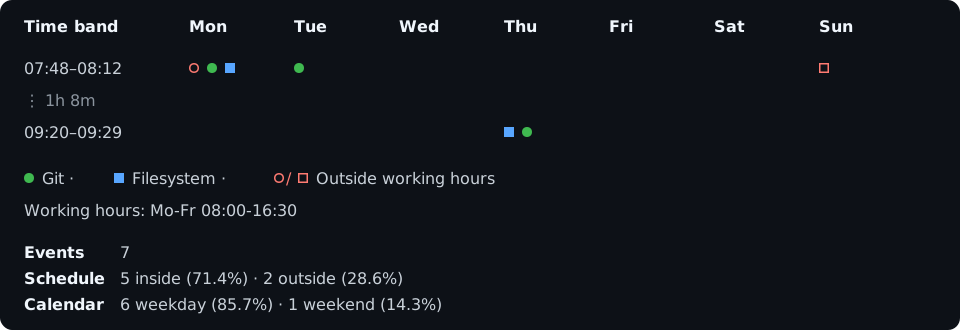
Workfold is local, private by design, terminal-only, and currently alpha.
Install
pip install workfold
workfold --help
For an isolated installation, use uv tool install workfold or
pipx install workfold. Standalone binaries are available from
GitHub releases.
Quick start
Run workfold inside a Git repository for the current ISO week:
workfold
Common views:
workfold . -t 2026-W31                         # one ISO week
workfold . -t 2026-W30 -t 2026-W31            # several weeks, folded together
workfold . -t 2w3d                             # rolling elapsed window
workfold . -t 2026-07-01..2026-07-31          # inclusive date range
workfold . -t all -m fs                        # filesystem metadata
workfold . -t all -m git -p portable           # portable Git-object timestamps
workfold . -t all -m all -p full               # exhaustive local view
workfold . --git-identity jan@example.com      # only that recorded Git identity
workfold . --marker-style identity             # identity codes instead of circles
workfold . --timezone Europe/Berlin
workfold . --hours 'Mo-Thu 08:00-16:30; Fr 08:00-14:00'
workfold . -E all                              # keep only occupied day columns
workfold . -E weekend                          # remove empty weekend columns
workfold . -H weekend                          # always hide weekend columns
workfold . --grid vertical                     # add column separators
workfold . --list-outside --limit 50
The three main selectors are independent:
| Selector | Purpose | Values |
|---|---|---|
-t, --time |
Date scope | this-week, 2w3d, YYYY-Www, DATE..DATE, all |
-m, --mode |
Evidence source | git, fs, all |
-p, --profile |
Collection depth | standard, portable, full |
standard— What does the ordinary activity pattern look like? Git uses commit author dates reachable from local branches (plus a detachedHEAD); filesystem mode uses birth/modified dates for regular files and respects Git ignore rules.portable— What dated evidence is stored inside Git objects? Includes commit author/committer and annotated-tag tagger dates, excluding local-only evidence.full— What dated evidence can this local machine still discover? Enables every supported kind inside the selected time and mode; it does not imply-t allor-m all.
Use --cluster-window 10m, --cluster-window 1h5m, or another duration to tune
row clustering. Use --no-color or the standard NO_COLOR environment
variable for colorless output.
Configuration
Put personal defaults in the platform configuration directory, or project
defaults in workfold.toml:
timezone = "Europe/Berlin"
hours = "Mo-Thu 08:00-16:30; Fr 08:00-14:00"
mode = "git"
profile = "portable"
grid = "vertical"
hide-empty-days = ["weekend"]
Python projects may use [tool.workfold] in pyproject.toml instead. Values
resolve as built-in → global → nearest project → CLI. Inspect the result and
each value's origin without collecting timestamps:
workfold . --show-config
Use --config FILE for one exact file or --no-config for built-ins plus CLI
only. The usage guide
documents locations, discovery, merging, and every supported key.
Reading the chart
- Circles are Git events; squares are filesystem events.
--marker-style identityreplaces Git circles with mapped codes such asJor the collision-safeJ1,J2, andJ3.- Green and blue are inside the configured schedule; red is outside.
- Filled/uppercase markers are inside; hollow/lowercase markers are outside.
- The key maps each visible identity/source once and adds an outside-hours cue only when needed.
- One symbol is one event. Busy cells use exact
×Ncounts. - Empty time is omitted. A
⋮row reports a compressed gap. - Day-column hiding changes only the matrix; totals continue to cover every selected event.
--grid vertical|horizontal|bothadds optional internal chart lines; the uncluttered default isnone.
The summary independently splits all events by schedule and by calendar day. Weekend events can therefore also be outside working hours.
Accuracy and privacy
- Events are discrete timestamp observations, not work sessions or duration.
- Collection is local: Workfold does not contact a Git host or telemetry service.
- Git history can be rewritten; reflogs can expire; filesystem metadata is a mutable snapshot and birth time depends on platform and filesystem support.
- Coverage output accounts for unavailable, filtered, unsupported, and unreadable timestamps in the requested scope.
See the documentation for every CLI option, collector semantics, coverage guarantees, and platform notes.
Development
The Python package lives directly in workfold/; there is no src/ wrapper.
nix develop
uv sync --extra dev
uv run pytest
ruff check .
ruff format --check .
uv run pyright
Use nix run .#docs-dev for the documentation site and
nix run .#docs-check to validate it.
1 maintainer

Download files
Download the file for your platform. If you're not sure which to choose, learn more about installing packages.
Source Distribution
Built Distribution
Filter files by name, interpreter, ABI, and platform.
If you're not sure about the file name format, learn more about wheel file names.
Copy a direct link to the current filters
File details
Details for the file workfold-0.1.0a3.tar.gz.
File metadata
- Download URL: workfold-0.1.0a3.tar.gz
- Upload date:
- Size: 203.8 kB
- Tags: Source
- Uploaded using Trusted Publishing? Yes
- Uploaded via: twine/6.1.0 CPython/3.13.7
File hashes
| Algorithm | Hash digest | |
|---|---|---|
| SHA256 |
7eb635e6c66539dbd97a2ba28083bc1d1c67baa025af05b8eebdc2ea8fb4aae5
|
|
| MD5 |
99af1aa5f6affe34f6f998c14648c750
|
|
| BLAKE2b-256 |
5620f2c1fdad2f963f45dbaaa1dbfaf1fe010dc5fb19ba62e2d4433c3071f343
|
Provenance
The following attestation bundles were made for workfold-0.1.0a3.tar.gz:
Publisher:
release.yml on janthmueller/workfold
-
Statement:
-
Statement type:
https://in-toto.io/Statement/v1 -
Predicate type:
https://docs.pypi.org/attestations/publish/v1 -
Subject name:
workfold-0.1.0a3.tar.gz -
Subject digest:
7eb635e6c66539dbd97a2ba28083bc1d1c67baa025af05b8eebdc2ea8fb4aae5 - Sigstore transparency entry: 2425624419
- Sigstore integration time:
-
Permalink:
janthmueller/workfold@4ba0ecf133d4678e16e37e62ec5223e5e27a4910 -
Branch / Tag:
refs/heads/main - Owner: https://github.com/janthmueller
-
Access:
public
-
Token Issuer:
https://token.actions.githubusercontent.com -
Runner Environment:
github-hosted -
Publication workflow:
release.yml@4ba0ecf133d4678e16e37e62ec5223e5e27a4910 -
Trigger Event:
workflow_run
-
Statement type:
File details
Details for the file workfold-0.1.0a3-py3-none-any.whl.
File metadata
- Download URL: workfold-0.1.0a3-py3-none-any.whl
- Upload date:
- Size: 172.7 kB
- Tags: Python 3
- Uploaded using Trusted Publishing? Yes
- Uploaded via: twine/6.1.0 CPython/3.13.7
File hashes
| Algorithm | Hash digest | |
|---|---|---|
| SHA256 |
f542ae69c1a73c6cb88d6c717944d1237ee97a3e583d6c3f9e38d1cd0a97fdd0
|
|
| MD5 |
09ca5f514de2a092a86ca906502f734d
|
|
| BLAKE2b-256 |
073b51292af1336f8ca70015966a5317fc9e40df59e91684f4ce681d12f6ced4
|
Provenance
The following attestation bundles were made for workfold-0.1.0a3-py3-none-any.whl:
Publisher:
release.yml on janthmueller/workfold
-
Statement:
-
Statement type:
https://in-toto.io/Statement/v1 -
Predicate type:
https://docs.pypi.org/attestations/publish/v1 -
Subject name:
workfold-0.1.0a3-py3-none-any.whl -
Subject digest:
f542ae69c1a73c6cb88d6c717944d1237ee97a3e583d6c3f9e38d1cd0a97fdd0 - Sigstore transparency entry: 2425624491
- Sigstore integration time:
-
Permalink:
janthmueller/workfold@4ba0ecf133d4678e16e37e62ec5223e5e27a4910 -
Branch / Tag:
refs/heads/main - Owner: https://github.com/janthmueller
-
Access:
public
-
Token Issuer:
https://token.actions.githubusercontent.com -
Runner Environment:
github-hosted -
Publication workflow:
release.yml@4ba0ecf133d4678e16e37e62ec5223e5e27a4910 -
Trigger Event:
workflow_run
-
Statement type:







