
Worklog for Claude Code
See what you did with Claude Code each day, and how many tokens it used. Automatically.



Independent community project, not affiliated with or endorsed by Anthropic.

What is this?
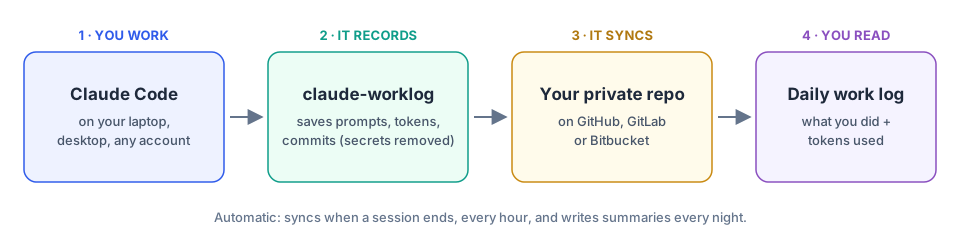
You use Claude Code all day. At the end of it, this tool gives you a simple page that shows:
- ✅ What you worked on: a short summary for each project
- 📊 How many tokens you used: per day, per account and per model
- 💻 All in one place: even if you use several computers or several Claude accounts
It works in the background. You don't have to do anything after setup.
Try it first (no setup)
pipx run --spec worklog-for-claude-code claude-worklog demo
Then open http://localhost:8766. It shows fake example data and doesn't touch your files. Press Ctrl+C to stop.
Install
You need Linux, Python 3.10+ and Claude Code.
# 1. Install
pipx install worklog-for-claude-code

# 2. Create a folder for your data and start the tool
git init ~/claude-worklog-data
claude-worklog install-service
3. Open http://worklog.localhost:8765, fill in the short setup form, then click Install hook.
Done. Your work log fills up as you use Claude Code.
Using more than one computer? Put the data folder in a private GitHub/GitLab repo so all your machines share it. See Full setup.
Is my data private?
Yes.
- 🔒 Everything stays on your computer, plus your own private git repo if you set one up. No cloud service, no tracking.
- ✂️ Only short notes are saved: your prompts (shortened), token counts, file names and commit messages. Never your code, and never Claude's replies.
- 🧹 Secrets are removed: API keys, passwords, tokens and e-mail addresses are cleaned out before saving.
- 🤖 Optional AI summaries use your own Claude account (
claude -p). Turn them off in Settings to keep everything fully local.
Good to know
- Works with Claude Code only, not claude.ai chat.
- Linux only for now (it uses systemd).
- It reads Claude Code's local log files. Their format isn't official, so a Claude Code update could break it for a while.
More
- 📖 Full guide: several computers, several accounts, all commands, uninstalling
- 🐛 Report a bug · 🔐 Security · 🤝 Contributing · 📝 Changelog
License
MIT © 2026 Urvin
1 maintainer

Release files for worklog-for-claude-code 0.1.0
For a detailed explanation of source distributions (sdists) and built distributions (wheels), please see the package formats documentation.
Source distribution (sdist)
| File | Size | Uploaded | |
|---|---|---|---|
| worklog_for_claude_code-0.1.0.tar.gz | 54.6 kB | Details |
Built distribution (wheel)
| File | Interpreter | ABI | Platform | Reset |
|---|---|---|---|---|
| worklog_for_claude_code-0.1.0-py3-none-any.whl | Python 3 | none | any | Details |
Total release size: 106.9 kB
Release files / worklog_for_claude_code-0.1.0.tar.gz
| Download URL | worklog_for_claude_code-0.1.0.tar.gz |
|---|---|
| Size | 54.6 kB |
| Tags | Source |
|
SHA-256 checksum How to use checksums |
c8548ba9404c01ec25c8cc855d4740f4b63300f38db3d70be84037cd3d511537
|
|
BLAKE2b-256 checksum How to use checksums |
308647ec0137c8681f4cae7438191deb4d7e4c4e0c899e7709f89c8ef5baa1ff
|
| Upload date | |
|
Uploaded using Trusted Publishing? What is trusted publishing? |
Yes |
| Uploaded via |
twine/7.0.0 CPython/3.13.14
|
Provenance
Provenance describes where a file came from. On PyPI, provenance is shared via attestations, which provide a verifiable record of the build or publishing details. View details, limitations and caveats.


PyPI Publish Attestation
PyPI verified that this artifact, at this checksum, originated from the publisher listed below.
Signed by GitHub Actions, verified by PyPI on Sep 26, 2026.
Transparency logRelease files / worklog_for_claude_code-0.1.0-py3-none-any.whl
| Download URL | worklog_for_claude_code-0.1.0-py3-none-any.whl |
|---|---|
| Size | 52.3 kB |
| Tags | Python 3 |
|
SHA-256 checksum How to use checksums |
c4d2ed672a327046adae9a73977e85614fe145f1863e7ce2ec540ce116d892b3
|
|
BLAKE2b-256 checksum How to use checksums |
e229d941af79a9aa48bb779dd8f0ed62153b23904e4a5d8605150220ab39c570
|
| Upload date | |
|
Uploaded using Trusted Publishing? What is trusted publishing? |
Yes |
| Uploaded via |
twine/7.0.0 CPython/3.13.14
|
Provenance
Provenance describes where a file came from. On PyPI, provenance is shared via attestations, which provide a verifiable record of the build or publishing details. View details, limitations and caveats.
PyPI Publish Attestation
PyPI verified that this artifact, at this checksum, originated from the publisher listed below.
Signed by GitHub Actions, verified by PyPI on Sep 26, 2026.
Transparency log












