
workstreams

Visually dispatch coding-agent work to subagents in real terminal windows and monitor it in one dashboard — for any coding agent (Claude Code, Codex, OpenCode, Qwen Code, Hermes, Cline, and more).
workstreams runs your coding agents in parallel across real terminal windows (tmux, zellij), isolates each one in its own git worktree + branch, and gives you a single live dashboard to watch them all. Instead of running subagents invisibly inside one agent's process, you see each agent working in its own visible window and get event-streamed progress back to one shared log.
Key capabilities:
- Parallel coding agents in visible terminals — one agent per tmux window / zellij tab, all in a detached session you can attach to at any time
- Git worktree isolation — each workstream gets its own branch (
ws/N) and working directory, so agents never step on each other's files - Live monitoring dashboard —
workstreams monitorrenders a real-time TUI: git status, PIDs, log alerts, and the last subagent events, refreshing every 2 seconds - Cross-process subagent event logging — any agent or script (in a pane, a CI job, a cron) appends JSONL events to one shared file; you read them from any terminal
- Cross-terminal notifications — desktop notifications (Linux
notify-send, macOSosascript) plus a sharednotifications.jsonlthat other terminals can poll - Agent-agnostic — no vendor lock-in.
dispatchandworksend arbitrary shell commands to panes, so it works with whatever agent binary you can run from a shell
⭐ If workstreams helps you ship faster, star the repo
If you found this useful, a GitHub star helps other developers discover it.

⭐ Star this repo: github.com/Dream-Pixels-Forge/workstreams-cli
Why this exists
Coding agents increasingly support "subagents" that run in the background of the main agent's process. That means: no visibility (you can't watch them), no isolation (they share one working tree and one set of installed dependencies), no way to run several in parallel on independent branches, and no shared event stream you can watch from your main terminal.
workstreams solves this by moving each subagent into a real, visible terminal window running in its own git worktree, and wiring all of them back to one shared event log + one dashboard. Your main agent (or you, manually) dispatches tasks, watches progress in monitor, and finishes with PR/merge commands.
Contents
- Installation
- Core Concepts
- Quick Start (5 commands)
- The Full Workflow
- Command Reference
- Configuration (.workstreams.yaml)
- How the Multiplexers Work
- Subagent Event System (Python API + CLI)
- Confidence Scoring
- Environment Variables
- Exit Codes
- Data Locations
- Integrating With Coding Agents (Skill)
- CI/CD Integration
- Troubleshooting
- Best Practices
- Architecture
- Contributing & License
Installation
Requires Python 3.9+ and git. A terminal multiplexer (tmux recommended, or zellij, nami, lmux, wmux, herdr) is required for start/dispatch/work to actually place agents into visible windows. pr/merge commands additionally require the gh CLI (GitHub) authenticated.
# from PyPI (core; JSON config fallback built-in)
pip install workstreams-cli

# with YAML config support (recommended — .workstreams.yaml becomes first-class)
pip install "workstreams-cli[yaml]"

# develop from source (this repo)
git clone https://github.com/Dream-Pixels-Forge/workstreams-cli.git
cd workstreams-cli
pip install -e ".[yaml,dev]"   # dev extras add pytest
Ubuntu / Debian (PEP 668 "externally-managed environment") — system pip refuses bare
pip install. Usepipx(recommended; installs a standaloneworkstreamscommand on your PATH) or a virtualenv:# option 1: pipx — cleanest, no venv juggling pipx install workstreams-cli # option 2: virtualenv python3 -m venv ~/.workstreams-venv ~/.workstreams-venv/bin/pip install "workstreams-cli[yaml]" export PATH="$HOME/.workstreams-venv/bin:$PATH"
Verify:
workstreams --version # -> workstreams 0.6.2
Note: every command also accepts
--jsonto emit machine-readable output (where supported), which coding agents can parse. All read-side commands work without a multiplexer installed; onlystart/dispatch/work/attachneed one.
Core Concepts
Understanding these five terms makes everything else click.
1. Workstream
An isolated development lane. Each workstream has its own:
- git branch (default
ws/<id>, e.g.ws/1,ws/2) - working directory — a git worktree under
worktrees/<id>/next to your repo (default mode) - terminal window/pane — one tmux window or zellij tab named after the workstream
- task assignment — one or more issues, or a free-form prompt
- its own log file —
worktrees/<id>/logs/worker.log
2. Multiplexer
The terminal tool that hosts the visible windows. workstreams currently supports:
| Multiplexer | Layouts | Notes |
|---|---|---|
default (auto-detect) |
per backend | Picks the best multiplexer installed for your OS: tmux on macOS, lmux on Linux, wmux on Windows — falling back to zellij when the platform primary is missing. This is now the out-of-the-box behaviour. |
tmux |
even-horizontal, even-vertical, main-horizontal, tiled |
One window per workstream (cleanest for agents), or all in one tiled window. Detached sessions survive your logout. |
zellij |
tabs | One tab per workstream. Simpler scripting surface; dispatch targets the current tab only. |
nami / lmux / wmux / herdr |
tmux-compatible | tmux-compatible CLIs wrapped by TmuxCompatibleMultiplexer. |
Auto-detect — you normally don't pick one. load_config resolves the
platform default at startup:
macOS   → tmux first, then zellij, nami, lmux, wmux
Linux   → lmux first, then zellij, then tmux
Windows → wmux first, then lmux, zellij, tmux
The first installed binary in that list wins — and for the
tmux-compatible wrapper family (nami / lmux / wmux / herdr)
workstreams validates that the binary actually exposes tmux-style verbs
(new-session / send-keys / …) before committing. For example lmux
v1 has a completely different CLI shape (workspace.create,
surface.send-key) so the validator rejects it and auto-detect falls
through to zellij or tmux. If you know your lmux build exposes
the tmux dialect, pin it explicitly with multiplexer: lmux — the
validator is only consulted on the default auto-pick path. If you want a specific one:
- Set it in your
.workstreams.yaml/.json:multiplexer: zellij - Or pass
--multiplexer zellijoninit/start/dispatch/work - Or run
workstreams init --chooseto interactively pick, which persists the choice into your config file so later commands use it.
The tmux/zellij/lmux/wmux session is auto-named workstreams-<project>.
3. Subagent
The coding agent doing the work inside a workstream. This is deliberately free-form: claude-code, codex, opencode, qwen-code, mimocode, hermes, kilo-code, cline, or any label you want. There is no vendor lock-in — a subagent is just an identifier used in the event log. The agent that actually runs is whatever command you send into the pane (see dispatch/work).
4. Event
A JSONL record written to a shared log whenever a subagent reports progress. Event types: started, progress, completed, failed, error, done. Events are the backbone of the dashboard and the cross-terminal notification flow.
5. Dashboard
workstreams monitor — a full-screen ANSI TUI (no external TUI deps) that re-renders every 2s (configurable) showing, per workstream: id, name, branch, git status, PID, last commit/activity, recent log alerts — plus a "Subagent Activity (last 10)" feed. Exit with q or Ctrl+C.
Worktree mode vs Branch mode (init --mode)
worktree(default, recommended): creates a real git worktree — a separate checkout directory underworktrees/. Maximum isolation; each lane has its own files. Slightly more disk.branch: all lanes share one directory and you switch branches. Faster and sharesnode_modules/.venvnaturally, but agents switching branches concurrently can collide.
Quick Start (5 commands)
# 0) install (once)
pip install "workstreams-cli[yaml]"

# 1) create 3 parallel lanes for a project, each in its own worktree + branch
workstreams init --project myproj --workstreams 3

# 2) open visible tmux windows and drop an agent into each (one window per lane)
workstreams start --multiplexer tmux --cmd "claude"

# 3) hand a task to lane 1 (fires a "started" event, notifies, sends the prompt into that pane)
workstreams dispatch --workstream 1 --subagent claude-code --issue 42 --prompt "Fix auth"

# 4) (optional) block the main terminal until lane 1's agent reports done/failed
# workstreams dispatch ... --wait

# 5) watch everything in one live dashboard (Ctrl+C to leave)
workstreams monitor
Now you have three tmux windows, each running its own agent on its own branch, and a single dashboard watching all of them.
Tip: to actually see the windows:
workstreams attach(ortmux attach -t workstreams-myproj).
The Full Workflow
A complete feature-from-scratch to merged loop:
# ── 1. Plan ──────────────────────────────────────────────────────────────
# Decide N lanes and what each owns. e.g. backend / frontend / database.

# ── 2. Initialize ───────────────────────────────────────────────────────
workstreams init --project myproj \
  --workstreams 3 \
  --multiplexer tmux \
  --layout even-horizontal \
  --base-branch main \
  --mode worktree

# Creates:
#   worktrees/ws1/  (branch ws/1)
#   worktrees/ws2/  (branch ws/2)
#   worktrees/ws3/  (branch ws/3)
#   .workstreams.yaml  (the config file, in your repo root)

# ── 3. Start visible terminals ──────────────────────────────────────────
workstreams start --multiplexer tmux
#   -> tmux session 'workstreams-myproj', one window per lane, persistent shell

# ── 4. Dispatch work ────────────────────────────────────────────────────
# Option A: send a ready-made agent command into the pane
workstreams dispatch --workstream 1 --subagent claude-code --issue 42 \
  --prompt "Implement JWT auth"

# Option B: run a specific agent binary with a task (agent-agnostic)
workstreams work --workstream 2 --agent "codex" --task "Build the login UI" \
  --subagent codex --issue 43

# Option C: a plain shell command in a lane (tests, builds, migrations)
workstreams run --workstream 3 --cmd "npm test"

# ── 5. Watch ────────────────────────────────────────────────────────────
workstreams monitor                    # live dashboard
workstreams events --since 30          # last 30 min of subagent events
workstreams logs --workstream 1 --follow   # tail one lane's log

# ── 6. Keep lanes fresh with main ──────────────────────────────────────
workstreams sync --workstream 1        # merge origin/main into ws/1
workstreams sync --workstream 1 --rebase   # ... or rebase instead

# ── 7. Ship ─────────────────────────────────────────────────────────────
workstreams pr --workstream 1 --title "feat: add JWT auth" \
  --body "Closes #42" --draft
#   -> pushes ws/1, runs: gh pr create --base main --head ws/1

# ── 8. Merge & clean up ─────────────────────────────────────────────────
workstreams merge --workstream 1 --method squash --delete-branch
workstreams workstream cleanup --workstream 1 --force
Command Reference
Run workstreams <command> --help for per-command flags. --project and --json are accepted by almost every command.
| Command | What it does |
|---|---|
init |
Create workstreams (worktrees + branches + .workstreams.yaml) |
start |
Open the multiplexer session and start the configured lanes (optionally running a command in each) |
attach |
Attach to the existing multiplexer session so you can see the windows |
status |
Print a one-shot status table (or --json) |
monitor |
Live TUI dashboard (default: refresh 2s; q/Ctrl+C exits) |
dispatch |
Send a task/prompt to a lane's pane; logs a started event; notifies |
work |
Run an arbitrary agent command in a lane (<agent> <task>); optional --wait |
run |
Run a plain shell command in a lane's directory (not sent to the pane) |
logs |
Tail a lane's worker.log (--follow to stream) |
tail |
Snapshot of the last N lines of one or all lanes' logs |
events |
Print recent subagent events (filter by lane/type/subagent; --json) |
event |
Emit one event from the calling process (the key agent-integration command) |
notify |
Send a desktop + file notification to other terminals |
assign |
Record issue numbers against a lane (bookkeeping in the lane log) |
sync |
git fetch + merge/rebase a lane with the base branch |
pr |
Push the lane's branch and open a GitHub PR via gh |
merge |
Merge the lane's PR via gh (squash/merge/rebase; optional --delete-branch) |
workstream add |
Add a new lane to the config (and create its worktree) |
workstream remove |
Remove a lane (optionally --force to delete its worktree) |
workstream cleanup |
Delete completed lanes' worktrees |
Flag details (the ones that matter)
init
--workstreams N— how many lanes to create (default 4)--multiplexer tmux|zellij--layout even-horizontal|even-vertical|main-horizontal|tiled--base-branch main— the branch all lanes fork from--mode worktree|branch--agent auto|claude|codex|opencode|qwen|generic— hint stored in config--force— overwrite an existing.workstreams.yaml--no-worktrees— write config only, skipgit worktree add(useful to pre-plan then materialize later)
start
--workstream N— start a single lane--cmd "<command>"— command to send into each pane (e.g.claude,codex)--multiplexer/--layout— override config for this run
dispatch
--workstream N(required)--subagent <label>(required, free-form identifier)--issue N— GitHub issue number--prompt "<text>"— the task text sent into the pane--agent <binary>— if set, the pane receives<binary> <prompt>; if omitted, the prompt is sent verbatim--wait— block until that subagent emitscompleted/failed/done(4h safety timeout)--multiplexer— override
work
--workstream N,--agent <cmd>,--task <text>(required)--subagent <label>,--issue N— event-log metadata--wait— block for a terminal event
events / event
events:--workstream N,--since <minutes>(default 10),--type started|progress|completed|failed|error|done,--subagent <label>,--limit N,--clear,--jsonevent:event <started|progress|completed|failed|error|done> --project P --subagent L [--workstream N] [--issue N] [--message "..."] [--data '{"files":3}'] [--json]
sync — --workstream N (omit to sync all), --rebase (else merge)
pr — --workstream N --title "..." --body "..." [--base BRANCH] [--draft]
merge — --workstream N [--method merge|squash|rebase] [--delete-branch] [--auto]
workstream add — --name X --branch B [--path P] [--command CMD]
Configuration (.workstreams.yaml)
Created by init in your repo's root. Edit by hand to give lanes meaningful names, commands, and env. If PyYAML is installed (workstreams-cli[yaml]) this is read/written as YAML; otherwise workstreams falls back to a JSON file (.workstreams.json).
project: myproject
multiplexer: tmux            # tmux | zellij | nami | lmux | wmux | herdr
layout: even-horizontal     # even-horizontal | even-vertical | main-horizontal | tiled
base_branch: main
mode: worktree              # worktree | branch
agent: auto                 # auto | claude | codex | opencode | qwen | generic

workstreams:
  - id: 1
    name: backend
    path: ./backend          # worktree dir (relative to repo root) or subdir
    branch: ws/backend
    command: "npm run dev"   # auto-run on start (or leave "" and use --cmd)
    env:
      PORT: "3001"
  - id: 2
    name: frontend
    path: ./frontend
    branch: ws/frontend
    command: "npm run dev"
    env:
      PORT: "3002"

shared_deps:                 # directories to symlink/share across lanes
  - node_modules
  - .venv
Config resolution order (highest wins): CLI flag → .workstreams.yaml → environment variable → default.
How the Multiplexers Work
tmux (default, most robust)
- Session name:
workstreams-<project>(detached, survives logout). - Window-per-workstream (all layouts except
tiled): each lane becomes a tmux window named after the workstream (backend,frontend, …). Windows are addressable by name (<session>:<window-name>), which is howdispatch/worksend the prompt to the correct lane. - Tiled layout: all lanes are panes in one window, targeted by pane index (
<session>:0.<idx>). - Every window/pane runs a persistent interactive
bashso the session never dies when a command exits. attach=tmux attach -t workstreams-<project>(pressb dto detach;Ctrl+c/qexits from the dashboard only).
zellij
- Session name:
workstreams-<project>; one tab per workstream. send_commandtargets the current tab only (Zellij has nosend-keysequivalent); a warning is printed and the command runs viazellij run. Prefer tmux for precise per-lane dispatch.attach=zellij attach workstreams-<project>.
If a command reports "tmux session 'workstreams-' is not running. Run
workstreams startfirst", that means the pane target exists but the session isn't up yet — start it.
Subagent Event System
This is the heart of the cross-process monitoring story. Any process — an agent inside a tmux pane, a CI job, a cron, a Python script, the main terminal — can write an event, and any other terminal can read it. Events are the data source for monitor, events, and status --live.
Event shape (JSONL, one object per line)
{
  "workstream_id": 1,
  "subagent": "claude-code",
  "issue": 42,
  "event_type": "progress",
  "message": "Created auth middleware",
  "timestamp": "2026-01-01T12:00:00+00:00",
  "data": {"files": 2}
}
event_type ∈ started | progress | completed | failed | error | done.
(done is the signal --wait blocks on; completed/failed/done all unblock a --wait.)
Two ways to emit an event
A. One-line CLI (no Python import needed — easiest for shell/agent scripts):
# mark start
workstreams event started --project myproj --workstream 1 \
  --subagent claude-code --issue 42 --message "Fix auth"

# report progress with structured data
workstreams event progress --project myproj --workstream 1 \
  --subagent claude-code --issue 42 \
  --message "Wrote middleware" --data '{"files": 2}'

# mark completion
workstreams event completed --project myproj --workstream 1 \
  --subagent claude-code --issue 42 --message "Auth complete"
B. Python API (for agents/scripts written in Python):
from workstreams import (
    subagent_started, subagent_progress,
    subagent_completed, subagent_failed,
    subagent_error, subagent_done, subagent_report,
)

subagent_started("myproj", 1, "claude-code", 42, "Implement JWT auth")
subagent_progress("myproj", 1, "claude-code", 42, "Created auth middleware", {"files": 2})
subagent_completed("myproj", 1, "claude-code", 42, "Auth complete", {"tests": "passed"})

# generic form
subagent_report("myproj", 1, "claude-code", 42, "progress", "Working...", {"step": 3})
Reading events
workstreams events --since 30                      # last 30 min, all lanes
workstreams events --workstream 1 --type progress   # one lane, filtered
workstreams events --json | jq .                    # machine-readable
workstreams monitor                                  # live dashboard (includes event feed)
Concurrency & storage
Events are appended to ~/.workstreams/<project>/events.jsonl using O_APPEND (atomic for small writes on POSIX) plus a short lock file that guards large lines and self-heals stale locks after 10s. Multiple processes can append concurrently without corruption.
Confidence Scoring
Subagents are sometimes wrong. Confidence scoring lets each subagent self-rate the quality of its result on a 0–10 scale so the main agent (or a CI gate) can decide whether to accept, re-dispatch, or escalate. It is the difference between "subagent said it's done" and "subagent is 9/10 sure it actually delivered the right result".
- The score rides in the event's
data.confidencefield — no new storage required. - A gate (
workstreams confidence --min-score N) exits0when the latest score is at/above the threshold and1otherwise, so it drops straight into CI or a--waitloop. - Scores are clamped to
[0, 10]; a misbehaving subagent can't emit100.
Emitting a score
# a subagent reports it finished, 9/10 confident
workstreams event completed --project myproj --workstream 1 \
    --subagent claude-code --issue 42 \
    --message "All tests green, edge cases covered" \
    --confidence 9

# or via --data JSON
workstreams event completed --project myproj --workstream 1 \
    --subagent codex --issue 42 --message "Done" --data '{"confidence": 7}'

# Python API (in a subagent script)
from workstreams import subagent_report
subagent_report("myproj", 1, "claude-code", 42, "completed", "Done",
                data={"confidence": 9})
Reading / gating on scores
# human-readable summary + gate (exit 0 if latest >= 8)
workstreams confidence --project myproj --workstream 1 --issue 42 --min-score 8

# machine-readable
workstreams confidence --project myproj --workstream 1 --json

# list every confidence-bearing event, oldest first
workstreams confidence --project myproj --workstream 1 --records
Example output:
Confidence for ws1 #42: PASS
  latest: 9.0/10 (completed from claude-code)
  average: 7.0/10 over 2 report(s)
  threshold: 8.0/10 -> All tests green, edge cases covered
Using it as a CI / re-dispatch gate
# block the merge until the subagent's latest self-rating clears the bar
workstreams confidence --project myproj --workstream 1 --issue 42 --min-score 9 \
  || { echo "confidence too low, re-dispatching"; workstreams dispatch ...; }
Scores are self-reported. Treat them as a signal, not a proof — pair them with real test coverage. A 10/10 that shipped a broken build is still a broken build.
Environment Variables
All are overridable in the config file / CLI; env vars are a fallback when neither is set.
| Variable | Controls | Default |
|---|---|---|
WORKSTREAMS_PROJECT |
project name | repo dir name |
WORKSTREAMS_MULTIPLEXER |
tmux/zellij |
tmux |
WORKSTREAMS_LAYOUT |
layout | even-horizontal |
WORKSTREAMS_BASE_BRANCH |
base branch | main |
WORKSTREAMS_WORKTREE_MODE |
worktree/branch |
worktree |
WORKSTREAMS_SHARED_DEPS |
comma-separated shared dirs | (none) |
WORKSTREAMS_DATA_DIR |
relocate the event/notification store | ~/.workstreams |
Exit Codes
| Code | Meaning |
|---|---|
| 0 | Success |
| 1 | General error (including a failed subagent event under --wait) |
| 2 | Invalid arguments / no command / --wait timed out (4h) |
| 3 | Git / gh error (sync, pr, merge, push) |
| 4 | Multiplexer unavailable / unsupported |
| 5 | Workstream not found |
| 6 | Already running |
| 7 | Dirty working tree |
| 8 | Merge conflict |
| 9 | Permission denied |
Data Locations
Everything workstreams writes lives in predictable places:
<repo root>/
├── .workstreams.yaml          # config (or .workstreams.json without PyYAML)
└── worktrees/
    ├── ws1/  (branch ws/1)   # git worktree for lane 1
    │   └── logs/worker.log   # lane 1 activity log
    ├── ws2/  (branch ws/2)
    └── ws3/  (branch ws/3)

~/.workstreams/<project>/
├── events.jsonl              # shared subagent event stream
├── events.lock               # (transient) append lock
└── notifications.jsonl       # shared notification queue

$WORKSTREAMS_DATA_DIR         # override the whole ~/.workstreams base if set
Integrating With Coding Agents (Skill)
The repo ships an agent skill under skills/ that teaches your coding agent (Claude Code, Codex, OpenCode, Qwen Code, MiMoCode, Hermes, Kilo Code, Cline, …) the exact commands above, so it can plan, dispatch, monitor, and collect work autonomously:
npx skills add https://github.com/Dream-Pixels-Forge/workstreams-cli/tree/main/skills
The skill (skills/SKILL.md, plus skills/REFERENCE.md and skills/EXAMPLES.md) maps to this CLI:
init/start— spin up parallel visible lanesdispatch/work— hand a task to a named subagent in a visible paneevent/events/monitor— subagents report; you watch the dashboardpr/merge/workstream cleanup— finish the loop with git worktrees
Compare with a single-agent workflow: workstreams replaces "one agent, sequential, one PR at a time" with "many agents, parallel, many PRs at a time" while keeping each agent in its own branch + terminal.
CI/CD Integration
workstreams is useful in CI to run a matrix of lane-scoped tests, and (locally) to drive auto-merge on green.
# .github/workflows/workstreams.yml
name: Workstreams CI
on:
  pull_request:
    types: [opened, synchronize, reopened]

jobs:
  lane-test:
    runs-on: ubuntu-latest
    strategy:
      matrix:
        workstream: [1, 2, 3, 4]
    steps:
      - uses: actions/checkout@v4
      - run: pip install workstreams-cli
      - run: |
          workstreams init --project ci-test --workstreams 4
          workstreams sync --workstream ${{ matrix.workstream }}
      - run: workstreams run --workstream ${{ matrix.workstream }} --cmd "pytest"
Auto-merge on green (local helper):
# after a lane's PR is green on CI:
workstreams merge --workstream 1 --auto --method squash
Troubleshooting
| Symptom | What to do |
|---|---|
pip install workstreams-cli fails on Ubuntu/Debian with "externally-managed-environment" (PEP 668) |
System pip is locked down. Use pipx install workstreams-cli or a virtualenv: python3 -m venv ~/.workstreams-venv && ~/.workstreams-venv/bin/pip install "workstreams-cli[yaml]". The package on PyPI is workstreams-cli (the module/CLI command stays workstreams). |
tmux session 'workstreams-<p>' is not running |
Run workstreams start first; the pane targets exist but the detached session isn't up. |
git worktree add failed for ws/N during init |
Stale worktree metadata. Run git worktree prune, then retry. Or pre-plan with init --no-worktrees and materialize later. |
Base branch main not found at init |
workstreams falls back to HEAD and prints a note. Set --base-branch to the real branch. |
| Port conflicts between lanes | Give each lane a distinct port in its env block (e.g. 3001/3002). |
Git conflicts on sync |
workstreams sync --workstream N --rebase to rebase onto the base branch; resolve, then re-push. |
Events not showing in monitor |
The dashboard reads the last 10 min. Check ~/.workstreams/<project>/events.jsonl and that the writer used the same --project name. |
| No desktop notification | Desktop sender is best-effort (notify-send/terminal-notify/osascript); the notification file is always written, so poll notifications.jsonl or rely on the dashboard. |
dispatch/work says "pane send failed" but no error |
The multiplexer binary may be missing or the session was killed. Verify with workstreams attach. |
zellij send_command runs in the wrong tab |
Known limitation — zellij dispatch targets the current tab. Use tmux for reliable per-lane targeting. |
| Config not loading | Without PyYAML, workstreams uses the built-in minimal parser (scalars + simple lists of maps). For full YAML, pip install "workstreams-cli[yaml]". |
Quick diagnostics
workstreams status                 # one-shot table, all lanes
workstreams events --since 60 --json   # recent event stream
ls -la ~/.workstreams/<project>/   # confirm events.jsonl exists
tmux list-sessions                # see if the session is actually up
workstreams logs --workstream 1 --lines 50
Best Practices
- Keep lanes small — one or two issues per workstream; split if a lane grows.
- Prefer worktree mode for isolation; reserve branch mode for small, fast, shared-dep projects.
- Share bulky deps (
node_modules,.venv,target/) viashared_depsto save disk + install time. - Sync often —
workstreams syncevery ~30–60 min to avoid large rebases later. - Give each lane its own service ports/DB names in
envto prevent cross-lane interference. - Watch from one terminal — leave
workstreams monitoropen; dispatch from the others. - Emit
completed/failedevents from any agent you dispatch so--waitand the dashboard reflect true terminal states. - Clean up after merge —
workstream cleanupto remove finished lanes' worktrees and keepgit worktree listtidy. - Use
--waitondispatch/workwhen the next step depends on a lane finishing. - Commit the
.workstreams.yamlinto the repo so the whole team (and CI) uses the same lane layout.
Architecture
workstreams is a thin orchestration layer that sits between you, your git repo, a terminal multiplexer, and any coding agent binary.
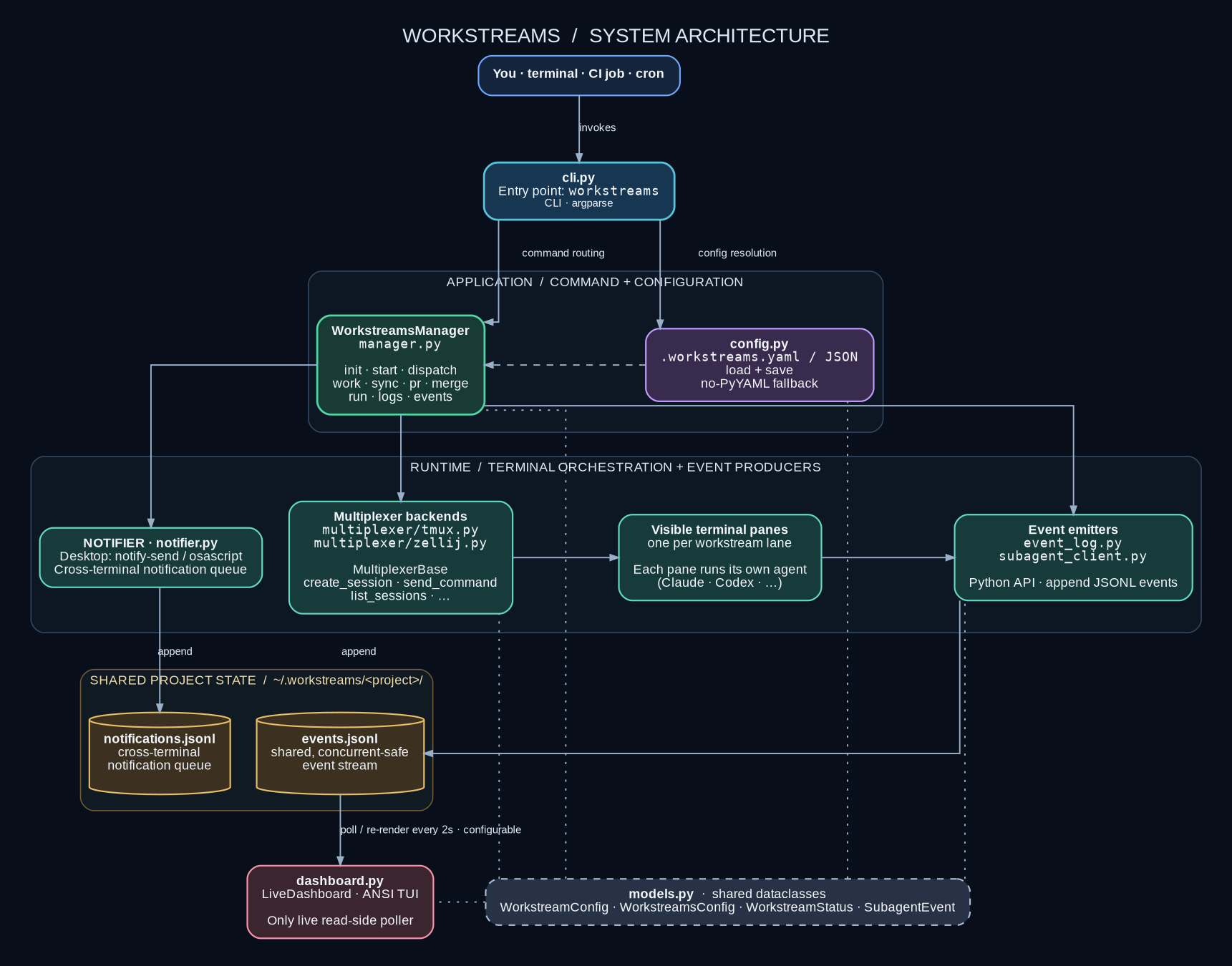
The diagram above shows the full data flow: the CLI routes each command to WorkstreamsManager, which talks to a pluggable multiplexer backend to place agents into visible terminal panes, while every lane's subagent writes JSONL events back to a shared, concurrent-safe log that the live dashboard re-renders on a timer. The core modules:
cli.py— argparse entry point; every command accepts--projectand--jsonmanager.py—WorkstreamsManagerorchestrates init/start/dispatch/work/sync/pr/merge/run/logs/eventsconfig.py— loads/saves.workstreams.yaml(or JSON) with no-pyyaml fallback; resolution order: CLI flag > yaml > env > defaultmultiplexer/— pluggable backends behindMultiplexerBase(tmux.py,zellij.py, plus tmux-compatible wrappers fornami/lmux/wmux/herdr)event_log.py+subagent_client.py— shared cross-process JSONL event stream and the Python API emittersnotifier.py— desktop notifications (notify-send/osascript/PowerShell) plus anotifications.jsonlqueueconfidence.py— aggregates subagent self-rated 0–10 quality scores for accept / re-dispatch gatingdashboard.py— the live ANSI TUI that polls events and re-renders every 2smodels.py— dataclasses (WorkstreamConfig,WorkstreamsConfig,WorkstreamStatus,SubagentEvent) shared across all of the above
How a run flows end-to-end:
initcreates the lanes: for each workstream it adds a git worktree/branch (ws/N) plus aworktrees/N/directory, then writes.workstreams.yamlin the repo root.startasks the chosen multiplexer backend (tmux by default) to open a detached, auto-named sessionworkstreams-<project>, one window/tab per lane, each holding a persistent shell.dispatch/work/runtarget a specific lane's pane (<session>:<window-name>for tmux windows, pane index for tiled) and send a command/prompt into it, emitting astartedevent to the shared log and firing a notification.- Any process — the agent inside a pane, a CI job, a script, the main terminal — appends JSONL events (
started,progress,completed,failed,error,done) toevents.jsonlusingO_APPENDplus a short lock that self-heals stale locks after 10s, so concurrent writers never corrupt the stream. monitor(the dashboard) andeventsread that stream back and re-render every 2s;--waitondispatch/workblocks until a terminal event arrives (4h safety timeout).sync/pr/merge/workstream cleanupclose the loop: rebase/merge the lane, push and open a PR viagh, merge it, and prune the finished worktree.
Read-side commands (status, events, logs, monitor) need no multiplexer; only start/dispatch/work/attach require one to be installed.
Contributing & License
- License: MIT
- Author: Dream-Pixels-Forge
- Development:
pip install -e ".[yaml,dev]"thenpytest(testpathstests, pythonpathsrc)
Project page: https://github.com/Dream-Pixels-Forge/workstreams-cli
1 maintainer

Metadata
1 maintainer
Release files for workstreams-cli 0.6.2
For a detailed explanation of source distributions (sdists) and built distributions (wheels), please see the package formats documentation.
Source distribution (sdist)
| File | Size | Uploaded | Provenance | |
|---|---|---|---|---|
| workstreams_cli-0.6.2.tar.gz | 74.0 kB | With provenance | Details |
Built distribution (wheel)
| File | Interpreter | ABI | Platform | Reset |
|---|---|---|---|---|
| workstreams_cli-0.6.2-py3-none-any.whl | Python 3 | none | any | Details |
Total release size: 124.8 kB
Release files / workstreams_cli-0.6.2.tar.gz
| Download URL | workstreams_cli-0.6.2.tar.gz |
|---|---|
| Size | 74.0 kB |
| Tags | Source |
|
SHA-256 checksum How to use checksums |
a42df816926107eff699b79cfd17eac480680f408e8e4855540474bb7987c4dd
|
|
BLAKE2b-256 checksum How to use checksums |
2b36ad324b59c3764dc94fa4765cf5e9b3d27ea0e8e51845cf8dc72783b27afd
|
| Upload date | |
|
Uploaded using Trusted Publishing? What is trusted publishing? |
Yes |
| Uploaded via |
twine/7.0.0 CPython/3.13.14
|
Provenance
Provenance describes where a file came from. On PyPI, provenance is shared via attestations, which provide a verifiable record of the build or publishing details. View details, limitations and caveats.


PyPI Publish Attestation
PyPI verified that this artifact, at this checksum, originated from the publisher listed below.
Signed by GitHub Actions, verified by PyPI on Oct 3, 2026.
Transparency logRelease files / workstreams_cli-0.6.2-py3-none-any.whl
| Download URL | workstreams_cli-0.6.2-py3-none-any.whl |
|---|---|
| Size | 50.9 kB |
| Tags | Python 3 |
|
SHA-256 checksum How to use checksums |
99af6ae272990a0e9d901b5de9e76189758adb811d242c90a71b904dc54faf39
|
|
BLAKE2b-256 checksum How to use checksums |
ab404c508238ea22d39e61b90e33d9eb396176e17c28331017e9fab4a2aa9560
|
| Upload date | |
|
Uploaded using Trusted Publishing? What is trusted publishing? |
Yes |
| Uploaded via |
twine/7.0.0 CPython/3.13.14
|
Provenance
Provenance describes where a file came from. On PyPI, provenance is shared via attestations, which provide a verifiable record of the build or publishing details. View details, limitations and caveats.
PyPI Publish Attestation
PyPI verified that this artifact, at this checksum, originated from the publisher listed below.
Signed by GitHub Actions, verified by PyPI on Oct 3, 2026.
Transparency logSecurity for workstreams-cli 0.6.2
Provenance
Provenance describes where a file came from. On PyPI, provenance is shared via attestations, which provide a verifiable record of the build or publishing details. View details, limitations and caveats.
Full provenance
All 2 files in this release have been uploaded with provenance metadata.
Attestation for workstreams_cli-0.6.2.tar.gz
PyPI Publish Attestation
PyPI verified that this artifact, at this checksum, originated from the publisher listed below.
Signed by GitHub Actions, verified by PyPI on Oct 3, 2026.
Transparency logA note on package security
PyPI is a repository for distributing packages, not a service for auditing them. While third-party security researchers and our staff do their best to detect and remove malicious packages, PyPI cannot guarantee the quality, security or suitability of any given package.
To learn more about protecting yourself from malicious actors, visit our package security documentation.














